Kupu Whakataki
Thank you for choosing the Generic TWS-S23 Wireless Earbuds. These earbuds are designed to provide a superior audio experience with advanced Bluetooth V5.3 technology, Hi-Fi stereo sound, and convenient features like smart touch control and an intelligent LED power display. This manual will guide you through the setup, operation, and maintenance of your new earbuds to ensure optimal performance.

Figure 1: Generic TWS-S23 Wireless Earbuds and Charging Case
He aha kei roto i te Pouaka
I te whakatuwheratanga o to kete, tirohia nga mea katoa e whai ake nei:
- Pūkoro Ahokore (Mauī me Matau)
- Charging Case with LED Power Display
- Taura Whakatau USB (Momo-C)
- Pukapuka Kaiwhakamahi
- Additional Earbud Tips (various sizes)

Figure 2: Packing List Overview
Tatūnga
1. Te Whakataki i nga Paorooro me te Puhi
Before first use, fully charge the earbuds and the charging case. Connect the provided USB Type-C cable to the charging port on the case and a power source. The LED display on the charging case will show the battery percentage, indicating the charging status. Each earbud also has an independent battery indicator.

Figure 3: Type-C Fast Charging
2. Takirua Nihokikorangi
- Me whakarite kei te utu nga purongo.
- Whakatuwherahia te putea utu. Ka hiko aunoa nga taringa ka uru ki te aratau takirua.
- I runga i to taputapu (waea atamai, papa, aha atu), whakaahei i a Nihokikorangi.
- Rapua "TWS-S23" in the list of available Bluetooth devices and select it to connect.
- Once connected, the earbuds will automatically pair with your device each time you open the charging case.

Figure 4: Earbuds in Charging Case with LED Display
Nga Tohutohu Whakahaere
Maataki Mana Pa
The earbuds are equipped with sensitive touch control panels for easy management of music and calls. Refer to the diagram below for specific functions:

Figure 5: Simple Touch Control Functions
- Purei/Tatari: Pao kotahi ki runga i tetahi purongo.
- Whakautu/Tauhia Waea: Pao kotahi ki runga i tetahi purongo.
- Waiata o mua: Pāwhiri-rua i te pane taringa maui.
- Waiata Panuku: Pāwhiri-rua te pane taringa matau.
- Whakahohehia te Kaiawhina Reo (Siri): Paa me te pupuri i tetahi purongo mo te 2 hēkona.
Nga Mahi Waea
The earbuds feature a built-in high-sensitive microphone with call noise reduction, ensuring clear communication. You can answer and end calls directly from the earbuds using the touch controls.

Figure 6: Call Noise Reduction for Clear Calls
Ngā āhuatanga
Oro Tirotiro Hi-Fi
Experience rich and detailed audio with the 10mm graphene composite diaphragm drivers. The earbuds deliver deep bass, crisp mids, and crystal-clear highs for an immersive listening experience, whether for music, movies, or games.
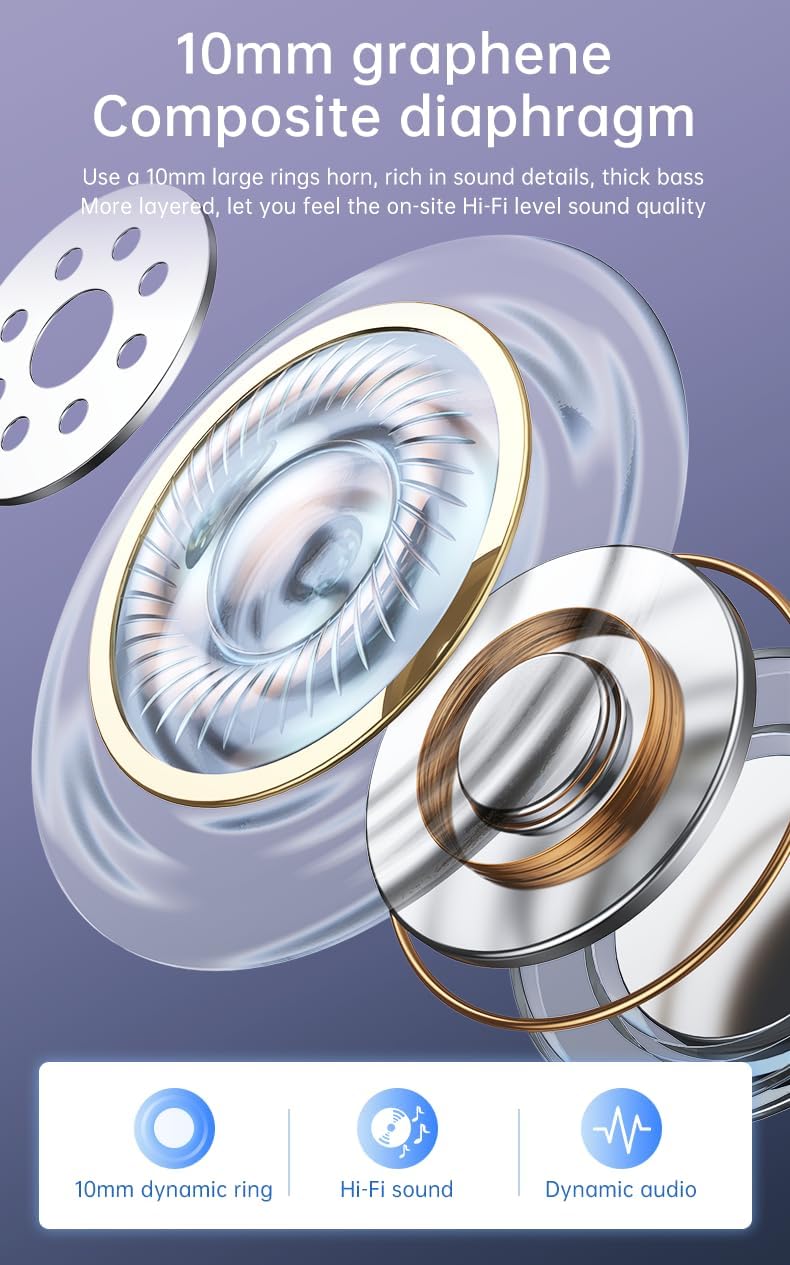
Figure 7: 10mm Graphene Composite Diaphragm
Lightweight, Portable & Ergonomic Design
Each earbud weighs only 0.14 ounces (approximately 4g), making them incredibly light and comfortable for extended wear. The ergonomic design ensures a firm and comfortable fit, suitable for various activities.

Figure 8: Comfortable and Stable Fit

Figure 9: Small and Portable Design
IP7 Whakatauranga parewai
The IP7 waterproof rating effectively protects the headphones from sweat and rain, making them ideal for sports and outdoor activities.
Zero Latency for Gaming
With an ultra-low latency of 0.05 seconds and a stable signal connection, these earbuds provide a seamless audio experience for gaming, ensuring you hear every detail without delay.

Figure 10: Perfect Headset for Gaming with Zero Latency
Te tiaki
Hei whakarite i te roa o te wā me te mahi tino pai o ō pane taringa, whai i ēnei aratohu tiaki:
- Te horoi: Horoia ngā pane taringa me te pouaka utu i ia wā ki te kakahu ngohengohe, maroke, kore-miro. Āta karohia te whakamahi i ngā rauemi whakakoi, i ngā matū kino rānei.
- Puranga wai: While the earbuds are IP7 waterproof, avoid prolonged submersion in water. Dry them thoroughly if they get wet from sweat or rain before placing them back in the charging case.
- Rokiroki: Rokirokihia ngā pane taringa ki roto i te pouaka utu ina kore e whakamahia hei tiaki i te puehu me te pakaru.
- Kei te utu: Use only the provided charging cable or a certified Type-C cable. Avoid overcharging or completely draining the battery for extended periods.
Raparongoā
If you encounter any issues with your earbuds, please refer to the following common troubleshooting steps:
| Raruraru | Rongoa pea |
|---|---|
| Karekau nga taringa e hono ana | Ensure earbuds are charged. Turn off and on your device's Bluetooth. Forget "TWS-S23" from your device's Bluetooth list and re-pair. |
| Karekau he oro mai i tetahi pukoro | Place both earbuds back in the charging case, close the lid, wait a few seconds, then open and try again. Check device's audio balance settings. |
| Karekau e utuhia ana | Ensure the USB cable is securely connected to both the case and the power source. Try a different charging cable or power adapter. |
| Ko nga mana pa kaore i te whakautu | Kia tino ma, kia maroke hoki ngā pane taringa. Tīmatahia anō ngā pane taringa mā te whakanoho ki roto i te pouaka ka tango i waho. |
Mena ka mau tonu te raruraru i muri i te whakamātau i ēnei mahi, whakapā atu ki te tautoko kiritaki mō ētahi atu āwhina.
Whakatakotoranga
| Āhuahira | Taipitopito |
|---|---|
| Ingoa Tauira | TWS-S23 |
| Hangarau Whakawhitiwhiti Ahokore | Nihokikorangi V5.3 |
| Tauwehe Puka | I te Taringa |
| Tikanga Mana | Paa |
| Momo Mana | Siri (Voice Assistant) |
| Whakatauranga parewai | IP7 |
| Rahi taraiwa | 10mm |
| Taumaha Tūemi | 3.95 hekere (tāpeke mōkihi) |
| Te wa takaro | 22+ Hāora (me te pouaka utu) |
| Tauranga Whakatau | USB Momo-C |
Pūtāhui me te Tautoko
For warranty information and customer support, please refer to the documentation included with your purchase or contact the retailer/manufacturer directly. Keep your proof of purchase for any warranty claims.


