
Kupu Whakataki
This manual provides detailed instructions for the safe and efficient use of your OttLite Wellness Series Wireless Charging LED Table Lamp. Ko tenei lamp features OttLite's exclusive ClearSun LED technology, designed to reduce eyestrain, along with convenient wireless charging and a USB charging port. Please read this manual thoroughly before operating the lamp me te pupuri hei tohutoro a meake nei.
Nga Tohutohu Haumaru Nui
Hei whakaiti i te tūponotanga o te ahi, te ru hiko, te whara rānei ki te tangata, me mātakitaki ki ēnei mea e whai ake nei:
- Kaua e whakamahia ki te taura pakaru, mono ranei.
- Kaua e whakahaerehia te lamp mēnā kua taka, kua pakaru rānei.
- Kaua e ngana ki te whakarereke i te lamp.
- Whakamahia anake te urutau hiko kua whakaratohia.
- Kia mau ki te lamp mawehe atu i te wai, i etahi atu wai ranei.
- Ko tenei lamp mo roto anake.
- Kaore e taea te whakakapi i te rama rama rama.
Ihirangi mokete
- OttLite Wellness Series Wireless Charging LED Table Lamp
- Pūurutau Hiko
Tatūnga
- Wewetehia te Lamp: Kia ata tangohia nga waahanga katoa mai i te kete.
- Hono Hono: Insert the power adapter plug into the power input port located on the back of the lamp base. Plug the other end of the adapter into a standard 110V AC wall outlet.
- Tuhia te Lamp: Whakanohoia te lamp on a stable, flat surface. Ensure the power cord is not pinched or obstructed.
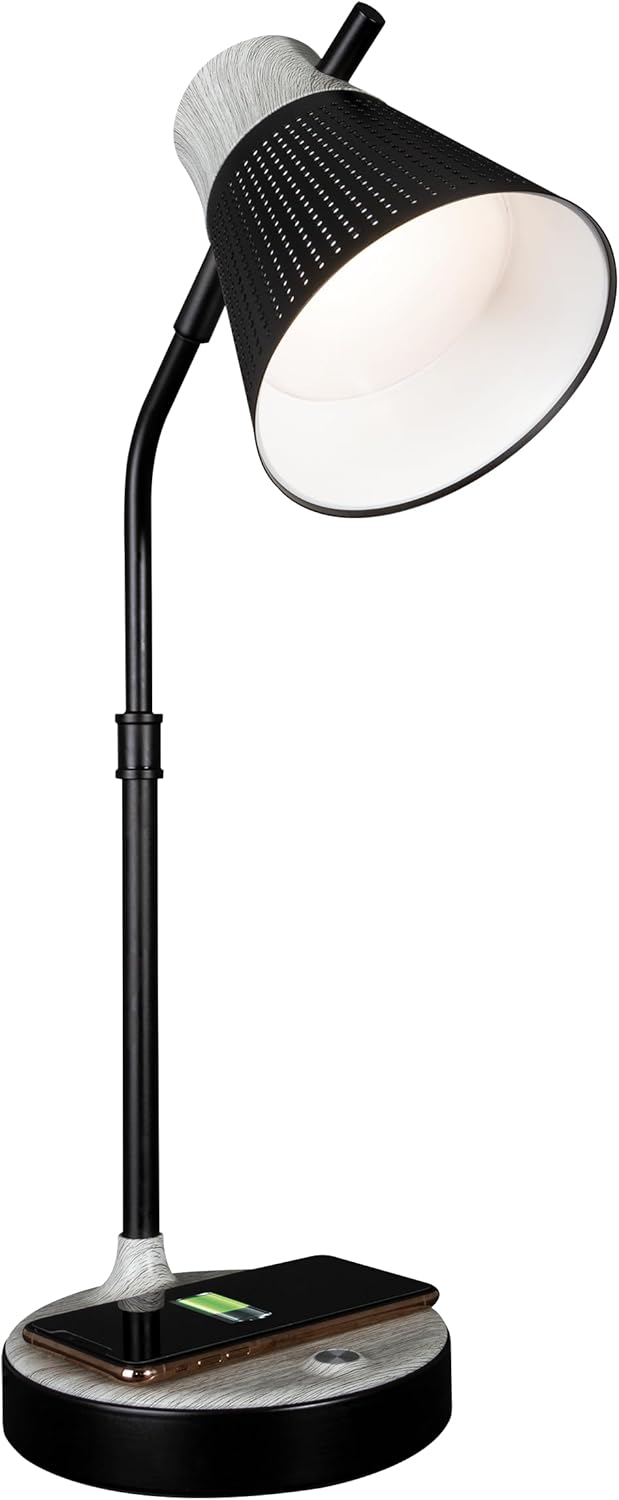
Kei teamp kua reri inaianei mo te mahi.
Nga Tohutohu Whakahaere
1. Power On/Off and Brightness Control
Kei teamp features touch-sensitive controls located on the base.
- Hei Whakakā/Weto: Lightly touch the power icon on the lamp turanga.
- Hei Whakarite i te Maama: Me te lamp on, repeatedly touch the power icon to cycle through three brightness levels.

2. Color Temperature Settings
Kei teamp offers three distinct color temperature modes:
- ClearSun Natural Daylight: Provides a balanced spectrum for reduced eyestrain.
- Mahana Ma: A softer, warmer light ideal for relaxation.
- Maama kanapa: A crisp, clear light suitable for tasks requiring focus.
To switch between color temperatures, touch the mode icon on the lamp base. Cycle through the available options to select your preferred light.

3. Te whakatikatika i te Lamp
Kei teamp features a flexible neck and an adjustable shade for precise light placement.
- Kaki Hangawari: Whakapikoa te lamp neck to direct light where needed.
- Taumarumaru Whakaritea: The shade can be moved up, down, and side-to-side to optimize illumination.

4. Whakatau Ahokore
Kei teamp base includes a Qi-compatible wireless charging pad.
- Place your Qi-compatible device (e.g., smartphone) directly onto the charging pad on the lamp turanga.
- Me whakarite kia noho te pūrere ki waenganui o te papa utu kia pai ai te hononga.
- A charging indicator on your device will confirm that charging has begun.

5. Tauranga Whakapaa USB
He 5V, 2.1A tauranga utu USB kua whakauruhia ki roto i te lamp base for charging additional devices.
- Connect your device's USB charging cable to the USB port on the back of the lamp turanga.
- Connect the other end of the cable to your device (e.g., headphones, smartwatch, tablet).

Te tiaki
- Te horoi: Momotuhia te hiko i mua i te horoi. Whakamahia he kakahu ngohengohe, maroke hei muru i te lamp. Kaua e whakamahi i nga kai horoi me nga whakarewa.
- Tiaki LED: The LED light source is designed for long-term use and does not require replacement. Avoid direct contact with the LED panel.
Raparongoā
| Raruraru | Take pea | Rongoā |
|---|---|---|
| Lamp kaore e huri. | Ko te urutau hiko kaore i te hono, kei te he te putanga. | Me whakarite kia mau te urutau hiko ki te lamp and a working wall outlet. Test the outlet with another device. |
| Karekau e mahi te utu ahokore. | Device not Qi-compatible or not properly aligned. | Verify your device supports Qi wireless charging. Reposition the device on the charging pad, ensuring it is centered. Remove any thick phone cases. |
| Ko te utu USB kaore e mahi. | USB cable faulty or device not compatible. | Try a different USB cable. Ensure the device is compatible with 5V, 2.1A charging. |
| Ka kemo, ka kore rānei e ōrite te mārama. | Loose power connection or electrical interference. | Check all power connections. Move the lamp kia matara atu i ētahi atu taputapu hiko ka pāngia pea e te wawaotanga. |
Whakatakotoranga
- Tau tauira: CSAQABG9-SHPR
- Waitohu: OTarua
- Rahi Hua: 6.88"D x 6.88"W x 25"H (adjustable height)
- Taumaha Tūemi: 4.99 pauna
- Puna Hiko: Waea Hiko (110 Volts AC)
- Momo Puna Maama: LED (Hangarau ClearSun)
- Wattage: 10 watts
- Tikanga Mana: Paa
- Nga waahanga motuhake: Wireless Charging, USB Charging Port, Flexible Neck, Adjustable Shade, 3 Brightness Settings, 3 Color Temperatures
- Rauemi: Tino, Wood
- Momo Mutu: Kua peita
- Whakamahinga o roto/waho: Roto anake

Nga korero Whakaputanga
OttLite products are manufactured to high-quality standards. For specific warranty details, including coverage period and terms, please refer to the warranty card included with your purchase or visit the official OttLite webpae. Puritia to tohu hoko mo nga kereme whakamana.
Tautoko Kiritaki
If you have any questions, require assistance, or need to report an issue with your OttLite Wellness Series Wireless Charging LED Table Lamp, please contact OttLite customer support through their official webte pae, te korero whakapā ranei kei roto i to kete hua.
Mo etahi atu korero, tirohia te Toa OttLite.