
1. Kupu Whakataki
The HIKMICRO ECO-V Handheld Thermography Camera is a versatile thermal imaging device designed for various professional applications. It offers thermal, bi-spectrum image fusion, and visible light modes to meet diverse business needs. This manual provides essential information for the safe and effective operation of your ECO-V camera.
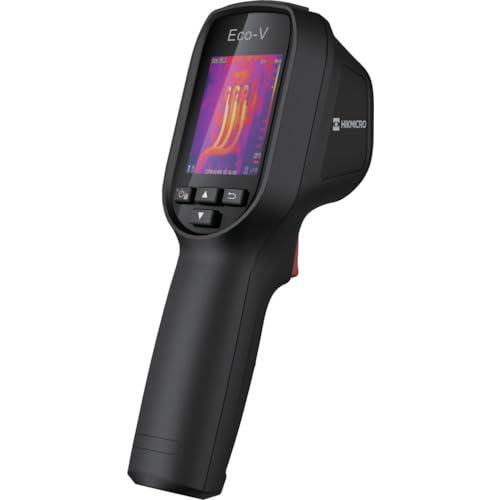
Figure 1: HIKMICRO ECO-V Handheld Thermography Camera
2. Nga korero haumaru
Pānuihia, kia mārama hoki ngā whakatūpato me ngā tohutohu haumaru katoa i mua i te whakamahinga o tēnei hua. Mēnā ka kore e whai i ēnei tohutohu, ka pāngia pea koe e te ru hiko, te ahi, te whara kino rānei.
Whakatupato Haumaru Whānui
- Kaua e whakahaeretia te taputapu i roto i nga hau pahū, penei i te aroaro o te wai mura, hau, puehu ranei.
- Tiakina te taputapu mai i te wai me etahi atu wai.
- Kaua e ngana ki te whakatuwhera, ki te whakarereke ranei i te taputapu. Tukuna atu nga ratonga katoa ki nga kaimahi whai tohu.
- Use only HIKMICRO-approved accessories.
- Avoid direct exposure of the thermal lens to strong light sources (e.g., sun, laser) as this may damage the detector.
Haumaru Pūhiko
- The device contains a built-in Lithium-ion battery. Do not expose the battery to excessive heat, direct sunlight, or fire.
- Do not puncture, open, or disassemble the battery.
- Charge the battery only with the provided USB cable and a compatible power adapter.
- Whakakorehia nga pākahiko kia rite ki nga ture o te rohe.
3. Ihirangi mokete
The HIKMICRO ECO-V package includes the following items:
- HIKMICRO Handheld Thermography Camera ECO-V
- USB Taura-C taura
- Quick Start Guide (not explicitly mentioned but standard)
- Calibration Certificate (not explicitly mentioned but standard)
Video 3.1: Unboxing the HIKMICRO M-Series (similar to ECO-V, showing typical package contents and device appearance).
4. Pūrere Neke Atuview
Familiarize yourself with the physical components and interface of your HIKMICRO ECO-V camera.
Te ahua me te Atanga
The ECO-V features a compact, ergonomic design for comfortable handheld use. Key components include the thermal lens, optical lens, laser indicator, white light, trigger button, navigation buttons, and a 2.4-inch display.
Video 4.1: This video demonstrates the physical appearance and interface of a HIKMICRO M-Series camera, which shares similar design elements and interface components with the ECO-V.
5. Tatūnga
5.1 Te Whakataki i te Pūrere
Before initial use, fully charge the device's built-in Lithium-ion battery.
- Connect the provided USB Type-C cable to the device's USB port.
- Connect the other end of the USB cable to a compatible power adapter (5V2A recommended) and plug it into a power outlet.
- The charging indicator will show red during charging and turn green when fully charged.
Video 5.1: This HIKMICRO ECO operation video demonstrates the charging process for the device.
5.2 Hiko / Whakaweto
To power on the device, press and hold the power button for more than 6 seconds. To power off, press and hold the power button again until the device shuts down.
Video 5.2: This HIKMICRO ECO operation video demonstrates how to power on the device.
6. Nga Tohutohu Whakahaere
This section covers the basic and advanced operational features of your ECO-V camera.
6.1 Image Capture and Display
To capture a thermal image, aim the camera at the target and press the trigger button. The captured image will be saved to the internal EMMC storage. To view saved images, navigate to the 'Albums' section in the menu.
Video 6.1: This HIKMICRO ECO operation video demonstrates image capture and viewing saved snapshots.
6.2 Utauta Ine
The ECO-V provides various measurement tools to analyze thermal images:
- Wāhi Wera: Automatically identifies and displays the highest temperature point.
- Wāhi Makariri: Automatically identifies and displays the lowest temperature point.
- Waahi Pokapū: E whakaatu ana i te pāmahana i waenganui o te mata.
Video 6.2: This HIKMICRO ECO operation video demonstrates the use of measurement tools like hot, cold, and center spots.
6.3 Whakapai Ake i te Whakaahua SuperIR
SuperIR technology enhances the thermal image resolution, providing more detail for analysis. You can enable or disable this feature in the settings menu.
Video 6.3: This HIKMICRO ECO operation video demonstrates how to enable and use the SuperIR image enhancement feature.
6.4 Aratau Whakaahua
The ECO-V supports multiple image modes for different inspection needs:
- Ngawha: Ka whakaatu anake i te atahanga waiariki.
- Huinga: Ka whakakotahi i nga whakaahua maamaa me nga whakaahua marama ka kitea mo nga taipitopito whakarei.
- PIP (Picture-in-Picture): Overlays a smaller thermal image on a visible light image.
- Optical: Ka whakaatu noa i te ahua o te mārama e kitea ana.
Video 6.4: This HIKMICRO B10S product video demonstrates switching between different image modes, including Thermal, Fusion, PIP, and Optical.
6.5 Parallax Correction
When using fusion modes, adjust the parallax correction based on the distance to the target to ensure accurate alignment between thermal and visible images.
Video 6.5: This HIKMICRO B10S product video demonstrates how to adjust parallax correction for accurate image fusion.
6.6 Palette Adjustment
Select from various color palettes (e.g., White Hot, Black Hot, Rainbow, Ironbow) to visualize temperature differences more effectively. This can be adjusted in the settings menu.
Video 6.6: This HIKMICRO B10S product video demonstrates how to adjust color palettes.
6.7 Emissivity and Distance Settings
For accurate temperature measurements, it is crucial to set the correct emissivity value for the target material and the distance to the target. Refer to the general emissivity reference table in the specifications section.
Video 6.7: This HIKMICRO ECO operation video demonstrates setting emissivity and distance for accurate temperature readings.
6.8 Tohu Taiaho
The built-in laser pointer helps to precisely identify the measurement target. It can be enabled or disabled in the settings menu.
Video 6.8: This HIKMICRO ECO operation video demonstrates how to enable and use the laser pointer.
6.9 Whakaoho Pawera Teitei
Set a high temperature alarm threshold to be notified when temperatures exceed a predefined limit. This feature is useful for identifying potential overheating issues.
Video 6.9: This HIKMICRO B10S product video demonstrates how to set a high temperature alarm.
6.10 Hotspot Connection
The ECO-V can connect to a mobile device via Wi-Fi hotspot for live viewing and data transfer. Enable the Wi-Fi hotspot function in the device settings and connect your mobile device.
Video 6.10: This HIKMICRO M-Series video demonstrates how to establish a hotspot connection with a mobile device.
6.11 HIKMICRO Viewer App Connection
Tikiake i te HIKMICRO Viewer app on your mobile device to access live view, manage images and videos, and generate reports. Connect the device to your phone via Wi-Fi.
Video 6.11: This HIKMICRO Pocket series video demonstrates connecting the device to the HIKMICRO Viewer app for various functions.
7. Tiaki
7.1 Te horoi
- Horoia te tinana o te taputapu ki te wai ngohengohe,amp kakahu. Kaua e whakamahi i nga kai horoi me nga whakarewa.
- Gently clean the lenses with a lens cleaning cloth. Avoid touching the lens surface with bare hands.
7.2 Rokiroki
- Whakaorangia te taputapu ki te waahi makariri, maroke, mawehe atu i te ra tika me te wera nui.
- Mena kei te rongoa mo te wa roa, me mohio kei te whakakiia te pākahiko (tata ki te 50%) ka whakakiia ia marama kia mau tonu te hauora o te pākahiko.
8. Te Raru
If you encounter issues with your HIKMICRO ECO-V, refer to the following common problems and solutions:
| Raruraru | Take pea | Rongoā |
|---|---|---|
| Kaore te taputapu i te hiko | Pūhiko iti; He hapa o te pūrere | Charge the battery; Contact support |
| Kore i tika te panui o te pāmahana | Incorrect emissivity/distance settings; Dirty lens | Adjust emissivity/distance; Clean the lens |
| Kāore e taea te hono atu ki te wāhi wera Wi-Fi | Incorrect password; Hotspot not enabled | Verify password; Enable hotspot in settings |
9. Whakatakotoranga
Detailed technical specifications for the HIKMICRO ECO-V camera:
| Āhuahira | Whakatakotoranga |
|---|---|
| Tauira | ECO-V |
| Measurement Temperature Range | -20°C ki te 550°C |
| Minimum Temperature Display | 0.1°C |
| Marae o View (FOV) | 50° × 50° |
| Taumira Mokowā (IFOV) | 8.89 mra |
| Te Awhe Maama Mahi | -10°C ki te 50°C |
| Te Awhe Paawera Rokiroki | -40°C ki te 70°C |
| Rahi Whakaatu | 2.4 inihi |
| Puna Mana | Hanga-i roto i te pākahiko Lithium-ion |
| Wā Mahi Pūhiko | 8 haora |
| Wi-Fi | Kāore i te wātea |
| Taumata Tiaki | IP54 |
| Atanga | USB Momo-C |
| Pika Pika | 12μm |
| Measuring Wavelength | 7.5-14μm |
| NETD | <40 mK (@25°C, F#=1.0) |
| Roa Arotahi | 1.35 mm |
| Aperture | F1.0 |
| Te Tino Maama Maama | 0.1m (0.33ft) |
| Auau anga | 25Hz |
| Pūnaha Arotahi | Arotahi-kore |
| Pupuri Puka | EMMC (4GB) |
| Te Rokiroki Whakaahua | 30,000 whakaahua |
| Whakaahua File Whakahōputu | BMP (includes measurement data) |
| Whakatau Atahanga Ngawha | 96×96 (9,216 pixels) |
| Visible Image Resolution | 640×480 |
| Tika | ±2°C or ±2% (whichever is greater), when ambient temperature is 15°C to 35°C and target temperature is 0°C or above. |
| Rauemi | Polycarbonate, kapia ABS |
| Taumaha | 360g |
General Emissivity Reference
| Rauemi | Harikiri |
|---|---|
| Te kiri o te tangata | 0.98 |
| PCB | 0.91 |
| Sima Raima | 0.95 |
| Nga karamu | 0.92 |
| rapa | 0.95 |
| Te peita | 0.93 |
| Te rakau | 0.85 |
| Pereki | 0.96 |
| kirikiri | 0.90 |
| Te oneone | 0.92 |
| Mirooro | 0.98 |
| Kaata | 0.90 |
| Pepa Ma | 0.96 |
| Wai | 0.96 |
10. Pūtāhui me te Tautoko
HIKMICRO products are covered by a limited warranty. For detailed warranty terms and conditions, please refer to the official HIKMICRO webte paetukutuku, whakapā atu ranei ki to kaitoha o to rohe.
Tautoko Kiritaki
If you require technical assistance, troubleshooting, or have questions about your ECO-V camera, please contact HIKMICRO customer support through their official webte pae, te korero whakapā ranei kei roto i to kete hua.