
1. Kupu Whakataki
This user manual provides comprehensive instructions for the BTXETUEL Mini 4-Key Keypad. This ultra-small, programmable mechanical gaming keypad is designed to enhance efficiency for both working and gaming applications. It features a detachable USB-C cable for convenient connectivity and portability.
The keypad comes with default arrow key functions (Up, Left, Down, Right) and is plug-and-play, requiring no initial software for basic operation. Advanced customization is available through dedicated software or a webatanga -anga
2. Ihirangi mokete
- BTXETUEL Mini 4-Key Keypad (Arrow Keycaps 1 Black)
- USB-C taura
- Spare Blank Keycaps (4 pieces)

Image: The Mini 4-Key Keypad shown with the four pre-installed arrow keycaps and four additional blank keycaps provided for customization.
3. Hua Neke Atuview me nga Ahinga
The BTXETUEL Mini 4-Key Keypad is designed for compact and efficient use. Its small footprint saves desktop space while providing essential functionality.

Image: A diagram illustrating the dimensions of the keypad. The keypad measures approximately 6.3 cm (2.5 inches) in width, 4.4 cm (1.7 inches) in depth, and 2.8 cm (1.1 inches) in height. It features a USB-C port and non-slip pads on the base. The included data cable is 1.5 meters (5 feet) long.
- Rahi Hua: 2.5 x 1.7 x 1.1 inihi (6.3 x 4.4 x 2.8 cm)
- Taumaha Tūemi: 3.52 hekere (100 karamu)
- Hononga: USB-C
4. Tatūnga me te Mahi Taketake
4.1 Connecting the Keypad
- Connect the provided USB-C cable to the USB-C port on the Mini 4-Key Keypad.
- Connect the other end of the USB-C cable to an available USB port on your computer (Laptop or PC).
- The keypad is plug-and-play. Your operating system will automatically detect the device.

Image: The Mini 4-Key Keypad with its USB-C cable connected, ready for use. The keycaps display arrow symbols, and the base shows a subtle blue backlighting.
4.2 Default Functionality
Out of the box, the four keys are pre-programmed with the following default functions:
- Top Key: Pere Runga
- Kī Mauī: Pere Mauī
- Bottom Key: Pere Raro
- Kī Tika: Pere Matau
This default configuration is ideal for navigation and many gaming applications without requiring any software installation.
5. Advanced Programming and Customization
The Mini 4-Key Keypad is fully programmable, allowing you to assign various functions to each key, including shortcut keys, multi-step operations, multi-key combinations, media controls (Play, Pause, Volume, Switch song), and more. Programming settings are saved directly on the device, so you do not need to reconfigure when connecting to a different computer.
5.1 Programming via Software (Windows Only)
For Windows users, a dedicated software is available for programming the keypad. Please note that Windows Firewall may issue a warning upon launch, but the software is safe.
- Tikiake i te pūmanawa mai i: https://dl.sayobot.cn/setting.zip
- Tāuta me te whakahaere i te pūmanawa.
- Follow the on-screen instructions to customize key functions and lighting modes.
5.2 Programming via Website (MacOS, Linux, Windows)
A web-based programming interface is available, compatible with MacOS, Linux, and Windows systems. It is recommended to use Chrome or Edge browser for optimal performance.
- Visit the programming webpae: SayoDevice.com
- Ensure your keypad is connected to your computer.
- I runga i te website, select your device and connect.
- Customize key assignments and save your settings.
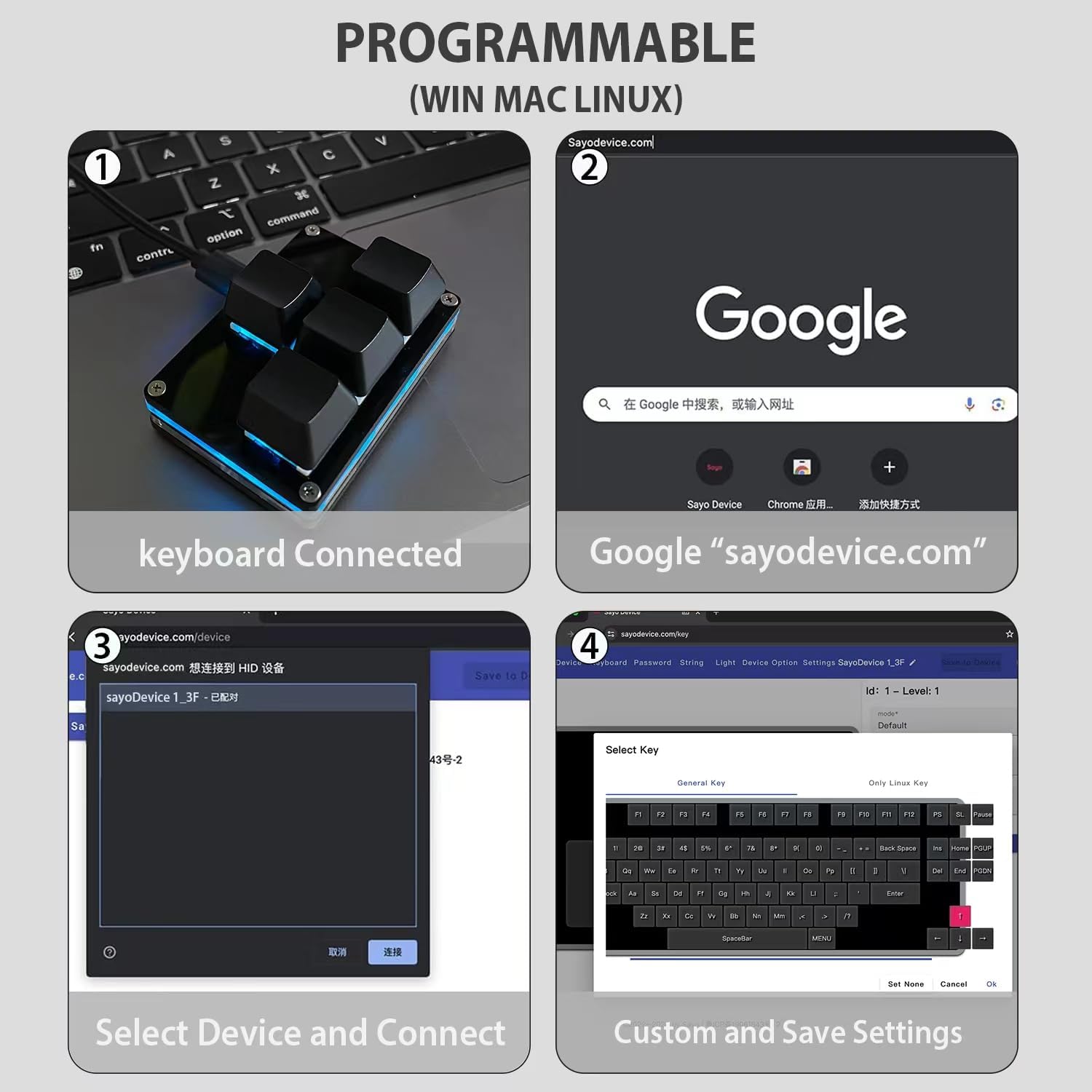
Image: A four-panel graphic demonstrating the web-based programming process. Panel 1 shows the keyboard connected. Panel 2 shows navigating to sayodevice.com. Panel 3 shows selecting and connecting the device. Panel 4 shows the interface for custom key assignment and saving settings.
5.3 Mana Rama
The keypad features customizable lighting. You can control the light color and gradient mode through the programming software or webpae.
6. Nga Tauari Whakamahi
The BTXETUEL Mini 4-Key Keypad is versatile and can be used in various applications:
- petipeti: Ideal for quick access to specific commands, stratagems, or movement controls in games.
- Hua: Assign shortcuts for frequently used software functions, such as copy, paste, undo, redo, or specific macros for design, editing, or data entry.
- Mana Media: Use it as a dedicated media controller for play/pause, volume adjustment, and track navigation.

Image: A split image showing the Mini 4-Key Keypad in two different usage environments. On the left, it is depicted in a professional working setup with a computer and design software. On the right, it is shown in a gaming setup with a gaming PC and headphones, highlighting its utility for both work and play.
7. Tiaki me te Tiaki
To ensure the longevity and optimal performance of your keypad, follow these maintenance guidelines:
- Keep the keypad clean by wiping it with a soft, dry cloth. Avoid using harsh chemicals or abrasive materials.
- Protect the keypad from excessive dust, moisture, and extreme temperatures.
- Handle the USB-C cable gently to prevent damage to the connector or cable.
- Store the keypad in a safe place when not in use to prevent accidental damage.
8. Te Raru
| Raruraru | Take pea | Rongoā |
|---|---|---|
| Kāore te papapātuhi e mōhiotia e te rorohiko. | Loose USB-C connection; faulty USB port; driver issue. |
|
| Keys do not perform assigned functions. | Keypad not programmed correctly; programming not saved. |
|
| Papatonotanga website/software not working. | Browser compatibility; firewall blocking; outdated software. |
|
If you encounter any problems with the keypad that are not resolved by the above steps, please contact BTXETUEL customer support for assistance.
9. Whakatakotoranga
| Āhuahira | Taipitopito |
|---|---|
| Waitohu | BTXETUEL |
| Tauira | Mini 4-Key Keypad (Arrow Keycaps 1 Black) |
| Hunga Hua | 2.5 x 1.7 x 1.1 inihi (6.3 x 4.4 x 2.8 cm) |
| Taumaha Tūemi | 3.52 hekere (100 karamu) |
| Hangarau Hononga | USB-C |
| Te maha o nga Kī | 4 |
| Whakaahuatanga Papapātuhi | Gaming, Mechanical |
| Pūrere Hototahi | Pona, PC |
| Nga Whakamahinga Manakohia | Programming, Gaming |
| Nga waahanga motuhake | Portable, Lightweight, Backlit, Programmable Keys, Hot-Swappable |
| Papapātuhi Whakamurirama | Single Color (Customizable) |
| Whenua Taketake | Haina |
| Te Ra Tuatahi Wātea | Paenga-whāwhā 17, 2024 |
10. Pūtāhui me te Tautoko
BTXETUEL is committed to providing high-quality products and customer satisfaction. If you encounter any issues with your Mini 4-Key Keypad, please contact our customer support team.
For support inquiries, please refer to the contact information provided with your product packaging or visit the official BTXETUEL store on Amazon: BTXETUEL Store.
Programming support and troubleshooting resources are also available on the SayoDevice webpae: SayoDevice.com.