
BANIGIPA T506
BANIGIPA Kids True Wireless Earbuds T506 Instruction Manual
Tauira: T506
1. Kupu Whakataki
Thank you for choosing the BANIGIPA Kids True Wireless Earbuds T506. These open-ear clip earbuds are designed with your child's safety and comfort in mind, featuring a unique design that allows awareness of surroundings and a healthy volume limit to protect hearing. This manual provides detailed instructions for setup, operation, and maintenance to ensure optimal performance and longevity of your device.

Image 1.1: BANIGIPA T506 Kids True Wireless Earbuds and Charging Case.
This image displays the pink BANIGIPA T506 true wireless earbuds, showing both earbuds and their matching charging case open, ready for use or charging.
2. Ihirangi mokete
Tena koa tirohia kei roto katoa nga taonga kei roto i to kete:
- 1x T506 True Wireless Earbuds (Left and Right)
- 1x USB-C Uera Whakatau
- 1x Manual Kaiwhakamahi
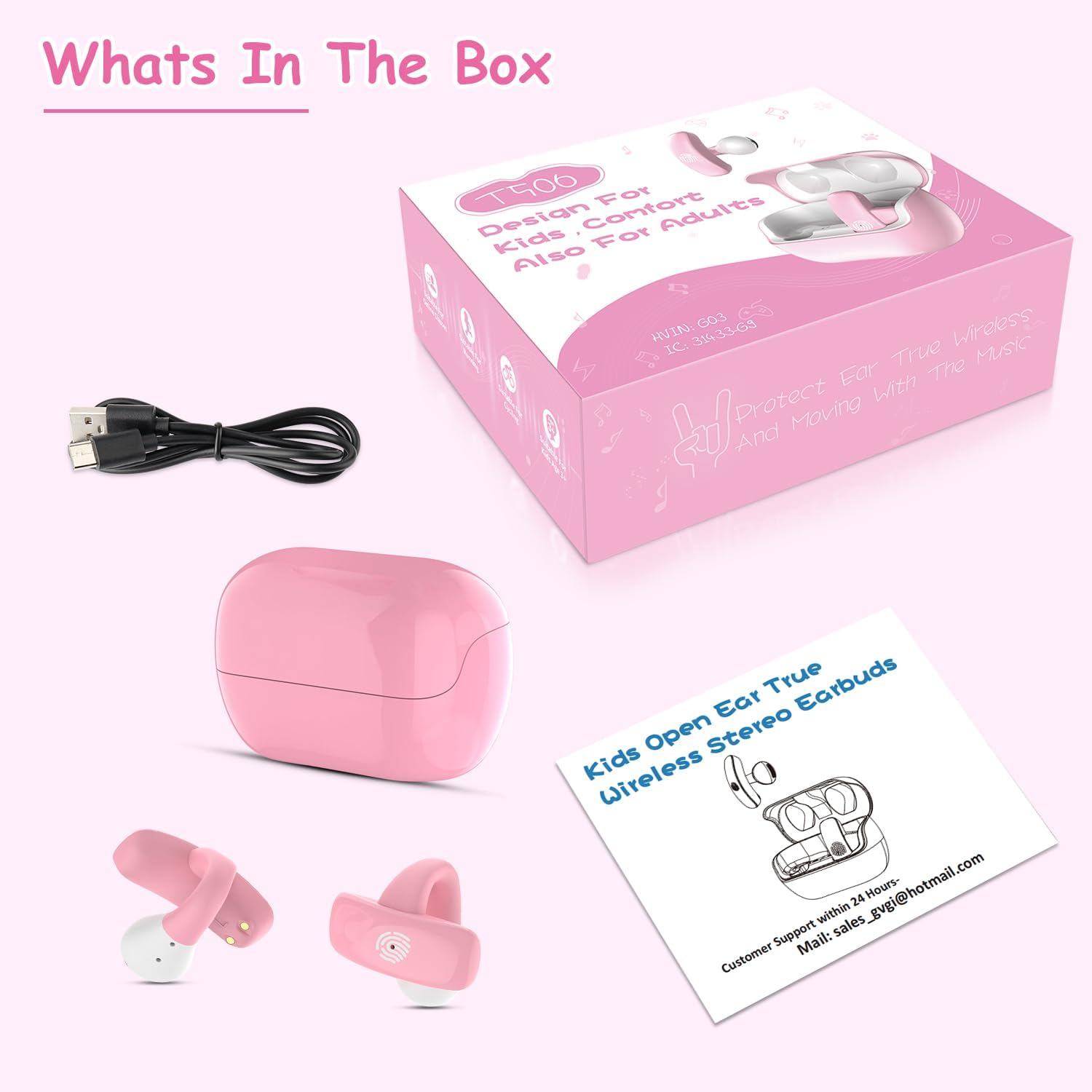
Whakaahua 2.1: Ngā Ihirangi o te Kete.
This image displays the BANIGIPA T506 earbuds, charging case, USB-C charging cable, and user manual, laid out next to the product packaging, illustrating all included items.
3. Hua Neke Atuview
The BANIGIPA T506 earbuds feature an open-ear clip design for comfort and safety. Each earbud is ultra-lightweight at 5g, ensuring comfortable wear for extended periods.
Āhuatanga matua:
- Open-Ear Clip Design: Ensures ear canal hygiene and environmental awareness.
- Tino-Maama: Each earbud weighs only 5g for maximum comfort.
- Healthy Volume Control: Sound pressure limited to 85dB to protect hearing.
- Nihokikorangi 5.4: E whakarato ana i te hononga ahokore pumau me te tere.
- Mana Pa Ataata: Easy management of music, calls, and voice assistants.
- IPX4 Parewai: Resistant to sweat, rain, and splashes.
- Roa te Ora o te Pūhiko: Up to 5 hours per charge, with 3-4 additional charges from the case.
4. Te Timata
4.1 Whakataki Tuatahi
Before first use, fully charge the earbuds and the charging case. Connect the provided USB-C charging cable to the charging port on the case and a power source. The indicator lights on the case will show the charging status. A full charge typically takes approximately 1.5 hours.
4.2 Te Whakamaunga i nga Paoro
The BANIGIPA T506 earbuds feature an open-ear clip design. To wear them correctly:
- Gently open the ear clip.
- Position the earbud on your ear, ensuring the speaker is aligned with your ear canal.
- Adjust the clip for a secure and comfortable fit. The earbuds should feel stable without causing pressure or discomfort.

Image 4.1: How to Wear the Earbuds.
This three-step diagram illustrates the correct way to position the open-ear clip earbuds on the ear for optimal sound and comfort, showing the earbud being placed and adjusted.
4.3 Paihere ki te Pūrere
Ka whakamahia e nga taringa te Nihokikorangi 5.4 mo te hononga tere me te pumau.
- Takirua tuatahi: Whakatuwherahia te putea utu. Ka uru aunoa nga taringa ki te aratau takirua.
- On your device (smartphone, tablet, PC), go to Bluetooth settings and enable Bluetooth.
- Rapua ngā pūrere e wātea ana, kātahi ka tīpako i te "T506" mai i te rārangi.
- Kia honoa, ka rangona he oro whakaū, ā, ka whakaatuhia te "Kua Honoa" e te pūrere.
- Hononga Aunoa: After the initial pairing, the earbuds will automatically connect to the last paired device when removed from the charging case.
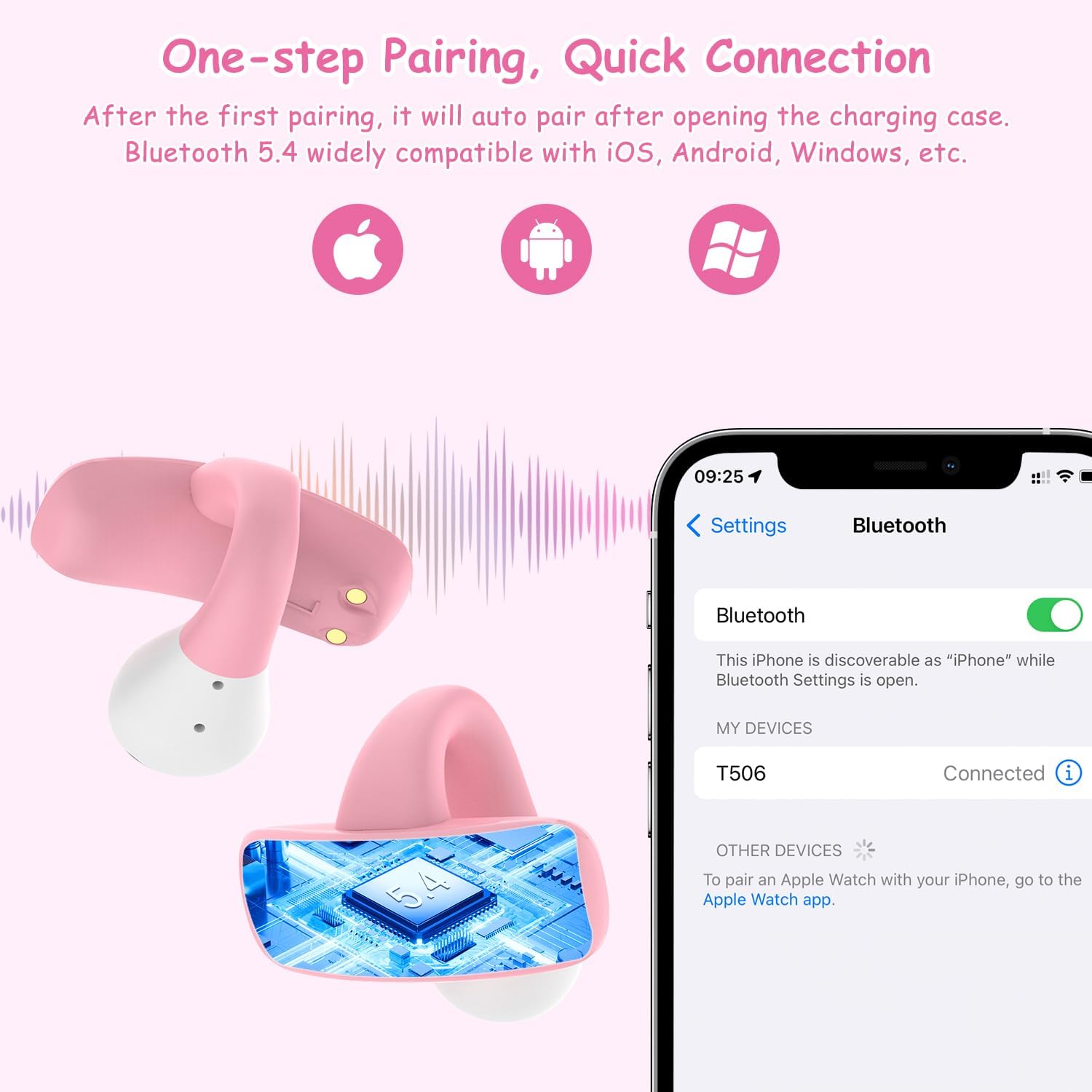
Image 4.2: Bluetooth Pairing.
This image depicts the BANIGIPA T506 earbuds next to a smartphone screen showing the Bluetooth settings, with 'T506' listed as a connected device, demonstrating the one-step pairing process.
5. Nga Tohutohu Whakahaere
The BANIGIPA T506 earbuds feature intuitive touch controls on each earbud.
Ngā Mahi Mana Pā:
- Purei/Tatari: Double-tap (Touch x2) on either L/R earbud.
- Whakautu Waea: Double-tap (Touch x2) on either L/R earbud.
- Karangatia te Waea: Double-tap (Touch x2) on either L/R earbud during a call.
- Whakakore Waea: Triple-tap (Touch x3) on either L/R earbud.
- Whakakore Waea: Double-tap (Touch x2) on either L/R earbud.
- Waiata o mua: Triple-tap (Touch x3) on the Left (L) earbud.
- Waiata Panuku: Triple-tap (Touch x3) on the Right (R) earbud.
- Runga Runga: Long press on the Right (R) earbud.
- Raro Raro: Long press on the Left (L) earbud.
- Tautuhi: Quadruple-tap (Touch x4) on either L/R earbud.

Image 5.1: Touch Control Functions.
This comprehensive diagram details the touch control functions for the BANIGIPA T506 earbuds, including play/pause, answer/hang up calls, skip tracks, and volume adjustment, along with a reset option.
6. Te Whakataki i nga Paorooro me te Puhi
The charging case provides portable power for your earbuds.
6.1 Te Whakataki i nga Paorooro
Place the earbuds into the charging case. They will automatically begin charging. The case holds enough power for 3-4 full charges of the earbuds, providing up to 20 hours of total listening time.
6.2 Te Whakautu i te Pouaka
When the charging case battery is low, connect it to a power source using the supplied USB-C cable. The charging time for the case is approximately 1.5 hours.

Image 6.1: Charging the Case.
The pink BANIGIPA T506 charging case is shown connected to a USB-C cable, indicating the charging process, with a smartphone displaying music playback in the background, highlighting the battery life.
7. Tiaki me te Tiaki
- Te horoi: Horoia ngā pane taringa me te pouaka utu i ia wā ki te kakahu ngohengohe, maroke. Āta karohia te whakamahi i ngā matū kaha, i ngā mea whakakoi rānei.
- Rokiroki: Store the earbuds in their charging case when not in use to protect them from dust and damage. Keep them in a cool, dry place away from extreme temperatures.
- Ātete wai: The earbuds are IPX4 waterproof, meaning they are resistant to sweat, light rain, and splashes. Do not submerge them in water or expose them to heavy rain.
- Tiaki Pūhiko: Hei whakaroa i te ora o te pākahiko, karohia te tuku katoa i nga pukoro me te pukoro i nga wa katoa. Me utu i nga wa katoa, ahakoa kaore i whakamahia mo nga wa roa.
8. Te Raru
If you encounter issues with your BANIGIPA T506 earbuds, please refer to the following common solutions:
| Raruraru | Rongoa pea |
|---|---|
| Karekau nga taringa e hono ana |
|
| Karekau he oro mai i tetahi pukoro |
|
| Karekau e utuhia ana |
|
| Raro iti |
|
9. Whakatakotoranga
| Ingoa Tauira | T506 |
| Putanga Nihokikorangi | 5.4 |
| Te Whakanoho Taringa | Open Ear (Clip Design) |
| Taumaha Earbud | 5 karamu (ia ia) |
| Whakatauhia te kaha o te pākahiko | 300 mah |
| Earbud Battery Life | Tae atu ki te 5 haora (te utu kotahi) |
| Te Ora o te Pūhiko (me te pouaka) | Tae atu ki te 20-25 haora |
| Waa Whakatau | Approx. 1.5 hours (earbuds & case) |
| Taumata Atete Wai | IPX4 |
| Rahi Atekōkiri Ororongo | 10 Mirimita |
| Te tairongo | 85 dB (volume limited) |
| Hangarau Hononga | Nihokikorangi, Ahokore |
| Momo Mana | Mana Pa |
10. Nga korero haumaru
- Parenga Rongo: The earbuds are designed with an 85dB volume limit to protect children's hearing. Avoid modifying this limit.
- Te Maara Taiao: The open-ear design allows users to hear their surroundings, enhancing safety, especially outdoors.
- Pūmate Koowao: Keep earbuds and small parts away from young children to prevent accidental ingestion.
- Haumaru Pūhiko: Do not attempt to replace the battery. Do not expose the device to extreme heat or dispose of it in fire.
- Whakakorea: Do not attempt to disassemble or repair the earbuds or charging case, as this will void the warranty and may cause damage.

Image 10.1: 85dB Volume Control.
A graphic representation of an earbud with a sound wave and an '85dB' indicator, emphasizing the healthy volume control feature designed to protect children's hearing by keeping sound pressure well below harmful thresholds.
11. Pūtāhui me te Tautoko
Mōhiohio Pūtāhui:
Please refer to your purchase documentation or the product packaging for specific warranty details and duration. The warranty typically covers manufacturing defects.
Tautoko Kiritaki:
If you have any questions, concerns, or require technical assistance with your BANIGIPA T506 Kids True Wireless Earbuds, please do not hesitate to contact our customer support team. We aim to respond within 24 hours to resolve any issues you may have.
Īmēra: Sales_gyg@hotmail.com
Mō ētahi atu pārongo, ka taea hoki e koe te toro atu ki te BANIGIPA Store on Amazon.
12. Hua Ataata
Note: No official product videos from the seller were available with the necessary metadata for embedding in this manual.
Ask a question about this manual
Ask about setup, troubleshooting, compatibility, parts, safety, or missing instructions. Manuals+ will review the question and use this page’s manual context to help answer it.