
T-Wolf GG-G530
T-Wolf RoboCop Competitive Gaming Mouse GG-G530 User Manual
Model: GG-G530
Kupu Whakataki
This manual provides essential information for the setup, operation, and maintenance of your T-Wolf RoboCop Competitive Gaming Mouse GG-G530. Please read this manual thoroughly before using the product to ensure optimal performance and longevity.
Ihirangi mokete
- 1 x T-Wolf RoboCop Competitive Gaming Mouse GG-G530
- 1 x Manual Kaiwhakamahi (tenei tuhinga)
Nga waahanga hua
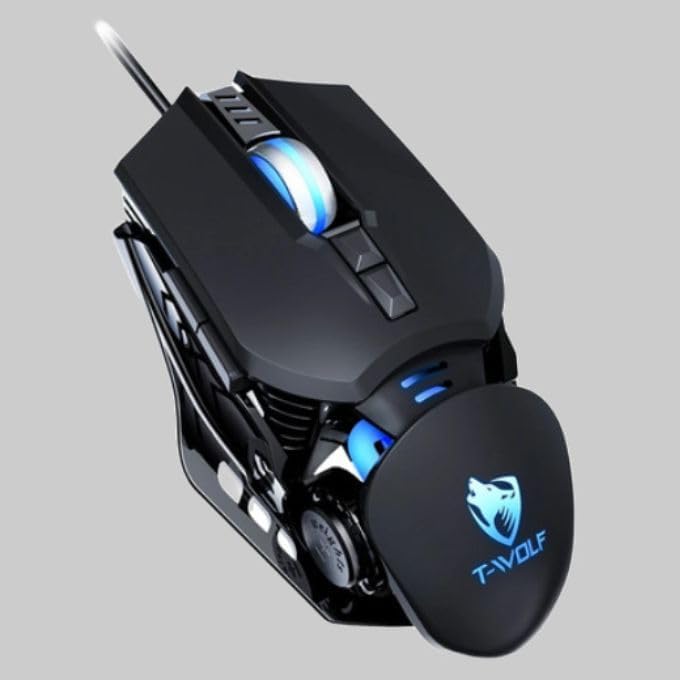
The T-Wolf RoboCop Competitive Gaming Mouse GG-G530 is designed for precision and comfort, suitable for both gaming and office use. Key features include:
- Optical Engine Design: Ensures stable operation and high sensitivity.
- Mechanical Armored Modeling: Distinctive and robust design.
- Symmetrical DIY Counterweight: Allows for adaptable weight adjustment.
- 7 Pātene: Includes left click, right click, scroll wheel, DPI switcher, and additional programmable buttons.
- Hononga Maramarama: Plug-and-play functionality with automatic driver installation.
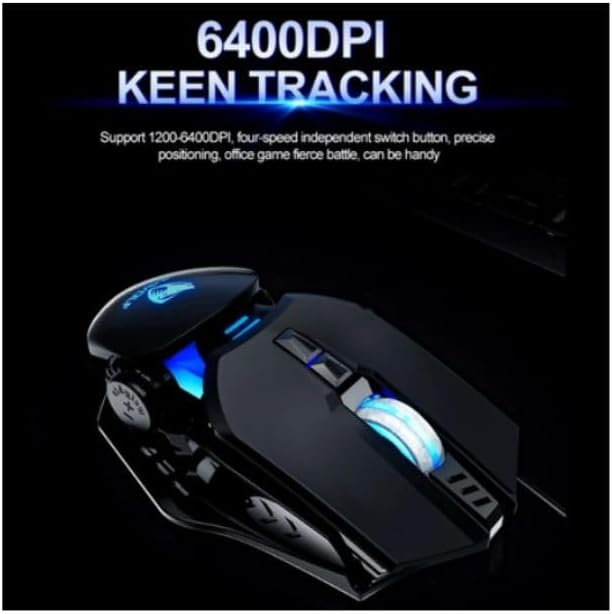
- DPI taea te whakarite: Four levels of sensitivity (1200/2400/3200/6400 DPI) for precise control.
- Hoahoa Ergonomic: Provides comfortable use for extended periods without fatigue.
- Four-Color Light Effect: Dynamic lighting for visual appeal.
- Hononga Waea: Reliable USB interface with a 150cm cable.
- Hototahi Pūnaha: E tautoko ana i ngā pūnaha whakahaere Windows me Mac.
Tatūnga
- Honoa te Kiore: Insert the USB connector of the T-Wolf RoboCop Gaming Mouse into an available USB port on your computer.
- Tāuta Atekōkiri Aunoa: The operating system will automatically detect the mouse and install the necessary drivers. This process typically takes a few moments. No manual driver installation is required.
- Kua Reri mo te Whakamahi: Kia tāutahia ngā taraiwa, kua rite te kiore mō te whakamahi tonu.
Nga Tohutohu Whakahaere
The T-Wolf RoboCop Gaming Mouse features 7 buttons for various functions. Familiarize yourself with their basic operations:
- Pātene Pātene Mauī: Te whiriwhiri tuatahi me te taunekeneke.
- Pātene Pāwhiri Matau: Accesses contextual menus and secondary functions.
- Panuku Wira: Panuku i roto i nga tuhinga me te web whārangi. Ka taea hoki te mahi hei pātene pāwhiri waenga.
- DPI Switcher Button: Ka whakarerekē i te aro o te kiore (DPI).
- Pātene Tāpiri: The remaining buttons can be assigned specific functions through your operating system's mouse settings or compatible third-party software (note: no macro programming is natively supported by the mouse hardware).

Whakatikatika DPI
The mouse features an adjustable DPI (Dots Per Inch) setting, allowing you to change the cursor sensitivity on the fly. This is particularly useful for different tasks, such as precise aiming in games or fast navigation in general use.
- Kimihia te DPI Switcher Button, typically positioned behind the scroll wheel.
- Press the DPI Switcher Button to cycle through the available DPI settings: 1200 DPI, 2400 DPI, 3200 DPI, and 6400 DPI.
- Each press will change the sensitivity, allowing you to find the setting that best suits your current activity.
Te tiaki
To ensure the longevity and optimal performance of your T-Wolf RoboCop Gaming Mouse, follow these simple maintenance guidelines:
- Te horoi: Whakamahia he kakahu ngohengohe, maroke hei muru i te mata o te kiore. Mo te paru maro, paku dampHoroia te kakahu ki te wai, ki tētahi wai horoi ngawari rānei. Āta karohia ngā matū kaha, ngā rauemi whakakoi rānei.
- Pūoko Optical: Periodically clean the optical sensor on the underside of the mouse with a cotton swab to prevent dust buildup, which can affect tracking performance.
- Tiaki taura: Avoid sharply bending or pulling the USB cable to prevent internal damage.
- Rokiroki: Ki te kore e whakamahia, penapenahia te kiore ki roto i te taiao ma, maroke kia matara atu i nga wera nui.
Raparongoā
If you encounter issues with your T-Wolf RoboCop Gaming Mouse, refer to the following common solutions:
- Kaore te Kiore i te whakautu:
- Me mohio kua honoa te taura USB ki tetahi tauranga USB mahi i runga i to rorohiko.
- Whakamātauria te mono i te kiore ki tetahi tauranga USB rereke.
- Tīmataria anō tō rorohiko.
- He pōturi, he pekepeke rānei te nekehanga o te pehu:
- Horoia te pūoko whatu kei raro o te kiore.
- Me whakarite kei te whakamahi koe i te kiore i runga i te mata ma, kore-whakaata, me te riterite. Ka tūtohuhia nga papa kiore.
- DPI Adjustment Not Working:
- Ensure you are pressing the correct DPI switcher button.
- The mouse cycles through fixed DPI settings; there is no visual indicator on the mouse itself for the current DPI level, only the change in cursor speed.
- Kāore ngā pātene e mahi ana:
- Check your operating system's mouse settings to ensure buttons are enabled and configured correctly.
- Whakamātauria te kiore i runga i tētahi atu rorohiko hei whakakore i te raru o tētahi pūmanawa, pūnaha rānei.
Whakatakotoranga
| Tauira | GG-G530 |
| Rauemi | ABS + Electroplating |
| Pūnaha Aroturuki | Optical |
| Hononga | Waea |
| Te roa o te taura | 150 cm |
| Momo Atanga | USB |
| Tautuhinga DPI | 1200 / 2400 / 3200 / 6400 (Ka taea te whakarite) |
| Te maha o nga Patene | 7 |
| Te Ora Mahi | Approximately three years |
| Tikanga Mahi | Whakaahua Whakaahua |
| Pānga Maama | Four-color cycling |
| Rahi Tuemi | 130 x 80 x 35 mm |
| Taumaha Tūemi | 160 g |
| Pūnaha Tautoko | Matapihi, Mac |
Pūtāhui me te Tautoko
Your T-Wolf RoboCop Competitive Gaming Mouse GG-G530 comes with a 6 marama te whakamana a te kaihanga mai i te ra o te hokonga.
This warranty covers defects in materials and workmanship under normal use. It does not cover damage caused by accident, misuse, abuse, unauthorized modification, or external causes such as liquid damage.
Mō ngā kereme pūtāhui, mō te tautoko hangarau rānei, whakapā atu ki tō kaihokohoko, ki te wāhi hoko rānei. Puritia tō taunakitanga hoko hei whakamana i te pūtāhui.
