
Active Pixel AP-4G-SY4.0MP-DUAL CAM-V-4MM-BW1
Active Pixel 4G SIM PTZ Security Camera User Manual
Model: AP-4G-SY4.0MP-DUAL CAM-V-4MM-BW1
1. Hua Neke Atuview
The Active Pixel 4G SIM PTZ Security Camera is an outdoor surveillance device designed for locations without traditional Wi-Fi or wired internet access. It operates using a 4G SIM card, providing remote monitoring capabilities. The camera features a dual-lens system for comprehensive coverage and detailed imaging, pan-tilt-zoom functionality, motion tracking, color night vision, and two-way audio communication.
1.1 Nga waahanga matua
- 4G SIM Connectivity: Operates independently using a 4G SIM card (Vi & Airtel Sim Supported), suitable for remote areas without Wi-Fi.
- Dual Lens (4MP + 4MP = 8MP Total): Provides both a wide-angle view and a detailed close-up view simultaneously for enhanced monitoring.
- 360° Pan-Tilt-Zoom (PTZ): Allows remote control of camera direction and zoom, with automatic human motion tracking.
- Tirohanga Po Tae: Equipped with bright spotlight LEDs and IR lights for clear, full-color footage i roto i nga ahuatanga marama iti.
- Ororongo Ara-rua: Enables real-time communication through the camera via a mobile application.
- Outdoor Ready (IP65): Weatherproof design ensures durability against rain and dust for outdoor installation.
- Aroturuki Nekehanga Atamai: Automatically follows detected human movement.
1.2 Ihirangi mokete
Manatokona kei roto katoa nga mea kei roto i te kete:
- 1x Active Pixel 4G SIM PTZ Security Camera
- 1x Whakaeke Tu
- 1x Pūurutau Hiko
- 1x Manual Kaiwhakamahi (tenei tuhinga)
- 1x Screw Kit for installation
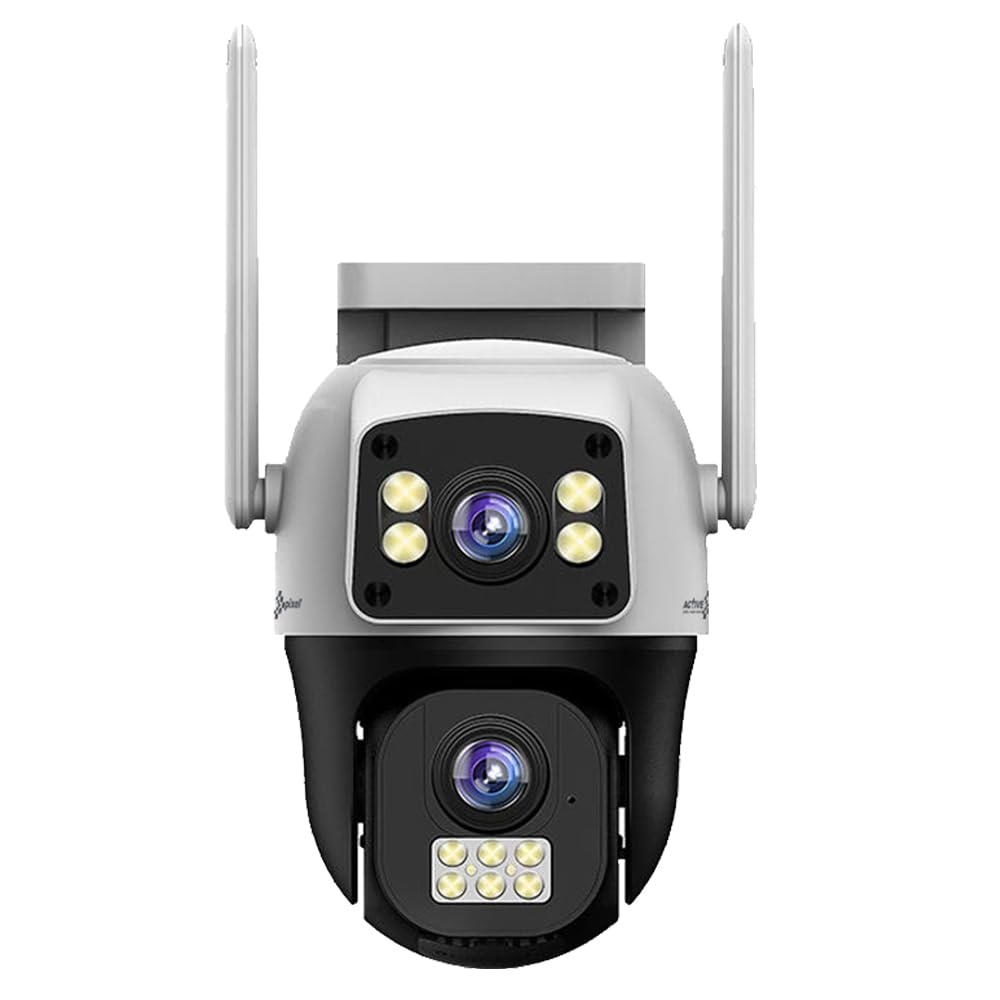
Figure 1: Active Pixel 4G SIM PTZ Security Camera (Front View)
2. Nga korero haumaru
- Ensure the camera is installed in a stable location to prevent falls.
- Use only the provided power adapter to avoid damage or fire hazards.
- Kaua e whakaatuhia te kāmera ki ngā pāmahana tino nui i waho atu i tōna awhe mahi.
- Puritia te kamera mai i nga papa autō kaha.
- Avoid direct exposure of the lens to strong light sources for extended periods.
- Do not attempt to disassemble or repair the camera yourself. Contact support for assistance.
- Ensure proper sealing of all connections to maintain the IP65 water resistance rating.
3. Tatūnga
3.1 Whakauru Kaari SIM
- Locate the SIM card slot on the camera. This is typically protected by a waterproof cover.
- Carefully open the cover using a small screwdriver if necessary.
- Insert a activated 4G SIM card (Vi or Airtel recommended) into the slot with the metal contacts facing down and the notched corner aligned correctly.
- Ensure the SIM card clicks into place.
- Securely close the waterproof cover to prevent water ingress.
Note: The camera does not require Wi-Fi. Ensure the 4G SIM card has an active data plan.
3.2 Hononga Hiko
- Honoa te urutau mana kua whakaratohia ki te tauranga tāuru mana o te kāmera.
- Monohia te urutau hiko ki tetahi putanga hiko tika.
- The camera will power on and initiate its self-test sequence.
3.3 Taupānga Tāuta me te Tauhoa
- Download the official Active Pixel security camera application from your mobile device's app store (e.g., Google Play Store for Android).
- Rēhita mō tētahi pūkete hōu, takiuru mai rānei mēnā kei a koe tētahi.
- Follow the in-app instructions to add a new device. This typically involves scanning a QR code on the camera or manually entering its device ID.
- Once paired, you will be able to view te kai ora me te whakahaere i te kamera.
3.4 Whakauru i te Kamera
The camera is designed for wall-mounted installation.
- Choose a suitable outdoor location that provides the desired viewing angle and is within reach of a power source.
- Use the included mounting stand as a template to mark drilling points on the wall.
- Porohia nga rua pairati me te whakauru i nga punga pakitara mehemea e tika ana.
- Whakamauhia te tūnga whakairi ki te pakitara mā te whakamahi i ngā tīwiri kua whakaratohia.
- Attach the camera to the mounting stand, ensuring it is firmly secured.
- Adjust the camera's initial angle as needed before final tightening.
Whakaahua 2: Example of camera mounting (Image not available, refer to physical manual for illustration).
4. Nga Tohutohu Whakahaere
4.1 Ora View me te Mana PTZ
- Open the Active Pixel app on your smartphone.
- Select your camera from the device list to access the live video feed.
- Use the on-screen controls to pan (move horizontally), tilt (move vertically), and zoom the camera.
4.2 Te Kitenga me te Aroturuki i te Nekehanga
- Whakatere ki ngā tautuhinga kāmera i roto i te taupānga.
- Enable "Motion Detection" and configure sensitivity levels as desired.
- Activate "Smart Motion Tracking" to allow the camera to automatically follow detected human movement.
- You will receive instant alerts on your mobile device when motion is detected.
4.3 Ororongo Waa-rua
- I te wa e ora ana view, patohia te ata hopuoro i roto i te taupānga hei kōrero mā te kaikorero o te kāmera.
- Patohia te ata korero hei whakarongo ki te ororongo mai i te hopuoro o te kamera.
4.4 Matakite Po
The camera automatically switches to night vision mode in low-light conditions. The powerful LEDs provide full-color night vision, while IR lights assist in darker environments.
4.5 Te tuhi me te rokiroki
The camera supports local storage via a MicroSD card (not included) and may offer cloud storage options (check app for details). Recordings are triggered by motion detection or can be initiated manually.
- Insert a MicroSD card (up to 128GB, Class 10 recommended) into the designated slot (usually near the SIM card slot).
- Format the MicroSD card via the app settings before first use.
- Uru rekoata footage through the playback feature in the app.
5. Tiaki
- Te horoi: Murua ata te arotahi kamera me te tinana ki te ngohengohe, damp kakahu. Kaua e whakamahi i nga matū kino me nga horoi horoi.
- Whakahōu Firmware: Regularly check the app for available firmware updates to ensure optimal performance and security. Follow in-app instructions for updating.
- parenga huarere: Periodically inspect the waterproof covers and seals for any signs of wear or damage, especially after extreme weather conditions. Ensure they are securely closed.
- Tuku Hiko: Kia tino mohio kei te pakaru te urutau hiko me te taura.
6. Te Raru
| Raruraru | Take pea | Rongoā |
|---|---|---|
| Karekau te kamera i te hiko | Kāore he hiko, he pūurutau hapa, he ngoikore te hononga. | Check power outlet, ensure adapter is securely connected, try a different outlet. |
| Kāore he whāngai ataata ora | No 4G signal, inactive SIM card, incorrect app pairing. | Check 4G signal strength, ensure SIM card is active and has data, re-pair camera with app. |
| Kaore i te mahi te kitenga nekehanga | Motion detection disabled, sensitivity too low, incorrect detection zone. | Enable motion detection in app, increase sensitivity, adjust detection zones. |
| Nga take ororongo-rua | Microphone/speaker disabled in app, poor network connection. | Ensure audio features are enabled in app, check 4G signal strength. |
| Poor video quality at night | Obstruction of IR/spotlight LEDs, dirty lens. | Clear any obstructions, clean the camera lens. |
7. Whakatakotoranga
| Āhuahira | Taipitopito |
|---|---|
| Tau tauira | AP-4G-SY4.0MP-DUAL CAM-V-4MM-BW1 |
| Waitohu | Active Pixel |
| Hangarau Hononga | Wireless (4G Cellular) |
| Whakataunga Hopu Ataata | 1536P (Dual 4MP lenses for 8MP total clarity) |
| Āhuahira Motuhake | Dual Lens, 360° PTZ, Smart Motion Tracking, Color Night Vision, Two-Way Audio |
| Mahinga o roto/waho | Waho |
| Puna Mana | DC |
| Tikanga Mana | App (Android compatible) |
| Rauemi | Acrylonitrile Butadiene Styrene (ABS) |
| Rahi Tūemi (LxWxH) | 15 x 10 x 8 Henemita |
| Taumata Atete Wai | IP65 (Atete Wai) |
| Hangarau Maama iti | Tae Po |
| Momo Matohi | Motini anake |
| Hangarau Pūoko Whakaahua | CMOS |
| Momo Tāuta | Whakanohoia ki runga taiepa |
| Nga Waahanga kei roto | Camera, Stand, Adapter, Manual, Screw Kit |
8. Pūtāhui me te Tautoko
8.1 Nga Korero Whakaputanga
This Active Pixel product comes with a 1 Tau Rarangi mai i te ra o te hokonga. Tena koa pupuri i to riirii hoko hei tohu whakamana.
The warranty covers manufacturing defects. It does not cover damage caused by misuse, accidents, unauthorized modifications, or improper installation.
8.2 Tautoko Kiritaki
For technical assistance, troubleshooting, or warranty claims, please contact Active Pixel customer care:
- Tau Tiaki Kiritaki: 9321367328
- Kaihanga: Glorious Digital Solution Pvt Ltd, Mumbai, India.
Please have your product model number (AP-4G-SY4.0MP-DUAL CAM-V-4MM-BW1) and purchase details ready when contacting support.
Ask a question about this manual
Ask about setup, troubleshooting, compatibility, parts, safety, or missing instructions. Manuals+ will review the question and use this page’s manual context to help answer it.