
1. Kupu Whakataki
The eRapta ACT702 Wireless Backup Camera System provides enhanced visibility and safety for various vehicles, including trailers, RVs, trucks, and cars. Featuring a 7-inch portable monitor and two magnetic FHD1080P cameras with infrared night vision and a 150° wide-angle view, this system is designed for quick, install-free setup and reliable performance in diverse conditions.

Figure 1: eRapta ACT702 Wireless Backup Camera System components.
2. He aha kei roto i te Pouaka
Upon opening your eRapta ACT702 package, please ensure all the following items are present:
- 7 inihi te aroturuki
- 2 magnetic backup cameras
- Momo-c taura
- Kaitohu Motoka
- Antennas (5 included, 2 for cameras, 1 for monitor, 2 spares)
- Taiapa U-Shaped
- Camera Fixed Screws
- Taiapa Momo Kapu

Figure 2: All components included in the eRapta ACT702 package.
3. Nga waahanga matua
- 1-Minute Install-Free: No wiring or drilling required. The strong magnetic base allows for quick attachment to any metal surface.
- Roa te Ora o te Pūhiko: Built-in 9600 mAh rechargeable battery provides extended continuous use. Camera enters sleep mode when the monitor is off to conserve power.
- FHD1080P Resolution & Infrared Night Vision: Upgraded image quality for clear, colorful vision day and night, even in low light.
- Advanced Stable Digital Signals: 2.4G Hz WiFi transmission with dual antennas ensures no frame drop or image delay, with transmission distances up to 328ft in open space.
- Loop Video Record: Supports SD card (up to 128GB, not included) for continuous recording, functioning as an observation system.
- Tautoko Maha-Kamera: The monitor supports up to 4 cameras (2 included), allowing for full, split, or quad-screen views.
- IP69K Waterproof & Weather Resistance: Constructed with high-quality waterproof materials and nano-coating technology for extreme weather conditions (-6°F to 151°F).
- 150° Koki-Whanui View & Parking Line: Ka whakarato i te whānui view and adjustable parking lines for precise maneuvering.
4. Tatūnga me te Tāuta
4.1 Whakaaturanga Kamera
The eRapta ACT702 cameras are designed for hassle-free installation due to their strong magnetic base. No complex wiring or drilling is required.
- Ensure the camera is fully charged using the provided Type-C cable. A 5V phone charger can also be used.
- Attach the camera securely to any flat metal surface on your vehicle where you desire a view (e.g., rear bumper, trailer hitch). The strong magnet will hold it in place.
- Screw the antenna onto the designated port on the camera.
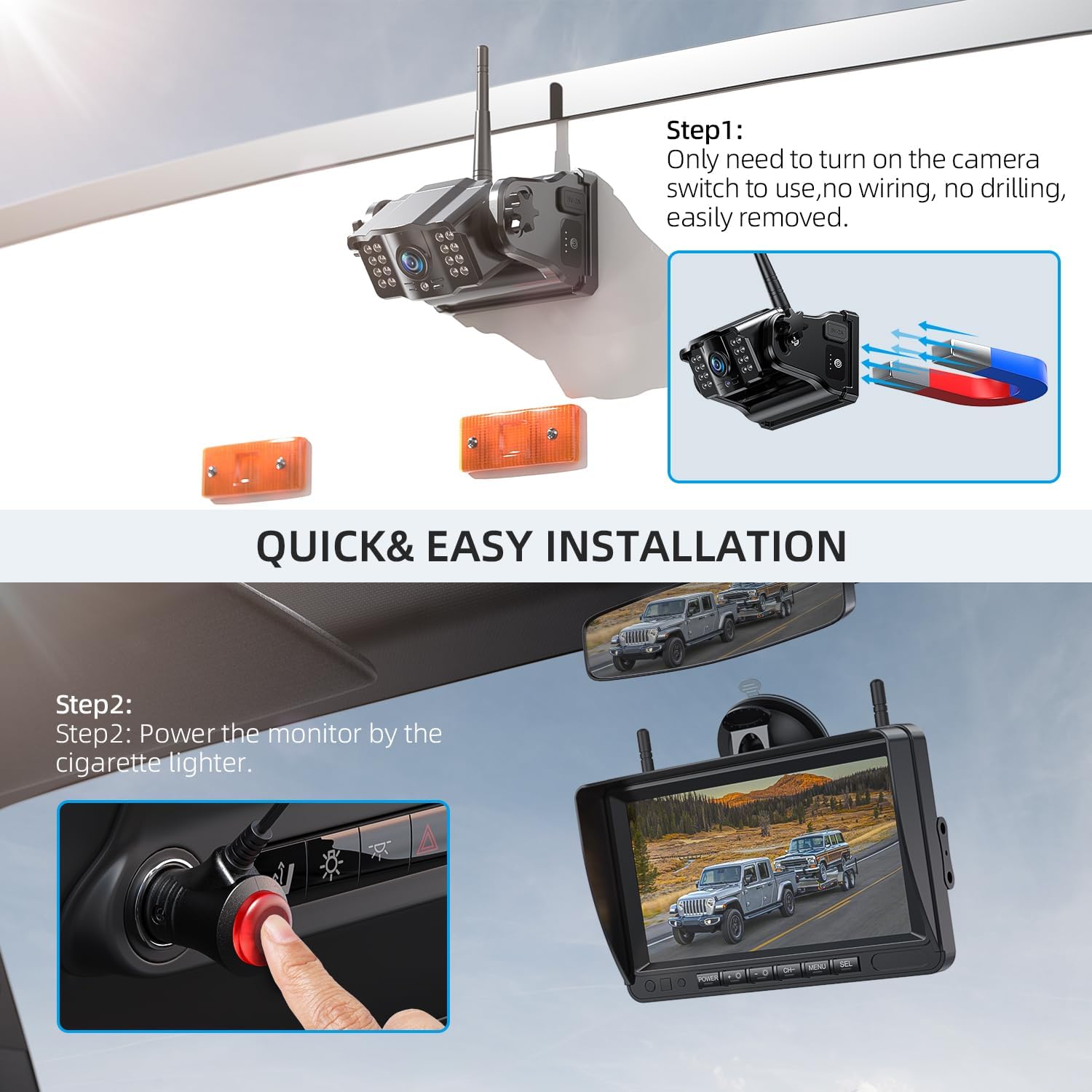
Figure 3: Quick and easy magnetic camera installation.

Figure 4: Camera features a 9600 mAh battery and can be charged via Type-C.
4.2 Tatūnga Aroturuki
The 7-inch monitor is equally simple to set up:
- Attach the monitor to your dashboard or windshield using the provided suction cup bracket.
- Plug the monitor's power cable into your vehicle's cigarette lighter socket. The monitor will power on automatically when the vehicle starts.
- Screw the antenna onto the designated port on the monitor.
Ataata 1: Ka mutuview of the eRapta 7-inch Wireless Backup Camera System, demonstrating its magnetic attachment and ease of use.
5. Nga Tohutohu Whakahaere
5.1 Kei te Hiko / Weto
- The monitor powers on automatically when connected to the cigarette lighter and the vehicle is started.
- The camera automatically enters a low-power sleep mode when the monitor is turned off, conserving battery life. It will reactivate when the monitor is powered on.
5.2 Whakaaturanga Aratau
The monitor supports multiple camera inputs and display configurations:
- Mata Katoa: Ka whakaatu i te view from a single camera.
- Mata Ritua: Divides the screen to show views from two cameras simultaneously.
- Quad Screen: Whakaaturanga views from up to four cameras at once (if additional cameras are purchased).
Use the 'CH' button on the monitor to cycle through available camera channels and display modes.

Figure 5: Monitor supporting various multi-camera display options.
5.3 Parking Lines
The monitor provides adjustable parking lines to assist with precise maneuvering. You can customize these lines using the buttons above the screen to fit your vehicle's dimensions and preferences.

Figure 6: Parking lines assist in hooking up trailers and other vehicles.
5.4 Matakite Po
The cameras are equipped with infrared night vision, providing clear 1080P images even in low-light conditions or complete darkness, ensuring safety during nighttime operations.

Figure 7: 1080P resolution ensures clear visibility even at night.
5.5 Video Recording (DVR)
To enable video recording, insert an SD card (up to 128GB, not included) into the monitor's SD card slot. Activate the loop recording function through the monitor's menu. This feature allows the system to function as a continuous observation system for your daily driving.

Figure 8: DVR recording capability for continuous observation.
6. Tiaki
- Te horoi: Regularly wipe the camera lens and monitor screen with a soft, damp kakahu kia marama te kitea. A ape i te horoi horoi.
- Whakataunga Pūhiko: Charge the camera's built-in battery using the provided Type-C cable when the battery indicator on the monitor shows low power. Ensure the camera is charged before its first use.
- Tiaki Antenna: Ensure antennas are securely screwed into place for optimal signal transmission.
- Rokiroki: If storing the system for an extended period, ensure both the camera and monitor are fully charged and stored in a cool, dry place.
7. Te Raru
| Raruraru | Take pea | Rongoā |
|---|---|---|
| No signal on monitor | Camera or monitor not powered on; antennas loose or missing; excessive distance or obstructions; interference. | Ensure both camera and monitor are powered on. Check that antennas are securely attached. Reduce distance between camera and monitor. Minimize obstructions. |
| Camera not charging or powering on | Incorrect charging cable; low battery; power button not pressed correctly. | Use the provided Type-C charging cable. Ensure the camera's power button is pressed firmly. Note that the camera enters sleep mode when the monitor is off to conserve battery. |
| Ko te maunga aukume kaore e mau | Surface is not metal (e.g., aluminum); surface is dirty or uneven. | Ensure the mounting surface is made of a ferrous metal. Clean the surface thoroughly. For non-ferrous surfaces, consider attaching a metal plate for the magnet to adhere to. |
| Image quality is poor or distorted | Dirty lens; signal interference; extreme weather conditions. | Clean the camera lens. Check for strong sources of interference. While the camera is weather-resistant, extreme conditions can temporarily affect performance. |
8. Whakatakotoranga Hua
| Āhuahira | Taipitopito |
|---|---|
| Hunga Hua | 7.2 x 4.6 x 0.9 inihi (Aroturuki) |
| Taumaha Tūemi | 5.3 pauna |
| Tau tauira | ACT702 |
| Pūhiko | 3 nga pākahiko Lithium Ion e hiahiatia ana (kei roto) |
| Hangarau Whakaatu | LCD |
| Rahi Mata | 7 Inihi |
| Tae | Pango pouri |
| Kaihanga | eRapta |
| Whenua Taketake | Haina |
| Momo Tāuta | Monitor plug and play + camera magnet adsorption |
| Whakataunga Hopu Ataata | 1080p |
| Voltage | 1 Volts |
| Hangarau Pūoko Optical | CCD |
| Momo Arotahi | Wide Angle (150°) |
9. Pūtāhui me te Tautoko
eRapta offers 24-hour online customer service and a 2-year after-sale support for the ACT702 Wireless Backup Camera System. If you encounter any questions or concerns, please do not hesitate to contact eRapta customer service. Your satisfaction is important, and the company is committed to providing assistance.
For more information or to contact support, please visit the official eRapta store: eRapta Amazon Store