
1. Kupu Whakataki
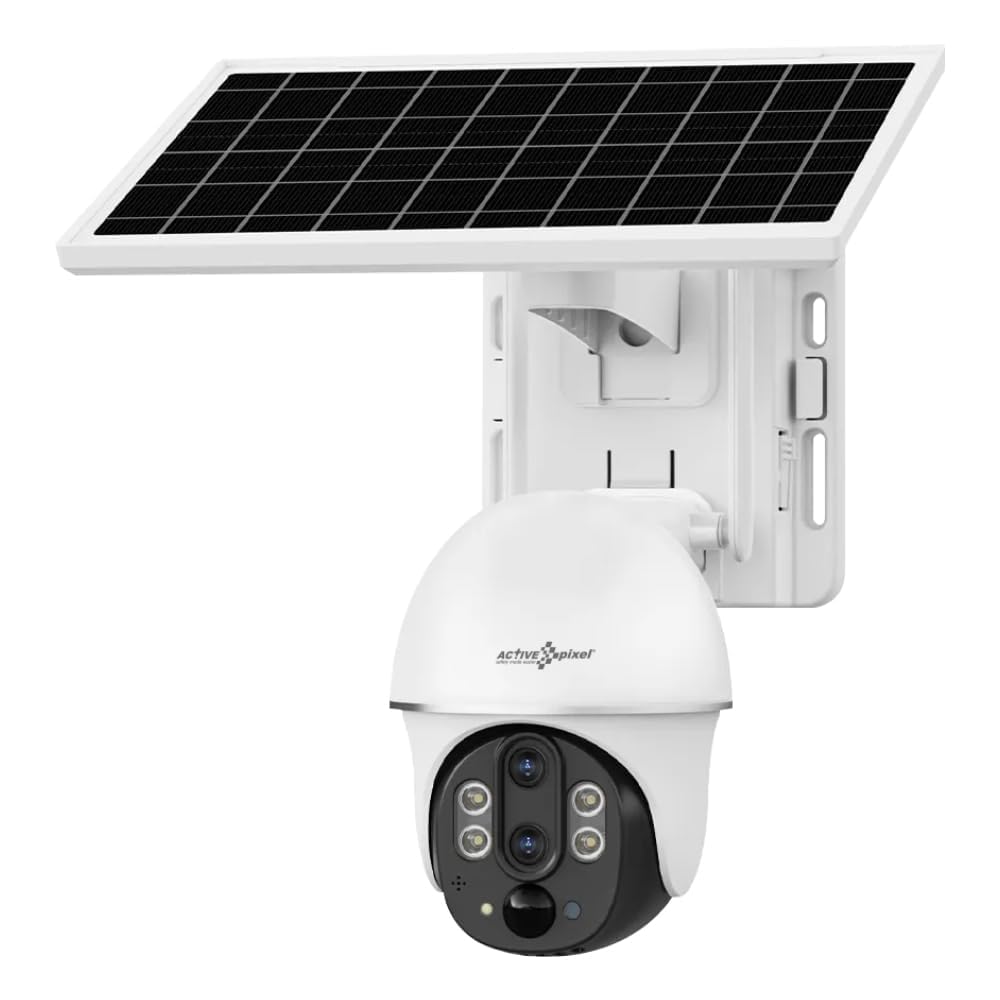
This manual provides detailed instructions for the installation, operation, and maintenance of your Active Pixel 4G Solar Powered Dual Lens Security Camera. Please read this manual thoroughly before using the product to ensure proper function and safety. This camera is designed for outdoor surveillance, featuring 4G connectivity, solar power, dual lenses for 10x zoom, 2-way audio, and motion detection capabilities.
1.1 Ihirangi mokete
- 1x 4G Solar Camera (with included battery)
- 1x Manual Kaiwhakamahi
- 1x Screw Kit for installation
- 1x Paewhiri Solar
2. Nga korero haumaru
Observe the following safety precautions to prevent damage to the product or injury to yourself or others.
- Tāutatanga: Me whakarite kia mau te mau o te kāmera kia kore ai e hinga. Kaua e tāuta tata ki ngā rauemi mura, ngā mea pahū rānei.
- Puna Hiko: Use only the provided solar panel and integrated battery. Do not attempt to replace the battery with unapproved alternatives.
- Ātete wai: The camera is IP65/IP66 rated for water and dust resistance. However, avoid submerging the camera in water or exposing it to high-pressure water jets.
- Te pāmahana: Whakahaerehia te kāmera i roto i te awhe pāmahana kua tohua mai i te -15°C ki te 60°C.
- Whakakorea: Kaua e ngana ki te wetewete, ki te whakarerekē rānei i te kāmera. Ka whakakorea te pūtāhui, ā, ka pā pea he kino, he whara rānei.
- Tamariki: Kaua e taea e nga tamariki te kamera me ona taonga.
3. Hua Neke Atuview
The Active Pixel 4G Solar Powered Dual Lens Security Camera is a robust surveillance solution. Key features include:
- Pūnaha Mata Matarua: Provides 10x zoom capability (3x optical + 3.2x digital).
- 4G Hononga: Operates on 4G LTE networks, ideal for locations without Wi-Fi. (Note: 4G Jio Sim Card Not Supported. VI and Airtel SIM recommended.)
- Whakahikohia te Ra: Equipped with a 7W solar panel and 8000mAh battery for continuous operation.
- Taumira teitei: 2MP+2MP sensors delivering 1080P Full HD video.
- Pan-Tītaha-Whakanui (PTZ): 355° paraharaha whakapae me te 90° poutū honga mo te rohe whanui.
- Rapu Ataata: PIR + Radar dual induction detection for human/animal detection.
- Ororongo Ara-rua: Ko te hopuoro me te kaikorero mo te whakawhitiwhiti korero.
- Tirohanga Po Tae: Clear color night vision up to 50ft.
- Rokiroki: Supports local TF card (up to 128GB, not included) and cloud storage.
- Taurangirangi: IP65/IP66 rated for outdoor use.
4. Tatūnga
4.1 Whakauru Kaari SIM
- Locate the SIM card slot on the camera body.
- Insert a compatible 4G SIM card (VI or Airtel recommended) into the slot. Ensure the SIM card is correctly oriented.
- Close the SIM card slot cover securely to maintain waterproofing.
4.2 Tāutanga Taupānga me te Tatūnga Pūkete
- Download the "V380 Pro" app from your smartphone's app store (Android or iOS).
- Whakatuwheratia te taupānga ka rēhita he pūkete hou, takiuru rānei mēnā kei a koe tētahi.
- Whaia nga tohutohu i roto-taupānga hei taapiri i to kamera. Ko te tikanga ko te tirotiro i tetahi waehere QR i runga i te kaamera me te whakauru-a-ringa ranei i tana ID.
4.3 Te Whakaeke i te Kaamera me te Paewhiri Solar
- Kōwhiria he Tauwāhi: Select a location with good 4G signal strength and ample direct sunlight for the solar panel. The camera should be mounted at a height that provides optimal viewing angle and security.
- Maunga te Kamera: Use the provided screw kit to securely mount the camera to a wall or pole. Ensure the mounting surface is stable.
- Whakanuia te Paewhiri Solar: Mount the solar panel in a position where it receives maximum direct sunlight throughout the day. Adjust its angle for optimal charging efficiency.
- Tūhono Paewhiri Solar: Honoa te taura paewhiri solar ki te tauranga utu o te kamera. Kia mau te hononga me te parewai.
5. Nga Tohutohu Whakahaere
5.1 Ora View me te Mana PTZ
- Open the V380 Pro app and select your camera from the device list.
- Ka whakaatu te taupānga i te kai ataata ora.
- Use the on-screen controls to pan (355° horizontal) and tilt (90° vertical) the camera.
- Pinch to zoom on the live feed to utilize the 10x dual lens zoom.
5.2 Ororongo Waa-rua
- I te wa e ora ana view, patohia te ata hopuoro hei kōrero mā te kaikorero o te kāmera.
- Patohia te ata korero hei whakarongo ki te ororongo mai i te hopuoro o te kamera.
5.3 Te Motini me nga Matohi
- Access the camera settings in the V380 Pro app.
- Enable "Smart Detection" (PIR+Radar dual induction) for human/animal detection.
- Configure alert settings, including push notifications to your mobile phone.
- When motion is detected, the camera will automatically record the event and send an alert.
5.4 Te Rekoata me te Purei
- Rokiroki Paetata: Insert a TF card (up to 128GB, not included) into the camera's slot for local recording. Recordings can be accessed via the app.
- Rokiroki Kapua: Subscribe to the cloud storage service through the V380 Pro app for alarm video storage.
- Ki view tuhia footage, navigate to the playback section in the app and select the desired date and time.
5.5 Matakite Po
The camera automatically switches to night vision mode in low light conditions using its IR-CUT switch and 4pcs Double Core LEDs. It provides clear color night vision up to 50 feet (15 meters).
6. Tiaki
- Te horoi: Me horoi i nga wa katoa te arotahi kamera me te panui solar ki te ngohengohe, damp cloth to ensure clear vision and efficient charging. Do not use harsh chemicals.
- Tiaki Pūhiko: The integrated battery is designed for long life. Ensure the solar panel is clean and receives adequate sunlight for optimal charging. Avoid prolonged storage in extreme temperatures.
- Whakahōu Firmware: Check the V380 Pro app periodically for firmware updates. Keeping the firmware updated ensures optimal performance and security.
- Whakahaere Kāri TF: If using a TF card, periodically check its storage capacity and format it if necessary to maintain recording efficiency.
7. Te Raru
| Raruraru | Take pea | Rongoā |
|---|---|---|
| Karekau te kamera i te hiko. | Low battery; Solar panel not charging; Faulty connection. | Ensure solar panel is clean and receiving direct sunlight. Check solar panel connection to the camera. Allow time for battery to charge. |
| No 4G signal or offline. | SIM card not inserted correctly; SIM card not activated; Poor network coverage; Incompatible SIM card. | Reinsert SIM card. Verify SIM card is active and has data plan. Move camera to an area with better 4G coverage. Ensure using a compatible SIM (VI/Airtel). |
| Kaore e mahi ana te kitenga nekehanga. | Detection sensitivity too low; Feature disabled in app; Obstructions in detection area. | Check app settings to ensure motion detection is enabled and sensitivity is appropriate. Clear any obstructions. |
| Te kounga ataata kino. | Dirty lens; Poor network signal; Low light conditions. | Clean the camera lens. Ensure good 4G signal. Video quality may be reduced in very low light, but night vision should activate. |
| Kaore e taea te hono atu ki te taupānga. | Incorrect camera ID; App issues; Network problems. | Verify camera ID. Restart the app or your phone. Check your phone's internet connection. Reset the camera if necessary (refer to app for reset procedure). |
8. Whakatakotoranga
| Āhuahira | Taipitopito |
|---|---|
| Tauira | AP-4G-SY2.0MP-DUAL LENS-V-3.6MM |
| Pūoko | 1/2.8" Progressive Scan CMOS *2 |
| Arotahi | 4mm F1.6 (Horizontal View: 80±5°, Vertical: 90±5°), 12mm F1.6 (Horizontal View: 26±1°, Vertical: 30±1°) |
| Topa | 10X Conflate Zoom (3X Optical + 3.2X Digital) |
| Kōpeketanga Ataata | H.265/15FPS |
| Whakatau | Main stream: 1920*1080P, Sub-stream: 640×360P |
| Whatunga | 4G LTE (SIM Supported) |
| Tikanga Rapu | PIR + Radar dual induction detection |
| Tawhiti Rapu | 0~12M |
| Koki Rapu | 120° |
| Panui-Honga | Whakapae: 355°, Poutū: 90° |
| Tere Hurihuri | Horizontal 55°/s, Vertical 40°/s |
| Matakitenga Po | IR-CUT automatic switch, 4pcs Double Core LEDs, effective distance 10M (IR/White LED) |
| Ororongo | Built-in speaker (3W), Built-in microphone (pickup area ~20M) |
| Rokiroki | TF card (Max 128GB), Cloud Storage (Alarm video) |
| Mana | 7W Solar Panel, 8000mAh Battery (included) |
| Ātete wai | IP65, IP66 |
| Te Waahi Mahi | -15°C ki te 60°C |
| Ahu (L x W x H) | 20 x 18 x 16 cm |
| Taumaha | 1.2 kg |
| Tikanga Mana | App (V380 Pro) |
| OS hototahi | Android, iOS |
9. Pūtāhui me te Tautoko
For warranty information and technical support, please refer to the contact details provided at the point of purchase or on the official Active Pixel website. The manufacturer is Glorious Digital Solution Pvt Ltd. For customer care, you may contact 9321367328.
Tena koa pupurihia to tohu mo te hoko mo nga kereme whakamana.