
1. Hua Neke Atuview
The ARPHA D180K-B is a keyless entry door lock designed for residential use, offering multiple unlocking methods and smart features for enhanced security and convenience. This manual provides detailed instructions for installation, operation, and maintenance.

Figure 1: ARPHA D180K-B Keyless Entry Door Lock (Matte Black)
2. Ihirangi mokete
I mua i te tāutanga, me whakarite kei te wātea ngā wāhanga katoa:
- Front Lock Unit
- Rear Lock Unit
- Porotaka maukati
- Ngā Kī Mīhini (2)
- Door Knobs (2)
- Tātauira Tāuta
- Miro Whakatakotoranga Miro
- Mahinga Mahi

Figure 2: Components included in the ARPHA D180K-B package.
3. Tāutanga
The ARPHA D180K-B is designed for easy installation on most US standard left and right-hand doors without additional drilling. A video guide is available to walk you through the process.
3.1 Hototahi kuaha
Me whakarite kia tutuki to tatau ki nga whakaritenga e whai ake nei:
- Door Thickness: 1-3/8" to 2-1/8" (35mm to 55mm)
- Door Backset: 2-3/8" or 2-3/4" (60mm or 70mm)
- Cross Bore Diameter: 2-1/8" (54mm)

Figure 3: Door dimensions and compatibility requirements.
3.2 Nga Waahi Whakataunga
Follow the instructions provided in the included manual and the video guide for a smooth installation.
Video 1: Detailed installation guide for the ARPHA D180K-B Keyless Entry Door Lock.
3.3 Tāuta Pūhiko
The keypad door lock requires 4 AA batteries (not included). Ensure correct polarity when inserting the batteries.

Figure 4: Battery compartment and low battery alert indicator.
4. Nga Tohutohu Whakahaere
The ARPHA D180K-B offers multiple ways to unlock and manage access.
4.1 Nga Tikanga Wewete
The lock can be unlocked using the following methods:
- Mana Taupānga: Unlock remotely via the Tuya Smart App (requires optional gateway ASIN: B09YHFG933 for remote functionality).
- Kupuhipa: Enter a 6-8 digit passcode on the keypad.
- EKey: Digital key access through the app.
- Kī Hangarau: Use the physical key as a backup.
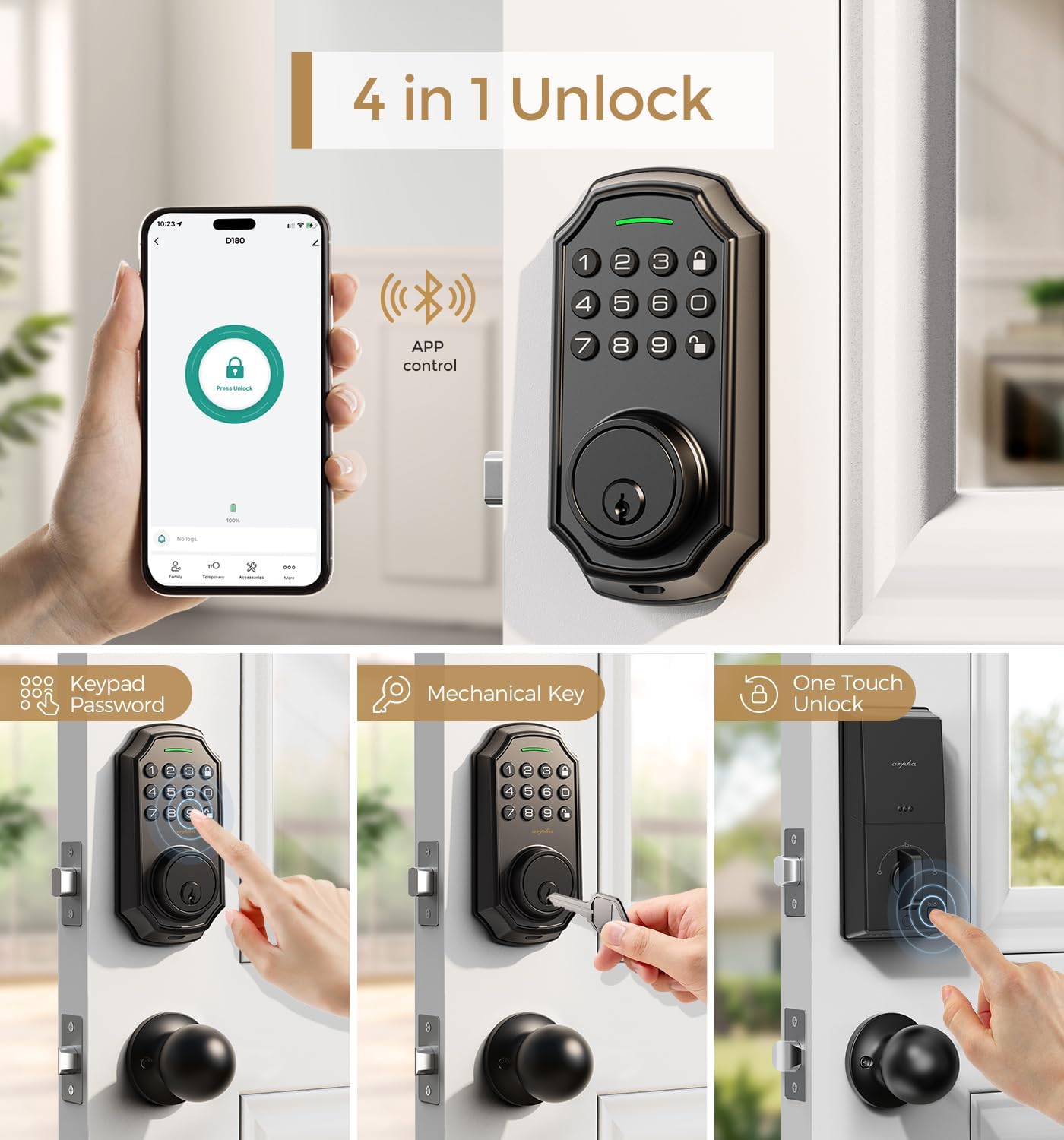
Whakaatu 5: Neke Atuview of the four primary unlocking methods.
4.2 Anti-Peeping Password
To protect your passcode from prying eyes, you can enter up to 16 virtual digits before or after your actual 6-8 digit passcode. The lock will still recognize the correct sequence within the longer entry.

Whakaahua 6: Example of using the anti-peeping password feature.
4.3 Auto-Lock and One-Touch Locking
The lock features an auto-lock function that can be set to activate between 10 seconds and 30 minutes after unlocking. Additionally, a one-touch lock feature allows for immediate locking by pressing a dedicated button.

Figure 7: Auto-lock timer setting and one-touch locking functionality.
4.4 App Connection and Management
Connect your lock to the Tuya Smart App for advanced features. Ensure Bluetooth is enabled and your network is set to 2.4G for gateway connection. The app allows you to:
- Generate and share one-time, permanent, scheduled, and recurring codes.
- Manage up to 100 user access codes (3 admin, 97 user).
- View rekoata uru.
- Remotely unlock/lock (with optional gateway).
Video 2: Tutorial on connecting the smart door lock to a gateway for remote access.
Video 3: Guide on connecting the D180K-B to the mobile application.
Video 4: Demonstrates various app functions and operations for the D180K-B.

Figure 8: App control via Bluetooth, effective within a 10-meter range.

Figure 9: The lock supports up to 100 user codes, including 3 admin and 97 regular users.

Figure 10: Generating and sharing temporary access codes via the app.

Figure 11: Real-time unlocking records can be viewed i roto i te taupānga.

Figure 12: Setting timed passcodes with automatic expiration dates.
5. Tiaki
5.1 Whakakapinga Pūhiko
The lock is powered by 4 AA batteries, which typically last around 180 days. A low battery alert will notify you when replacement is needed. Replace all four batteries simultaneously with new ones to ensure optimal performance.

Figure 13: The app displays a low battery reminder when the lock's power is low.
5.2 Te horoi
Wipe the keypad and lock body with a soft, dry cloth. Avoid using abrasive cleaners or solvents that could damage the finish or electronic components.
6. Te Raru
If you encounter issues with your ARPHA D180K-B lock, consider the following:
- Maukati kaore e whakautu: Tirohia nga taumata o te pākahiko me te whakakapi mehemea e tika ana.
- Kāore te papapātuhi e mura ana: Me whakarite kia tika te whakauru me te utu o nga pākahiko.
- Unable to connect to app: Verify Bluetooth is on, the gateway is powered, and your Wi-Fi network is 2.4G. Refer to the app connection video for detailed steps.
- Tāurunga kupuhipa hē: Ensure you are entering the correct 6-8 digit passcode. Remember the anti-peeping feature allows extra digits before or after.
- Kāore te raka e hono/wete: Check for any obstructions in the door frame or latch mechanism.
Mo etahi atu awhina, tena waea atu ki te tautoko a nga kaihoko.
7. Whakatakotoranga
| Āhuahira | Whakatakotoranga |
|---|---|
| Waitohu | ĀRAPA |
| Ingoa Tauira | D180K-B |
| Momo Maukati | Papamahi Patapata |
| Āhuahira Motuhake | Passcode Unlock, App Control, Auto-Lock |
| Rauemi | Zinc |
| Tae | Maama Pango |
| Rahi Tūemi (L x W x H) | 5.8 x 2.3 x 1.57 inihi |
| Taumaha Tūemi | 3.5 pauna |
| Puna Mana | 4 Pahiko AA (kaore i uru) |
| Kawa Hononga | Nihokikorangi |
| Te Kaha Kaiwhakamahi | 3 Administrator, 97 User Passcodes |
| Te haumākū whakahaere | 0% - 95% |
| Te Waahi Mahi | -4°F ki +140°F (-20°C ki +60°C) |
8. Pūtāhui me te Tautoko
ARPHA offers a 30-day money-back guarantee, an 18-month assurance, and lifetime technical support for the D180K-B Keyless Entry Door Lock.
Our dedicated support team is available 24/7 via email to assist you with any questions or issues.
- Tautoko Īmēra: tautoko@arpha.com
- Tautoko Waea: (1) 844-820-5077
Figure 14: ARPHA provides 24/7 online service and a 2-hour fast response.