
Kupu Whakataki
This manual provides essential instructions for the setup, operation, and maintenance of your BLOW Portable Internet Radio RI 1. Please read this manual thoroughly before using the device to ensure proper functionality and to prevent damage.
Nga Korero Haumaru Nui
- Kaua e tukuna te taputapu ki te ua, ki te makuku ranei.
- Do not disassemble the device. Refer all servicing to qualified personnel.
- Whakamahia anake te urutau hiko kua whakaratohia.
- A ape i te wera nui me te ra tika.
- Tiakina te taputapu mai i nga papa autō kaha.
Ihirangi mokete
Me mohio kei roto katoa nga mea kei roto i te kete:
- BLOW Internet Radio RI 1
- Pūurutau Hiko
- User Manual (in Polish and English)

Image: The BLOW Internet Radio RI 1 packaging, showing the radio unit, power adapter, and user manual.
Ka mutu te huaview
The BLOW Portable Internet Radio RI 1 offers a wide range of features for an enhanced audio experience. It includes internet radio access, FM tuner, Bluetooth connectivity, and a clear LCD display.

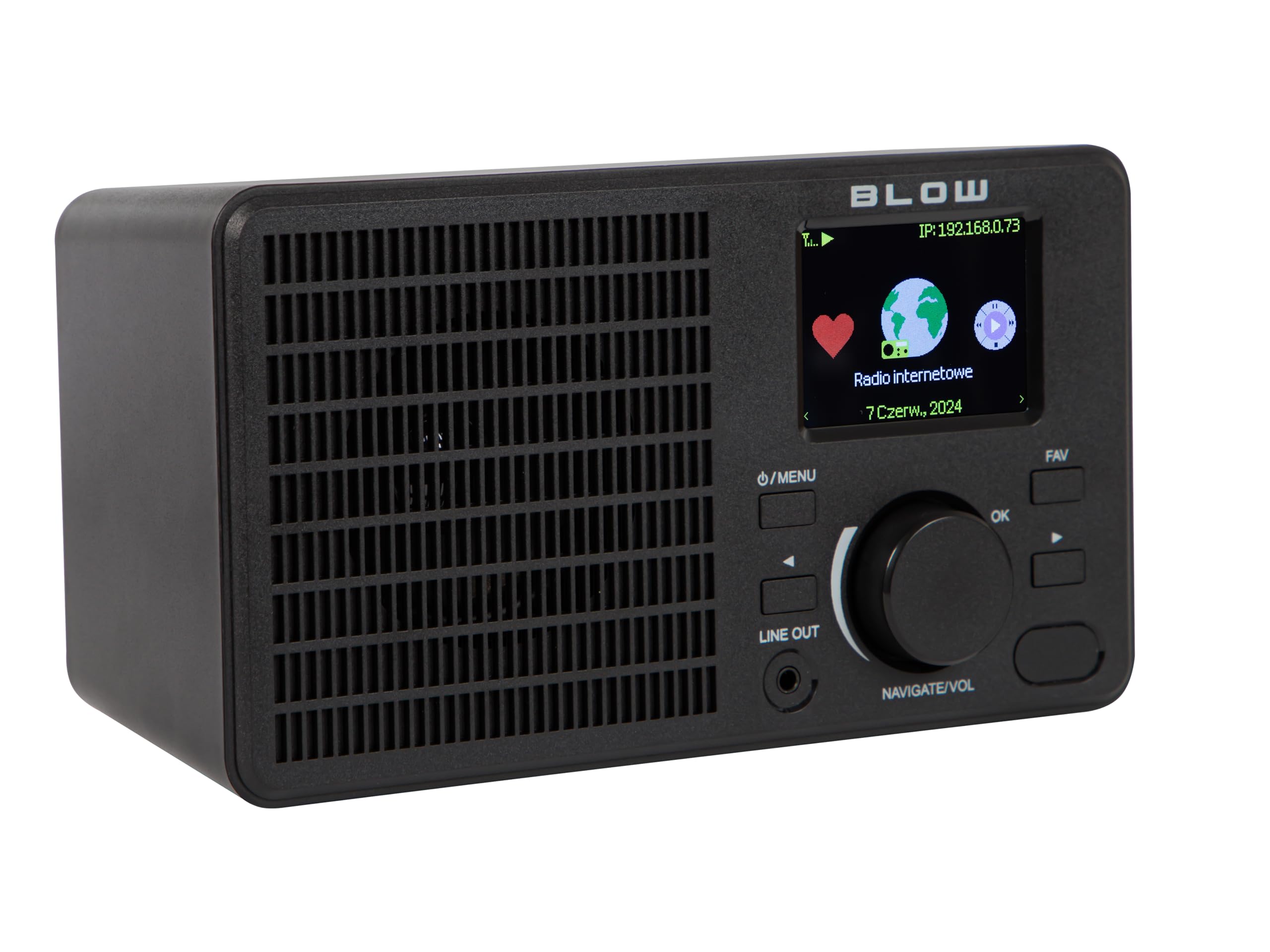
Whakaahua: Mua view of the BLOW Internet Radio RI 1, showcasing the display, speaker grille, and control buttons.
Āhuatanga matua:
- Irirangi Ipurangi: Access thousands of stations worldwide via Wi-Fi.
- Hononga Wi-Fi: Wireless access to internet radio and network features.
- Nihokikorangi: Stream music from mobile devices.
- 2.4-inch TFT Color Display: Shows station information and track details.
- Dual Alarm with Snooze: Wake up to music or news.
- Raina Atu: Hono atu ki tetahi amplifier or external audio system.
- Hoahoa Kiato: Elegant black design suitable for various interiors.
- Tuner FM: For local radio broadcasts.
Whakaahua: Rear view of the BLOW Internet Radio RI 1, showing the DC 5V power input and product information label.
Tatūnga
1. Hononga Mana
- Connect the provided power adapter to the DC 5V input port on the back of the radio.
- Monohia te urutau hiko ki te putanga hiko paerewa.
- Ka hiko aunoa te reo irirangi, ka uru ranei ki te aratau tatari.

Image: The power adapter included with the BLOW Internet Radio RI 1, showing the plug and DC connector.
2. Initial Wi-Fi Setup
- Upon first power-on, the radio will guide you through the initial setup process.
- Use the navigation dial and OK button to select your preferred language.
- Ka matawai te reo irirangi mo nga whatunga Wi-Fi e waatea ana. Tīpakohia tō whatunga mai i te rārangi.
- Enter your Wi-Fi password using the navigation controls. Confirm with the OK button.
- Ina hono ana, ka whakaatu te reo irirangi i te karere whakau.

Image: The BLOW Internet Radio RI 1 display showing the internet radio interface with network status.
Nga Tohutohu Whakahaere
Mana Taketake
- Pātene Mana/Tahua: Press to turn on/off or access the main menu.
- Navigate/Volume Dial: Rotate to navigate menus or adjust volume. Press to confirm selection.
- Pene OK: Ka whakamana i nga whiringa.
- Pātene FAV: Accesses favorite stations.
- Raina Atu: 3.5mm jack for connecting to external audio systems.

Whakaahua: He tata view of the BLOW Internet Radio RI 1's control panel, highlighting the display and buttons.
Aratau Irirangi Irirangi
- Mai i te tahua matua, tīpakohia "Ipurangi Ipurangi".
- Browse stations by location, genre, or search by name.
- Select a station and press OK to start playback.
- To save a station as a favorite, navigate to the station and press the FAV button.
Aratau Irirangi FM
- Mai i te tahua matua, tīpakohia "Reo Irirangi FM".
- Use the navigation dial to tune to a frequency or perform an auto-scan for stations.
- Press OK to select a station.
Aratau Nihokikorangi
- Mai i te tahua matua, tīpakohia "Nihokikorangi". Ka uru te reo irirangi ki te aratau takirua.
- On your mobile device (smartphone, laptop), enable Bluetooth and search for "BLOW RI 1".
- Tīpakohia te reo irirangi hei takirua. Kia hono, ka taea e koe te rere ororongo mai i to taputapu ki te reo irirangi.

Image: The BLOW Internet Radio RI 1 shown alongside a smartphone, illustrating Bluetooth connectivity for music streaming.
Mahi Karaka Whakaoho
- Access the "Alarm" settings from the main menu.
- Whakaritehia kia rua nga whakaoho motuhake.
- Configure alarm time, source (buzzer, internet radio, FM), and snooze duration.
- Ensure the radio is connected to power for the alarm to function reliably.
Te tiaki
- Te horoi: Use a soft, dry cloth to clean the radio's surface. Do not use liquid cleaners or abrasive materials.
- Rokiroki: Mena kāore e whakamahia ana mō te wā roa, rongoatia te reo irirangi ki te wāhi hauhautanga, maroke.
- Whakahōu Pūmanawa: Periodically check for firmware updates through the radio's system settings to ensure optimal performance and access to new features.
Raparongoā
| Raruraru | Rongoa pea |
|---|---|
| Karekau he kaha | Check if the power adapter is securely connected to the radio and the electrical outlet. Try a different outlet. |
| Kaore e taea te hono ki Wi-Fi | Ensure your Wi-Fi password is correct. Check if your router is working. Try restarting the radio and your router. Ensure the radio is within range of your Wi-Fi signal. |
| Internet radio stations not playing | Verify your internet connection is active. Some stations may be temporarily offline. Try other stations. |
| Ka rahua te takirua Nihokikorangi | Ensure the radio is in Bluetooth pairing mode. Make sure Bluetooth is enabled on your mobile device and it's within range. Try unpairing and re-pairing. |
| Te pōhiri FM kino | Adjust the radio's position. Ensure there are no strong interference sources nearby. |
Whakatakotoranga
| Āhuahira | Taipitopito |
|---|---|
| Waitohu | Pupuhi |
| Tauira | 5900804137467 |
| Hangarau Hononga | Wi-Fi, Bluetooth, Aux, Line Out |
| Hangarau Tuner | FM |
| Momo Whakaatu | LCD (2.4-inch TFT Color Display) |
| Puna Mana | Corded Electric (AC: 100-240V, 50/60Hz; DC: 5V/1A) |
| Pūrere Hototahi | Smartphone, Laptop, Headphones |
| Nga waahanga motuhake | Lightweight, Portable, Dustproof, Built-in Clock, Dual Alarm with Snooze |
| Hunga Hua | 19.4 cm (L) x 8.8 cm (W) x 11 cm (H) |
| Tae | Pango |
Pūtāhui me te Tautoko
For warranty information and technical support, please refer to the contact details provided in the separate warranty card included with your product or visit the official BLOW webpae.
Kaihanga: PUHI
Webpae: www.blow.pl