
Jectse Jectse12u8gy7kmn
Jectse RC Airplane Servo PDB Module User Manual
Model: Jectse12u8gy7kmn | Brand: Jectse
1. Kupu Whakataki
The Jectse RC Airplane Servo PDB Module is specifically designed for RC fixed wing aircraft FPV applications. It provides a stable and adjustable power output for servo components, ensuring reliable performance for your aircraft's control systems.
This module integrates a 4Amp BEC (Battery Eliminator Circuit) to efficiently meet the power requirements of various servo setups. Its compact design and clear labeling facilitate easy and correct installation.
2. Hua Neke Atuview
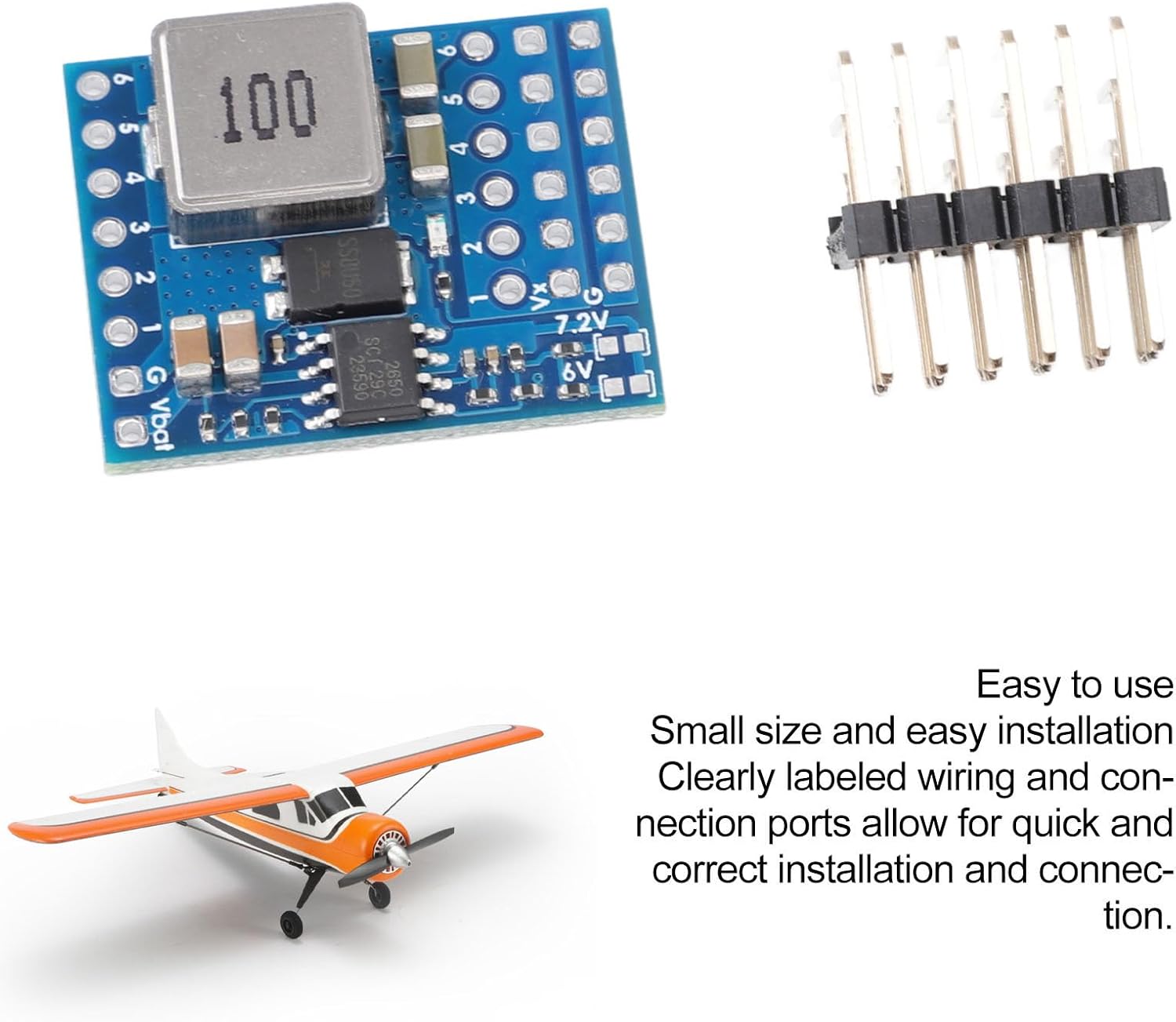
The Jectse RC Airplane Servo PDB Module is a printed circuit board (PCB) with integrated components for power regulation and distribution. It includes input terminals for battery connection and multiple output terminals for connecting servos.

3. Whakatakotoranga
| Āhuahira | Taipitopito |
|---|---|
| Momo Tuemi | RC Airplane Servo PDB Module |
| Rauemi | PCB |
| Te Awhi Tono | RC Fixed Wing Airplane FPV |
| Whakauru Voltage Awhe | 5.5V to 36V (Compatible with lithium batteries up to 8S) |
| Putanga Voltage (Servo) | Default 5V, 6V, 7.2V (Adjustable 5V option) |
| Continuous Current Load | 4A |
| Burst Current Capacity | 7A |
| Integrated BEC | 4Amp |
| Ahu mōkihi | 4.72 x 3.15 x 0.39 inihi |
| Taumaha Tūemi | 0.317 hekere |
| Tau tauira | Jectse12u8gy7kmn |
4. Tatūnga me te Tāuta
The module is designed for straightforward installation due to its compact size and clearly labeled connection ports. Follow these steps for correct setup:
- Tautuhia nga Tohu Hononga: Kimihia te vol tāurutage (Vbat) and ground (G) pads, as well as the servo output pads (1-6) and voltage selection jumpers (6V, 7.2V, 5V adjustable).
- Whakauru Hiko: Connect your power source (5.5V to 36V, e.g., lithium battery up to 8S) to the Vbat and G pads. Ensure correct polarity to prevent damage.
- Hononga Servo: Connect your servos to the numbered output pads. The module provides regulated power output for these servo components.
- Voltage Kōwhiringa:
- The module supports default servo settings of 5V, 6V, and 7.2V.
- Use the jumpers or designated pads on the PCB to select the desired output voltage for your servos. Refer to the markings on the PCB for 6V and 7.2V options.
- An adjustable 5V option is also available for fine-tuning.
- Tāuta Haumaru: Mount the module securely within your RC fixed wing aircraft. Ensure it is protected from vibrations, moisture, and potential physical damage.

5. Nga Tohutohu Whakahaere
Once installed and connected, the module operates by converting the input voltage from your battery to the selected stable output voltage for your servos. It ensures efficient and consistent power delivery to all connected servo components.
- Whakahiko: Apply power to the Vbat input. The integrated 4Amp BEC will automatically regulate the voltage for the servo outputs based on your selection.
- Raukaha o nāianei: The module provides a continuous current load of 4A and a burst current capacity of 7A, which is sufficient for most standard RC servo requirements. Ensure the total current draw of your servos does not exceed these limits.
- Aroturuki Mahinga: During initial operation and subsequent flights, it is advisable to monitor the performance of your servos and the overall power system to ensure stable operation.

6. Tiaki
The Jectse RC Airplane Servo PDB Module is designed for durability and requires minimal maintenance. However, following these guidelines can help ensure its longevity and optimal performance:
- Pupuri Ma: Regularly inspect the module for dust, dirt, or debris. Gently clean with a soft, dry brush or compressed air if necessary. Avoid using liquids or harsh chemicals.
- Tirotiro Hononga: Periodically check all wiring connections to ensure they are secure and free from corrosion or damage. Loose connections can lead to intermittent power supply or performance issues.
- Tiaki Taiao: Protect the module from extreme temperatures, high humidity, and direct sunlight. While robust, these conditions can degrade electronic components over time.
- A ape i te taumaha tinana: Do not bend or apply excessive force to the PCB or its components. Ensure it is mounted in a location where it will not be subjected to impacts or excessive vibration.
7. Te Raru
If you encounter issues with your Jectse RC Airplane Servo PDB Module, consider the following troubleshooting steps:
- Kore Putanga Hiko:
- Manatokohia te urunga voltage source (battery) is charged and connected correctly to the Vbat and G pads.
- Check for any loose or disconnected wires in the power path.
- Whakaritea te voltagkei roto i te awhe kua tohua (5.5V ki te 36V).
- Puawai Putanga Hētage:
- Whakapumautia ko te voltage selection jumpers or settings are correctly configured for your desired output (5V, 6V, or 7.2V).
- Ine i te putanga voltage with a multimeter to confirm the actual voltage.
- Servos Behaving Erratically or Weakly:
- This could indicate insufficient current. Ensure the total current draw of your servos does not consistently exceed the module's continuous (4A) or burst (7A) current capacity.
- Check for short circuits in the servo wiring or faulty servos.
- Verify that the servos themselves are functioning correctly by testing them with an alternative power source if possible.
- Te wera rawa o te kōwae:
- Ensure adequate airflow around the module, especially if it's enclosed.
- Check if the current draw is consistently exceeding the continuous current rating, leading to excessive heat generation.
- Manatokohia ko te voltage is not excessively high, which can cause the BEC to dissipate more heat.
Mena ka raru tonu i muri i te whakamātau i ēnei mahi, whakapā atu ki te tautoko kiritaki mō ētahi atu āwhina.
8. Pūtāhui me te Tautoko
This product is covered by a standard return policy. For specific details regarding warranty coverage, returns, or technical support, please refer to the purchase platform or contact Jectse customer service directly.
Ratonga Kiritaki: Mo te awhina, tirohia te Jectse Store on Amazon tirohia rānei ngā taipitopito whakapā i whakaratohia me tō hoko.
Ask a question about this manual
Ask about setup, troubleshooting, compatibility, parts, safety, or missing instructions. Manuals+ will review the question and use this page’s manual context to help answer it.