
Huayong NLQ4-125/3P
Huayong NLQ4-125/3P Automatic Transfer Switch User Manual
Model: NLQ4-125/3P (Three-Phase)
Kupu Whakataki
This manual provides essential information for the safe and efficient installation, operation, and maintenance of your Huayong NLQ4-125/3P Automatic Transfer Switch (ATS). The ATS is designed to automatically switch between a primary power source (e.g., utility grid) and a secondary power source (e.g., generator) to ensure continuous power supply to critical loads. Please read this manual thoroughly before installation and use.
Nga Korero Haumaru Nui
WHAKATŪPATO: Electrical shock hazard. Improper installation or operation can result in serious injury or death. Always follow local electrical codes and standards.
- Installation and maintenance must be performed by qualified electrical personnel only.
- Ensure all power sources are disconnected before performing any work on the ATS.
- Manatokohia te tika o ngā waea me ngā hononga i mua i te whakamahi i te hiko.
- Kaua e whakahaerehia te ATS mēnā te āhua kua pakaru.
- Mau taputapu whakamarumaru whaiaro (PPE) e tika ana ina mahi ana me nga punaha hiko.
- The switch housing is made of flame-retardant material, but proper ventilation and clearance must be maintained.
Ka mutu te huaview
The Huayong NLQ4-125/3P is a three-phase automatic transfer switch designed for reliable power management. It features a robust design and efficient switching capabilities.
Āhuatanga matua:
- Kounga Kairangi: The switch housing is constructed from flame-retardant material, ensuring resistance to flame, ruggedness, and corrosion. It features all-copper silver point contacts for good conductivity and high connection efficiency.
- Whakawhiti Tere: Designed for millisecond switching, with a switching time of less than 50ms, ensuring minimal interruption to power supply.
- Mahi Aunoa: Automatically transfers load between main power and backup power when abnormalities are detected in the primary source.
- Taupānga Whānui: Suitable for residential neighborhoods, commercial buildings, shopping malls, hospitals, schools, and other critical power applications.
- Designed for Pz30 Distribution Box: Specifically designed for home track TV installation and use with Pz30 distribution boxes.
Tautuhi Wae:

Whakaahua 1: Mua view of the Huayong NLQ4-125/3P ATS, showing main power (A), backup power (B), and load side terminals. The manual/auto switch and indicator light are visible.

Whakaahua 2: Runga-mua view of the ATS, highlighting the R, S, T phase indicators and the main power (A) and backup power (B) input terminals. The manual override lever is also visible.
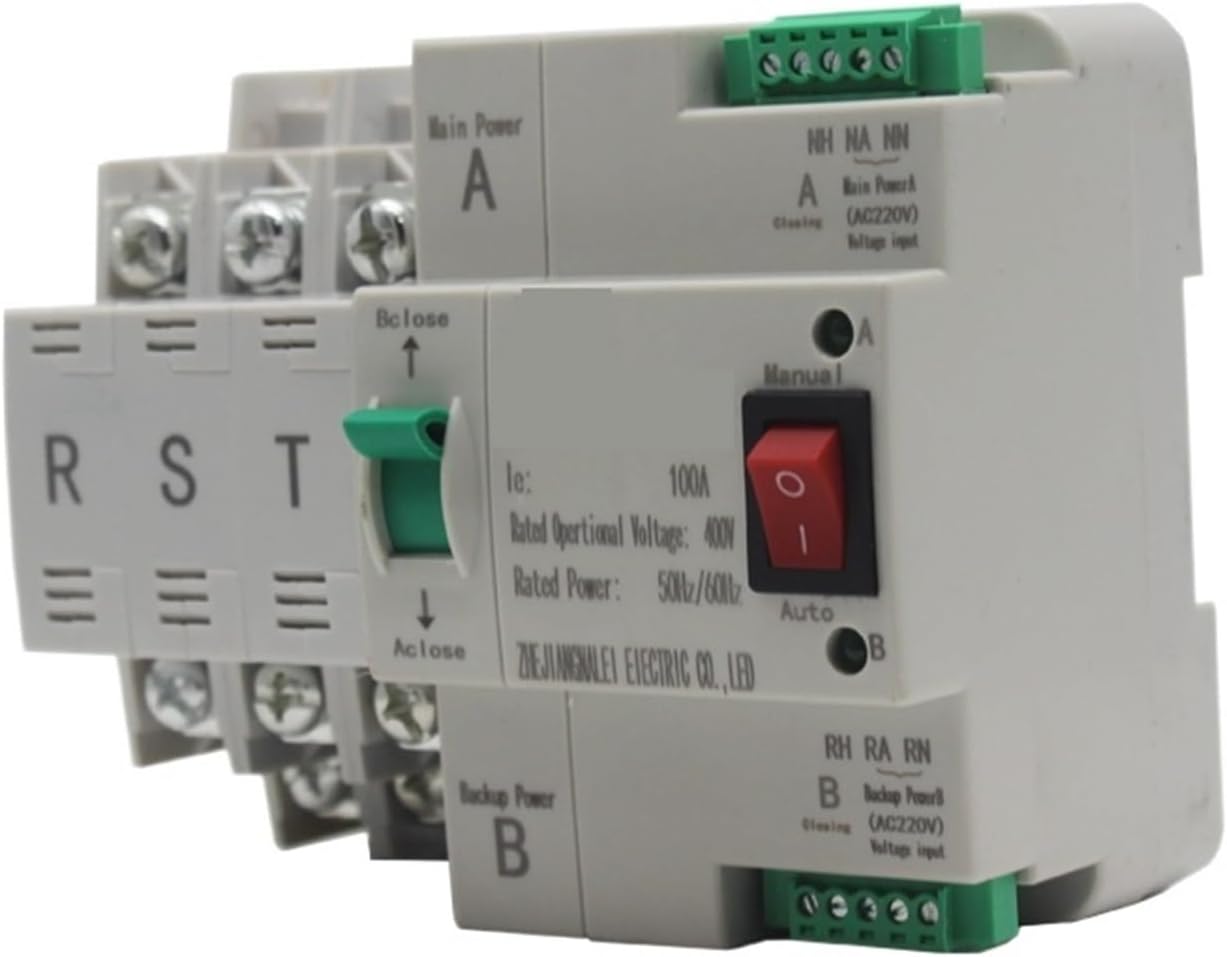
Whakaahua 3: Koki view showing the control panel with the "Manual" and "Auto" selector switch, the red indicator light, and the main power (A) and backup power (B) status indicators. Control wiring terminals are also visible.
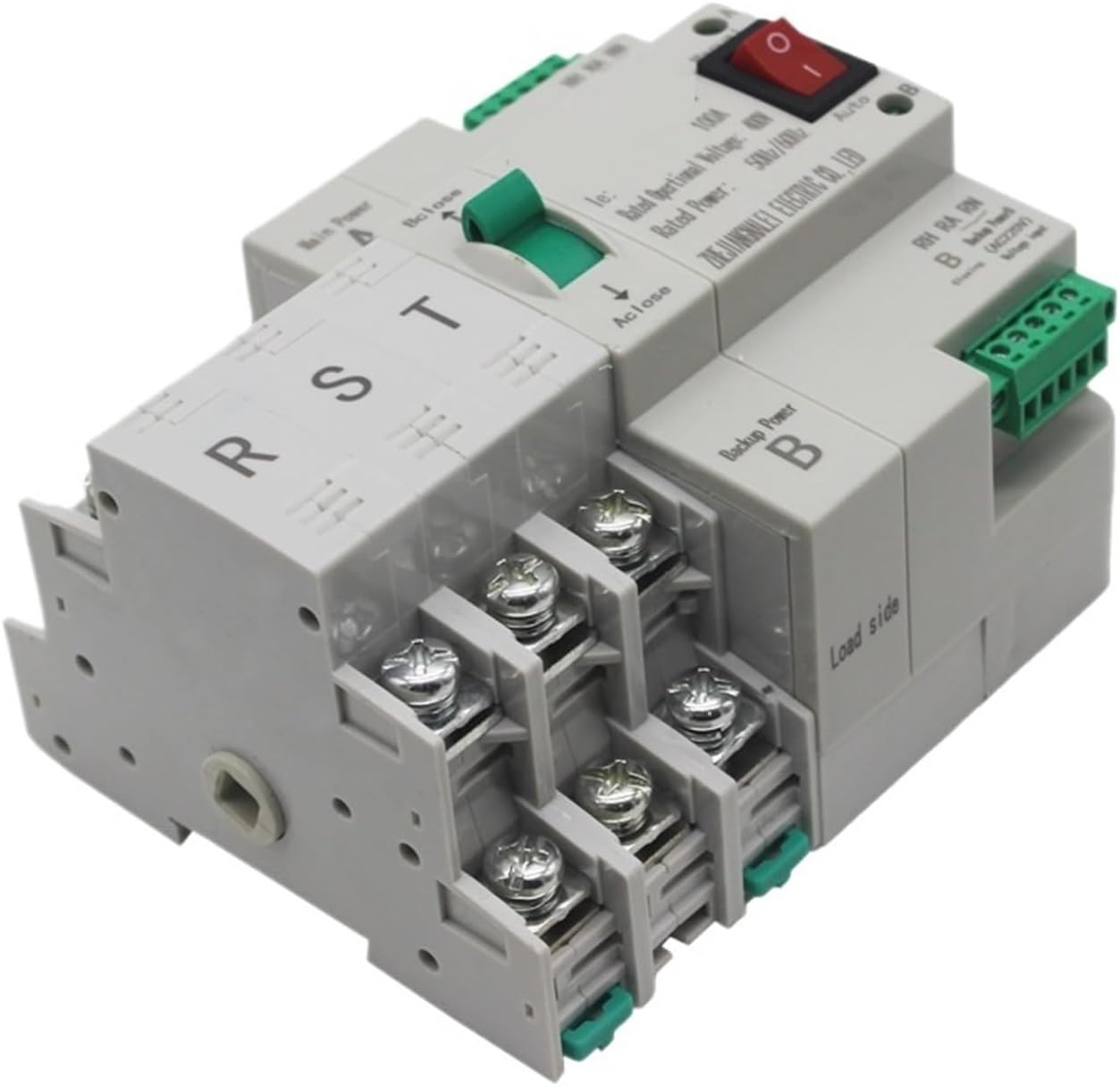
Figure 4: Side-rear view of the ATS, showing the robust terminal connections for the load side and the overall compact design suitable for distribution box installation.
Whakatakotoranga
| Tawhā | Uara |
|---|---|
| Tau tauira | NLQ4-125/3P |
| Whakatauhia te Voltage | 400V (Three-Phase) |
| Rated Current (Example) | 50A (Available in 20A, 32A, 40A, 50A, 63A, 80A, 100A, 125A variants) |
| Auautanga Whakatau | 50Hz/60Hz |
| Waa Hurihuri | Iti iho i te 50ms |
| Coil Working Voltage Awhe | 85%-110% of rated working voltage |
| Rauemi Whare | He mea aukati mura |
| Taumaha Tūemi | Tata ki te 1.98 pauna |
| Ahu mōkihi | Approximately 1.18 x 0.79 x 0.39 inches (Note: This seems incorrect for the actual product size, likely a packaging error in source data. Refer to physical product for accurate dimensions.) |
Note: Specific current ratings (e.g., 3P50A, 3P100A) refer to different variants of the NLQ4-125/3P series. Ensure you have the correct variant for your application.
Tatūnga me te Tāuta
NUI: All installation procedures must be carried out by a licensed electrician in accordance with national and local electrical codes. Failure to do so may result in property damage, serious injury, or death.
- Momotu Hiko: Before beginning any work, ensure that both the main utility power and any backup power sources (e.g., generator) are completely disconnected and locked out. Verify zero voltage at all connection points.
- Whakapiki: Mount the ATS securely within a suitable electrical enclosure, such as a Pz30 distribution box, ensuring adequate clearance for wiring and ventilation.
- Main Power Connection (Source A): Connect the three-phase main utility power lines (R, S, T) and neutral (N) to the designated "Main Power A" input terminals on the ATS. Ensure connections are tight and secure.
- Backup Power Connection (Source B): Connect the three-phase backup power lines (R, S, T) and neutral (N) from your generator or secondary source to the designated "Backup Power B" input terminals on the ATS. Ensure connections are tight and secure.
- Uta Hononga: Connect the three-phase load lines (R, S, T) and neutral (N) from your electrical panel or critical loads to the "Load side" output terminals of the ATS.
- Waea Mana: Honoa te mana voltage input terminals (NH, NA, NN for Main Power A control; RH, RA, RN for Backup Power B control) as per the wiring diagram provided with the product. These typically require AC220V for operation.
- Manatoko: Double-check all wiring connections for correctness, tightness, and proper insulation. Ensure no loose strands or potential short circuits.
- Te Katinga o te Āpiti: Close and secure the electrical enclosure.
- Hinga-Whakaoho tuatahi: Restore power to the backup source first, then the main utility power. Observe the ATS for proper operation and indicator lights.
Refer to the specific wiring diagram included with your product for detailed connection instructions.
Nga Tohutohu Whakahaere
The Huayong NLQ4-125/3P ATS is designed for automatic operation, but also includes a manual override.
Aratau Aunoa:
- Set the selector switch on the front panel to "Auto".
- When the main utility power (Source A) is stable and within operational parameters, the ATS will connect the load to Source A. The "A" indicator light will illuminate.
- If the main utility power fails or falls outside acceptable parameters, the ATS will automatically detect the abnormality. After a short delay, it will initiate a transfer to the backup power source (Source B). The "B" indicator light will illuminate.
- When the main utility power is restored and stable, the ATS will automatically switch the load back to Source A.
Aratau ā-ringa:
- To manually switch between power sources, set the selector switch on the front panel to "Manual".
- Use the manual override lever (often green, labeled "Bclose" and "Aclose") to physically switch the contacts to either Source A or Source B.
- TUpato: Only operate in manual mode when absolutely necessary and with full understanding of the power sources involved. Ensure the load can handle the selected source.
Te tiaki
Regular maintenance ensures the longevity and reliable operation of your ATS. Always disconnect all power sources before performing maintenance.
- Tirotiro Tirohanga (Ia Hauwhā): Check for any signs of physical damage, loose connections, discoloration from overheating, or accumulation of dust and debris.
- Cleaning (Annually): With power disconnected, use a soft, dry cloth or a vacuum cleaner to remove dust and debris from the interior and exterior of the ATS. Do not use liquids.
- Terminal Tightness (Annually): Verify that all power and control wiring terminals are securely tightened. Loose connections can cause overheating and arcing.
- Functional Test (Annually): Periodically test the automatic transfer function by simulating a main power outage (e.g., by temporarily shutting off the main breaker, if safe to do so and permitted by local regulations). Observe if the ATS transfers to backup power and then back to main power upon restoration.
- Contact Inspection (Every 3-5 years or as needed): For advanced maintenance, a qualified technician may inspect the contacts for wear or pitting.
Raparongoā
If you encounter issues with your ATS, refer to the table below. For problems not listed or if solutions do not resolve the issue, contact qualified service personnel.
| Raruraru | Take pea | Rongoā |
|---|---|---|
| ATS does not transfer to backup power during main power outage. |
|
|
| ATS does not switch back to main power after restoration. |
|
|
| No power to load from either source. |
|
|
| ATS indicator lights not working. |
|
|
Pūtāhui me te Tautoko
For warranty information and technical support, please refer to the documentation provided with your purchase or contact your vendor. Keep your purchase receipt for warranty claims.
Kaihanga: Huayong
Ask a question about this manual
Ask about setup, troubleshooting, compatibility, parts, safety, or missing instructions. Manuals+ will review the question and use this page’s manual context to help answer it.