
WOLFANG WP02
WOLFANG Mini Projector WP02 User Manual
Tauira: WP02 | Waitohu: WOLFANG
1. Hua Neke Atuview
The WOLFANG WP02 Mini Projector is a portable and versatile device designed for home theater, outdoor movie nights, and presentations. It features advanced LCD display technology, supporting Full HD 1080P input with a native resolution of 1280x720. Its compact size and lightweight design make it easy to carry, while built-in HIFI speakers provide clear audio. The projector offers multiple connectivity options for various smart devices.

Image: WOLFANG WP02 Mini Projector with included tripod.
2. Ihirangi mokete
Tena koa tirohia te pouaka mo nga mea e whai ake nei:
- WOLFANG WP02 Mini Projector
- Mana Mamao (kaore nga pākahiko)
- Waea Hiko
- Tauera HDMI
- Pukapuka Kaiwhakamahi
- 3-i-1 AV Taura
- Takitoru Mini
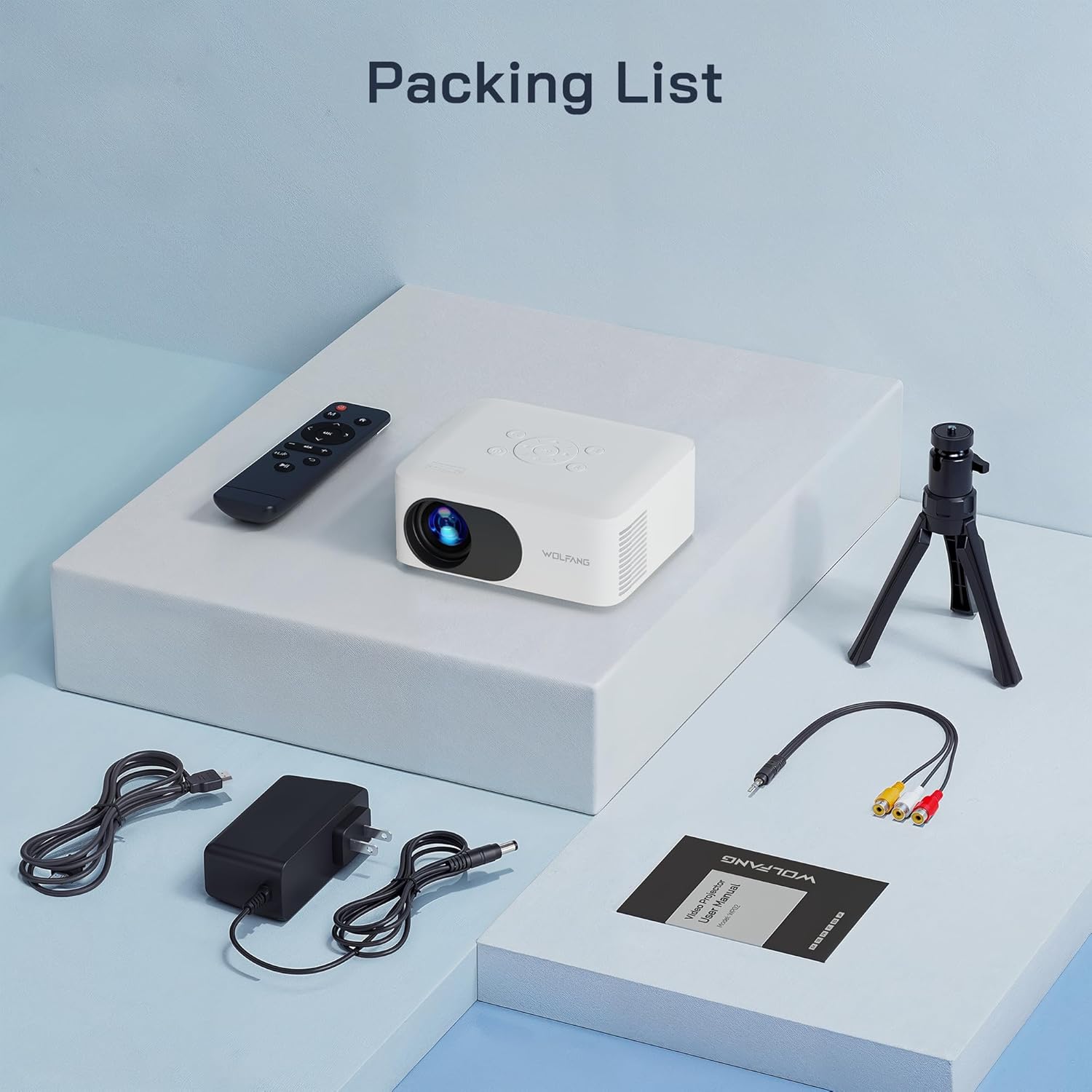
Image: All items included in the WOLFANG WP02 Mini Projector package.
3. Aratohu Tatūnga
3.1 Hononga Hiko
Connect the provided power cable to the 'DC IN' port on the projector and then plug it into a power outlet. The projector will power on or enter standby mode.
3.2 Kōwhiringa Whakanoho
The WP02 projector offers flexible placement options:
- Whakanoho Ripanga: Whakanohoia te pūwhiti ki runga i te mata papatahi, taumau.
- Tāuta Takitoru: Use the included mini tripod by screwing it into the tripod mount on the bottom of the projector. This allows for easy height and angle adjustment.
- Maunga Pouaka: The projector supports ceiling projection. Ensure proper mounting hardware (not included) is used and the projector is securely fastened.

Image: Multiple installation options for the WOLFANG WP02 Mini Projector.
3.3 Te Arotahi me te Whakaritenga Kohatu Matua
To achieve a clear and rectangular image, adjust the focus and keystone correction:
- Arotahi: Rotate the 'FOCUS' dial on the side of the projector until the image appears sharp and clear.
- Te Whakatikatika Kohatu: Rotate the 'KEYSTONE' dial to correct any trapezoidal distortion in the image, making it perfectly rectangular.

Image: The WOLFANG WP02 Mini Projector's focus and keystone adjustment dials for optimal viewing.
4. Pūrere hono
4.1 Input Ports Overview
The WOLFANG WP02 Mini Projector features a variety of input ports:
- HDMI: For connecting devices like TV sticks, gaming consoles (e.g., PS5), and PCs.
- USB-A: For playing media directly from USB flash drives.
- Micro SD: For playing media directly from Micro SD cards.
- O: For connecting older devices using the included 3-in-1 AV cable.
- 3.5mm Jack Paneoro: Mo te hono i nga taringa o waho, i nga kaikorero ranei.

Image: Multimedia connection ports on the WOLFANG WP02 Mini Projector.
4.2 Connecting to Smartphones
To connect your smartphone (Android or iPhone) to the projector, an additional HDMI adapter is required (not included). For Android phones, you will need an HDMI to USB-C cable/adapter. For iPhones, you will need an HDMI to Apple Lightning cable/adapter. Once connected, select the HDMI input source on the projector.
Video: This video demonstrates the unboxing, setup, and connection process for the WOLFANG WP02 Portable Mini Projector, including how to connect it to various devices like smartphones.
4.3 Connecting to Other Devices
For TV sticks, PCs, or gaming consoles, connect them directly to the HDMI port using an HDMI cable. For USB drives or Micro SD cards, insert them into the respective slots. Use the 3.5mm audio jack to connect external speakers or headphones for enhanced audio.
5. Mahi
After connecting your desired device and powering on the projector, use the remote control or the buttons on top of the projector to navigate the menu. Select the correct input source (HDMI, USB, Micro SD, AV) corresponding to your connected device. You can adjust volume, picture mode, and other settings through the on-screen menu.
6. Tiaki me te Tiaki
To ensure the longevity and optimal performance of your WOLFANG WP02 Mini Projector, follow these maintenance guidelines:
- Whakapai Arotahi: Gently clean the projector lens with a soft, lint-free cloth or lens cleaning paper. Avoid using abrasive materials or harsh chemicals.
- Whakahau: Ensure that the projector's ventilation holes are not blocked. Proper airflow is crucial to prevent overheating and maintain performance.
- Rokiroki: Mena kāore e whakamahia ana, rongoatia te pūwhakaata ki te wāhi hauhautanga, maroke, kia matara atu i te rā tika me te puehu nui.

Image: The WOLFANG WP02 Mini Projector features advanced noise reduction technology for quiet operation, indicating efficient heat dissipation.
7. Te Raru
If you encounter any issues with your WOLFANG WP02 Mini Projector, please refer to the following common problems and solutions:
- Kore Pikitia: Ensure the power cable is securely connected and the projector is powered on. Verify that the correct input source is selected. Check all video cables for secure connections.
- Kore Oro: Check the volume settings on both the projector and the connected device. Ensure external speakers or headphones are properly connected if used.
- Atahanga Pouriuri: Adjust the 'FOCUS' dial until the image is clear. Ensure the projection distance is within the recommended range.
- He Trapezoidal te ahua: Adjust the 'KEYSTONE' dial to correct the image shape.
- Mana Mamao Kaore i te Mahi: Check if the batteries are inserted correctly and are not depleted. Point the remote directly at the projector's IR receiver.
For further assistance, please contact WOLFANG customer service.
8. Whakatakotoranga Hua
| Āhuahira | Whakatakotoranga |
|---|---|
| Waitohu | WOLFANG |
| Tau tauira | WP02 |
| Hunga Hua | 14.48 x 11.94 x 6.1 cm |
| Taumaha Tūemi | 550 g |
| Hangarau Whakaatu | LCD |
| Whakatau Maori | 1280 x 720 |
| Taumira Whakaaturanga Mōrahi | 1920 x 1080 (1080P e tautokona ana) |
| Hangarau Hononga | HDMI, USB, Micro SD, AV |
| Nga waahanga motuhake | Palm Size, Built-In Speaker, Low Noise |
| Nga Whakamahinga Manakohia | Matauranga, Kiriata Kainga, Pakihi |
| Momo Whakaeke | Maunga Tripod |
| Whenua Taketake | Haina |
9. Pūtāhui me te Tautoko Kiritaki
WOLFANG provides a 12-marama whakamana for the WP02 Mini Projector, along with lifetime technical support. If you have any questions, require assistance, or need to inquire about upgrading accessories (such as a projection screen or dongle), please do not hesitate to contact our customer service team.
We are committed to resolving any issues to your satisfaction within 24 hours.
Īmēra Mana: tautoko.vc@wolfang.co
You can also reach out via the QR code provided in the product packaging for WOLFANG WhatsApp support.
Ask a question about this manual
Ask about setup, troubleshooting, compatibility, parts, safety, or missing instructions. Manuals+ will review the question and use this page’s manual context to help answer it.