
1. Kupu Whakataki
This manual provides essential instructions for the safe and efficient use of your DALI IO-8 Wireless/Wired Hi-Fi Headphones. Please read this manual thoroughly before using the product and retain it for future reference. The DALI IO-8 headphones are designed to deliver a high-fidelity audio experience with advanced features such as Active Noise Cancellation (ANC), Bluetooth AptX Adaptive connectivity, and a long-lasting battery.
2. Hua Neke Atuview
Familiarize yourself with the components and controls of your DALI IO-8 headphones.

Whakaahua 2.1: Mua view of the DALI IO-8 headphones, showcasing the caramel and white color scheme and overall design.

Whakaahua 2.2: runga-iho view of the DALI IO-8 headphones, highlighting the earcups and visible control buttons on the side.
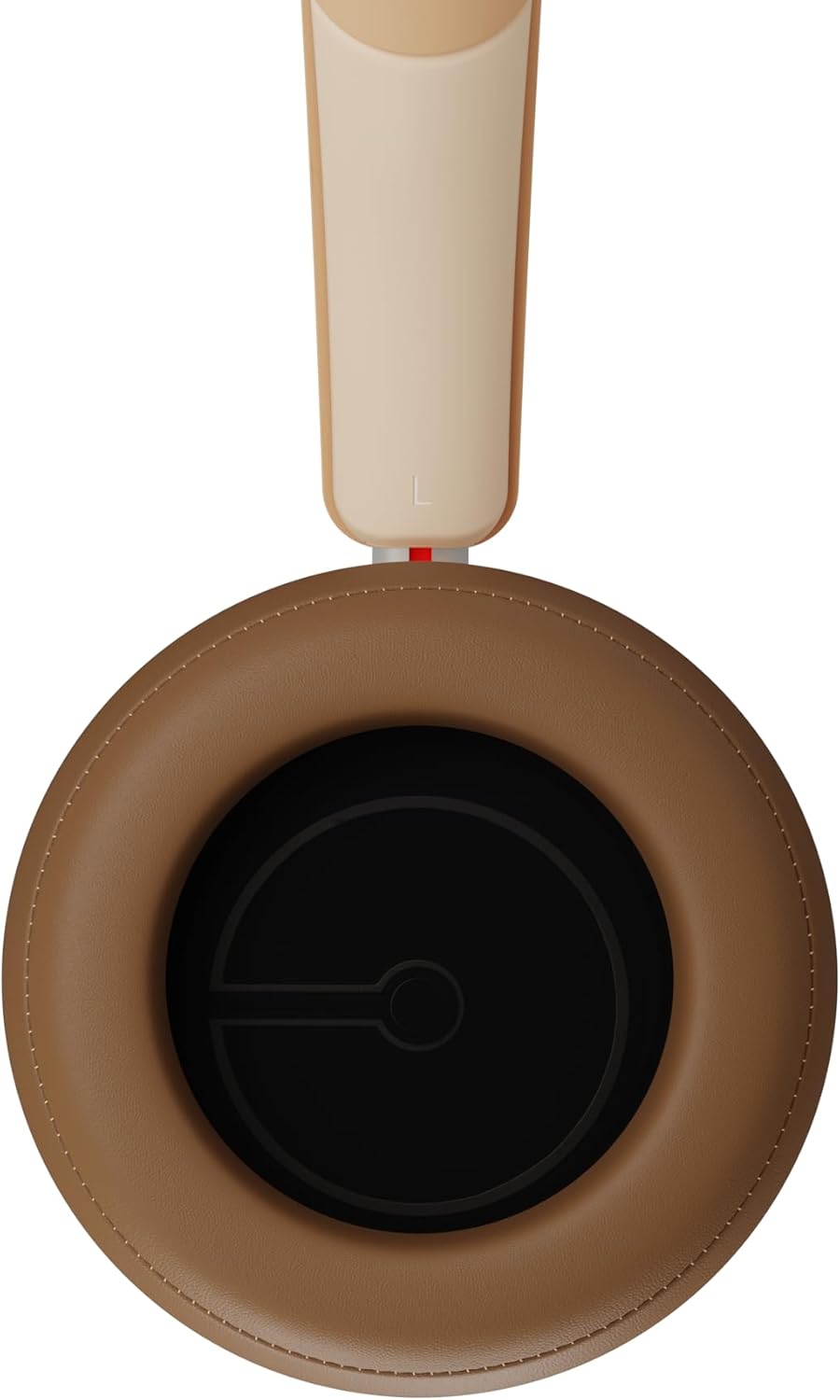
Whakaahua 2.3: o roto view of a DALI IO-8 earcup, showing the soft padding and driver grille, designed for comfort and sound delivery.

Whakaahua 2.4: Kati-ake view of the DALI IO-8 earcup, showing the USB-C charging port and other control buttons.
2.1 Ihirangi mokete
- DALI IO-8 Headphones
- USB-C Uira Whakatau
- 3.5mm Waea Ororongo
- Travel Case (if included)
- Pukapuka Kaiwhakamahi (tenei tuhinga)
2.2 Ngā Wāhanga Paneoro

Whakaahua 2.5: Pahū view illustrating the internal components of the DALI IO-8 headphones, including the 50mm driver, circuitry, and earcup structure.
- Headband (Adjustable)
- Earcups (Over-ear design with genuine leather)
- 50mm Driver (SMC Driver Technology)
- Control Buttons (Power, Volume, ANC, Multifunction)
- USB-C Port (Charging and Wired Audio)
- 3.5mm Audio Jack (Wired Audio)
- Microphones (for ANC and calls)
3. Tatūnga
3.1 Te Whakataki i nga Waea
Before initial use, fully charge your DALI IO-8 headphones.
- Connect the supplied USB-C cable to the USB-C port on the headphone earcup.
- Honoa te pito kē atu o te taura USB-C ki tētahi pūtake hiko USB hototahi (hei tauira, te tauranga USB rorohiko, te urutau pakitara USB).
- The LED indicator will show charging status. A full charge provides up to 35 hours of playback with ANC enabled.
- Kia oti te utu, momotuhia te taura.
3.2 Hiko / Whakaweto
- Hei Whakahiko: Press and hold the Power button for approximately 2 seconds until the LED indicator illuminates.
- Hei Whakaweto: Pēhia me te pupuri i te pātene Mana mō te 3 hēkona pea tae noa ki te whakaweto o te tohu LED.
3.3 Takirua Nihokikorangi
The DALI IO-8 supports Bluetooth AptX Adaptive for high-quality wireless audio.
- Me mohio kua weto nga taringa.
- Press and hold the Power button for approximately 5 seconds until the LED indicator flashes blue rapidly. This indicates pairing mode.
- On your audio device (smartphone, tablet, computer), enable Bluetooth and search for available devices.
- Select "DALI IO-8" from the list of found devices.
- Once paired, the LED indicator will glow solid blue or flash slowly.
- Ka ngana aunoa nga taringa ki te hono ano ki te taputapu takirua whakamutunga ina ka ana.
3.4 Hononga Waea
The DALI IO-8 can be used with a wired connection via the 3.5mm audio jack or USB-C.
- Tauera Ororongo 3.5mm: Connect one end of the supplied 3.5mm audio cable to the headphone's 3.5mm jack and the other end to your audio source's headphone output. The headphones can be used passively in this mode, or actively with ANC and amplification if powered on.
- Ororongo USB-C: Connect the supplied USB-C cable to the headphone's USB-C port and the other end to a compatible USB audio output on your computer or device. This mode allows for digital audio transmission and charging simultaneously.
4. Te whakahaere i nga Paneoro
4.1 Whakakahoretanga Hapa Kaha (ANC)
The DALI IO-8 features three distinct ANC modes and wind noise suppression.
- Press the dedicated ANC button to cycle through the available modes:
- ANC i runga: Te whakakore haruru teitei.
- Aratau Puataata: Allows ambient sounds to pass through for situational awareness.
- ANC Weto: Active noise cancellation is disabled.
- Wind noise suppression is automatically engaged in ANC modes to reduce interference from wind.
4.2 Aratau oro
Customize your listening experience with two sound profiles.
- Press the Sound Mode button (if available, or refer to specific button on device) to switch between:
- Aratau Hi-Fi: Delivers a balanced and neutral sound signature.
- Aratau Pango: Enhances low-frequency response for a more impactful bass.
4.3 Playback and Volume Control
Use the control buttons on the earcup for media playback and volume adjustments.
- Runga Runga: Patohia te paatene '+'.
- Raro Raro: Patohia te paatene '-'.
- Purei/Tatari: Kotahi te paatene i te paatene Mahi maha.
- Riu Panuku: Pēhia rua te pātene Maha-mahi.
- Riu o mua: Pēhia te pātene Maha-mahi kia toru ngā wā.
4.4 Whakahaere Waea
Manage phone calls when connected via Bluetooth.
- Whakautu/Whakamutu Waea: Kotahi te paatene i te paatene Mahi maha.
- Whakakore Waea: Patohia me te pupuri i te paatene Multifunction mo te 2 hēkona.
- Whakahohe i te Kaiawhina Reo: Press and hold the Multifunction button for 2 seconds (when not on a call).
5. Tiaki
5.1 Te horoi
- Horoia nga taringa ki te kakahu ngohengohe, maroke, kore-raru.
- Kaua e whakamahia nga kai horoi, nga whakarewa, me nga rehu matū.
- Mō ngā kapu taringa, horoia mārire ki te wai pakupakuamp whakamarokehia tonutia te kakahu mēnā e tika ana.
- Kia tino mohio kei uru te makuku ki roto i ngā pūaha, i ngā whakatuwheratanga rānei.
5.2 Rokiroki
- When not in use, store the headphones in their protective travel case to prevent damage.
- A ape i te tuku i nga taringa ki te wera nui, te makuku, te ra tika ranei.
6. Te Raru
| Raruraru | Take pea | Rongoā |
|---|---|---|
| Karekau he kaha | Kua pau te pākahiko. | Me utu nga taringa ma te whakamahi i te taura USB-C kua tukuna. |
| Kaore e taea te hono ma te Nihokikorangi | Ko nga taringa kaore i te aratau takirua; pūrere Nihokikorangi weto; tawhiti rawa atu i te taputapu. | Ensure headphones are in pairing mode (rapid blue LED flash). Turn on Bluetooth on your device. Move headphones closer to the device. Forget "DALI IO-8" on your device and re-pair. |
| Karekau he tangi | Volume too low; incorrect input source; headphones not connected. | Increase volume on headphones and source device. Check Bluetooth connection or wired cable. Ensure the correct audio output is selected on your device. |
| Ko te ANC kaore e mahi pai | ANC mode off; poor earcup seal. | Ensure ANC is enabled. Adjust headphones for a proper seal around your ears. |
7. Whakatakotoranga
| Āhuahira | Taipitopito |
|---|---|
| Ingoa Tauira | DALI IO-8 |
| Waitohu | DALI |
| Hangarau Hononga | Waea, Ahokore (Nihokikorangi) |
| Hangarau Whakawhitiwhiti Ahokore | Bluetooth (AptX Adaptive) |
| Whakakore Haruru | Active Noise Suppression (ANC) with Wind Noise Suppression |
| Te Whakanoho Taringa | Ki runga-taringa |
| Rahi taraiwa | 50mm (SMC Driver Technology) |
| Te aukati | 25 ohm |
| Tiki Waeoro | 3.5 mm |
| Ora Pūhiko | Tae atu ki te 35 hāora (me te ANC) |
| Rauemi | Genuine Leather (earcups) |
8. Nga korero haumaru
Please observe the following safety guidelines to ensure safe operation and prevent damage to your headphones or injury to yourself.
- Do not expose the headphones to water, rain, or moisture.
- A ape i te wera nui.
- Do not disassemble, repair, or modify the headphones. This voids the warranty.
- Whakarongo ki nga taumata reo iti kia kore ai e pakaru te rongo.
- Kaua e taea e nga tamariki.
- Whakakorehia te hua kia rite ki nga ture o te rohe.
9. Pūtāhui me te Tautoko
DALI products are manufactured to high standards and are covered by a limited warranty. For specific warranty terms and conditions, please refer to the warranty card included with your product or visit the official DALI website. For technical support, troubleshooting assistance, or service inquiries, please contact your authorized DALI dealer or DALI customer support.

Whakaahua 9.1: A person wearing the DALI IO-8 headphones, demonstrating their comfortable fit and use in a real-world environment.