
1. Kupu Whakataki
This manual provides essential instructions for the safe and efficient operation of your Jectse 5G Portable Wi-Fi Hotspot, Model Jectsekwnbat6q37. Please read this manual thoroughly before using the device and retain it for future reference.
2. Ihirangi mokete
Manatokona kei roto katoa nga mea kei roto i to kete:
- Jectse 5G Portable Wi-Fi Hotspot (Model Jectsekwnbat6q37)
- USB-C Uira Whakatau
- Pukapuka Kaiwhakamahi (tenei tuhinga)
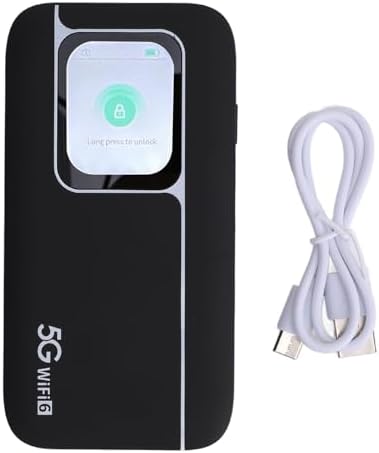
Image: The Jectse 5G Portable Wi-Fi Hotspot shown next to its included USB-C charging cable.
3. Pūrere Neke Atuview
Familiarize yourself with the physical components of your hotspot.
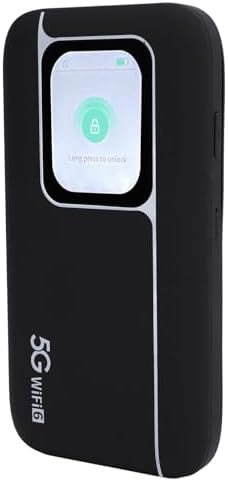
Whakaahua: Mua view of the Jectse 5G Portable Wi-Fi Hotspot, showcasing its display screen with a lock icon and "Long press to unlock" message.
- Whakaatu Mata: Shows network status, signal strength, battery level, and data usage.
- Pātene Hiko: Used to turn the device on/off and wake/sleep the screen.
- Tauranga USB-C: Mo te utu i te taputapu.
- Mokamoka Kaari SIM: Located on the side or back, for inserting your 5G/4G/3G SIM card.
- Tohu LED: Provide quick visual cues for device status (e.g., signal, battery).
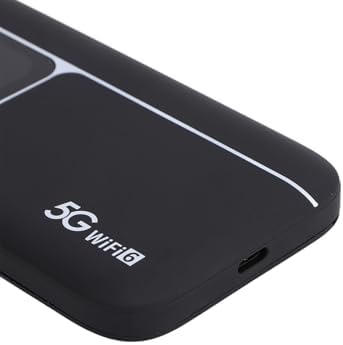
Whakaahua: He tata view of the USB-C charging port located on the side of the Jectse 5G Portable Wi-Fi Hotspot.
4. Tatūnga
- Kōkuhu Kāri Sim:
Locate the SIM card slot. Carefully insert your activated 5G/4G/3G SIM card into the slot until it clicks into place. Ensure the SIM card is correctly oriented.
- Utuhia te Pūrere:
Connect the provided USB-C cable to the hotspot's charging port and the other end to a compatible USB power adapter (not included) or a computer's USB port. The device features a 7100mAh polymer battery. Allow the device to fully charge before first use.
- Whakahiko:
Press and hold the Power Button for a few seconds until the display screen illuminates. The device will begin to boot up and connect to the cellular network.
- Hononga Wi-Fi Tuatahi:
Once powered on, the device's display will show the default Wi-Fi Network Name (SSID) and Password (Wi-Fi Key). You can also find this information on the back of the device.
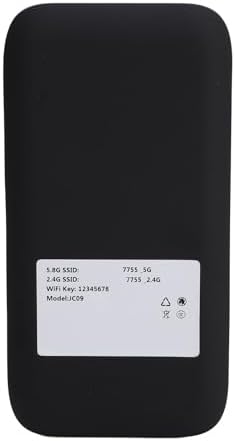
Image: The back panel of the Jectse 5G Portable Wi-Fi Hotspot, displaying the default 5.8G SSID, 2.4G SSID, and Wi-Fi Key.
On your computer, smartphone, or other Wi-Fi enabled device, search for available Wi-Fi networks. Select the SSID matching your hotspot and enter the Wi-Fi Key to connect.
5. Nga Tohutohu Whakahaere
- Hononga Pūrere Maha:
The hotspot supports connecting up to 16 devices simultaneously. It operates on dual bands (2.4GHz and 5.8GHz) with WiFi6 (802.11 a/b/g/n/ac/ax) for optimized performance across various devices.

Image: An illustration depicting the Jectse 5G Portable Wi-Fi Hotspot providing high-speed internet to several users with laptops, tablets, and smartphones.
- Monitoring Device Status:
The display screen and LED lights provide real-time information on signal strength, battery level, and data usage. Refer to the screen for detailed status updates.
- Network Frequency Support:
The device supports a broad range of network frequencies, including 5G NR, 4G, and 3G, ensuring connectivity in various locations. The built-in 1T4R 5G antenna enhances signal reception.
- Hot Swappable SIM:
The device supports hot-swapping of SIM cards, allowing you to change SIM cards without powering down the device, though a brief network re-connection period may occur.
6. Tiaki
- Tiaki Pūhiko: To prolong battery life, avoid exposing the device to extreme temperatures. Charge the 7100mAh battery regularly and avoid complete discharge.
- Te horoi: The device features an IP67 reinforced design, offering protection against dust and water. To clean, gently wipe the exterior with a soft, dry cloth. Do not use harsh chemicals or abrasive materials.
- Rokiroki: Ki te kore e whakamahia mo te wa roa, penapenahia te taputapu ki tetahi waahi makariri, maroke.
7. Te Raru
If you encounter issues with your Jectse 5G Portable Wi-Fi Hotspot, refer to the following common solutions:
| Raruraru | Take pea | Rongoā |
|---|---|---|
| Kaore he tohu whatunga | SIM card not inserted correctly, no cellular coverage, or SIM not activated. | Reinsert SIM card, move to an area with better coverage, or contact your service provider to activate SIM. |
| Kaore e taea te hono ki Wi-Fi | Incorrect Wi-Fi password, device too far from hotspot, or hotspot is off. | Verify password, move closer to the hotspot, ensure hotspot is powered on. |
| Te tere ipurangi puhoi | Weak signal, too many connected devices, or network congestion. | Check signal strength on the display, reduce number of connected devices, or try connecting in a less congested area. |
| Kaore te taputapu i te hiko | He ngoikore te pākahiko, te hapa rānei o te taputapu. | Charge the device for at least 30 minutes. If issue persists, contact support. |
Mena kei te haere tonu te raru i muri i te whakamatau i enei otinga, tena koa whakapā atu ki te tautoko a te kaihoko.
8. Whakatakotoranga
| Āhuahira | Taipitopito |
|---|---|
| Ingoa Tauira | Jectsekwnbat6q37 |
| Waitohu | Jectse |
| Hangarau Hononga | 5G |
| Paerewa Whakawhitinga Korerokore | 802.11ax (WiFi6) |
| Karaehe Band Auautanga | Rōpū-rua (2.4GHz & 5.8GHz) |
| Data Transfer Rate (Download) | Tae atu ki te 2.77 Gbps |
| Data Transfer Rate (Upload) | Tae atu ki te 1.25 Gbps |
| Pūhiko Raukaha | 7100mAh Porohita Porohita |
| Antenna | 1T4R 5G Antenna |
| Hoahoa Rueke | IP67 (Protection against drops, dust, and water) |
| Ngā Pūrere Tūhono mōrahi | 16 |
| Pūnaha Mahi | ZyNOS |
| Ahu mōkihi | 17 x 10 x 4 cm |
| Taumaha Tūemi | 280 g |
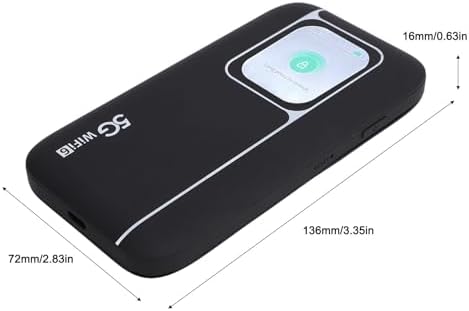
Image: A visual representation of the Jectse 5G Portable Wi-Fi Hotspot's dimensions, showing its length (136mm/3.35in), width (72mm/2.83in), and thickness (16mm/0.63in).
9. Pūtāhui me te Tautoko
Jectse products are designed for reliability and performance. For warranty information, please refer to the warranty card included with your purchase or visit the official Jectse webpae.
For technical support, troubleshooting assistance, or service inquiries, please contact Jectse customer support through the contact information provided on the official webpae, to tuhinga hoko ranei.
Please have your model number (Jectsekwnbat6q37) and purchase details ready when contacting support.