
1. Kupu Whakataki
This manual provides essential information for the proper setup, operation, and maintenance of your NUU N30 Cell Phone and NUU Buds A Earbuds. Please read this guide thoroughly before using your devices to ensure optimal performance and longevity. Keep this manual for future reference.
2. Ihirangi mokete
Manatokona kei roto katoa nga mea kei roto i to kete hua:
- NUU N30 Cell Phone
- NUU Buds A Earbuds with Charging Case
- USB-C Uira Whakatau
- Utauta Whakaputa SIM
- Aratohu Timata Tere
- Nga Korero Haumaru me te Raihana

Whakaahua 2.1: The NUU N30 Cell Phone and Buds A Earbuds, as included in the bundle. The phone is purple with a large display, and the white earbuds are shown in their charging case.
3. Hua Neke Atuview
3.1 NUU N30 Cell Phone
The NUU N30 is an unlocked Android smartphone designed for reliable communication and multimedia consumption.
- Whakaatu: 6.7-inch 1600 x 720 display with a 90Hz refresh rate for smooth visuals.
- Pūnaha Kāmera: Equipped with a 50MP Main AF Camera, 8MP Front Selfie Camera, and a 2MP Macro Camera, alongside a Bokeh Camera (VGA) and LED Flash.
- Mahinga: Powered by a MediaTek Helio G81 processor, featuring 6GB RAM and 128GB internal storage.
- Pūhiko: A 5000 mAh battery supports 18W Quick Charge for extended usage.
- Hononga: Supports 4G LTE and Bluetooth. Includes a 3.5mm audio jack.
- Haumarutanga: Features a side-mounted Fingerprint ID sensor for secure access.
- Kawea Hototahi: Compatible with T-Mobile, Mint Mobile, Metro, Q Link Wireless, Google Fi, Hello Mobile, Tello Mobile, Lycamobile, Patriot Mobile, Republic Wireless, Simple Mobile, StandUp Wireless, SpeedTalk, and Telcel America. Tuhipoka: This device is not compatible with Verizon, AT&T, or Cricket Wireless.
- Mana Mātua: Supports various parental control applications such as Google Family Link, Bark, Qustodio, and Norton Family.

Whakaahua 3.1: Whakamuri view of the NUU N30 phone highlighting the camera module. Specifications indicate a 50MP Main AF Camera, 2MP Macro Camera, VGA Bokeh Camera, LED Flash, and an 8MP Front Selfie Camera.
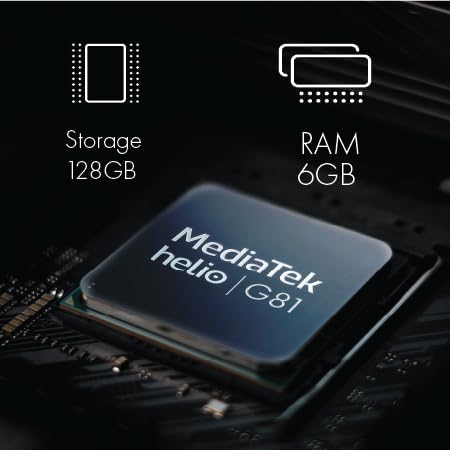
Whakaahua 3.2: He roto view of the NUU N30 phone's components, showing the MediaTek Helio G81 processor, 128GB storage, and 6GB RAM.

Whakaahua 3.3: The NUU N30 phone with text indicating a 5000 mAh battery and 18W Quick Charge capability.

Whakaahua 3.4: A close-up of the NUU N30 phone showing the triple card slot for SIM cards and microSD, and the 3.5mm audio jack.

Whakaahua 3.5: A visual representation of the fingerprint ID sensor located on the side of the NUU N30 phone.

Whakaahua 3.6: A chart illustrating the U.S. carrier compatibility for the NUU N30 phone, showing supported carriers like T-Mobile, Mint Mobile, and Metro, and unsupported carriers like Verizon, AT&T, and Cricket.
3.2 NUU Buds A Earbuds
The NUU Buds A are wireless earbuds designed for clear audio and communication.
- Hangarau Ororongo: Features Feedforward Active Noise Cancellation (ANC) and 10mm neodymium magnetic speaker drivers for efficient environmental noise filtering.
- Kounga Waea: Equipped with ENC (Environmental Noise Cancellation) Dual Mic for clear voice calls.
- Ora Pūhiko: Provides up to 8 hours of playtime per charge, with the charging case extending total playtime to up to 30 hours.
- Kei te utu: The charging case is powered via USB-C.

Whakaahua 3.7: The NUU Buds A earbuds in their charging case. The case contributes to the overall battery life, providing multiple charges for the earbuds.

Whakaahua 3.8: An image depicting a person wearing the NUU Buds A earbuds, illustrating the ENC Dual Mic Noise Reduction feature for improved call clarity.
4. Tohutohu Tatūnga
4.1 NUU N30 Cell Phone Setup
- Kōkuhu Kāri SIM me Kāri MicroSD: Locate the triple card slot on the side of the phone. Use the provided SIM ejector tool to open the tray. Carefully place your Nano-SIM card(s) and an optional microSD card (for expanded storage) into the designated slots. Ensure the cards are correctly oriented before reinserting the tray.
- Utuhia te Waea: Connect the USB-C charging cable to the phone's charging port and plug the other end into a compatible power adapter. Allow the phone to charge fully before initial use.
- Whakahiko: Press and hold the power button located on the side of the phone until the NUU logo appears.
- Ruānuku Tatūnga Tuatahi: Follow the on-screen instructions to select your language, connect to a Wi-Fi network, sign in to your Google account, and set up basic security features.
- Whakaritea TT Matimati: During the initial setup or later via Settings > Security, register your fingerprint(s) for quick and secure unlocking.
4.2 NUU Buds A Earbuds Setup
- Utuhia ngā Taringa me te Pouaka: Place the earbuds into the charging case. Connect the USB-C cable to the charging case and a power source. The indicator light on the case will show charging status. Ensure both the earbuds and case are fully charged before first use.
- Pair with NUU N30 Phone (or other Bluetooth device):
- Whakatuwherahia te putea utu. Ka uru aunoa nga taringa ki te aratau takirua.
- On your NUU N30 phone, go to Settings > Connected devices > Bluetooth.
- Kia mahara kua tahuna te Nihokikorangi.
- Select "NUU Buds A" from the list of available devices to connect.
- Once connected, a confirmation message will appear on your phone.
5. Nga Tohutohu Whakahaere
5.1 NUU N30 Cell Phone Operation
- Whakaterenga Taketake: Use touch gestures to navigate the Android interface. Swipe up from the bottom for the app drawer, swipe down from the top for notifications and quick settings.
- Te Waea me te Tuku Karere: Use the Phone app to dial numbers or select contacts. Use the Messages app for SMS/MMS communication.
- Whakamahinga kāmera: Open the Camera app. Tap to focus, pinch to zoom. Select between Main, Selfie, and Macro modes. Tap the shutter button to capture photos or videos.
- Parental Control Applications: To utilize parental control features, download and install a compatible application (e.g., Google Family Link, Bark, Qustodio, Norton Family) from the Google Play Store and follow the app's specific setup instructions.
5.2 NUU Buds A Earbuds Operation
- E mau ana i nga Paorooro: Insert the earbuds gently into your ears, ensuring a comfortable and secure fit for optimal sound and ANC performance.
- Whakahoki Waiata: Once paired, audio from your phone will automatically play through the earbuds. Use the touch controls on the earbuds (refer to the Quick Start Guide for specific gestures) to play/pause, skip tracks, or adjust volume.
- Whakahaere Waea: During an incoming call, use the touch controls to answer or end the call. The ENC Dual Mic system will enhance your voice clarity during conversations.
- Whakakore Haruru Hohe (ANC): Activate or deactivate ANC via the touch controls on the earbuds to filter out environmental noise.
6. Tiaki
6.1 NUU N30 Cell Phone Maintenance
- Te horoi: Whakamahia he kakahu ngohengohe, kore-raro hei horoi i te mata me te tinana o te waea. A ape i nga mea abrasive me nga matū kino.
- Tiaki Pūhiko: Hei whakaroa i te ora o te pākahiko, karohia ngā pāmahana tino kino. Kaua e waiho te waea kia utua katoatia, kia kore rānei e pau te hiko mō te wā roa.
- Whakahōu Pūmanawa: Regularly check for and install system updates to ensure your phone has the latest features and security patches. Go to Settings > System > System update.
6.2 NUU Buds A Earbuds Maintenance
- Te horoi: Gently wipe the earbuds and charging case with a dry, soft cloth. Remove any earwax buildup from the earbud tips using a small brush or cotton swab.
- Tiaki Keehi: Keep the charging contacts on both the earbuds and the case clean and dry to ensure proper charging.
- Rokiroki: Mena karekau e whakamahia, penapenahia nga purongo ki roto i to pukoro hei tiaki kia mau tonu te utu.
7. Te Raru
7.1 NUU N30 Cell Phone Troubleshooting
- Phone will not power on: Kia tino utua te pākahiko. Honoa te waea ki te rihi mō te 15 meneti pea, kātahi ka ngana anō ki te whakakā.
- Karekau he tohu whatunga: Check if your SIM card is correctly inserted. Verify that your carrier is supported by the NUU N30 (refer to Section 3.1). Ensure airplane mode is off.
- Kāre e mahi ana te kāmera: Restart the phone. Clear the cache and data of the Camera app via Settings > Apps > Camera > Storage.
- Kāore te pūoko tapumati e aro mai ana: Me whakarite kia ma, kia maroke to maihao. Rēhita anō i tō tapumati mēnā ka mau tonu te take.
7.2 NUU Buds A Earbuds Troubleshooting
- Karekau e honoa nga taringa: Ensure Bluetooth is enabled on your phone. Place the earbuds back in the case, close it, then open it again to re-enter pairing mode. Forget the device on your phone's Bluetooth settings and try pairing again.
- Kāore he oro mai i ngā pane taringa: Check the volume level on both your phone and the earbuds. Ensure the earbuds are charged and properly connected.
- Nga take utu: Clean the charging contacts on both the earbuds and the case. Ensure the USB-C cable and power adapter are functioning correctly.
8. Whakatakotoranga
8.1 NUU N30 Cell Phone Specifications
| Āhuahira | Whakatakotoranga |
|---|---|
| Tau tauira | NUU N30 |
| Pūnaha Mahi | Android |
| Whakaatu | 6.7 Inches, 1600 x 720 Resolution, 90Hz Refresh Rate |
| Tukatuka | MediaTek Helio G81 |
| RAM | 6 GB |
| Rokiroki Roto | 128 GB |
| Kāmera Matua | 50 MP |
| Kaamera Whaiaro | 8 MP |
| Kāmera Tonotono | 2 MP |
| Pūhiko Raukaha | 5000 mAh (18W Quick Charge) |
| Hononga | 4G LTE, Bluetooth |
| Jack Ororongo | 3.5 mm |
| Haumarutanga | TT matimati |
8.2 NUU Buds A Earbuds Specifications
| Āhuahira | Whakatakotoranga |
|---|---|
| Hangarau Ororongo | Feedforward Active Noise Cancellation (ANC) |
| Kaikōrero taraiwa | 10mm Neodymium Magnetic |
| hopuoro | ENC Dual Mic (Voice Call Noise Reduction) |
| Waa purei Puoro | Tae atu ki te 8 haora mo ia utu |
| Wā Takaro Tapeke (me te pouaka) | Tae atu ki te 30 haora |
| Tauranga Whakatau | USB-C |
9. Pūtāhui me te Tautoko
Your NUU N30 Cell Phone and NUU Buds A Earbuds are covered by a limited manufacturer's warranty. For detailed warranty terms and conditions, please refer to the warranty card included in your package or visit the official NUU Mobile website. For technical support, product registration, or service inquiries, please contact NUU Mobile customer support through their official channels.