
Kupu Whakataki
Thank you for choosing the Keylitos 7-in-1 Multifunctional Facial Massager. This device is designed to enhance your daily skincare routine by combining various technologies to promote healthier, more radiant skin. Please read this manual thoroughly before use to ensure proper operation and safety.
Ka mutu te huaview
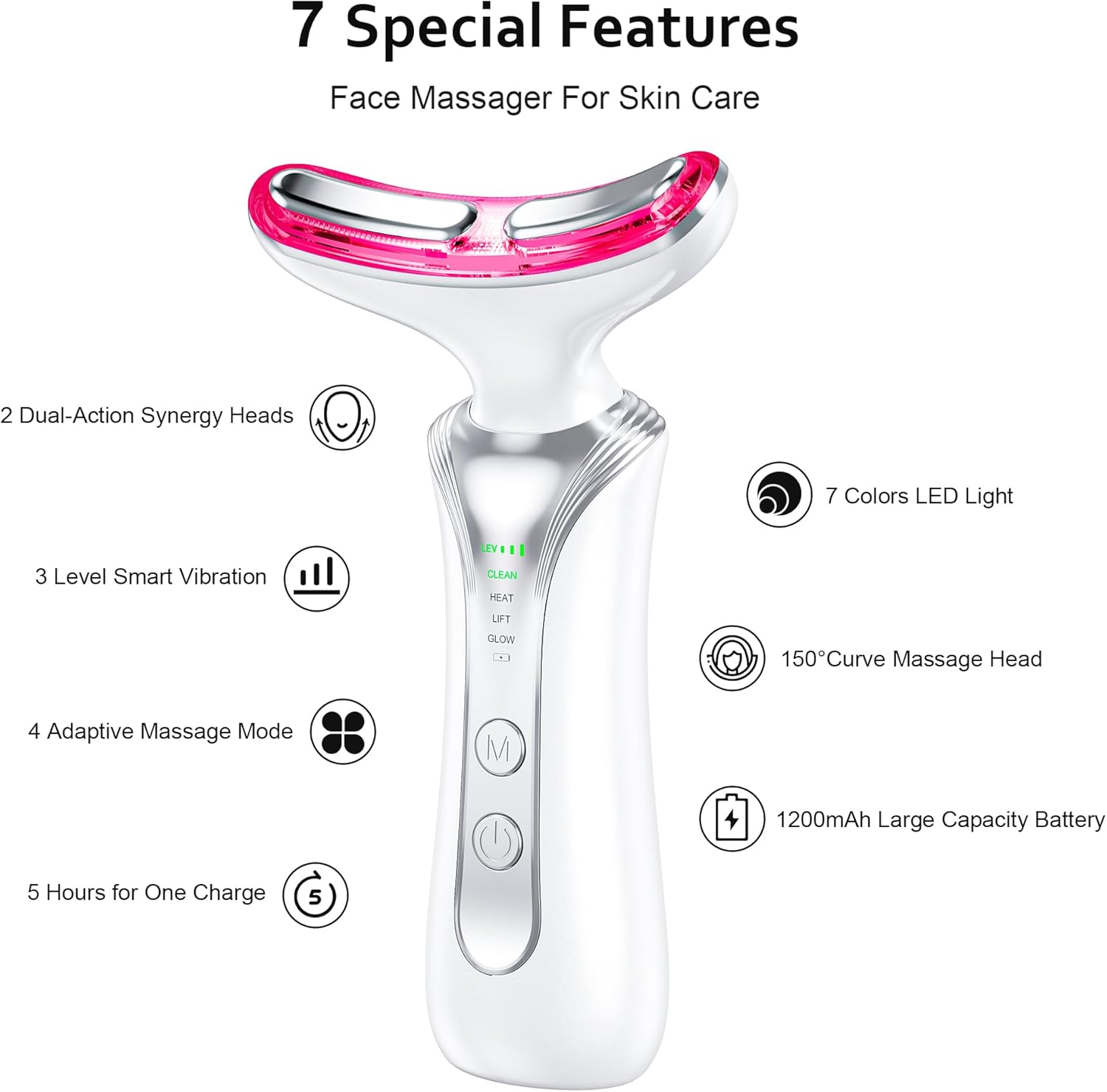
The Keylitos 7-in-1 Facial Massager features upgraded technology with three modes and seven colors of light, suitable for all skin types. Its ergonomically curved design allows for smooth gliding across the face and neck, enhancing product absorption. The device is portable, rechargeable, and designed for simple, effective daily use.
Āhuatanga matua:
- Upgraded Technology: Three modes and seven colors of light for diverse skincare needs.
- Ergonomically Curved Design: Glides smoothly across face and neck, enhancing product absorption.
- Aratau Whakaritea: Offers gentle, medium, or intense massage options.
- Kawe me te utu ano: Exquisite, lightweight, and USB-C charging enabled for home or travel.
- Simple & Effective: Easy to use for daily skincare.
Nga korero haumaru
Mo waho anake.
Tatūnga
Before first use, ensure the device is fully charged using the provided USB-C cable. A full charge typically takes a few hours. The device is ready for use once charged.
Initial Use Steps:
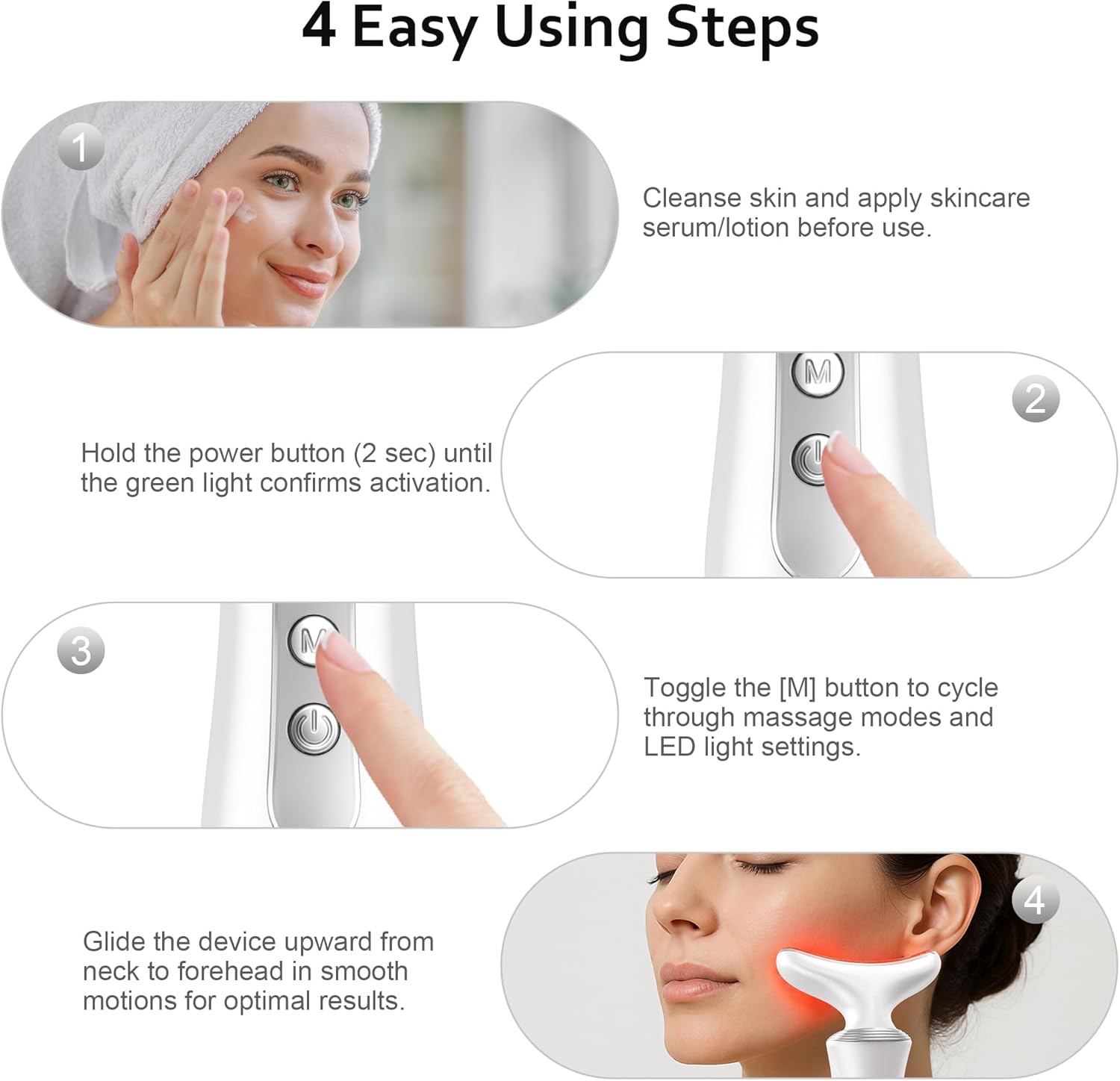
- Utuhia te Pūrere: Connect the USB-C cable to the charging port at the bottom of the device and a suitable power source.
- Horoi kiri: Ensure your face and neck are clean and free of makeup.
- Whakamahia te Hua Tiaki Kiri: Apply your preferred serum, lotion, or cream to your face and neck. This helps the device glide smoothly and enhances product absorption.
Nga Tohutohu Whakahaere
Hiko Whakaka/Weto:
- To power on, press and hold the power button for 2 seconds until the green light confirms activation.
- Hei whakaweto, purihia te paatene mana mo te 2 hēkona.
Modes and Light Therapy:
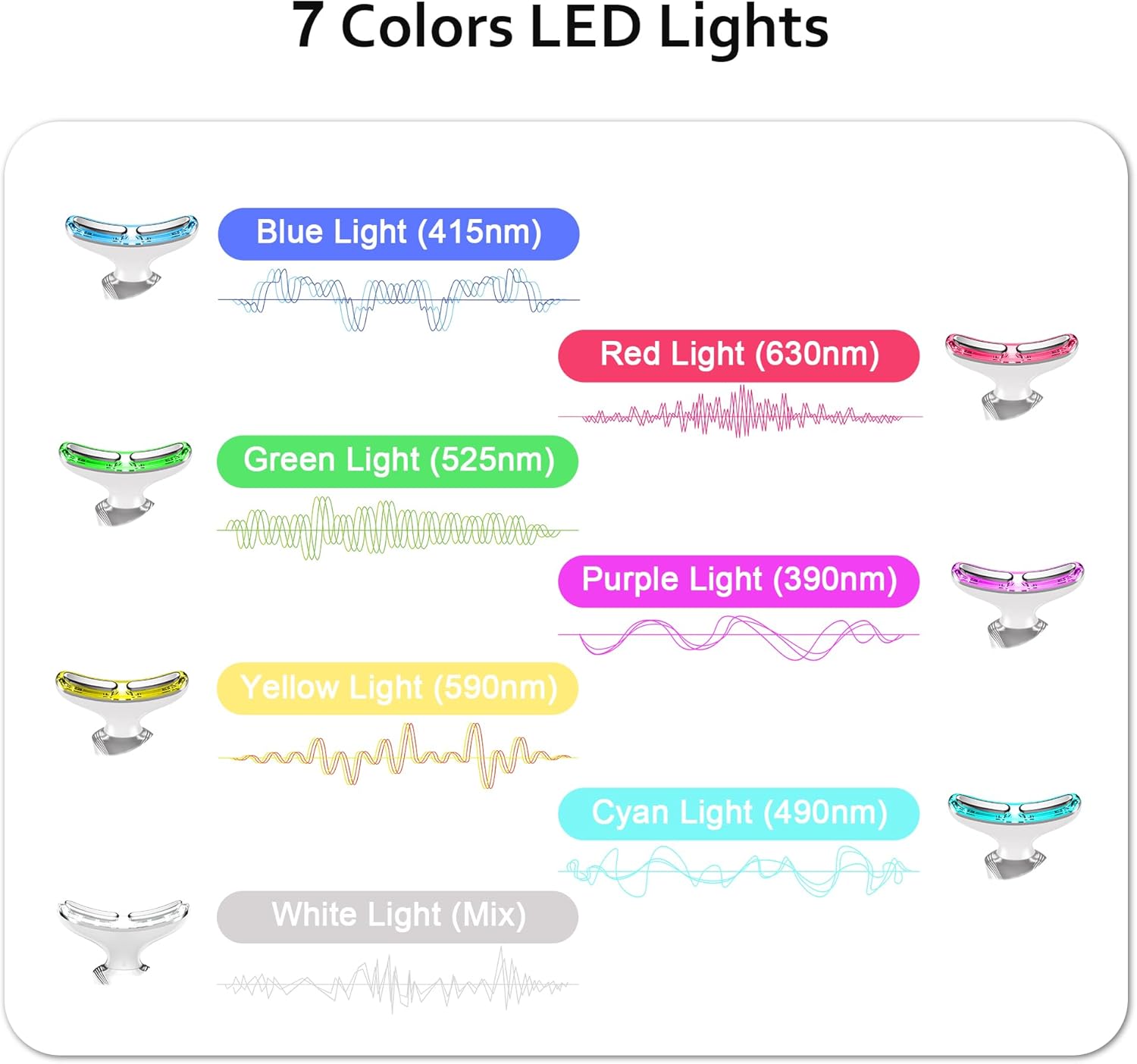
The device features three main modes and seven LED light colors, each with specific benefits. Use the 'M' button to cycle through the modes and light settings.
| Mode/Light Color | Mahi |
|---|---|
| Clean Mode (Green Light) | Clears pores, keeps skin clean and glowing. Smooths wrinkles and fine lines. |
| EMS Mode (Red Light) | Microcurrent therapy to relax skin, help absorb skincare products, and reduce lines and wrinkles. Anti-aging and promotes collagen production. |
| Hot Mode (Blue Light) | Accelerates blood circulation, promotes absorption of skincare products. Soothes inflammation and calms sensitive skin. |
| Marama Pura | Promotes lymphatic drainage. |
| Marama Kowhai | Reduces melanin production. |
| Maama Cyan | Reduces skin tension and swollen capillaries. |
| White Light (Mix) | Relaxes skin and accelerates growth and healing of skin cells. |
Tikanga Whakamahinga:
- Always move the device in an upward motion ki to kiri.
- Ensure the metal contact points on the device head are touching your skin for optimal effect, especially for vibration and EMS functions.
- Glide the device from your neck upwards towards your forehead.
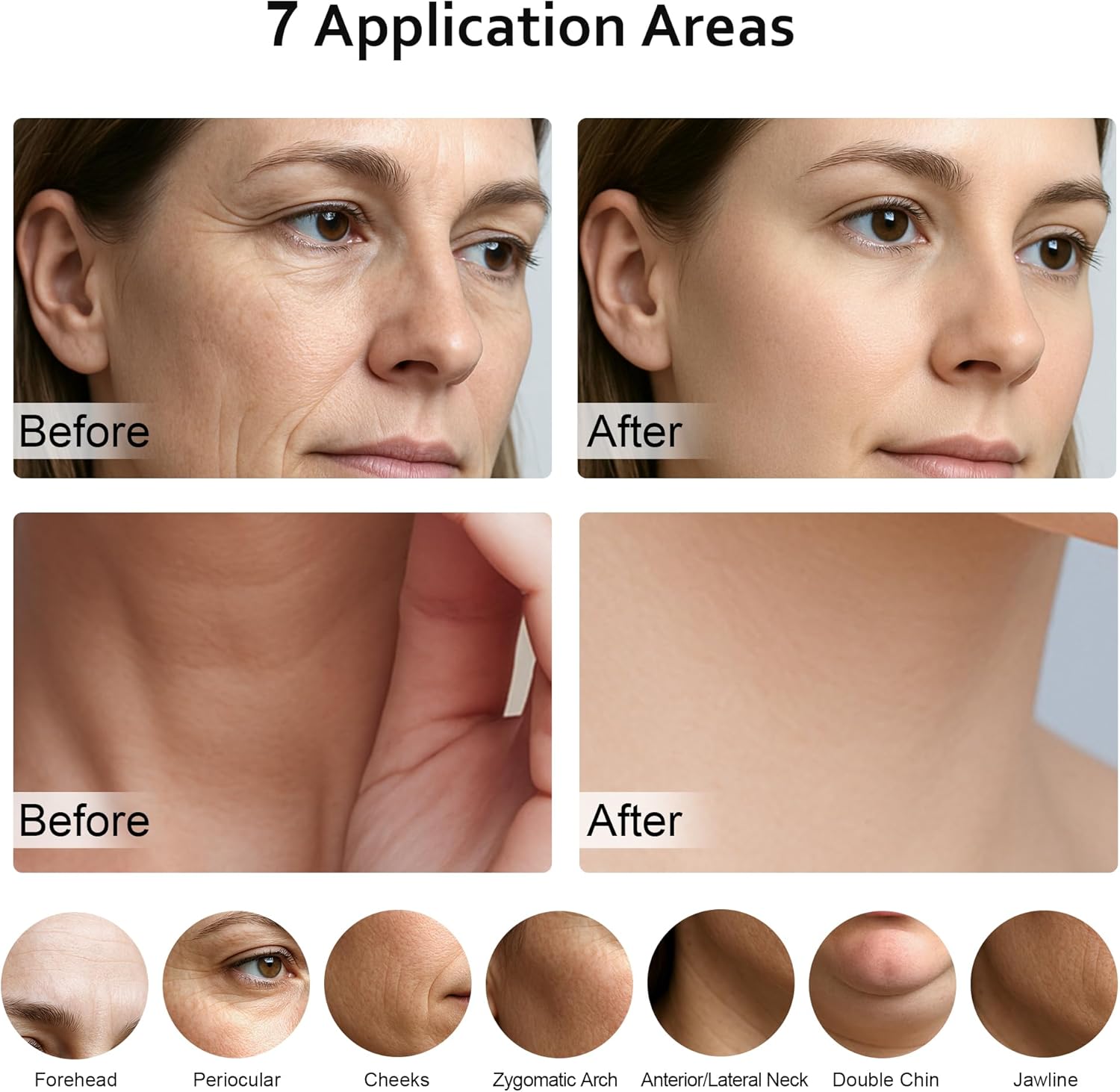
- Focus on areas like the forehead, periocular area, cheeks, zygomatic arch, anterior/lateral neck, double chin, and jawline.
Ataata Whakaaturanga:
Video: A demonstration of the facial and neck massager's light therapy functions and application techniques. This video is provided by the seller, Yolopim.
Te tiaki
Hei whakarite i te akuaku me te roa o te wā e whakamahia ana tō pūrere:
- After each use, gently wipe the device head with a soft, damp kakahu.
- Me whakarite kia maroke rawa te taputapu i mua i te penapena.
- Store the device in a clean, dry place, preferably with its protective cover on the head to prevent dust accumulation and maintain hygiene.
Raparongoā
If you experience issues with your device, please refer to the following common solutions:
- Kaore te taputapu e huri ana: Ensure the device is fully charged. If the issue persists, try using a different USB-C cable or power adapter.
- No vibration/EMS function: The vibration and EMS functions are activated when the metal contact points on the device head are in contact with your skin. Ensure proper contact.
- Skin tingling/shock sensation: Some users have reported a tingling or slight shock sensation, particularly on stronger settings or when switching modes. This may indicate sensitive skin or improper contact. Ensure your skin is adequately moisturized with serum/lotion before use. If discomfort persists, use a lower intensity setting or discontinue use.
- Lights not changing: Press the 'M' button firmly to cycle through the different modes and light colors.
Whakatakotoranga
| Āhuahira | Taipitopito |
|---|---|
| Waitohu | Keylitos |
| Ingoa Tauira | face massager tool |
| Tauira Tuemi | red light therapy for face |
| ASIN | B0DWMQJ2MR |
| Tae | Mā |
| Rauemi | Kirihou |
| Taumaha Tūemi | 0.24 Kirokaramu (8.47 hekere) |
| Ahu mōkihi | 7.05 x 4.72 x 1.85 inihi |
| Kaihanga | Keylitos |
| Te Ra Tuatahi Wātea | Maehe 27, 2025 |
Pūtāhui me te Tautoko
For warranty information and customer support, please refer to the contact details provided with your product packaging or visit the official Keylitos webpae. Puritia tō rīhiti hoko mō ngā kereme pūtāhui katoa.
Whakakahoretanga Ture
Ko nga korero e pa ana ki nga taapiringa kai kaore ano kia arotakehia e te FDA, kaore i te whakaaro ki te tirotiro, ki te rongoa, ki te rongoa, ki te aukati ranei i nga mate, i nga ahuatanga hauora ranei.