
1. Kupu Whakataki
Thank you for choosing the JUNJIEUNVO Q16 Wireless Translation Earbuds. These open-ear design earbuds offer a comfortable listening experience, advanced Bluetooth 5.4 connectivity, IPX5 waterproof rating, and support for real-time language translation across over 100 countries. This manual provides detailed instructions on how to set up, operate, and maintain your earbuds to ensure optimal performance.
2. Ihirangi mokete
Tena koa tirohia te kete mo nga mea e whai ake nei:
- JUNJIEUNVO Q16 Wireless Translation Earbuds (Left and Right)
- Puhi utu
- Pukapuka Kaiwhakamahi
- Charging Cable (USB-C, not always included, please check packaging)
3. Hua Neke Atuview
The Q16 earbuds feature an open-ear design for comfort and situational awareness, housed in a compact charging case. The case includes a digital display for battery status.

Whakaahua 3.1: Q16 Earbuds in their charging case, showing the left (L) and right (R) indicators along with the digital battery display.

Whakaahua 3.2: The open-ear design of the Q16 earbuds, emphasizing comfort and awareness of surroundings.

Whakaahua 3.3: Diagram illustrating the directional sound transmission technology, designed to protect privacy and reduce sound leakage.
4. Tatūnga
4.1 Te Whakataki i nga Paorooro me te Puhi
Before first use, fully charge the earbuds and the charging case. The charging case has a 500mAh battery, and each earbud has a 40mAh battery. A full charge takes approximately 1.5 hours.
- Connect the charging cable (typically USB-C) to the charging port on the case and to a USB power source.
- The digital display on the charging case will show the charging progress.
- Place the earbuds into the charging case. Ensure they are correctly seated; the case will indicate if they are charging.
4.2 Takirua Nihokikorangi
The Q16 earbuds use Bluetooth 5.4 for a stable and efficient connection. The pairing process is automatic upon opening the case.
- Ensure your smartphone or device's Bluetooth is turned on.
- Whakatuwheratia te taupoki o te pouaka ka tohutohutia. Ka uru aunoa nga taringa ki te aratau takirua.
- On your device, search for Bluetooth devices and select "Q16" from the list.
- Ina hono ana, ka rongo koe i te tangi whakau, ka reri nga taringa mo te whakamahi.
- For subsequent connections, simply open the charging case, and the earbuds will automatically reconnect to the last paired device.
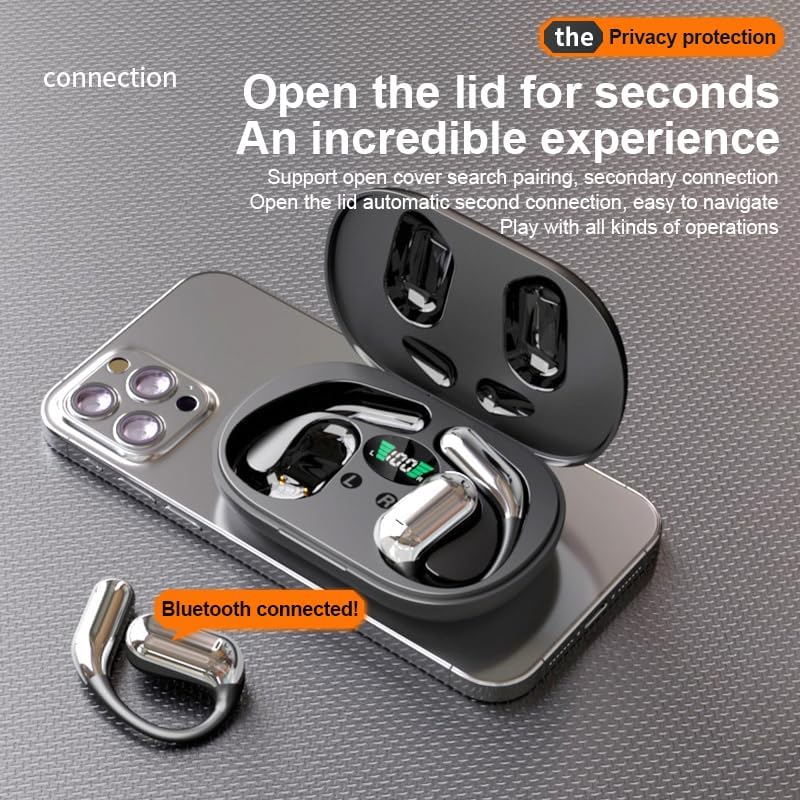
Whakaahua 4.1: The Q16 earbuds connected to a smartphone, indicating successful Bluetooth pairing.
5. Nga Tohutohu Whakahaere
5.1 Hiko / Whakaweto
- Whakahiko: Whakatuwheratia te taupoki o te pouaka utu, ā, ka whakakā aunoa ngā pane taringa.
- Weto Whakakore: Whakahokia nga purongo ki roto i te puha utu ka kati te taupoki. Ka weto aunoa ka timata ki te utu.
5.2 Purei Waiata
(Specific touch controls are not detailed in the provided product data. The following are common gestures; refer to the manufacturer's official app or website for precise controls.)
- Purei/Tatari: Patohia tetahi purongo kia kotahi.
- Riu Panuku: Patohia-rua te purongo taringa matau.
- Riu o mua: Paoa rua te purongo maui.
- Mana Rōrahi: (Typically a long press or triple tap, specific action not provided. Adjust via your connected device if not available on earbuds.)

Whakaahua 5.1: Illustration of the panoramic stereo surround sound feature, enhancing the audio experience.
5.3 Whakahaere Waea
- Whakautu/Whakamutu Waea: Patohia tetahi purongo kia kotahi.
- Whakakore Waea: Pēhi roa i tetahi purongo mo te 2 hēkona.
5.4 Language Translation Function
The Q16 earbuds support real-time translation for over 100 languages. This feature typically requires a dedicated translation application on your paired smartphone.
- Download and install the recommended translation app (refer to product packaging or manufacturer's website for app details) on your smartphone.
- Ensure the earbuds are connected to your smartphone via Bluetooth.
- Open the translation app and follow its instructions to initiate real-time translation. The earbuds will act as your audio input/output device for the translation.
5.5 IPX5 Whakatauranga parewai
The earbuds are rated IPX5 waterproof, meaning they are resistant to splashing water from any direction. This makes them suitable for sports and outdoor activities. Note: The charging case is not waterproof. Avoid exposing the charging case to water.
6. Tiaki me te Tiaki
- Te horoi: Me ata muru nga pukoro me te pukoro utu ki te kakahu ngohengohe, maroke, kore-rara. Kaua e whakamahi i nga matū kino, i nga mea awhiowhio ranei.
- Rokiroki: Mena karekau e whakamahia, penapenahia nga purongo ki roto i to pukoro hei tiaki kia mau tonu te utu. Whakaorangia ki te waahi makariri, maroke atu i nga wera nui.
- A ape i te wai: While the earbuds are IPX5 waterproof, avoid submerging them in water. The charging case is not waterproof.
- Tiaki Pūhiko: Hei whakaroa i te ora o te pākahiko, kaua e tukua kia pau katoa te wera o ngā pane taringa me te pouaka utu i ngā wā katoa. Utuhia i ngā wā katoa, ahakoa kāore e whakamahia tonutia.
7. Te Raru
| Raruraru | Rongoā |
|---|---|
| Karekau nga taringa e hono ana ki te taputapu. |
|
| Karekau he oro mai i nga taringa. |
|
| Karekau nga taringa e utu ana. |
|
| Kāore te mahi whakamāori e mahi. |
|
8. Whakatakotoranga
| Āhuahira | Taipitopito |
|---|---|
| Ingoa Tauira | YYK-Q16 |
| Putanga Nihokikorangi | V5.4+EDR |
| Tipi | Blue Flood |
| Kawa Tautokohia | AVRCP V1.6, A2DP V1.3, HFP V1.7 (Simultaneous LE and BR / EDR) |
| Usage/Playback Time | Tata ki te 8 haora (i te 80% rōrahi) |
| Wā tūtatari | 80 haora |
| Waa Whakatau | Tata ki te 1.5 haora |
| Tawhiti Ahokore | 10 mita |
| Raukaha Puku Earbud | 40mAh (ia) |
| Whakatauhia te kaha o te pākahiko | 500mAh |
| Whakatauranga parewai | IPX5 (nga taringa anake) |
| Tautoko Whakamāori | Over 100 languages |
| Te Whakanoho Taringa | On Ear (Open-ear design) |
| Te aukati | 32 Ohm |
| Taumaha Kupenga | 84g (total) |
9. Pūtāhui me te Tautoko
For warranty information and customer support, please refer to the documentation included with your purchase or visit the official JUNJIEUNVO webpae. Mena ka tūtaki koe ki ētahi raruraru kāore i roto i tēnei pukapuka, whakapā atu ki tā mātou tīma ratonga kiritaki mō te āwhina.
Kaihanga: UNVO
Waitohu: JUNJIEUNVO