
Kupu Whakataki
Thank you for choosing the JUNJIEUNVO Q39 Wireless Translation Earbuds. These earbuds are designed to provide high-quality audio, comfortable wear, and convenient language translation capabilities. This manual will guide you through the setup, operation, and maintenance of your new device.
Ihirangi mokete
- JUNJIEUNVO Q39 Wireless Translation Earbuds (Left and Right)
- Puhi utu
- Tauira Whakatau USB
- Pukapuka Kaiwhakamahi (Tenei tuhinga)
Ka mutu te huaview
The JUNJIEUNVO Q39 earbuds feature an open-ear design for comfort and situational awareness, integrated Bluetooth 5.4 for stable connectivity, and IPX5 water resistance for sports use. The charging case provides extended battery life and includes a digital display.

Image: The JUNJIEUNVO Q39 Wireless Translation Earbuds in their charging case. The earbuds are beige with gold accents, and the charging case is open, revealing the earbuds and a digital display for battery status.
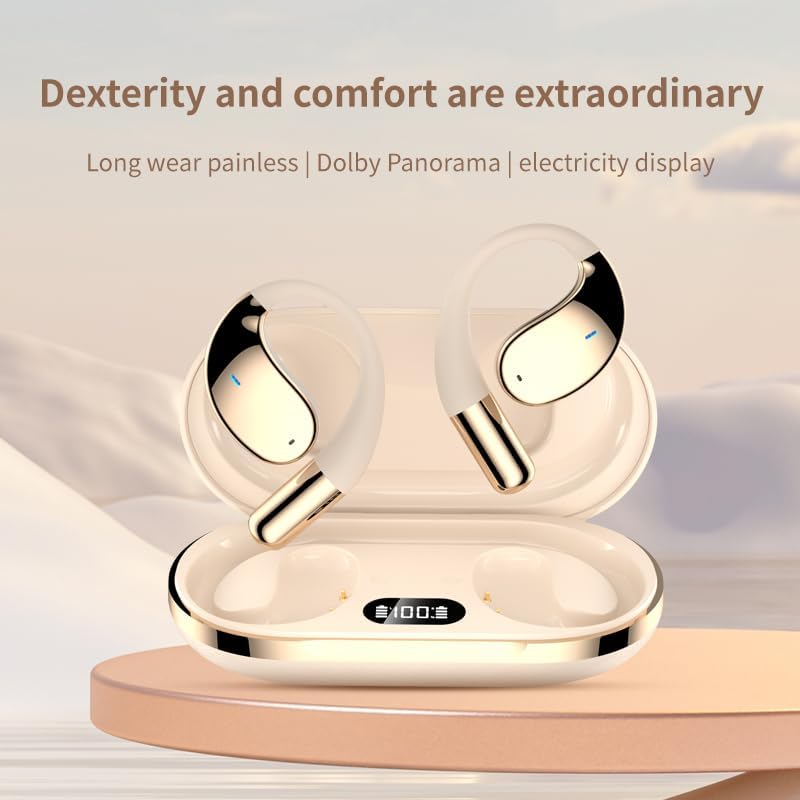
Whakaahua: He tata view of the JUNJIEUNVO Q39 earbuds nestled in their charging case. The case features a clear digital display indicating the battery percentage, currently showing "100".
Tatūnga
1. Te Whakataki i nga Paorooro me te Puhi
I mua i te whakamahi tuatahi, whakakiia katoatia nga pukoro taringa me te putea utu.
- Connect the USB charging cable to the charging port on the case and to a USB power source.
- The digital display on the charging case will show the battery level during charging.
- E rua hāora te roa o te utunga katoa o te pouaka.
- The earbuds will charge automatically when placed inside the powered charging case. Earbuds battery capacity: 40mAh each. Charging case battery capacity: 500mAh.
2. Takirua Nihokikorangi
Hei hono i ō pane taringa ki tētahi pūrere:
- Me whakarite kei te utu nga purongo.
- Whakatuwherahia te putea utu. Ka uru aunoa nga taringa ki te aratau takirua.
- I runga i to taputapu (smartphone, tablet, etc.), haere ki nga tautuhinga Nihokikorangi ka whakakaa te Nihokikorangi.
- Rapua available devices and select "Q39" from the list.
- Ina hono ana, ka rongo koe i te tangi whakau, ka reri nga taringa mo te whakamahi.
- The earbuds support Bluetooth V5.4+EDR and a connection distance of up to 10 meters.
Nga Tohutohu Whakahaere
Te Hiko / Whakaweto
- Whakahiko: Whakatuwheratia te pukoro utu, ka hiko aunoa nga taringa.
- Weto Whakakore: Whakahokia nga purongo ki roto i te puha utu ka kati te taupoki. Ka weto aunoa ka timata ki te utu.
Purei Waiata
Specific touch controls for music playback are typically detailed in a quick start guide or on the product itself. Generally, common controls include:
- Purei/Tatari: Pao kotahi ki runga i tetahi purongo.
- Riu Panuku: Pao rua ki te purongo matau.
- Riu o mua: Pao rua ki te purongo maui.
- Mana Rōrahi: (If supported) Triple tap on an earbud or adjust via your connected device.
Whakahaa Piiraa
- Whakautu/Whakamutu Waea: Pao kotahi ki runga i tetahi purongo i te wa o te waea taumai.
- Whakakore Waea: Pēhia me te pupuri i tetahi purongo mo te 2 hēkona i te wa o te waea taumai.
Mahi Whakamāori
The JUNJIEUNVO Q39 earbuds support language translation for over 134 countries. To utilize this feature:
- Ensure your earbuds are connected to your smartphone.
- Download and install the dedicated translation application (if available) or a compatible third-party translation app on your smartphone.
- Follow the instructions within the translation application to initiate and manage real-time translation. The earbuds will act as the audio input and output device for the translation.
Te tiaki
- Te horoi: Whakamahia he kakahu ngohengohe, maroke, kore-raro hei horoi i nga pukoro taringa me te putea utu. Kaua e whakamahi i nga matū kino, i nga mea awhiowhio ranei.
- Ātete wai: The earbuds are IPX5 waterproof, meaning they are resistant to splashes and sweat. Do not submerge them in water or expose them to heavy rain. Ensure they are dry before placing them back in the charging case.
- Rokiroki: Whakaorangia nga purongo i roto i te pukoro utu ina kore e whakamahia hei tiaki me te pupuri i te utu. A ape i te wera nui.
Raparongoā
- Karekau e honoa nga taringa:
- Me whakarite kia utu nga purongo e rua.
- Whakawetohia te Nihokikorangi i runga i to taputapu ka whakahurihia.
- Wareware atu ki te "Q39" i te rārangi Nihokikorangi o tō pūrere, ka ngana anō ki te hono.
- Whakahokia nga taringa ki roto i te take, kati te taupoki, tatari mo etahi hēkona, ka tuwhera ki te tautuhi.
- Karekau he oro mai i tetahi pukoro:
- Tirohia te taumata pākahiko o ngā pane taringa e rua.
- Try resetting the earbuds as described above.
- Karekau e utuhia ana:
- Me mohio kei te hono pai te taura utu ki te take me te puna hiko.
- Whakamātauria he taura USB rereke, he urutau hiko ranei.
Whakatakotoranga
| Ingoa Tauira | YYK-Q39 |
| Putanga Nihokikorangi | V5.4+EDR |
| Nihokikorangi Chip | Blue Flood |
| Kawa Tautokohia | AVRCP V1.6, A2DP V1.3, HFP V1.7 (Simultaneous LE and BR / EDR) |
| Usage/Playback Time | Tata ki te 8 haora (i te 80% rōrahi) |
| Wā tūtatari | 80 haora |
| Wā Whakatau (Puhi) | Tata ki te 1.5 haora |
| Tawhiti Ahokore | 10 mita |
| Raukaha Puku Earbud | 40mAh |
| Whakatauhia te kaha o te pākahiko | 500mAh |
| Whakatauranga Atete Wai | IPX5 |
| Te Whakanoho Taringa | On Ear (Open-ear design) |
| Te aukati | 32 Aue |
| Taumaha Tūemi | 5 ounces (total package weight is 185g gross, 84g net) |
| UPC | 884613749477 |
Pūtāhui me te Tautoko
Mō ngā mōhiohio pūtāhui me te tautoko kiritaki, tirohia ngā tuhinga i whakaratohia i te wā o te hoko, whakapā atu rānei ki tō kaihokohoko. Puritia tō taunakitanga hoko mō ngā kereme pūtāhui katoa.