
Ka mutu te huaview
The GOBOULT Y1 Pro Wireless Earbuds are designed to provide a high-quality audio experience with features like extended playtime, clear calling, and low-latency gaming. This manual provides detailed instructions for setting up, operating, and maintaining your earbuds.

Whakaahua: He whakaaturanga toirau casing key features of the GOBOULT Y1 Pro Earbuds, including 60 hours playtime, Zen Quad Mic ENC, 45ms low latency gaming, 13mm bass drivers, Type-C fast charging, and Bluetooth 5.3.
Ihirangi mokete
- GOBOULT Y1 Pro Wireless Earbuds
- Puhi utu
- USB Momo-C Taura Whakapae
- Uinga Taringa (he rereke nga rahi)
- Eartips (nga momo rahi)
- Kaari Raati
Tatūnga
1. Te Whakataki i nga Paorooro me te Puhi
Before initial use, ensure both the earbuds and the charging case are fully charged. This optimizes battery life and performance.
- Connect the provided USB Type-C charging cable to the charging port on the case and to a compatible USB power adapter (not included).
- The LED indicator on the charging case will illuminate to show charging status.
- A full charge typically takes a few hours. A quick 10-minute charge can provide approximately 120 minutes of playtime.

Image: The GOBOULT Y1 Pro earbuds and charging case, illustrating the Type-C fast charging capability, where 10 minutes of charge provides 120 minutes of playtime.
2. Takirua Tuatahi
Follow these steps to pair your earbuds with your device for the first time:
- Remove any protective film from the charging contacts on the earbuds.
- Place both earbuds into the charging case and close the lid for a few seconds.
- Open the charging case lid. The earbuds will automatically power on and enter pairing mode, indicated by flashing LED lights.
- I tō waea atamai, i tētahi atu pūrere rānei e whakahohea ana e te Nihokikorangi, haere ki ngā tautuhinga Nihokikorangi.
- Rapua ngā taputapu e wātea ana, ā, tīpakohia "GOBOULT Y1 Pro"mai i te rarangi.
- Ina hono ana, ka whakauhia e te aki reo te mahi takirua angitu.

Image: A diagram illustrating the initial setup steps, including removing protective film and opening the case, along with a detailed guide to the touch controls for both left and right earbuds.
3. Automatic Reconnection
After initial pairing, the earbuds will automatically connect to the last paired device when removed from the charging case and Bluetooth is enabled on the device.

Image: GOBOULT Y1 Pro earbuds and charging case, demonstrating Bluetooth 5.3 for stable, efficient, and fast pairing with a connected smartphone.
Nga Tohutohu Whakahaere
Te Hiko / Whakaweto
- Whakahiko: Open the charging case lid. The earbuds will power on automatically. Alternatively, if outside the case, long press the touch area on both earbuds for 3 seconds.
- Weto Whakakore: Place both earbuds back into the charging case and close the lid. They will power off automatically. Alternatively, long press the touch area on both earbuds for 5 seconds.
Mana Pa
The GOBOULT Y1 Pro earbuds feature intuitive touch controls for managing music, calls, and other functions. Refer to the diagram below and the following list for specific actions:
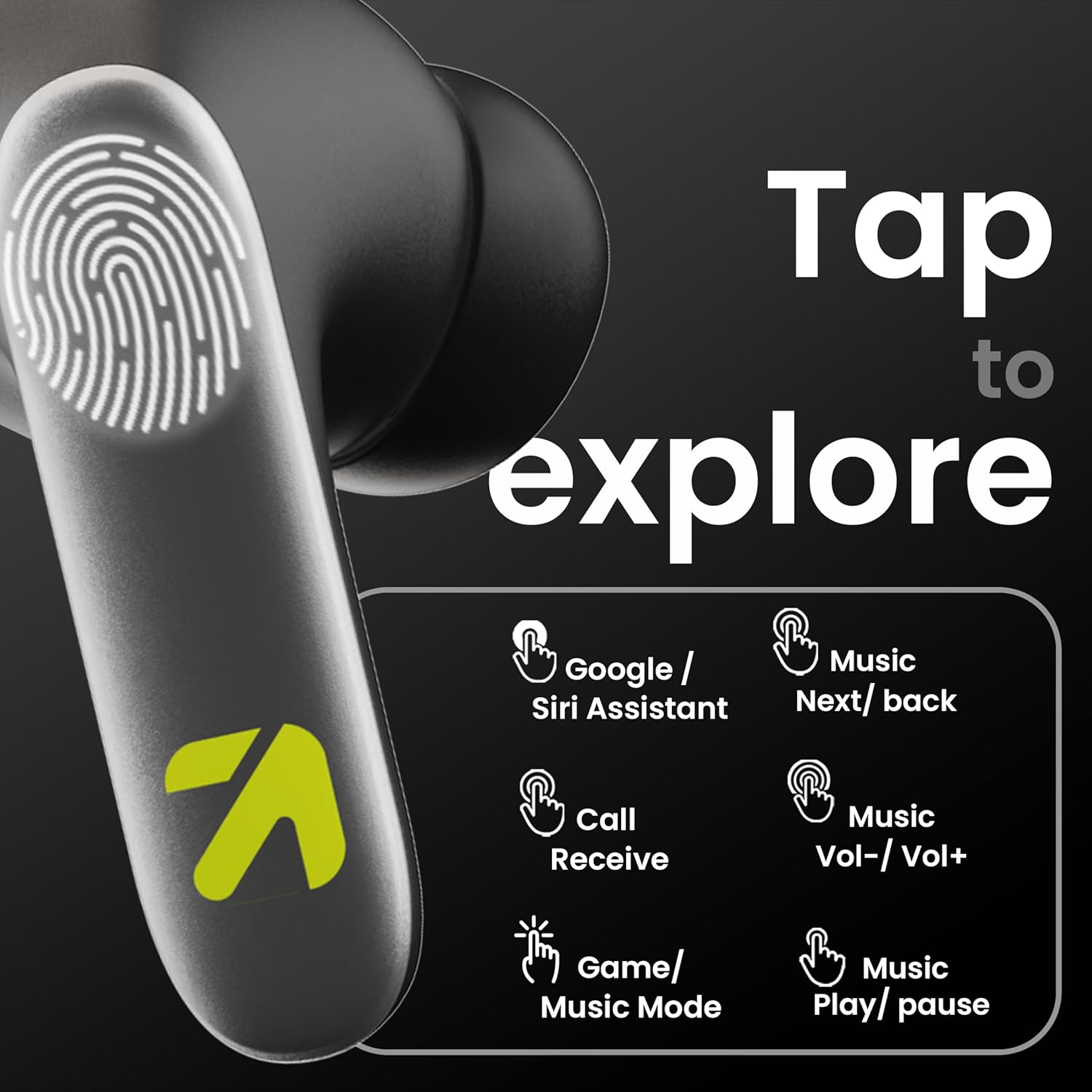
Image: A visual guide to the touch controls on the GOBOULT Y1 Pro earbuds, detailing actions for Google/Siri Assistant, music navigation, call management, volume control, and game/music mode switching.
- Single Tap (Left/Right): Purei/Tatari waiata, Whakautu/Whakamutua te waea.
- Paoa Taurua (Punarongo Mauī): Waiata o mua.
- Paoa Taurua (Punarongo Matau): Waiata Panuku.
- Pato Takitoru (Puna taringa maui): Rōrahi Whakararo.
- Pato Takitoru (Pono Whakamatau): Rōrahi Whakarunga.
- Long Press (2 seconds, Left/Right): Reject incoming call, Activate Voice Assistant (Google/Siri).
- Four Taps (Left/Right): Activate/Deactivate Gaming Mode.
Aratau petipeti
For an enhanced gaming experience, activate the ultra-low latency Gaming Mode:
- Whakahohenga: Tap the touch area four times on either earbud.
- Wehenga: Tap the touch area four times again.

Image: GOBOULT Y1 Pro earbuds and charging case, highlighting the 45ms low latency gaming mode for real-time audio synchronization, activated by four taps.
Kaiāwhina reo
Quickly access your device's voice assistant (Siri or Google Assistant) for hands-free control:
- Whakahohenga: Perform a long tap on the touch area of either earbud.

Image: Illustration showing how to access Siri or Google Assistant with a long tap on the earbud's touch sensor.
Whakakorea te Riihi Taiao (ENC)
The GOBOULT Y1 Pro features Zen Quad Mic ENC technology, ensuring crystal-clear calls by effectively filtering out ambient noise from your surroundings.

Image: A diagram explaining how Environmental Noise Cancellation (ENC) works by isolating your voice from environmental noise, ensuring clear communication during calls.
Te tiaki
Te horoi
- Me horoi i nga wa katoa nga pukoro me te pukoro utu ki te kakahu ngohengohe, maroke, kore-puru.
- Ensure the charging contacts on both the earbuds and inside the case are free from dust and debris to maintain proper charging.
- Do not use abrasive cleaners, solvents, or harsh chemicals, as these may damage the product.
Ātete wai
The GOBOULT Y1 Pro earbuds are rated IPX5 water-resistant. This means they are protected against low-pressure water jets from any direction, making them suitable for workouts and light splashes.
- Kaua e rukuhia nga taringa ki te wai.
- Avoid exposing them to heavy rain or extreme moisture.
- Me whakarite kia maroke nga purongo i mua i te whakahoki ano ki roto i te pukoro utu kia kore ai e pakaru.

Image: GOBOULT Y1 Pro earbuds with water droplets, illustrating their IPX5 water resistance, providing protection against sweat and splashes.
Raparongoā
If you encounter any issues with your GOBOULT Y1 Pro earbuds, refer to the following common troubleshooting steps:
Kāore ngā taringaoro e hono ana, e hono ana rānei
- Me whakarite kei te rawaka te pākahiko o ngā pane taringa me te pouaka utu.
- Turn off Bluetooth on your device, wait 5 seconds, then turn it back on.
- On your device, "Forget" or "Unpair" "GOBOULT Y1 Pro" from the Bluetooth list, then attempt the pairing process again.
- Place both earbuds back into the charging case, close the lid, wait 10 seconds, then open the lid to re-enter pairing mode.
Kotahi anake te pukoro e mahi ana
- Me whakarite kia utu nga purongo e rua.
- Whakahokia nga purongo e rua ki roto i te putunga utu, kati te taupoki, ka whakatuwhera ano. He maha nga wa ka tukutahi ano tenei.
- If the issue persists, try resetting the earbuds (refer to the manufacturer's web(pae mō ngā tohutohu tautuhi anō mēnā kāore i te whakamāramahia i konei).
He kino te kounga oro, he iti ranei te oro
- Ensure the earbuds are properly seated in your ears to create a good seal. Try different sized eartips.
- Horoia ngā paru katoa mai i ngā anga o te taringa.
- Check the audio source device's volume and sound settings.
- Neke atu ki tō pūrere hono kia kore ai e pokanoa ki te tohu.
Nga take utu
- Me mohio kei te hono pai te taura utu ki te take me te puna hiko.
- Try a different USB Type-C charging cable or power adapter.
- Horoia ngā hononga utu o ngā pane taringa me roto hoki o te pouaka ki te miro maroke.
Whakatakotoranga
| Āhuahira | Taipitopito |
|---|---|
| Waitohu | GOBOULT |
| Ingoa Tauira | AirBass |
| Putanga Nihokikorangi | 5.3 |
| Te Whakanoho Taringa | I te Taringa |
| Mana Haruru | Whakakorea te Riihi Taiao (ENC) |
| Rahi Atekōkiri Ororongo | 13 Milimetera |
| Tapeke Wā takaro | Tae atu ki te 60 Haora (me te putea utu) |
| Rooputanga Iti | 45ms (Aratau petipeti) |
| Momo utu | Momo-C Tere Tere |
| Ātete wai | IPX5 |
| Tikanga Mana | Paa |
| Pūrere Hototahi | Waea atamai, Papaaho, Pona, Papamahi, Kaikōrero Atamai |
| Taumaha Tūemi | 50 Karamu |
| Whenua Taketake | Haina |
Nga korero Whakaputanga
The GOBOULT Y1 Pro Wireless Earbuds are covered by a 1 Tau Rarangi a te Kaihanga mai i te ra o te hokonga.
This warranty covers manufacturing defects. Please retain your proof of purchase for any warranty claims. The warranty does not cover damage caused by misuse, accidents, unauthorized modifications, or normal wear and tear.
Tautoko
For further assistance, technical support, or warranty inquiries, please contact:
- Kaihanga: Exotic Mile Private Limited, B-67 Wazirpur Industrial Area, New Delhi 110052
- Kai kawemai: Exotic Mile Pvt. Ltd., B67 Wazirpur Industrial Area, New Delhi 110052
- For customer service contact details, please refer to the GOBOULT official webpae, te turanga ranei i hokona e koe te hua.