
1. Kupu Whakataki
Thank you for choosing the JUNJIEUNVO Q16 PRO Wireless Translation Earbuds. These earbuds are designed to provide a versatile audio experience, featuring real-time language translation, high-definition sound, and an open-ear design for comfort. This manual provides essential information for setting up, operating, and maintaining your device.
2. Ihirangi mokete
- JUNJIEUNVO Q16 PRO Wireless Translation Earbuds (Left and Right)
- Charging Case with Smart Touch Screen
- Pukapuka Kaiwhakamahi
- Ura Whakatau (USB-C)
3. Hua Neke Atuview

Whakaahua 3.1: JUNJIEUNVO Q16 PRO Wireless Translation Earbuds and Charging Case. This image displays the white and silver earbuds with their unique ear-hook design, alongside the charging case which features a digital display showing time and battery levels.
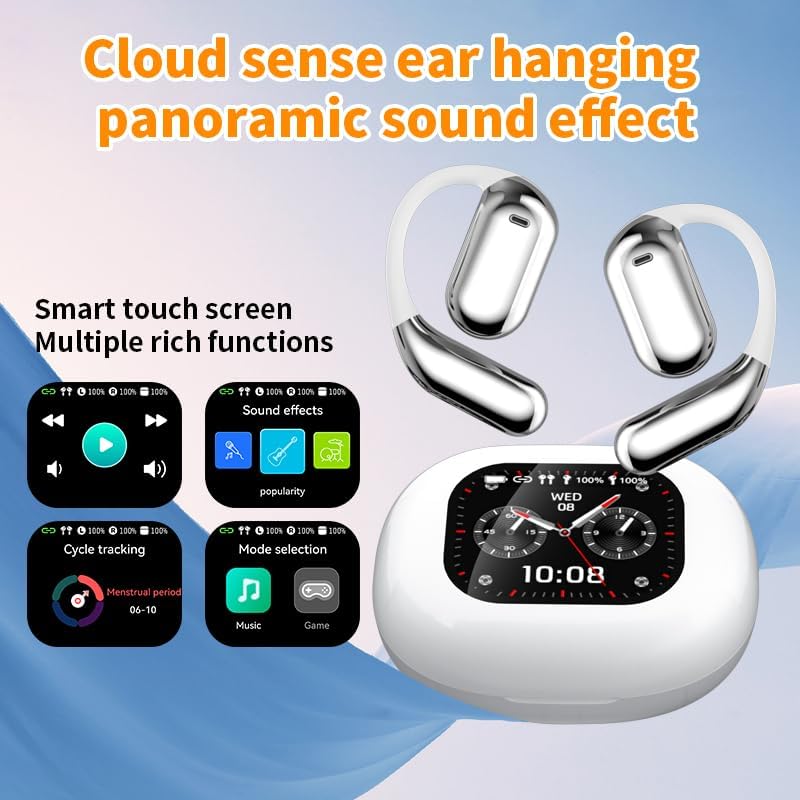
Whakaahua 3.2: Smart Touch Screen Functions. This image highlights the charging case's smart touch screen, illustrating various functions such as media playback controls, sound effects, cycle tracking, and mode selection (music/game).

Whakaahua 3.3: Environmental Noise Cancellation (ENC). This image depicts a person wearing the earbuds, with an overlay illustrating how the ENC technology reduces ambient noise by up to 99.44%, providing a clearer audio experience.

Whakaahua 3.4: Open-Ear Design for Comfort. This image shows a person wearing the earbuds, emphasizing the open-ear design that offers comfort and allows for awareness of external sounds, protecting ear canal health.

Whakaahua 3.5: Multiple Sound Adjustment Modes. This image displays the charging case's screen showing "Sound effects" with options for various music genres, indicating the ability to customize audio preferences.

Whakaahua 3.6: Extended Battery Life and Rich Functions. This image showcases the earbuds and charging case, highlighting a 40-hour endurance with a 500mAh charging case capacity, along with a mention of multiple functions.

Whakaahua 3.7: Earbuds and Charging Case (Open View). A detailed view of both earbuds and the open charging case, showing the internal design and charging contacts.

Whakaahua 3.8: Earbuds in Charging Case. This image shows the earbuds securely placed within their charging case, ready for charging or storage.

Whakaahua 3.9: Earbuds and Charging Case (Angled View). Another perspective of the earbuds and charging case, emphasizing their sleek design and compact form factor.
4. Tatūnga
4.1 Te Whakataki i nga Paorooro me te Puhi
I mua i te whakamahi tuatahi, whakakiia katoatia nga pukoro taringa me te putea utu.
- Whakanohoia nga purongo ki roto i te pukoro utu. Me whakarite kia tika te noho ki roto i o raatau waahi (L mo te taha maui, R mo te taha matau).
- Connect the charging cable to the USB-C port on the charging case and to a power source.
- The digital display on the charging case will indicate the charging status.
A full charge for the earbuds takes approximately 1.5 hours. The charging case has a 500mAh battery, providing extended use.
4.2 Paihere ki te Pūrere
The earbuds use Bluetooth 5.4 for a stable connection up to 10 meters.
- Whakatuwherahia te putea utu. Ka uru aunoa nga taringa ki te aratau takirua.
- I runga i to taputapu (waea atamai, papa, aha atu), whakaahei i a Nihokikorangi.
- Rapua available Bluetooth devices and select "Q16 PRO" from the list.
- Once connected, the earbuds will indicate successful pairing, and the device will show them as connected.
Ka hono aunoa nga taringa ki te taputapu takirua whakamutunga ina tangohia mai i te keehi, mena ka taea te Nihokikorangi ki runga i te taputapu.
5. Nga Tohutohu Whakahaere
5.1 Smart Touch Screen Functions
The charging case features a smart touch screen for easy control of various functions. Navigate through options by swiping or tapping on the screen.
- Purei Huringa Pāpāho: Control music (play, pause, skip tracks) directly from the screen.
- Pānga oro: Select from various sound modes.
- Kōwhiringa Aratau: Whakawhiti i waenga i ngā aratau puoro me ngā aratau kēmu.
- Aroturuki Porohita: Access additional features if supported by the connected application.
5.2 Mana Pa (Ponorongo)
The earbuds themselves also feature touch-sensitive areas for basic controls:
- Paato Kotahi: Purei/Tatari waiata, Whakautu/Whakamutua te waea.
- Double Tap (Left): Te ara o mua.
- Double Tap (Right): Te ara o muri.
- Panui Roa: Whakahohehia te kaiawhina reo, Whakakorehia te waea.
5.3 Translation Function
The Q16 PRO earbuds support real-time translation for up to 144 languages. This feature typically requires a dedicated application on your connected smartphone.
- Download and install the companion translation application (refer to the app store or product packaging for details).
- Open the application and follow the on-screen instructions to connect your earbuds.
- Select the desired source and target languages within the application.
- Use the earbuds as instructed by the application for real-time translation during conversations or audio playback.
5.4 Sound Adjustment Modes
Customize your audio experience through the charging case's smart touch screen. Available sound modes include:
- Pūnoa
- Pop
- Toka
- Jazz
- Puāwaitanga
- Tangata
- Custom (user-defined equalizer settings)
5.5 IPX5 Whakatauranga parewai
The earbuds are rated IPX5 waterproof, meaning they are resistant to splashes and sweat. They are suitable for sports and outdoor activities but should not be submerged in water.
6. Tiaki
- Te horoi: Whakamahia he kakahu ngohengohe, maroke hei horoi i ngā pane taringa me te pouaka utu. Kaua e whakamahi i ngā rauemi whakakoi, i ngā matū kino rānei.
- Rokiroki: Whakaorangia nga purongo i roto i o raatau putea karekau e whakamahia ana hei tiaki me te pupuri i te utu.
- Aukati i nga Pawera Nui: Do not expose the device to extreme heat or cold, as this can damage the battery and internal components.
- Puranga wai: While IPX5 rated, avoid prolonged exposure to water or high humidity. Ensure the charging port is dry before charging.
7. Te Raru
| Raruraru | Rongoa pea |
|---|---|
| Karekau nga taringa e hono ana | Ensure earbuds are charged. Turn off and on Bluetooth on your device. Forget "Q16 PRO" from your device's Bluetooth list and re-pair. |
| Karekau he oro mai i tetahi pukoro | Check battery level of both earbuds. Place both earbuds back in the case, close it, then reopen to reset. Re-pair with your device. |
| Karekau e utuhia ana | Ensure the charging cable is securely connected. Try a different USB-C cable and power adapter. |
| Translation function not working | Ensure the companion app is installed and updated. Check app permissions (microphone, internet). Verify a stable internet connection. |
| He kino te kounga oro | Ensure earbuds are clean. Check the distance to your device (within 10m). Avoid obstacles between earbuds and device. |
8. Whakatakotoranga
| Āhuahira | Taipitopito |
|---|---|
| Ingoa Tauira | YYK-Q16 PRO |
| Putanga Nihokikorangi | V5.4 + EDR |
| Tipi | Blue Flood |
| Kawa Tautokohia | AVRCP V1.6, A2DP V1.3, HFP V1.7, Simultaneous LE and BR / EDR |
| Usage/Playback Time | Tata ki te 8 haora (i te 80% rōrahi) |
| Wā tūtatari | 80 haora |
| Waa Whakatau | Tata ki te 1.5 haora |
| Tawhiti Ahokore | 10 mita |
| Raukaha Puku Earbud | 40mAh (ia purongo) |
| Whakatauhia te kaha o te pākahiko | 500mAh |
| Whakatauranga parewai | IPX5 |
| Taumaha Tūemi | 6.4 hekere (katoa) |
| UPC | 884613749637 |
| Kaihanga | UNVO |
| Tae | White+Silver |
| Te Whakanoho Taringa | On Ear (Open-wear design) |
| Tauwehe Puka | Ahokore Pono |
9. Pūtāhui me te Tautoko
For warranty information and customer support, please refer to the documentation included with your purchase or contact the retailer/manufacturer directly. Keep your proof of purchase for any warranty claims.