
1. Kupu Whakataki
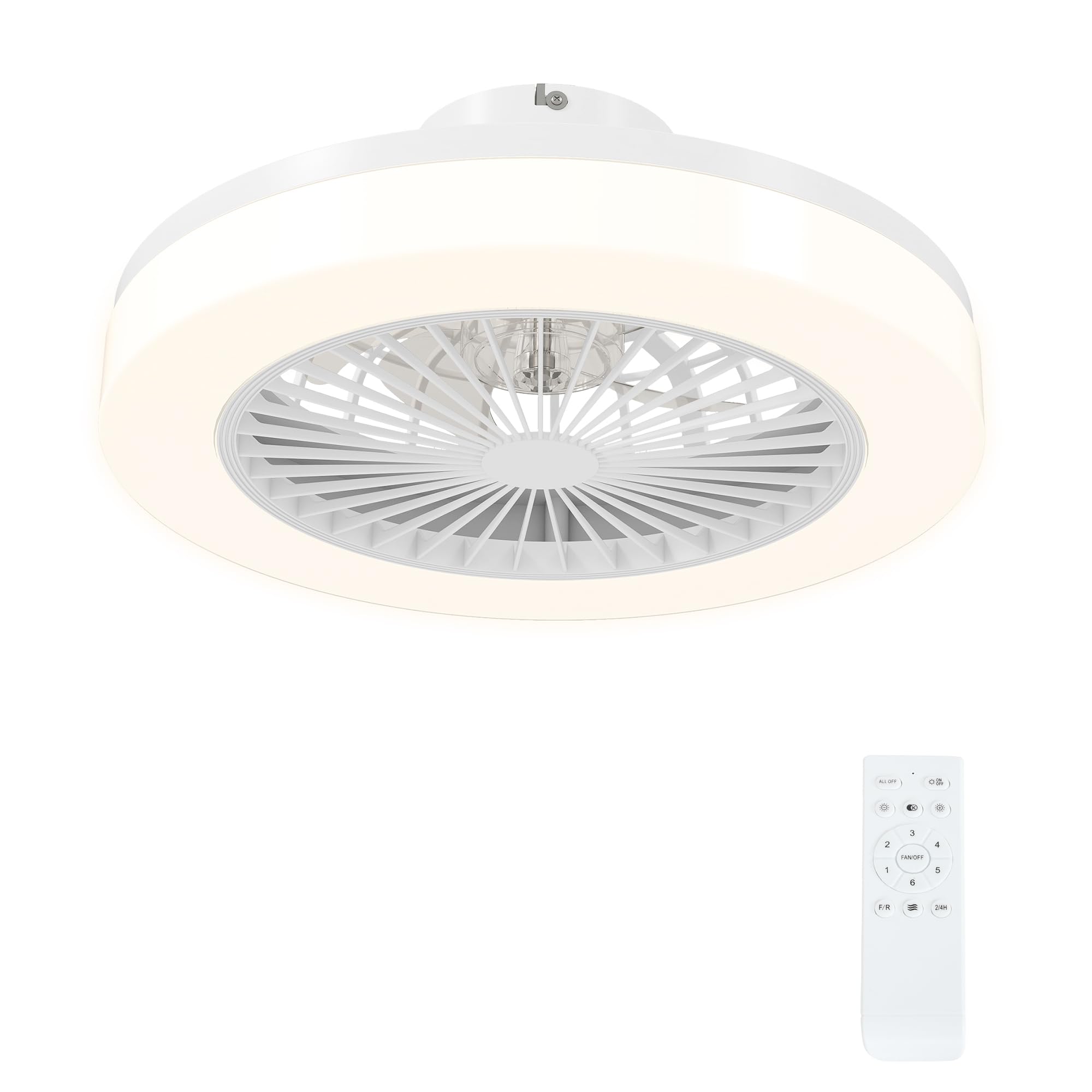
Thank you for choosing the HOMCOM Ceiling Fan with LED Light. This product combines efficient air circulation with versatile lighting, designed to enhance comfort in your living space. Featuring a quiet DC motor, multiple speed settings, and adjustable light color and brightness, this ceiling fan is controlled conveniently via a remote. Please read this manual thoroughly before installation and use to ensure safe and optimal performance.
2. Nga Tohutohu Haumaru
Hei whakaiti i te tupono o te wiri hiko, te ahi, te whara ranei, me whai tonu i enei tikanga tiaki haumaru:
- Tāuta Ngaio: Me mahi te tāutanga me ngā hononga hiko e te tohunga hiko whai tohu, kia rite ki ngā ture hiko ā-rohe me ā-motu katoa.
- Momotu Hiko: Me momotu te hiko mai i te whati hiko matua i mua i te whakamātau i tētahi tāutanga, tiaki, whakatika rānei.
- Whakapiki: Ensure the mounting structure can support the weight of the fan (approximately 1.7 kg) and is securely fastened.
- Whakawātea Mata: Kaua e whakauru i tētahi mea ki te ara o ngā mata o te pā i te wā e mahi ana te pā.
- Pūhiko Mana Mamao: Use only the specified battery type (2 AAA) for the remote control. Ensure correct polarity. Keep batteries out of reach of children.
- Whakamahi Roto anake: Kua hangaia tēnei hua mō te whakamahi i roto i ngā wāhi maroke. Kaua e tukua kia pā ki te wai, ki te haumākū nui rānei.
- Te horoi: Horoi anake ki te kakahu maroke, ngawari. Kaua e whakamahi i nga kai horoi me nga whakarewa.
3. Ihirangi mokete
Me manatoko kei te wātea ngā wāhanga katoa, ā, kāore he pakaru i mua i te tāutanga:
- Ceiling Fan Unit with Integrated LED Light
- Mana Mamao (e hiahia ana kia 2 nga pākahiko AAA, kaore i whakauruhia)
- Whakanuia nga taputapu (tuukiri, punga, aha atu)
- Pukapuka Kaiwhakamahi
4. Nga Hua o te Hua
The HOMCOM Ceiling Fan with LED Light offers a range of features for optimal comfort and convenience:
- Rama LED Whakaritea: Choose between cool white (6000K), neutral white (4000K), or warm white (3000K) light. Brightness is adjustable from 0-100%. The LED technology provides approximately 25,000 hours of durability, reducing energy consumption and maintenance costs.
- Quiet and Efficient Fan: Equipped with a 40W DC copper motor, the fan operates quietly while providing powerful airflow. It features six speed settings and a natural breeze mode that simulates gentle wind.
- All-Season Comfort: The reversible motor allows you to change the direction of the fan blades. In summer, it creates a cooling downdraft. In winter, it circulates warm air trapped near the ceiling, improving heat distribution.
- Mana Mamao Watea: The included remote control has a range of up to 10 meters, allowing you to adjust fan speeds, light settings, and the timer independently.
- Taumahi Matawā: Tautuhia te hau kia whakaweto aunoa i muri i ngā haora e 2, e 4 rānei.


5. Tatūnga me te Tāuta
Hiranga: Installation of this ceiling fan requires professional expertise. It involves electrical wiring and secure ceiling mounting. Consult a qualified electrician for installation to ensure safety and compliance with local regulations.
Takitaki i mua i te whakaurunga:
- Me whakarite kua whakawetohia te pūhiko ki te wāhi tāutanga i te pūwāhi ara iahiko.
- Verify that the ceiling structure is capable of supporting the fan's weight.
- Wewetehia nga waahanga katoa ka tirotirohia mo te kino.
Installation Steps (Summary - Refer to detailed instructions from your electrician):
- Mount the ceiling bracket securely to the ceiling joist or a suitable support structure.
- Connect the electrical wiring from the ceiling to the fan unit, ensuring correct polarity and grounding.
- Attach the fan unit to the ceiling bracket.
- Install the fan blades and light cover.
- Insert 2 AAA batteries into the remote control, observing correct polarity.
- Restore power at the circuit breaker and test the fan and light functions.

6. Nga Tohutohu Whakahaere
The HOMCOM Ceiling Fan is operated using the included remote control.

Nga Mahi Mana Mamao:
- I KIA/OFF: Pēhia te pātene ata pā hei whakakā, hei whakaweto rānei i te pā.
- Tere Kiri: Use the speed buttons (usually indicated by numbers or fan blade icons) to cycle through 6 fan speeds.
- Aratau hau: Activate the breeze mode (often indicated by a wave icon) for a natural, fluctuating airflow.
- Reversible Function (F/R): Press the F/R button to switch between summer (downdraft) and winter (updraft) modes.
- Maama ON/OFF: Press the light bulb icon button to turn the LED light on or off.
- Color Temperature Change (K): Press the 'K' button to cycle through cool white, neutral white, and warm white light settings.
- Whakaritenga Tirohanga: Use the dimming buttons (often indicated by sun icons or +/-) to adjust the light brightness from 0% to 100%.
- Timer (2/4H): Press the timer button to set the fan to automatically turn off after 2 or 4 hours.
7. Tiaki
Ko te tiaki i nga wa katoa ka whakarite i te roa me te mahi tino pai o to mea powhiriwhiri tuanui.
Te horoi:
- Always ensure the power is off before cleaning.
- Wipe the fan and light housing with a soft, dry cloth.
- Do not use water, harsh chemicals, or abrasive cleaners, as these can damage the finish or electrical components.
Whakakapinga Puna Maama:
- The integrated LED light source is replaceable. If replacement is needed, contact a qualified technician or HOMCOM customer support for guidance.
Whakakapinga Pohiko Mana Mamao:
- When the remote control's range decreases or it stops responding, replace the 2 AAA batteries.
- Me whakarite kia tika te polarity i te wa e whakauru ana i nga pākahiko hou.
8. Te Raru
Mena ka pāngia koe e ngā raruraru me tō pā hau tuanui, tirohia ngā raruraru me ngā otinga e whai ake nei:
| Raruraru | Take pea | Rongoā |
|---|---|---|
| Kaore e timata te Fan | No power supply; Remote control batteries are dead or incorrectly inserted; Wiring issue. | Check circuit breaker; Replace remote batteries; Consult an electrician to check wiring. |
| Kare te rama e ka ana | No power supply; Light source issue; Remote control batteries are dead. | Check circuit breaker; If light source is replaceable, check it; Replace remote batteries. |
| Ko te mana mamao kaore e mahi | Dead or incorrectly inserted batteries; Out of range; Interference. | Replace batteries, ensure correct polarity; Move closer to the fan (within 10m); Remove potential sources of interference. |
| Ka haruru te Fan | Loose mounting screws; Unbalanced blades; Obstruction. | Ensure all mounting screws are tight; Check for any obstructions; Contact support if noise persists. |
Mena kei te haere tonu te raru i muri i te whakamatau i enei otinga, tena koa whakapā atu ki te tautoko a te kaihoko HOMCOM mo etahi atu awhina.
9. Whakatakotoranga
| Āhuahira | Whakatakotoranga |
|---|---|
| Tau tauira | B31-513V00WT |
| Ahu (Diamita x Teitei) | Ø46 cm x 16 cm |
| Taumaha | 1.7 kg |
| Mana (Pā) | 40 W |
| Voltage | 220 V |
| Momo Maama | LED whakauru |
| Rerewharewha | 2700 lm |
| Te Paemahana Tae | Adjustable (3000K Warm, 4000K Neutral, 6000K Cool) |
| Tirohanga | Ka taea te whakarite (0-100%) |
| Nga Tere o te Kaiwhaiwhai | 6 speeds + Breeze Mode |
| Mahi Matawā | 2 / 4 haora |
| Tikanga Mana | Mana Mamao (Whawhāwhero) |
| Awhe Mana Mamao | Tae atu ki te 10 mita |
| Pūhiko Mana Mamao | 2 x AAA (kaore i whakauruhia) |
| Rauemi | Kiriaku, Kirihou |
| Momo Whakaeke | Maunga Pouaka |
| Tautukunga | CE, RoHS |
| Whakamahi o roto/waho | Roo-roto |
10. Pūtāhui me te Tautoko
This HOMCOM product comes with a limited warranty. For specific warranty terms and conditions, please refer to the documentation provided at the time of purchase or contact HOMCOM customer service.
For technical support, troubleshooting assistance, or to inquire about replacement parts, please contact HOMCOM customer support through their official website or the retailer where the product was purchased. Please have your model number (B31-513V00WT) and purchase information ready when contacting support.