
SVITOO SVITOO Tab 10 GMS Certified 1027C
SVITOO Kids Tablet 10 Inch User Manual
Model: SVITOO Tab 10 GMS Certified 1027C
Kupu Whakataki
This manual provides essential instructions for setting up, operating, and maintaining your SVITOO Kids Tablet 10 Inch. Designed for young users, this Android 15 tablet features parental controls, a durable shockproof case, and a vibrant 10-inch HD IPS display. Please read this guide thoroughly to ensure proper use and to maximize your tablet's functionality.
He aha kei roto i te Pouaka
- SVITOO Kids Tablet 10 Inch
- Protective Cover (Pre-installed)
- USB-C Uira Whakatau
- Pukapuka Kaiwhakamahi
- Pouaka Koha
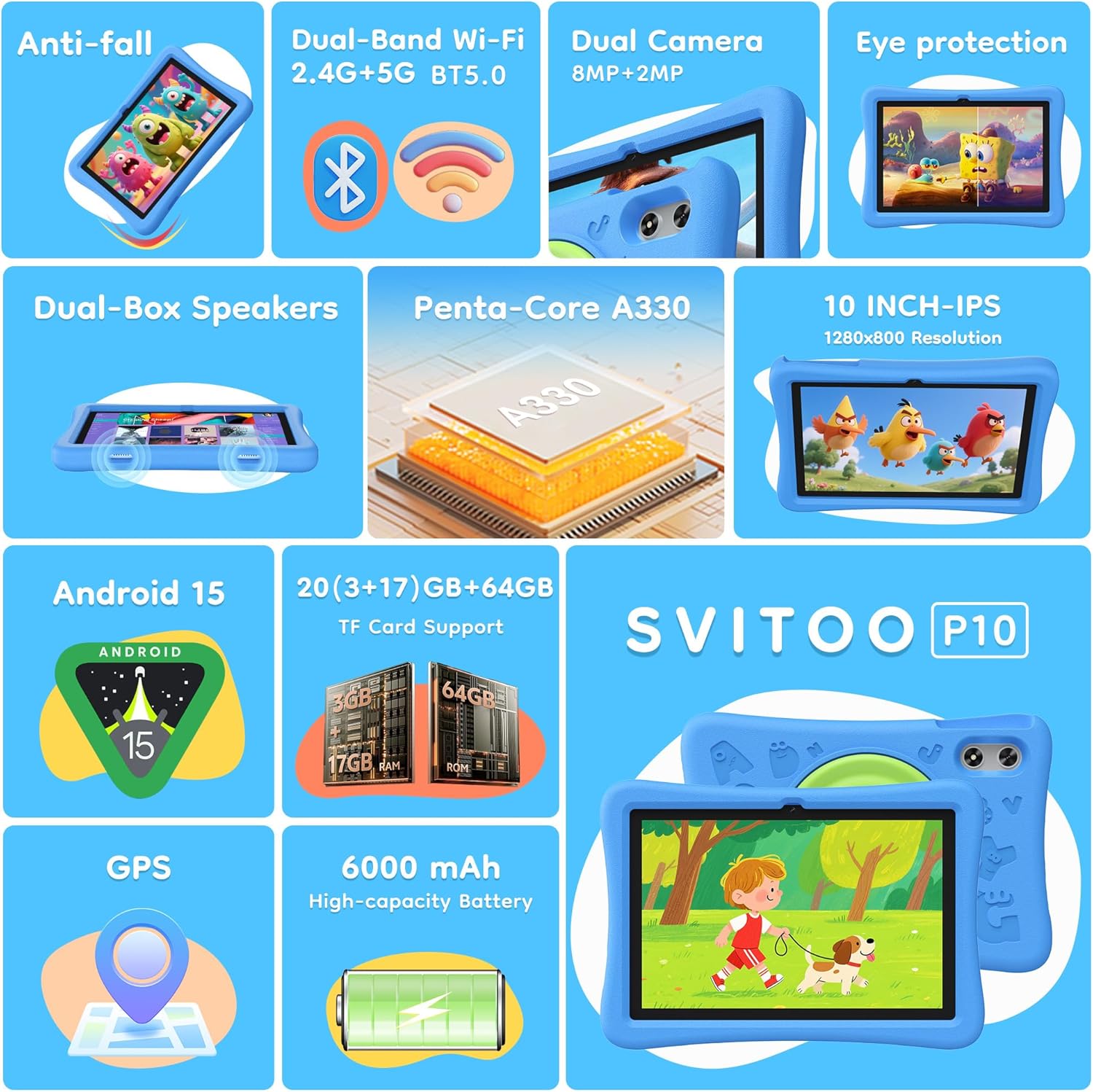
Image: The SVITOO Kids Tablet 10 Inch, shown in its blue protective case, highlighting its robust design suitable for children.
Ka mutu te huaview
Nga waahanga matua
- Pūnaha Mahi: Android 15 with GMS Certification for full Google Play access.
- Whakaatu: 10-inch HD IPS (1280 x 800 pixels) touchscreen with eye protection mode.
- Tukatuka: Unisoc T7200 8-core CPU for smooth performance.
- Pūmahara me te Rokiroki: 20GB RAM (3GB physical + 17GB virtual) and 64GB internal storage, expandable up to 1TB via microSD card (sold separately).
- Ngā Kāmera: 8MP Rear Camera and 2MP Front Camera.
- Hononga: Dual-Band Wi-Fi (2.4/5 GHz) and Bluetooth 5.0.
- Pūhiko: 6000mAh high-capacity battery for extended usage.
- Ororongo: Dual-box speakers and a 3.5mm headphone jack.
- Mauroa: Kid-friendly EVA shockproof case with a 360° rotating handle and 180° rotating stand.
- Mana Mātua: Advanced settings for screen time limits, content filtering, and app management.
Wae Ripa
Kia mohio koe ki nga waahanga tinana o to papa:

Whakaahua: He taipitopito view of the tablet's side and rear, indicating the USB Type-C port, headphone jack, power ON/OFF button, volume controls, speakers, rear camera, and front camera.
- Tauranga Momo-C USB: Mo te utu me te whakawhiti raraunga.
- Jack Puoro (3.5mm): Mo te hono waea waea.
- Pihi WAI ON / WAWHI: To turn the tablet on/off or put it to sleep.
- Pātene Rōrahi: Hei whakatika i te reo ororongo.
- Kaikōrero: Dual-box speakers for audio output.
- Kāmera Mua: Mo nga waea ataata me te whaiaro.
- Kāmera Whakamuri: Mo te tango whakaahua me nga ataata.
- Miihini Kaari MicroSD: Located under a protective flap, for storage expansion.

Image: The tablet's protective case featuring a versatile 360-degree rotating handle that also functions as a 180-degree rotating stand, allowing for various viewnga koki.
Aratohu Tatūnga
- Utuhia te Papa: Before first use, fully charge the tablet using the provided USB-C cable and a compatible power adapter.
- Whakahiko: Press and hold the Power ON/OFF button until the screen lights up.
- Tatūnga Tuatahi: Whaia nga tohu i runga-mata hei kowhiri i to reo, hono atu ki te whatunga Wi-Fi, ka whakarite i to putea Google.
- Google Kids Space / Parental Controls: During setup, you will have the option to configure Google Kids Space or other parental control settings. It is highly recommended to set these up immediately to ensure a safe environment for your child.
- Tāuta Taupānga: Once setup is complete, you can download age-appropriate apps and games from the Google Play Store.
Nga Tohutohu Whakahaere
Whakaterenga Taketake
- Mata Kāinga: Swipe left or right to access different app pages.
- Kaituhi Taupānga: Swipe ake i te raro o te mata ki te view nga tono whakauru katoa.
- Whakamōhiotanga & Tautuhinga Tere: Swipe down from the top of the screen to access notifications and quick settings like Wi-Fi, Bluetooth, and screen brightness.
- Hoki, Kāinga, Taupānga Tata Nei: Use the navigation buttons at the bottom of the screen to go back, return to the home screen, or view kua whakatuwheratia nga tono.
Te Whakataki i te Papa
Connect the USB-C charging cable to the tablet's USB-C port and the other end to a power adapter. The battery icon on the screen will indicate charging status. A full charge provides approximately 12 hours of mixed use.

Image: The tablet connected to a charger, displaying a battery icon with 99% charge, illustrating the charging process and battery life features like Night Mode and Energy Saving.
Aratau Tiaki kanohi
To reduce eye strain, especially during prolonged use, activate the Eye Protection Mode (often called Night Mode or Reading Mode) from the quick settings panel or display settings. This mode adjusts screen colors to warmer tones.
Ngā Mana Mātua
The SVITOO Kids Tablet features robust parental controls to help manage your child's digital experience. These controls are integrated with Android 15 and Google Family Link.

Image: A family using the tablet, with an overlay showing various parental control options such as setting screen time limits, blocking harmful apps/websites, approving app downloads, and tracking child's location.
Te Whirihora i ngā Mana Mātua:
- Tautuhinga Uru: Haere ki Tautuhinga > Te Ora Mamati me nga Mana Maatua or search for "Family Link" in your app drawer.
- Set Screen Time Limits: Define daily limits for tablet usage to encourage balanced screen time.
- Tātari Ihirangi: Āraia te urunga ki ngā mea kāore i te tika webpae me taupānga.
- App Approvals: Require parental approval for new app downloads or in-app purchases.
- Tauwāhi Aroturuki: Monitor your child's device location (if enabled and configured).
For detailed instructions on Google Family Link, please refer to Google's official support documentation.
Te tiaki
- Te horoi: Use a soft, lint-free cloth to clean the screen and tablet body. Avoid abrasive cleaners or solvents.
- Tiaki Pūhiko: To prolong battery life, avoid fully discharging the tablet frequently. Charge it regularly and avoid exposing it to extreme temperatures.
- Whakahōu Pūmanawa: Keep the tablet's operating system and apps updated to ensure optimal performance and security.
- Rokiroki: Store the tablet in a cool, dry place away from direct sunlight when not in use.
- Puhi Tiaki: The included EVA shockproof case provides protection against drops and bumps. Ensure it is properly fitted at all times.
Raparongoā
| Raruraru | Rongoā |
|---|---|
| Kaore te papa e huri ki runga. | Ensure the tablet is fully charged. Connect it to a charger for at least 30 minutes, then try powering it on again. |
| Karekau te mata e aro. | Perform a force restart by holding the Power ON/OFF button for 10-15 seconds. If the issue persists, contact support. |
| Nga take hononga Wi-Fi. | Check if other devices can connect to the Wi-Fi network. Restart your router and the tablet. Forget the network and reconnect. |
| Kei te pakaru, kei te puhoi rānei ngā taupānga. | Close background apps. Clear app cache (Settings > Apps > [App Name] > Storage > Clear Cache). Ensure sufficient storage space is available. Restart the tablet. |
| Ka tere te pau o te pākahiko. | Whakaitihia te kanapa o te mata. Katia ngā taupānga kāore i te whakamahia. Monokia te Wi-Fi/Nihokikorangi ina kore e whakamahia. Tirohia te whakamahinga pākahiko i roto i ngā tautuhinga hei tautuhi i ngā taupānga e hiahia ana ki te hiko. |
Whakatakotoranga
| Āhuahira | Taipitopito |
|---|---|
| Ingoa Tauira | SVITOO Tab 10 GMS Certified 1027C |
| Pūnaha Mahi | Android 15 |
| Rahi Mata | 10 Inihi |
| Whakatau Mata | 1280 x 800 Pika (HD IPS) |
| Tukatuka | 1.8 GHz (Unisoc T7200 8-core CPU) |
| RAM | 20 GB (3GB tinana + 17GB mariko) |
| Rokiroki Roto | 64 GB |
| Rokiroki Whakawhanui | Up to 1TB via MicroSD (sold separately) |
| Kaitukatuka Whakairoiro | Mali-G57 processor Imagination Tech |
| Momo Ahokore | 802.11a/b/g/n/ac (Dual-Band 2.4/5 GHz) |
| Nihokikorangi | Nihokikorangi 5.0 |
| Pūhiko Raukaha | 6000mAh |
| Toharite Pūhiko Ora | 12 haora |
| Kāmera Mua | 2 Megapixel |
| Kāmera Whakamuri | 8 Megapixel |
| Taumaha Tūemi | 2.44 pauna |
| Hunga Hua | 9.7 x 6.4 x 0.4 inihi |
Pūtāhui me te Tautoko
Your SVITOO Kids Tablet comes with a 1-Year Manufacturer Protection. This warranty covers manufacturing defects under normal use. It does not cover damage caused by misuse, accidents, natural disasters, or unauthorized modifications.
For technical support, warranty claims, or any questions regarding your product, please contact SVITOO customer service through your Amazon order page. Look for the "Contact Us" option next to your order details.
Tena koa pupurihia to tohu hoko mo nga kaupapa whakamana.
Ask a question about this manual
Ask about setup, troubleshooting, compatibility, parts, safety, or missing instructions. Manuals+ will review the question and use this page’s manual context to help answer it.