
Kupu Whakataki
This user manual provides comprehensive instructions for the safe and effective operation of your HelloBaby Baby Monitor with Camera and Audio, Model HB6363. This system is designed to provide secure and reliable monitoring of your baby, offering features such as a large 6-inch display, pan-tilt-zoom camera, night vision, two-way talk, and long battery life without relying on WiFi.
Nga Korero Haumaru Nui
Please read and understand all safety warnings and instructions before using this product. Failure to follow these instructions may result in injury or damage.
- Pūmate Kakaina: Children have been strangled in cords. Keep cords out of reach of children (more than 3 feet / 0.9 meters away). Never place camera or cords within reach of the crib.
- Pūmate Koowao: This product contains small parts. Keep small parts away from children when assembling.
- Pūtake wera: Do not place the monitor or camera near heat sources such as radiators, heat registers, stoves, or other appliances that produce heat.
- makuku: Do not expose the product to water or moisture. This product is not water resistant.
- Whakahau: Kaua e ārai i ngā pūaha hau. Me whakarite kia tika te rere o te hau huri noa i ngā waeine.
- Nga Puna Hiko: Use only the AC power adapters provided with the product. Using other adapters may damage the product.
- Haumaru Pūhiko: The monitor unit contains a rechargeable battery. Do not attempt to replace the battery yourself. Do not expose the battery to excessive heat or direct sunlight.
- pokanoa: This product operates on 2.4GHz FHSS technology. Keep it away from other 2.4GHz devices to avoid interference.
- Tirohanga Pakeke: This product is intended to assist in monitoring, but it is not a substitute for responsible adult supervision.
Ihirangi mokete
Manatokona kei roto katoa nga mea kei roto i to kete:
- HelloBaby 6-inch Video Monitor Unit (Parent Unit)
- HelloBaby Baby Camera Unit (Baby Unit)
- Pūurutau Hiko mō te Wāhanga Aroturuki
- Pūurutau Hiko mō te Wāhanga Kāmera
- Pukapuka Kaiwhakamahi (tenei tuhinga)
Ka mutu te huaview

Image: The HelloBaby monitor and camera, highlighting the 6-inch IPS LCD screen and the camera's 320° pan and 120° tilt capabilities.

Whakaahua: Kua mutuview of the monitor's key functions including camera view, temperature monitoring, lullabies, ECO mode, timer, and language settings. Also shows icons for 4000mAh battery, auto night vision, 2-way talk, multi-camera support, remote pan/tilt/zoom, long range, temperature alarm, 8 lullabies, and 150 languages.
Waeine Matua (Aroturuki)
- 6-inch IPS LCD Display: Provides a clear and detailed video feed of your baby.
- Patene Mana: Intuitive buttons for navigation, volume, brightness, zoom, and menu access.
- Puorooro me te Kaiorooro Rorohiko: Mō te whakawhitiwhiti kōrero e rua ngā ara.
- Antenna: For stable 2.4GHz FHSS wireless connection.
- Pūhiko Rechargeable: 4000mAh te kaha mō te whakamahinga roa.
- Pūoko pāmahana: Ka whakaatu i te pāmahana rūma.
Wae Peepi (Kamera)
- Arotahi kāmera: Ka hopu i te whāngai ataata.
- Nga LED Infrared: For automatic night vision.
- Puorooro me te Kaiorooro: For two-way communication and playing lullabies.
- Pan & Tilt Mechanism: Allows remote adjustment of camera angle (320° horizontal, 120° vertical).
- Kōwhiringa Whakapuru: Designed for freestanding, wall mount, or ceiling mount.
Tatūnga
1. Te Whakautu i te Wāhanga Matua
- Connect the smaller end of the monitor's power adapter to the DC-Jack port on the side of the Parent Unit.
- Plug the larger end of the power adapter into a wall outlet.
- The battery indicator on the screen will show charging status. For optimal performance, charge the Parent Unit for at least 4 hours before first use.
- The 4000mAh battery provides up to 16-30 hours of battery life depending on usage (30 hours in ECO mode).

Image: Illustrates the battery performance, showing 18 hours with the screen on and up to 30 hours in ECO mode, powered by a 4000mAh battery.
2. Te Whakakaha i te Pūnaha Pēpi (Kāmera)
- Connect the power adapter to the DC-Jack port on the back of the Baby Unit.
- Plug the power adapter into a wall outlet. The Baby Unit does not operate on battery and must remain plugged in.
3. Positioning the Baby Unit (Camera)
- Place the Baby Unit on a flat surface, such as a dresser or shelf, at least 3 feet (0.9 meters) away from the crib to prevent strangulation hazards from the power cord.
- Ensure the camera has a clear line of sight to the baby.
- Alternatively, the camera can be wall-mounted or ceiling-mounted using appropriate hardware (not included).
4. Hononga Tuatahi
- Once both units are powered on, they should automatically connect. The Parent Unit will display the video feed from the Baby Unit.
- If the units do not connect, ensure they are within range (up to 1000ft outdoor, 165ft indoor) and try moving them closer.
- This system uses 2.4GHz FHSS technology, providing a secure and private connection without WiFi or app requirements, eliminating hacking risks.

Image: Diagram illustrating the secure and stable 2.4GHz FHSS transmission, emphasizing no app, no WiFi, and no hacking troubles, with indicated indoor and outdoor ranges.
Nga Tohutohu Whakahaere
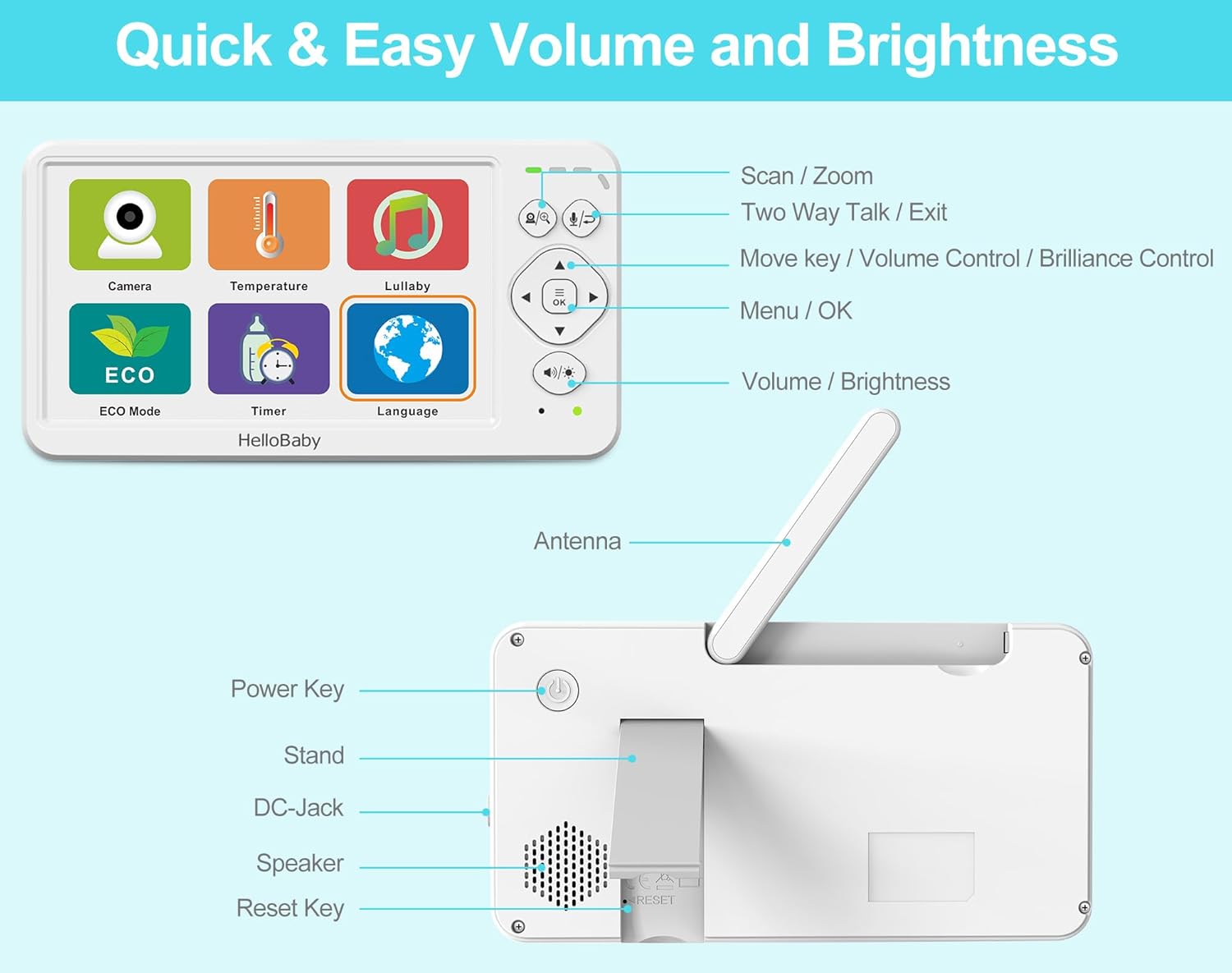
Whakaahua: Taipitopito view of the HelloBaby monitor's front controls (Scan/Zoom, Two-Way Talk/Exit, Move/Volume/Brilliance, Menu/OK, Volume/Brightness) and rear ports (Power Key, Stand, DC-Jack, Speaker, Reset Key, Antenna).
Ngā Mana Whakahaere Wāhanga Matua
- Kī Hiko: Press and hold to turn the monitor On/Off.
- Pātene Tahua / Āe: Press to access the main menu or confirm a selection.
- Patene Whakaterenga (Runga/Raro/Maui/Matau): Use to navigate through menu options or control camera pan/tilt.
- Pātene Rōrahi / Tīahoaho: Adjust audio volume or screen brightness directly.
- Scan / Zoom Button: Press to activate scan mode (if multiple cameras are paired) or to zoom in/out on the video feed (2x digital zoom).
- Two-Way Talk / Exit Button: Press and hold to speak to your baby through the camera's speaker. Press briefly to exit a menu.
Nga Ahuatanga Matua me nga Mahi
Korero Takirua
Press and hold the "Two-Way Talk" button on the Parent Unit to speak to your baby. Your voice will be transmitted through the camera's speaker. Release the button to hear your baby again.
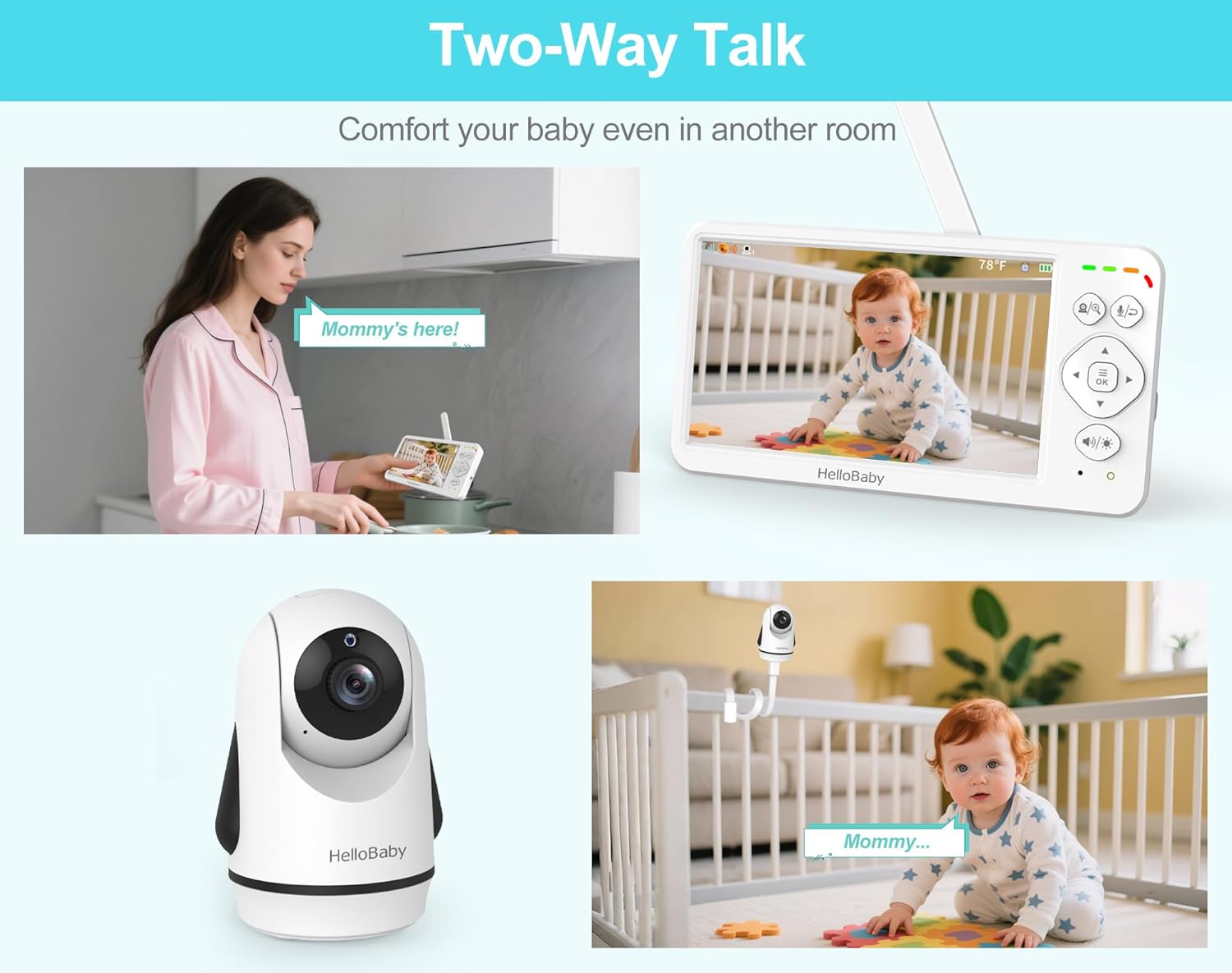
Image: Depicts scenarios of using the two-way talk feature, allowing parents to comfort their baby from another room.
Pan, Tilt, and Zoom (PTZ)
Use the navigation buttons on the Parent Unit to remotely adjust the camera's viewing angle. The camera supports 320° horizontal pan and 120° vertical tilt. Press the "Scan / Zoom" button to activate 2x digital zoom for a closer look.
Tirohanga Po Aunoa
The Baby Unit is equipped with infrared LEDs that automatically activate in low-light conditions, providing a clear black and white video feed up to 5 meters away. The monitor will automatically switch between day (color) and night (black and white) modes.

Image: Illustrates the automatic night vision feature, showing how the monitor switches between day and night modes for continuous monitoring of a sleeping baby.
Nga here
The monitor includes 8 pre-programmed lullabies and natural white noise sounds. Access the Lullaby menu to select a single song or enable loop playback to soothe your baby.

Image: Shows the monitor's interface for selecting from 8 lullabies and choosing from 150 language options, catering to global families.
ECO Mode (Audio Power Saving)
Activate ECO mode to conserve battery life. In this mode, the screen turns off and audio is muted when no sound is detected from the baby's room. The monitor will automatically activate when sound is detected, alerting you to your baby's needs. This extends battery life up to 30 hours.
Te Aroturuki i te pāmahana
The Baby Unit has a built-in temperature sensor that displays the room temperature on the Parent Unit. You can set temperature alerts to be notified if the room becomes too hot or too cold for your baby.
Multi-Camera Expansion
The system supports up to 4 cameras (additional cameras sold separately). You can switch between cameras manually or use the scan mode to cycle through all paired cameras automatically.
Kōwhiringa Reo
The monitor supports 150 language options. Navigate to the Language settings in the menu to select your preferred language.
Te tiaki
- Te horoi: Disconnect both units from power before cleaning. Use a soft, dry cloth to wipe the surfaces of the monitor and camera. Do not use cleaning sprays or liquid cleaners.
- Tiaki Pūhiko: To prolong battery life, avoid fully discharging the Parent Unit battery frequently. If storing the unit for an extended period, charge it periodically.
- Rokiroki: Store the units in a cool, dry place away from direct sunlight and moisture when not in use.
Raparongoā
| Raruraru | Take pea | Rongoā |
|---|---|---|
| No picture/sound on Parent Unit. | Units are not powered on or not paired. Out of range. | Ensure both units are plugged in and powered on. Move Parent Unit closer to Baby Unit. Re-pair if necessary (refer to pairing instructions in full manual, if applicable). |
| Picture is frozen or distorted. | He tohu ngoikore, he pokanoa ranei. | Move Parent Unit closer to Baby Unit. Avoid placing units near other 2.4GHz devices (e.g., Wi-Fi routers, microwaves). |
| He poto te ora o te pākahiko. | Battery not fully charged. ECO mode not enabled. | Charge Parent Unit for at least 4 hours. Enable ECO mode for extended battery life. |
| Kāore e mahi ana te kōrero ā-rua. | Microphone muted or button not pressed correctly. | Ensure microphone is not muted. Press and hold the Two-Way Talk button firmly. |
| Ko te ahua o te panui i te pāmahana he he. | Ka whakanohoia te kāmera ki te taha o te pūtake wera, o te hauhautanga rānei. | Relocate the Baby Unit to an area with stable ambient temperature. |
Whakatakotoranga

Image: Dimensions of the HelloBaby monitor and camera units, providing measurements in centimeters and inches.
| Āhuahira | Taipitopito |
|---|---|
| Ingoa Tauira | Hellobaby 6'' Baby Monitor HB6363 |
| Rahi Mata | 6-inihi IPS LCD |
| Whakataunga Hopu Ataata | 480p |
| Hangarau Ahokore | 2.4GHz FHSS (No WiFi) |
| Awhe Tuku | Up to 1000ft (outdoor), 165ft (indoor) |
| Koki Pane kamera | 320° Whakapae |
| Koki Tilt Camera | 120 ° Poutū |
| Huringa Mamati | 2x |
| Awhe Tirohanga Po | Tae atu ki te 5 mita |
| Pūhiko Waeine Matua | 4000mAh (16-30 hours battery life) |
| Puna Mana | Battery-Powered (Screen) & Corded Electric (Camera) |
| Rauemi | Plastic Electronic Components |
| Rahi Tūemi (L x W x H) | 13 x 4.6 x 10.2 Centimeters (Monitor) |
| Taumaha Tūemi | 739 g |
| Ngā Kāmera Mōrahi e Tautokona ana | 4 |
| Nga here | 8 |
| Kōwhiringa Reo | 150 |
Pūtāhui me te Tautoko
This HelloBaby Baby Monitor comes with a 1 tau te kapinga mai i te ra o te hokonga. Ka kapi tenei whakamana i nga hapa o te hanga me te mahi i raro i te whakamahinga noa.
For technical support, warranty claims, or any questions regarding your product, please contact the seller or HelloBaby customer service. Refer to your purchase documentation for specific contact details.
For additional cameras (HB6363-2, HB6363TX) or compatible accessories, please contact your seller before purchasing ki te whakarite hototahi.