
Kupu Whakataki
Thank you for choosing the GOBOULT Soniq Over Ear Bluetooth Headphones. These headphones are designed to provide a superior audio experience with features like 70 hours of playtime, 40mm bass drivers, Zen™ ENC microphone, Type-C fast charging, and dual device pairing. This manual will guide you through the setup, operation, and maintenance of your new headphones to ensure optimal performance.
He aha kei roto i te Pouaka
Tena koa tirohia nga ihirangi o te kete kia mohio kei te noho katoa nga taonga:
- Soniq Headphone
- Momo-C Taura Whakapae
- Pukapuka Kaiwhakamahi
- Ngā Urunga Taringa (kua tāutahia i mua)
- Kaari Raati
Nga Ahuatanga Hua Nekeview
The GOBOULT Soniq headphones come equipped with several advanced features:
- Wā purei roa: Tae atu ki te 70 hāora o te purei ororongo i runga i te utunga kotahi.
- Customizable EQ Modes: Whakaritea oro profiles for bass boost, balanced audio, or vocal clarity.
- Whakakore Haruru Taiao (ENC): Ka whakarei ake i te mārama o te waea mā te whakaiti i te haruru papamuri.
- Te Hononga Pūrere Takirua: Seamlessly connect and switch between two devices simultaneously.
- Powerful Audio Drivers: 40mm bass-boosted drivers for rich sound.
- Latest Bluetooth Technology: Bluetooth 5.4 for faster pairing and stable connections.
- Hoahoa whakamarie: Lightweight build with cushioned earcups for prolonged wear.
- Ātete wai: IPX5 rating for splash, rain, and sweat protection.
- Mana Whakataki: Easy-to-use physical buttons for volume, playback, and mode switching.
- AI Voice Assistant Support: Compatible with Google Assistant and Siri.

Whakaahua: Ka mutuview of key features including 70H battery, EQ modes, ENC, dual pairing, 40mm drivers, and Bluetooth 5.4.

Image: Close-up of the GOBOULT Soniq headphone earcup highlighting the 40mm power-packed bass neodymium drivers with BoomX™ Technology and Memory Foam.
Aratohu Tatūnga
1. Te Whakataki i nga Paneoro
Before first use, fully charge your GOBOULT Soniq headphones. Use the provided Type-C charging cable to connect the headphones to a compatible USB power source.
- Ma te utu katoa ka tae ki te 70 haora te wa takaro.
- Fast charging feature: 10 minutes of charge provides approximately 8 hours of playtime.
- The LED indicator will show charging status and turn off or change color when fully charged.

Image: GOBOULT Soniq headphones connected via Type-C cable, illustrating 70 hours playtime and fast charging capability.
2. Te Whakakaha/Weto
To power on, press and hold the Power button for approximately 3 seconds until the LED indicator lights up. To power off, press and hold the Power button again for 3 seconds until the LED indicator turns off.
3. Takirua Nihokikorangi
Whāia ēnei mahi hei hono i ō pane whakarongo ki tētahi pūrere Bluetooth:
- Me mohio kei te whakakiia nga taringa me te whakaweto.
- Pēhia, pupuritia hoki te pātene Mana mō te 5-7 hēkona kia mura te tohu LED i te whero me te kikorangi, e tohu ana i te aratau takirua.
- I runga i to taputapu (smartphone, tablet, pona), whakaahei i te Nihokikorangi me te rapu mo nga taputapu e waatea ana.
- Select "GOBOULT Soniq" from the list of found devices.
- Kia honoa, ka āta mura te tohu LED ki te kikorangi, ka noho kikorangi tonu rānei.

Image: GOBOULT Soniq headphones highlighting Bluetooth 5.4 for fast and stable connection.
Nga Tohutohu Whakahaere
1. Mana Taketake
The headphones feature tactile buttons for easy control:
- Pātene Hiko: Pēhia, ka pupuri kia whakakā/whakaweto. Pēhia poto hei purei/whakamutu.
- Rōrahi Whakarunga (+): Perehi poto hei whakanui ake i te rōrahi. Paa roa mo te riu panuku.
- Rōrahi Raro (-): Pēhi poto hei whakaiti i te rōrahi. Pehi roa mo te riu o mua.
- Multi-function Button (often combined with Power or a dedicated button): Answer/End calls, activate voice assistant.

Image: Close-up of the right earcup showing tactile button controls for volume and play/pause.
2. Aratau EQ
Customize your audio experience with multiple EQ modes. Press the dedicated EQ button (or a specific combination, refer to quick start guide if available) to cycle through modes:
- Aratau Whakarei Paoro: Enhances low frequencies for a deeper bass sound.
- Aratau Taurite: Ka whakarato i te pro tangi korefile suitable for various genres.
- Aratau reo: Optimizes mid-range frequencies for clearer vocals.
- Aratau Kēmu: Reduces latency for a more synchronized gaming audio experience (60ms ultra-low latency).
- Aratau Waiata: Pro ororongo paerewafile for general music listening.
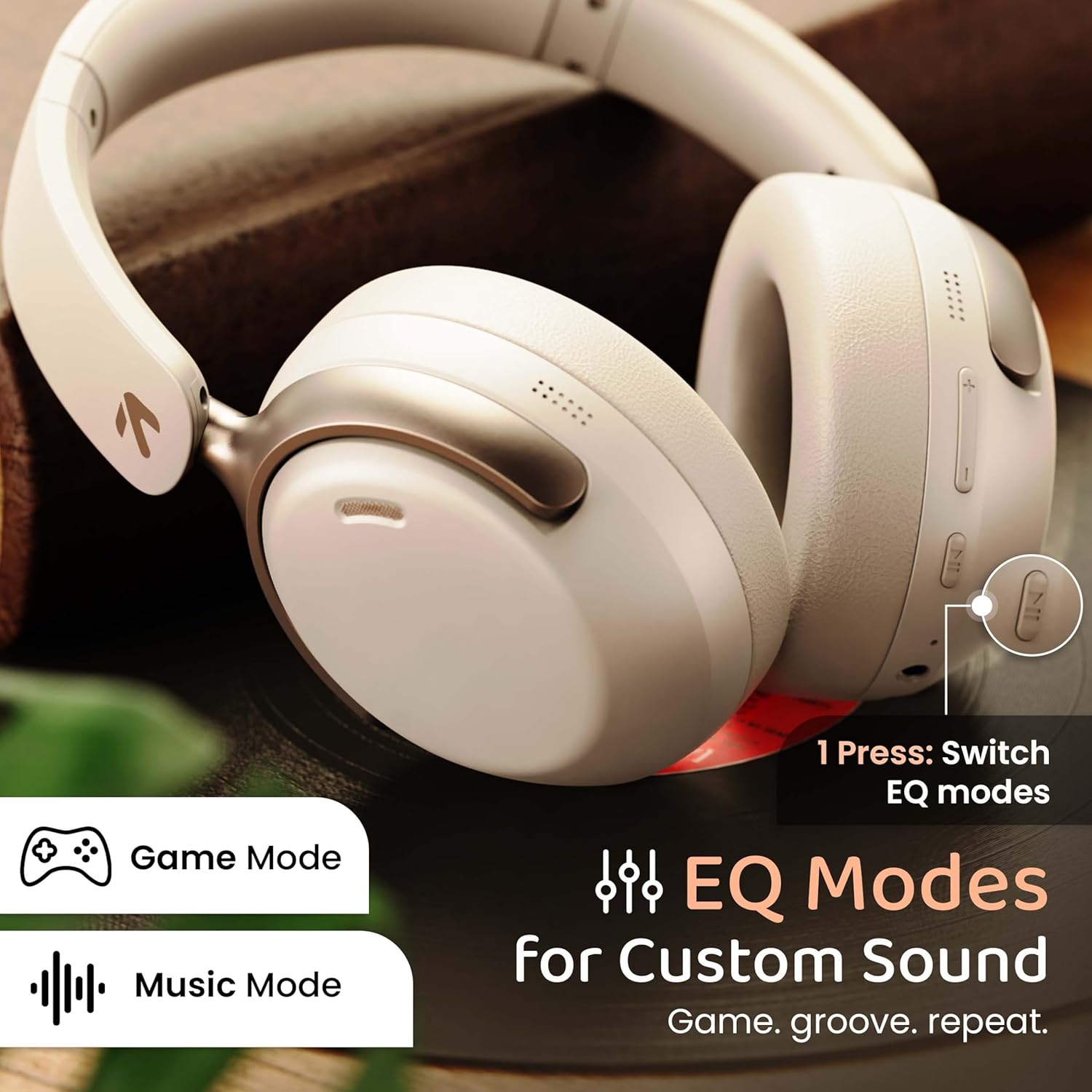
Image: GOBOULT Soniq headphones illustrating the EQ modes for custom sound, including Game Mode and Music Mode.

Image: GOBOULT Soniq headphones highlighting Combat™ Gaming Mode with 60ms ultra-low latency, tailored for mobile gaming and real-time sound accuracy.
3. Takirua Pūrere Taurua
The headphones support dual device pairing, allowing you to connect to two devices simultaneously and switch between them seamlessly.
- Tāruatia ngā pane whakarongo ki te pūrere tuatahi e ai ki te whakaahuatanga i te wāhanga "Tauira Nihokikorangi".
- Monokia te Nihokikorangi i runga i te taputapu tuatahi.
- Tauhoatia nga taringa ki te taputapu tuarua.
- Whakahohehia ano te Nihokikorangi i runga i te taputapu tuatahi. Me hono aunoa nga taringa ki nga taputapu e rua.
- Audio will play from the device currently active. To switch, pause audio on the first device and start playing on the second.

Image: GOBOULT Soniq headphones demonstrating dual device connectivity with a laptop and a smartphone.
4. Wired Mode (AUX)
For a wired connection, use a standard 3.5mm AUX cable (not included) to connect the headphones to your audio source. In wired mode, the headphones operate passively, and the built-in microphone will not function.

Image: GOBOULT Soniq headphones showing the option for wireless mode and an optional wired mode via AUX cable, noting that the mic is off in wired mode.
5. Environmental Noise Cancellation (ENC) for Calls
The Zen™ ENC microphone technology helps reduce ambient noise during calls, ensuring clearer conversations. This feature is automatically active during phone calls.

Image: Close-up of the GOBOULT Soniq headphone earcup highlighting the Zen™ ENC Mic for processed calling, ambient noise isolation, enhanced call experience, and sharper voice clarity.
6. Kaiāwhina reo
Activate your device's voice assistant (Google Assistant or Siri) by pressing the multi-function button (or specific button, refer to quick start guide) for approximately 2 seconds.

Image: GOBOULT Soniq headphones with icons for Google Assistant and Siri, indicating personalized AI assistant support.
Te Tiaki me te Tiaki
- Te horoi: Horoia ngā paneoro ki te kakahu ngohengohe, maroke. Kaua e whakamahi i ngā mea horoi whakakoi, i ngā mea whakarewa rānei.
- Ātete wai: The headphones are IPX5 water resistant, meaning they are protected against splashes, rain, and sweat. Do not submerge them in water or expose them to strong jets of water.
- Rokiroki: Ki te kore e whakamahia, penapenahia nga taringa ki tetahi waahi makariri, maroke, kia matara atu i te ra me te wera nui. Ko te hoahoa kopaki ka taea te rokiroki kiato.
- Tiaki Pūhiko: Hei whakaroa i te ora o te pākahiko, karohia te whakakore i nga taringa i nga wa katoa. Me utu i nga wa katoa, ahakoa kaore i te whakamahia tonu.
Image: GOBOULT Soniq headphones illustrating IPX5 water resistance, indicating protection against splash, rain, and sweat.

Image: GOBOULT Soniq headphones showcasing their adjustable headband, foldable design, and movable earcups for maximum comfort and portability.
Raparongoā
| Raruraru | Rongoa pea |
|---|---|
| Karekau e kaha ana nga waea. | Kia tino utua ngā paneoro. Honoa ki tētahi pūtake hiko mā te whakamahi i te taura Momo-C. |
| Kaore e taea te hono ki te taputapu. |
|
| Karekau he oro, he iti te reo. |
|
| Kāore te hopuoro e mahi ana i te aratau waea. | The built-in microphone is not active when using the AUX wired connection. This is normal operation. |
| Hononga mokowhiti. |
|
Whakatakotoranga
| Āhuahira | Taipitopito |
|---|---|
| Ingoa Tauira | AirBass |
| Hangarau Hononga | Nihokikorangi, Waea, Ahokore |
| Hangarau Whakawhitiwhiti Ahokore | Nihokikorangi 5.4 |
| Awhe Nihokikorangi | 10 Mita |
| Rahi Atekōkiri Ororongo | 40 Milimetera |
| Momo Atekōkiri Ororongo | Atekōkiri Hihiko |
| Ora Pūhiko | 40 haora |
| Tauranga Whakatau | Hononga Utu Tere Momo-C |
| Mana Haruru | Whakakorea te Riihi Taiao (ENC) |
| Taumata Atete Wai | IPX5 (Splash, Rain, Sweat Proof) |
| Latency Ororongo | 60 Milihekona (Aratau Keemu) |
| Hanga Whakatangitangi | Ki runga Taringa |
| Rauemi | Memory Foam (Ear Cushions) |
| Taumaha Tūemi | 227 Karamu |
| Rahi Hua (LxWxH) | 17 x 5.5 x 19 Henemita |
| Momo Kaiwhakahaere | Button, Google Assistant |
| Te aukati | 32 Ohm |
| Te tairongo | 118 dB |
Pūtāhui me te Tautoko
Your GOBOULT Soniq Over Ear Bluetooth Headphones come with a 1 tau te whakamana a te kaiwhakanao from the date of purchase. This warranty covers manufacturing defects and ensures the reliability of your product.
For warranty claims, technical support, or any inquiries, please refer to the contact information provided on the warranty card included in your package or visit the official GOBOULT support webpae.
Puritia tō rīhiti hoko hei taunakitanga hoko mō te manatoko i te pūtāhui.