
1. Kupu Whakataki
This manual provides instructions for the safe assembly, operation, maintenance, and troubleshooting of your EYESUN Exercise Bike Model QM-530W. Please read this manual thoroughly before using the product and retain it for future reference.
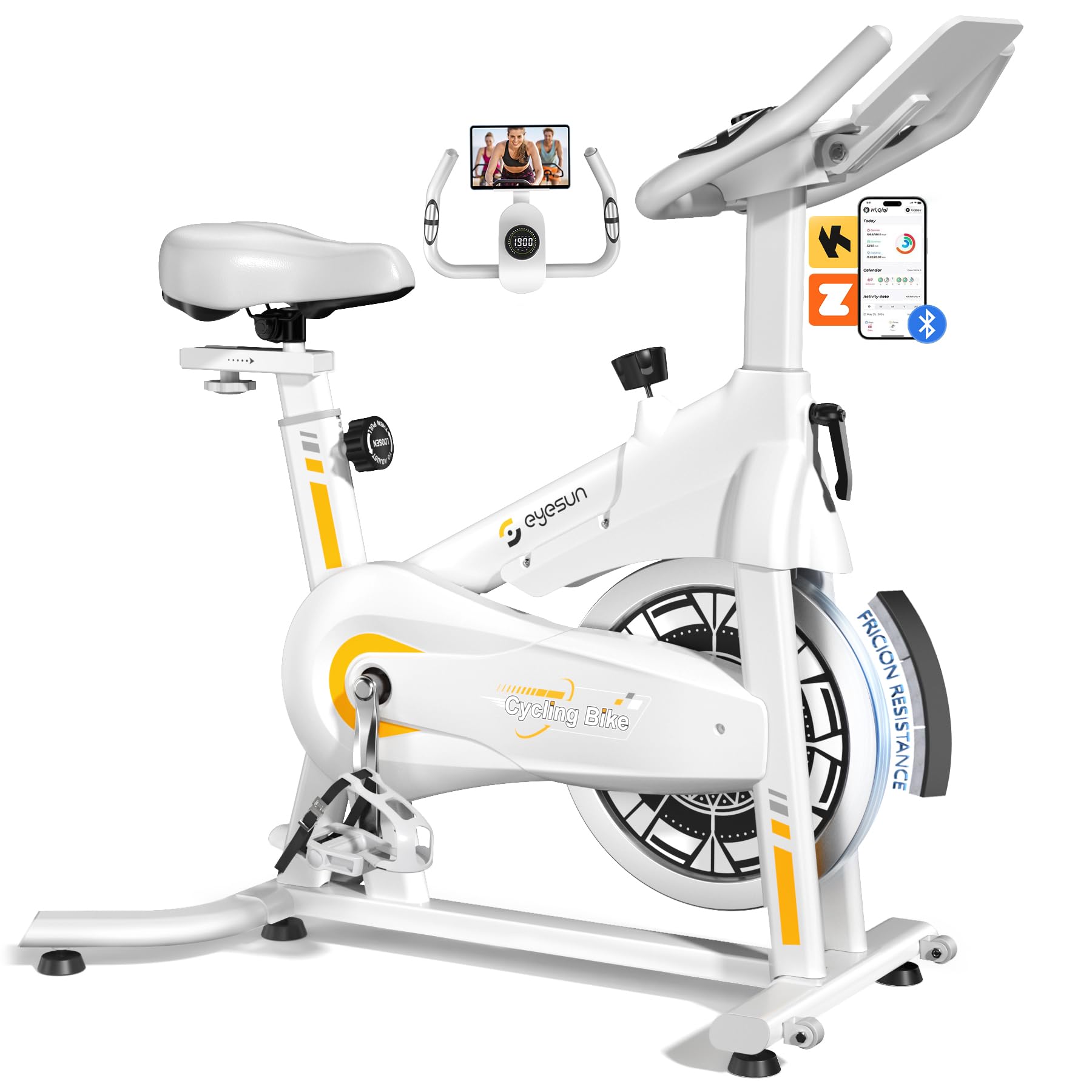
Image 1: EYESUN Exercise Bike QM-530W, White & Yellow model.
2. Nga korero haumaru
Before beginning any exercise program, consult with your physician. It is essential to understand and follow all safety precautions to prevent injury and ensure proper operation of the exercise bike.
- Me whakarite kia mau nga waahanga katoa i mua i ia whakamahinga.
- Place the exercise bike on a flat, stable surface. Use a mat underneath to protect flooring and reduce noise.
- Tiakina nga tamariki me nga kararehe mai i nga taputapu i te wa e mahi ana.
- Kia mau ki ngā hu hākinakina me ngā kākahu e tika ana. Āta karohia ngā kākahu koretake ka mau pea i ngā wāhanga e neke ana.
- The maximum user weight capacity for this bike is 330 lbs (150 kg).
- The resistance bar functions as an emergency stop. Press it down firmly to stop the flywheel immediately.
- Adjustable cage pedals are designed to keep your feet secure during exercise. Ensure your feet are properly secured before starting.
- Do not dismount the bike until the flywheel has completely stopped.

Image 2: Illustration of the exercise bike's sturdy construction and body muscles engaged during use.
3. Ihirangi mokete
Manatokohia kei te noho nga waahanga katoa i mua i te tiimata o te huihuinga. Mena kei te ngaro, kua pakaru ranei etahi waahanga, waea atu ki te tautoko a te kaihoko.
- Anga Matua (kua oti te huihui)
- Huihuinga kakau
- Tūru Pou me te Noho
- Tuhinga o mua me muri
- Pedals (Mauī me Matau)
- Aroturuki LCD
- Kete Taputapu (pūtu, horoi, nati, taputapu)
- Pukapuka Kaiwhakamahi
4. Nga Tohutohu Huihuinga
The EYESUN Exercise Bike is designed for quick assembly, with approximately 80% of the unit pre-assembled. Typical assembly time is around 25 minutes.
- Āpiti Pūmau: Secure the front and rear stabilizers to the main frame using the provided bolts and washers. Ensure they are tightened firmly.
- Tāuta Pedals: Identify the left (L) and right (R) pedals. The left pedal screws counter-clockwise, and the right pedal screws clockwise. Thread them into the crank arms and tighten securely with a wrench.
- Maunga Nohoanga: Insert the seat post into the main frame and adjust to your desired height. Secure with the adjustment knob. Attach the seat to the seat post.
- Tāpirihia te Pae Whakahaere: Slide the handlebar assembly into the front post. Adjust the height and secure with the adjustment knob.
- Honoa te Aroturuki LCD: Connect the sensor cable from the main frame to the back of the LCD monitor. Ensure the connection is vertical and perpendicular to the flywheel for accurate data tracking. Mount the LCD monitor onto the handlebar post.
Video 1: Detailed assembly guide for the EYESUN Exercise Bike. This video demonstrates step-by-step installation of components.
5. Whakatikatika
Mā te whakarerekētanga tika o te pahikara ka noho whakamarie me te whai hua i te wā e whakangungu ana koe.
5.1 Whakatikatika nohoanga
- Teitei: Loosen the adjustment knob on the vertical seat post. Raise or lower the seat until your leg has a slight bend at the knee when the pedal is at its lowest point. Tighten the knob securely.
- Whakamua/Whakamuri: Loosen the adjustment knob under the seat. Slide the seat forward or backward to achieve a comfortable position relative to the handlebars. Ensure your knees are aligned with the balls of your feet when pedals are horizontal. Tighten the knob securely.
5.2 Te Whakarerekētanga o te Pūmau
- Loosen the adjustment knob on the handlebar post. Raise or lower the handlebars to a comfortable height that allows for a relaxed upper body posture. Tighten the knob securely.
5.3 Whakatikatika Atete
- The resistance knob is located on the main frame. Turn the knob clockwise to increase resistance and counter-clockwise to decrease resistance.
- To engage the emergency brake, press the resistance knob down firmly.

Image 3: Visual guide for adjusting handlebar and seat positions for various user heights.
Video 2: Demonstration of adjusting the seat and handlebar for optimal user comfort.
6. Operating the Exercise Bike
6.1 Ngā Mahi a te Aroturuki LCD
The upgraded LCD monitor tracks your workout data in real-time.
- Wā: Te roanga o to mahi.
- Tere: Te tere pahikara o naianei.
- Tawhiti: Te tawhiti katoa i haerea i te wā o te whakangungu.
- Calories: Kua tahuna nga calories.
- Putu: Heart rate (if connected to a compatible sensor, not included).
- Odometer: Te tawhiti katoa i kohia.
Ensure the APP sensor cable is correctly connected to the flywheel for accurate data tracking.

Image 4: Close-up of the digital LCD display and proper sensor cable connection.
6.2 Whakaurunga Taupānga
The exercise bike supports Bluetooth connectivity for integration with fitness applications.
- Taupānga Hototahi: FantomFite, KINOMAP, and Zwift.
- Tukutahi Raraunga: Supports syncing with Google Fit and Apple Health for comprehensive fitness tracking.
- Pupuri Ripa: Use the built-in tablet holder to enjoy music or videos while riding, or to view your fitness app.

Image 5: Illustration of the exercise bike's compatibility with popular fitness applications.
Ataata 3: Ka mutuview of the LCD monitor and Bluetooth connectivity features.
7. Tiaki
Mā te tiaki auau ka roa te ora me te haumaru o te mahi a tō pahikara whakakori tinana.
- Te horoi: Horoia te pahikara me te panuiamp he kakahu i muri i ia whakamahinga hei tango i te werawera me te puehu. A ape i te horoi horoi.
- Tirotiro: Tirohia ngā pūtu, ngā nati, me ngā wāhanga e neke ana i ia wā, i ia wā, mō te piripono me te pakaru. Whakakīia ngā here e kore e herea.
- Whakahinuhinu: The belt drive system is designed to be low maintenance and quiet. No lubrication is typically required for the belt.
- Rokiroki: When not in use, store the bike in a dry, cool place away from direct sunlight and moisture. The built-in transport wheels allow for easy relocation.

Image 6: Features like the smooth belt drive and stable U-shaped bottom contribute to low maintenance and durability.

Image 7: The space-saving design and transport wheels facilitate easy movement and storage.
8. Te Raru
If you encounter issues with your EYESUN Exercise Bike, refer to the following common problems and solutions.
| Raruraru | Take pea | Rongoā |
|---|---|---|
| Te haruru oro, oro rānei i te wā e mahi ana | Loose components; debris in flywheel area; worn belt. | Check and tighten all bolts and nuts. Inspect flywheel area for foreign objects. If noise persists, contact support. |
| Inaccurate LCD monitor readings | Sensor cable not connected properly; low battery in monitor. | Ensure the APP sensor cable is securely and vertically connected to the monitor. Replace monitor batteries if necessary. |
| Kare e huri te parenga | Resistance knob mechanism issue. | Check if the resistance knob is fully engaged. If the mechanism feels loose or unresponsive, contact support. |
| Wobbly seat or handlebars | Adjustment knobs not tightened sufficiently. | Ensure all seat and handlebar adjustment knobs are tightened firmly after positioning. |
9. Whakatakotoranga
| Āhuahira | Taipitopito |
|---|---|
| Tau tauira | QM-530W |
| Hunga Hua | 100.08 x 50.55 x 106.93 cm (39.4 x 19.9 x 42.1 inihi) |
| Taumaha Tūemi | 21.32 kg (47 lbs) |
| Morahi Taumaha Rawa | 330 lbs (150 kg) |
| Pūnaha taraiwa | He Peara Tere |
| Rauemi | Korotahi Steel |
| Tikanga Atete | Friction (Adjustable Brake Pad) |
| Nga waahanga motuhake | Adjustable Pedal, Adjustable Resistance Level, Adjustable Seat, Flywheel |
| Teitei Kaiwhakamahi Manakohia | 4'8" to 6'1" (142 cm to 185 cm) |
| Inseam Range | 25"–35" (63.5 cm – 89 cm) |
| Puna Hiko (Aroturuki) | Pūhiko (Kei roto ngā Pūhiko) |
10. Pūtāhui me te Tautoko
EYESUN provides a 24-marama whakamanawa-kore-awangawanga for your exercise bike. This warranty covers manufacturing defects and ensures product quality.
For any questions, concerns, or warranty claims, please contact EYESUN customer service:
- Īmēra: tautoko@eyesun.net
- Customer support is available 24/7.