
1. Kupu Whakataki
This manual provides comprehensive instructions for the Teslong TTM120S Thermal Imaging Camera and the Teslong Thermal Monocular. These devices are designed for a variety of applications, including industrial maintenance, electrical inspections, building diagnostics, HVAC inspections, hunting, law enforcement, and search and rescue operations. Please read this manual thoroughly before operating the devices to ensure proper use and to maximize their performance and longevity.

Whakaahua 1.1: The Teslong TTM120S Thermal Imaging Camera (left) and the Teslong Thermal Monocular (right). These devices offer advanced thermal imaging capabilities for various professional and recreational uses.
2. Nga korero haumaru
To ensure safe operation and prevent damage to the devices, please observe the following safety precautions:
- Do not expose the devices to extreme temperatures, direct sunlight for prolonged periods, or corrosive environments.
- Avoid dropping or subjecting the devices to severe impact.
- Do not attempt to disassemble or modify the devices. Repairs should only be performed by authorized service personnel.
- Keep the lenses clean and free from dust and debris. Use a soft, lint-free cloth for cleaning.
- Ensure the devices are fully charged before use, especially for critical applications.
- Whakakorehia nga pākahiko kia rite ki nga ture o te rohe.
3. Hua Neke Atuview
3.1 Teslong TTM120S Thermal Imaging Camera
The TTM120S is a handheld thermal imaging camera featuring a 3.2-inch HD screen and a 120 x 90 IR resolution, enhanced to 240 x 180 using super-resolution technology. It provides clear and smooth images with a 25Hz frame refresh rate, making it suitable for detailed inspections.

Whakaahua 3.1: Mua me muri view of the Teslong TTM120S Thermal Imaging Camera. It features an ergonomic grip, a large display, and intuitive controls for easy operation.
Āhuatanga matua:
- Enhanced Thermal Image: Super-resolution technology upgrades 120 x 90 IR resolution to 240 x 180.
- Reiti Tāpare Teitei: 25Hz refresh rate for smooth thermal imaging.
- Accurate Temperature Measurement: Range of -4°F to 752°F (-20°C to 400°C) with ±2°C accuracy.
- Aroturuki Mahana Aunoa: Displays highest, lowest, and center point temperatures.
- Temperature Exceedance Alarms: Alerts for temperatures outside a set range.
- Athermalized Fixed Focal Lens: 2.3mm, F1.1 lens for thermal stability and low-light performance.
- Papatae Tae: 8 color palettes (Iron, White Hot, Black Hot, Rainbow, Hottest, High Contrast, Green Hot, Lava) and 3 Thermal AGC modes (Smooth, Normal, High Contrast) for diverse visualization.

Whakaahua 3.2: The TTM120S displaying various thermal images using different color palettes and AGC settings. This allows users to optimize visualization for specific inspection needs.
3.2 Teslong Thermal Monocular
The Teslong Thermal Monocular is designed for clear thermal imaging in outdoor and low-light conditions, featuring a 256x192 thermal vision sensor and a 720x540 LCOS display. It is ideal for applications such as hunting, surveillance, and search and rescue.
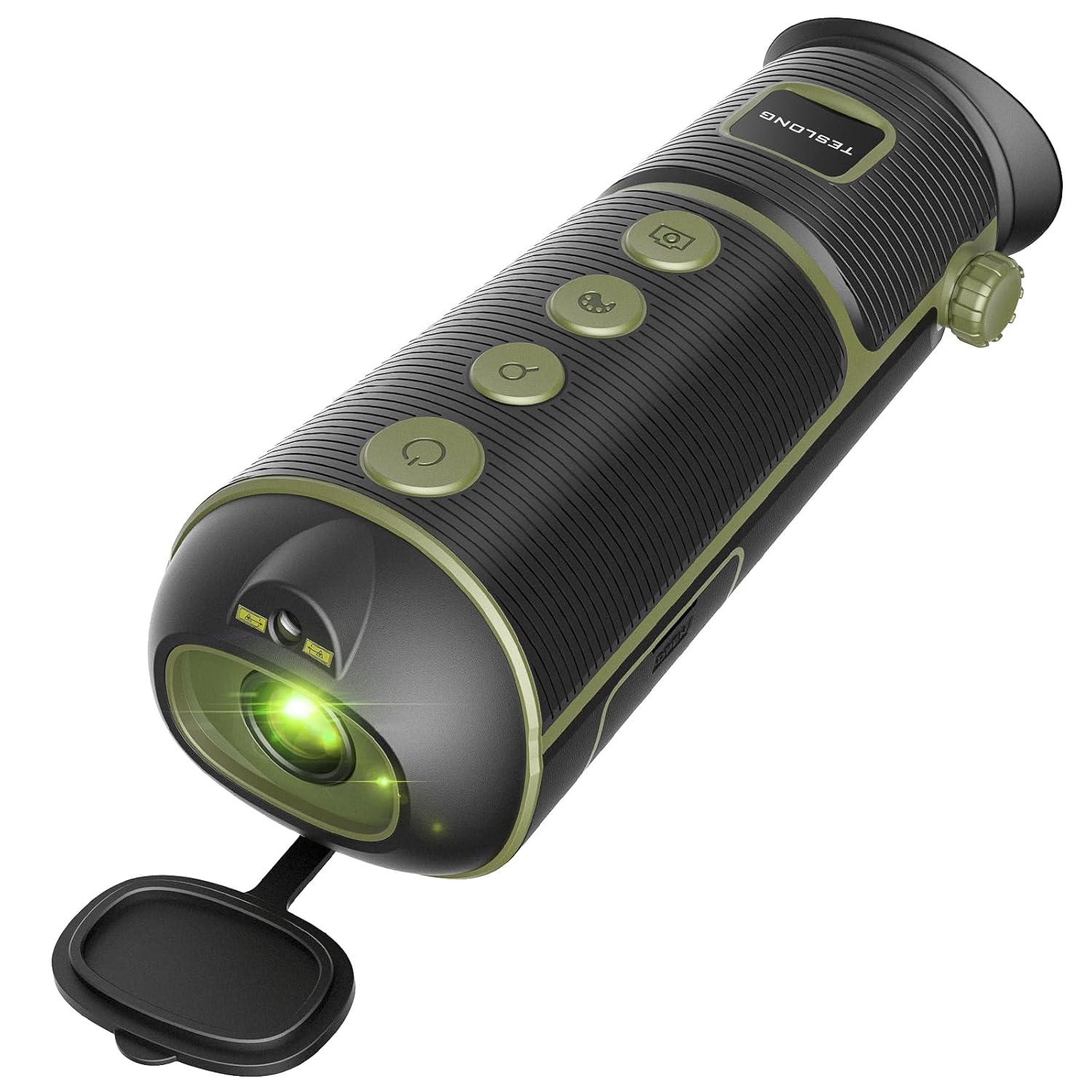
Whakaahua 3.3: The Teslong Thermal Monocular, a compact and portable device for thermal observation. It features a robust design suitable for outdoor use.
Āhuatanga matua:
- Pūoko-Taumira teitei: 256x192 thermal vision sensor for detailed imaging.
- Maama Whakaatu: 720x540 LCOS display for sharp viewing.
- Mahimaha: Equipped with hotspot marking to quickly identify targets.
- Whakaritenga Diopter: Customizable diopter to match individual vision needs.
- Aratau Whakaatu: 5 color modes including White Hot, Black Hot, Red Hot, Green Hot, and Iron Oxide Hot for versatile scenarios.
- Topa Mamati: Up to 4x digital zoom for closer observation.
- Te kawe: Compact design with hand wrist lanyard and carry case, tripod mounting supported.
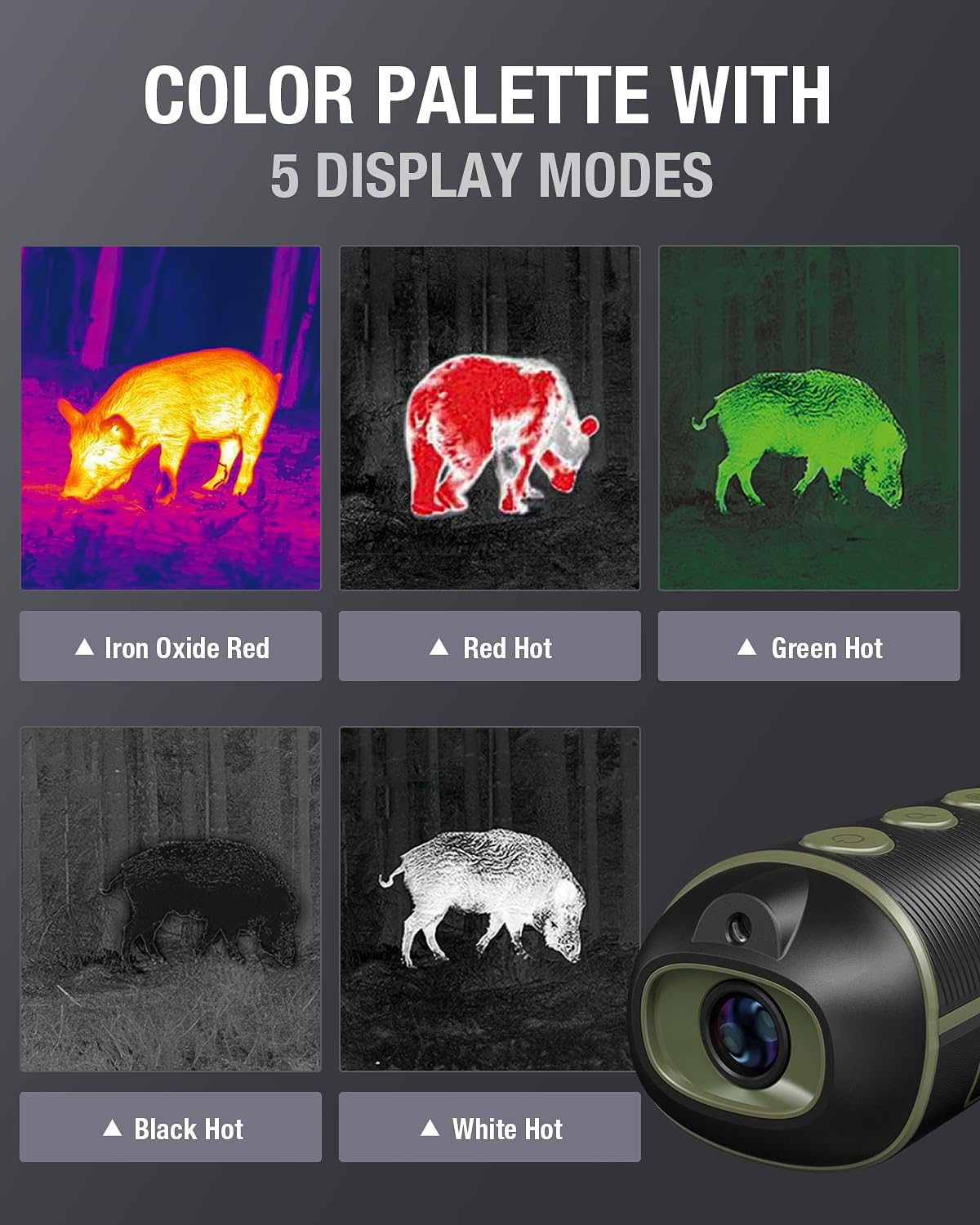
Whakaahua 3.4: The thermal monocular showcasing its five distinct display modes. These modes allow users to adapt the thermal view to different environments and target characteristics.
4. Tatūnga
4.1 Whakataki Tuatahi
Before first use, fully charge both the Teslong TTM120S Thermal Imaging Camera and the Thermal Monocular. Connect the provided USB charging cable to the device's charging port and to a standard USB power adapter (not included) or a computer USB port. The charging indicator will typically show the charging status and turn off or change color when fully charged.
4.2 Kei te Hiko / Weto
- Hei Whakahiko: Press and hold the power button (usually marked with a power symbol) for a few seconds until the screen or display illuminates.
- Hei Whakaweto: Patohia me te pupuri ano i te paatene hiko kia tutakina te taputapu.
4.3 Basic Settings (TTM120S)
Upon first power-on, you may be prompted to set basic parameters such as language, time, and date. Navigate through the menu using the directional buttons and confirm selections with the OK button.
4.4 Diopter Adjustment (Thermal Monocular)
For the Thermal Monocular, adjust the diopter ring near the eyepiece to achieve a clear focus for your vision. This ensures the on-screen display and thermal image are sharp.
5. Nga Tohutohu Whakahaere
5.1 Teslong TTM120S Thermal Imaging Camera Operation
- Ine inenga: Point the camera at the target. The screen will automatically display the highest, lowest, and center point temperatures within the field of view.
- Palette Selection: Use the menu or dedicated palette button to cycle through the 8 available color palettes (Iron, White Hot, Black Hot, Rainbow, Hottest, High Contrast, Green Hot, Lava) to best visualize temperature differences.
- Thermal AGC Modes: Adjust the Automatic Gain Control (AGC) settings (Smooth, Normal, High Contrast) to fine-tune the image contrast based on the thermal scene.
- Hopu Atahanga: Press the capture button to save a thermal image to the device's internal memory.
5.2 Teslong Thermal Monocular Operation
- Viewkei: Look through the eyepiece. The thermal image will be displayed on the LCOS screen.
- Tīpakonga Aratau Whakaatu: Use the mode button to switch between the 5 display modes (White Hot, Black Hot, Red Hot, Green Hot, Iron Oxide Hot) to suit different observation conditions.
- Topa Mamati: Use the zoom buttons to magnify the image up to 4x.
- Hotspot Marking: Activate the hotspot marking feature to automatically highlight the hottest point in the field of view, aiding in quick target identification.

Whakaahua 5.1: A user demonstrating the 4x digital zoom capability of the Teslong Thermal Monocular. The images show the progression from 1x to 4x magnification, enhancing distant target visibility.
6. Tiaki
- Whakapai Arotahi: Use a soft, clean, lint-free cloth specifically designed for optical lenses. Gently wipe the lens surfaces to remove dust or smudges. Do not use abrasive materials or harsh chemicals.
- Tinana horoi: Horoia te tinana o te taputapu ki te wai ngohengohe,amp cloth. Avoid getting moisture into ports or openings.
- Rokiroki: Store the devices in a cool, dry place, away from direct sunlight and extreme temperatures. If storing for extended periods, ensure the battery is partially charged (around 50%) to prolong battery life.
- Tiaki Pūhiko: Avoid fully discharging the battery frequently. Recharge as needed.
7. Te Raru
If you encounter issues with your Teslong thermal devices, refer to the following common problems and solutions:
| Raruraru | Take pea | Rongoā |
|---|---|---|
| Kaore te taputapu i te hiko | Pūhiko iti; pātene mana hapa | Charge the device fully. Ensure the power button is pressed correctly. |
| Image is blurry or out of focus (Monocular) | Diopter not adjusted; lens dirty | Adjust the diopter ring. Clean the lens. |
| Inaccurate temperature readings (TTM120S) | Incorrect emissivity setting; object too far | Adjust emissivity in settings if applicable. Ensure target is within optimal range. |
| Screen is blank or frozen | He hapa pūmanawa; he iti te pākahiko | Perform a soft reset (power off/on). Charge the device. |
If the problem persists after attempting these solutions, please contact Teslong customer support for further assistance.
8. Whakatakotoranga
8.1 Teslong TTM120S Thermal Imaging Camera
- Taumira IR: 120 x 90 (enhanced to 240 x 180 with Super-Resolution)
- Auau Tāpare: 25Hz
- Manawaariki: <60mk
- Awhe Pawera: -4°F ki te 752°F (-20°C ki te 400°C)
- Tikanga Ine: ±2°C
- Marae o View: 50° x 38°
- Whakaatu: 3.2-inihi HD mata
- Arotahi: Athermalized Fixed Focal Lens 2.3mm, F1.1
- Papatae Tae: 8 (Iron, White Hot, Black Hot, Rainbow, Hottest, High Contrast, Green Hot, Lava)
- Thermal AGC Modes: 3 (Smooth, Normal, High Contrast)
8.2 Teslong Thermal Monocular
- Pūoko Weariki: 256x192
- Whakaatu: 720x540 LCOS
- Topa Mamati: 4x
- Aratau Whakaatu: 5 (White Hot, Black Hot, Red Hot, Green Hot, Iron Oxide Hot)
- Āhuatanga: Hotspot marking, Diopter adjustment, Tripod mounting support
9. Pūtāhui me te Tautoko
Teslong products are manufactured to high-quality standards. For warranty information, technical support, or service inquiries, please refer to the official Teslong webpaetukutuku, whakapā atu ranei ki ta raatau tari ratonga kaihoko. Puritia to riirii hoko hei tohu mo te hoko mo nga kereme whakamana.