
AJAZZ 308i
AJAZZ 308i Wireless Bluetooth Keyboard User Manual
Tauira: 308i
Kupu Whakataki
Mauruuru koe mo te hokoasing the AJAZZ 308i Wireless Bluetooth Keyboard. This manual provides detailed instructions on how to set up, operate, and maintain your keyboard. Please read this manual carefully before use to ensure optimal performance and longevity of your device.
Ka mutu te huaview
The AJAZZ 308i is a compact 84-key wireless Bluetooth keyboard featuring a unique typewriter-inspired design with round keycaps. It offers multi-system compatibility and a comfortable typing experience.

Figure 1: AJAZZ 308i Wireless Bluetooth Keyboard (Gradient Green)
Āhuatanga matua:
- Typewriter-Inspired Design: Round keycaps provide a retro aesthetic and comfortable typing feel.
- Tahora Matua-84 Kiato: Lightweight and portable, measuring 32cm x 13.6cm x 3cm, making it easy to carry.
- Hononga Nihokikorangi Ahokore: Stable connection up to 10 meters, compatible with various devices.
- Hototahitanga Maha-Pūnaha: Supports Windows, Mac OS, iOS, and Android operating systems.
- Tiaki Hiko Ataata: Automatically enters sleep mode after 15 minutes of inactivity to conserve battery.
- Pato Ataahua: Soft chocolate keys ensure a smooth and silent typing experience.
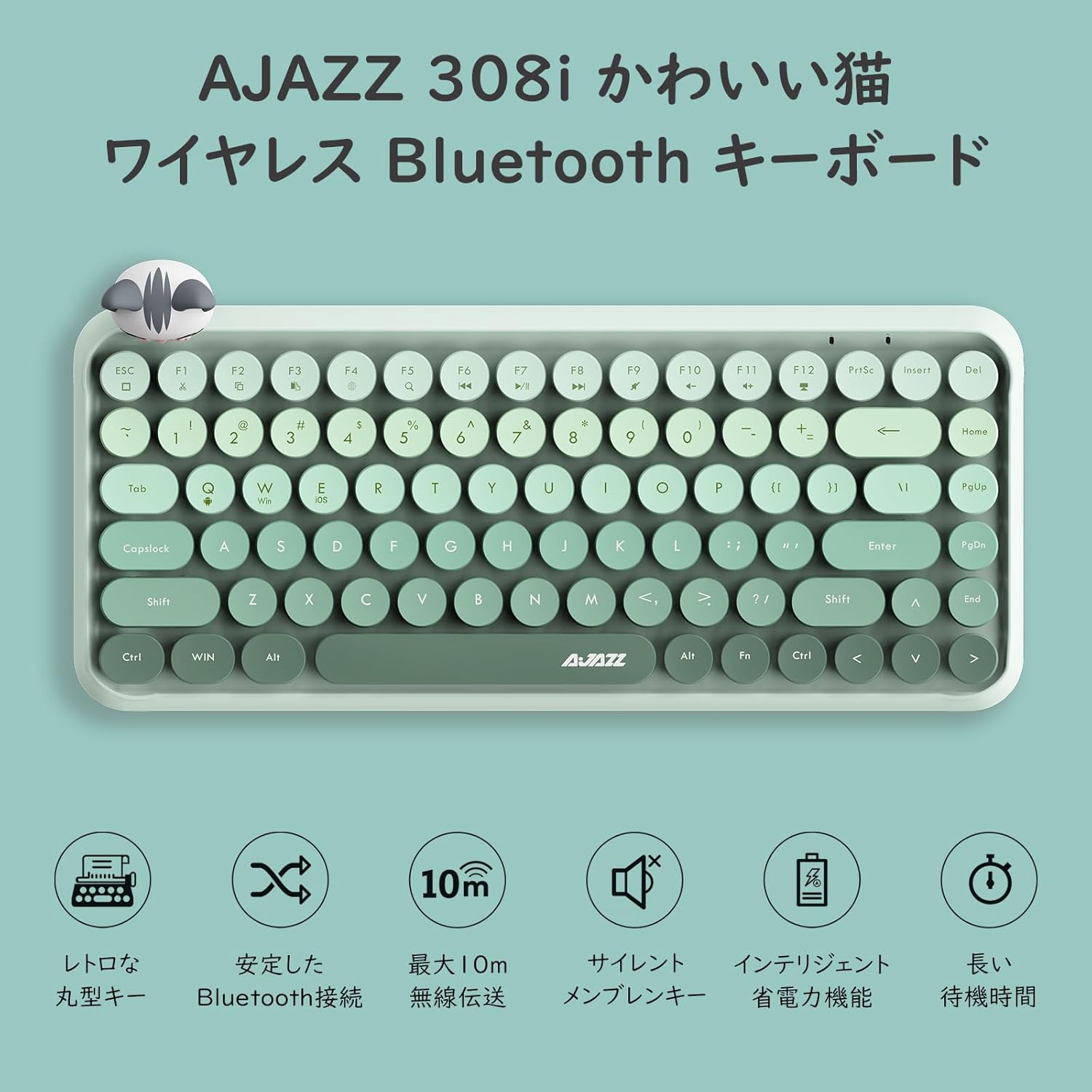
Whakaatu 2: Neke Atuview of AJAZZ 308i Keyboard Features
Setup: Bluetooth Pairing
Follow these steps to connect your AJAZZ 308i keyboard via Bluetooth:
- Ensure your device's Bluetooth is turned ON.
- Huri ON the power switch on the keyboard.
- Patohia me te pupuri i te FN + C keys simultaneously on the keyboard. The keyboard will enter Bluetooth device search mode.
- On your device (tablet, smartphone, computer), search for Bluetooth devices.
- When "AJAZZ BLUETOOTH 5.0 KEYBOARD" appears in the list of available devices, tap or click on it to initiate pairing.
- A code will be displayed on your device's screen. Type this code using the AJAZZ 308i keyboard and press KAUPAPA.
- The keyboard is now successfully connected to your device.

Figure 3: Multi-device compatibility and connection example
Nga Tohutohu Whakahaere
Pāpāho Kī:
The keyboard includes dedicated media function keys, accessible by pressing the FN key in combination with the F-keys:
- FN + F1: Tapahia
- FN + F2: Tārua
- FN + F3: Whakapiri
- FN + F5: Kimihia
- FN + F6: Tuhinga o mua
- FN + F7: Purei/Tatari
- FN + F8: Riro Panuku
- FN + F9: Wahangu
- FN + F10: Rōrahi Whakararo
- FN + F11: Rōrahi Whakarunga
- FN + F12: Maukati
Note: On some devices like iPad, certain F-keys (e.g., F2, F3) might function directly without the FN key for copy/paste. Experimentation may be required depending on your operating system.
Aratau Tiaki Mana:
The AJAZZ 308i features a smart power-saving mechanism. If there is no key operation for more than 15 minutes, the keyboard will automatically enter sleep mode. To reactivate it, simply double-click any key.
Te tiaki
Tāuta Pūhiko me te Whakakapi:
The keyboard is powered by two AAA alkaline batteries. To install or replace batteries:
- Kimihia te wahanga pākahiko kei raro o te papapātuhi.
- Whakatuwheratia te uhi o te wahanga pākahiko.
- Whakauruhia kia rua nga pākahiko kawakore AAA hou, kia tika te polarity (+/-).
- Katia kia mau te uhi o te wahanga pākahiko.
With smart power-saving technology, two AAA alkaline batteries can last for several months under normal use. Avoid using rechargeable lithium batteries as their performance degradation can lead to keyboard malfunction.
Raparongoā
Key Layout Differences (English vs. Japanese Input):
The AJAZZ 308i keyboard has an English layout. When using Japanese input, some characters output may not match the characters printed on the keycaps. In such cases:
- Switch your device's input method to English and type according to the characters displayed on the keycaps.
- Alternatively, for Japanese input, refer to the standard Japanese keyboard layout for character mapping.
If you encounter any other issues or have questions, please refer to the warranty and support section for assistance.
Whakatakotoranga
| Āhuahira | Taipitopito |
|---|---|
| Waitohu | AJAZZ |
| Tau tauira | 308i |
| Hangarau Hononga | Nihokikorangi 5.0 |
| Pūrere Hototahi | Windows, Mac OS, iOS, Android (Bluetooth function required) |
| Te maha o nga Kī | 84 |
| Tahora Papapātuhi | QWERTY (English Layout) |
| Momo Whakawhiti Nui | Membrane (Chocolate Key) |
| Mokowoko Korekore | Tae atu ki te 10 mita |
| Puna Mana | 2 x AAA Patuhi Alkaline |
| Taumaha Tūemi | 590 karamu |
| Ahu | 32cm x 13.6cm x 3cm |
| Nga Waahanga kei roto | Magnetic Cat Figurine |
| Tae | Rōnaki Kākāriki |
Pūtāhui me te Tautoko
The AJAZZ 308i Wireless Bluetooth Keyboard comes with a 12-marama whakamana mai i te ra o te hokonga.
If you have any questions, concerns, or require technical assistance, please do not hesitate to contact our customer support. Contact details can typically be found on the product packaging or the retailer's webte waahi i hoko ai koe.
Ask a question about this manual
Ask about setup, troubleshooting, compatibility, parts, safety, or missing instructions. Manuals+ will review the question and use this page’s manual context to help answer it.