1. Neke atu i teview
The femometer Smart Ring is a wearable device designed for comprehensive health tracking, focusing on fertility, ovulation, basal body temperature (BBT), and sleep analysis. It provides real-time data synchronization with a dedicated mobile application to help users understand their body's cycles and overall well-being.
Ko nga mahi matua ko:
- Real-time fertility temperature monitoring.
- Automatic data synchronization with the femometer app.
- Prediction of menstruation and ovulation.
- High-accuracy temperature sensors for precise BBT measurement.
- Detailed sleep analysis and personalized recommendations.
- Durable and comfortable design with a premium ceramic exterior and aluminum core.
2. Ihirangi mokete
Upon opening the femometer Smart Ring package, verify that all items are present:
- femometer Smart Ring
- USB Magnetic Charging Base
- Pukapuka Kaiwhakamahi
- Aratohu Timata Tere

Image: Contents of the femometer Smart Ring package.
3. Nga korero haumaru
- Kaua e ngana ki te whakatuwhera, ki te wetewete, ki te whakarereke ranei i te taputapu.
- Purihia te taputapu mai i nga wera nui me te ra tika.
- Āta tirohia kia kore te taputapu e pāngia e ngā pānga kaha, e ngā hinganga rānei.
- This device is waterproof; however, avoid prolonged submersion in water beyond typical daily use (e.g., showering, handwashing).
- Consult a healthcare professional before using this device for medical purposes or if you have any health concerns.
- Kaua e taea e nga tamariki.
4. Tatūnga
4.1 Determining Your Ring Size
I mua i te hokoasing your femometer Smart Ring, it is recommended to use a sizing kit to ensure the most accurate fit for optimal data collection and comfort. The femometer ring is available in sizes 6-9.

Image: Steps for using the femometer sizing kit to determine the correct ring size.
4.2 Te Whakataki i te Mowhiti
To charge your femometer Smart Ring:
- Place the ring onto the magnetic charging base. Ensure the ring aligns correctly and clicks into place.
- Connect the USB cable from the charging base to a power source (e.g., USB wall adapter, computer USB port).
- The indicator light on the charging base will show the charging status. A full charge typically takes less than 1 hour and provides 7-10 days of operating time.
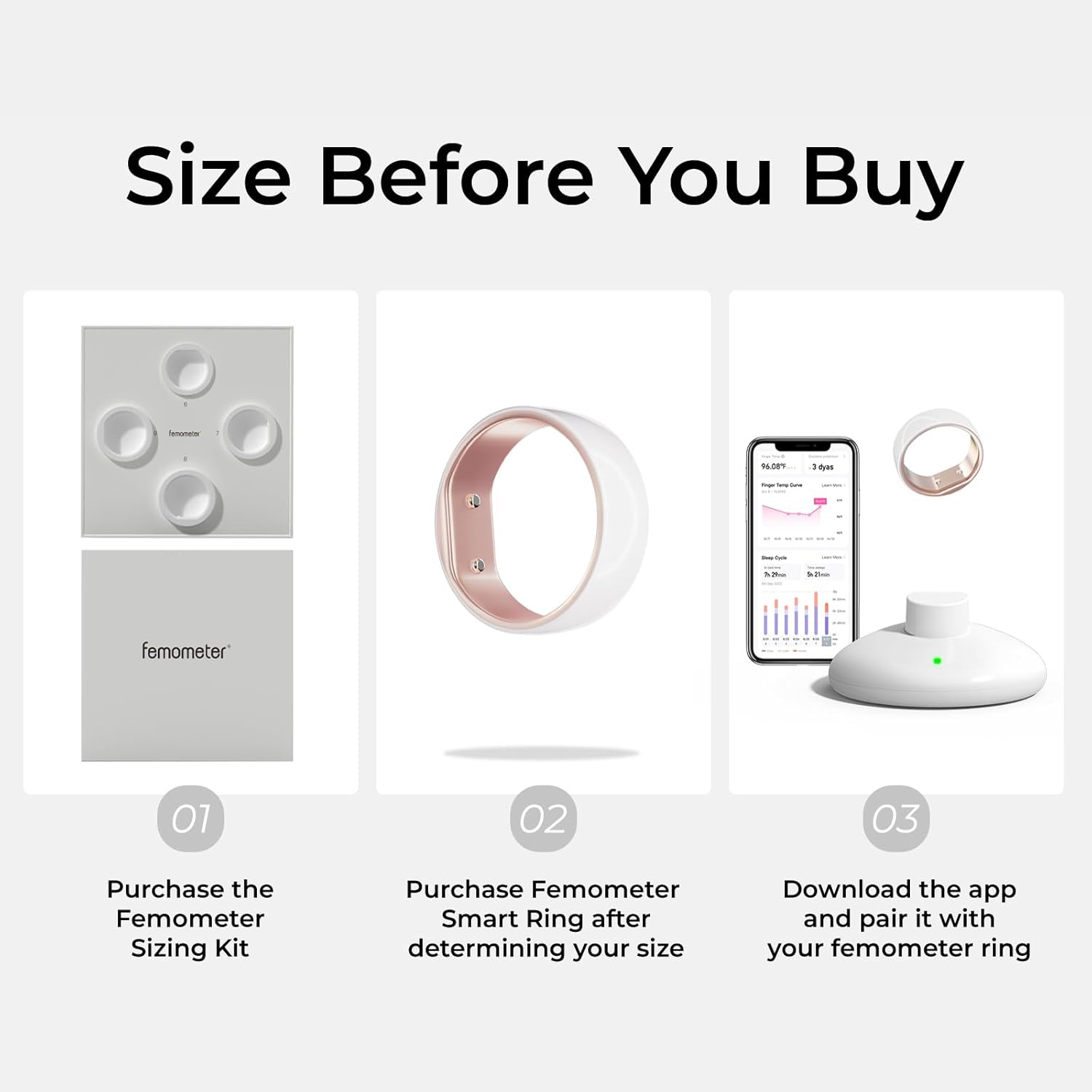
Image: The femometer Smart Ring on its magnetic charging base.

Image: Charging specifications for the femometer Smart Ring.
4.3 Taupānga Tikiake me te Tauhoa
To utilize the full features of your femometer Smart Ring, download the appropriate app and pair your device:
- For Android users, search and download "Femometer Connect" from the Google Play Store.
- For iOS users, search and download "femometer" from the Apple App Store.
- Open the app and follow the on-screen prompts to create an account and pair your femometer Smart Ring via Bluetooth. Ensure Bluetooth is enabled on your smartphone.

Image: The femometer app icon.
5. Nga Tohutohu Whakahaere
5.1 Te Mau i te Mowhiti
Wear the femometer Smart Ring on your finger overnight. For accurate readings, ensure the sensors on the inner surface of the ring are in contact with the palm side of your finger.

Image: Proper wearing of the femometer Smart Ring for sleep tracking.
5.2 Tukutahinga Raraunga
The ring automatically records your basal body temperature and sleep data throughout the night. Upon waking, open the femometer app on your paired smartphone. The ring will automatically sync the collected data to the app, where it will be analyzed and displayed.
5.3 Fertility and Ovulation Tracking
The femometer Smart Ring continuously monitors your temperature, providing data for fertility and ovulation tracking. The app processes this data to generate customized fertility charts, predict menstruation, and identify your fertile window and ovulation day. This eliminates the need for manual temperature taking each morning.

Image: Ovulation tracking interface within the femometer app.

Image: Detailed ovulation tracking features in the femometer app.
5.4 Tātaritanga Moe
The ring also tracks your sleep patterns, including light sleep, deep sleep, and awake times. The app provides a detailed sleep score and personalized recommendations based on your sleep data, helping you understand and improve your sleep quality.

Image: Sleep tracking interface within the femometer app.

Image: Detailed sleep tracking features in the femometer app.
6. Nga ahuatanga
The femometer Smart Ring incorporates advanced technology for accurate and convenient tracking:
- TriNyx BBT Monitoring System: Utilizes highly thermal conductive recycled aluminum and three high-precision sensors for accurate BBT measurements from both sides and the pulp of the finger.
- Minima Algorithm: An advanced MCU chip performs over 1,400 BBT measurements throughout your night's sleep, automatically capturing the most stable and representative values.
- Hoahoa parewai: Allows for daily wear without concern for water exposure during activities like handwashing or showering.
- Whakanoho pai: Features a smooth surface for comfortable wearing during sleep and daily activities.

Image: Internal components and technology of the femometer Smart Ring.
7. Tiaki
7.1 Te horoi
To clean your femometer Smart Ring, gently wipe it with a soft, damp cloth. Avoid using harsh chemicals or abrasive materials that could damage the ring's surface or sensors.
7.2 Tiaki Pūhiko
Charge the ring regularly to maintain optimal performance. Avoid completely draining the battery frequently, as this can reduce its overall lifespan. Store the ring in a cool, dry place when not in use.
8. Te Raru
- Ring not syncing data: Ensure Bluetooth is enabled on your phone and the ring is within range. Open the app to initiate synchronization. Check if the ring's battery is charged.
- Ngā pānui pāmahana hē: Verify that the ring is worn correctly with the sensors making good contact with your skin. Ensure the ring is fully charged.
- App not connecting to ring: Restart both your phone and the ring (by placing it on the charger). Re-attempt pairing through the app settings.
- Ora pūhiko poto: Ensure the ring is fully charged before use. If battery life significantly degrades, contact customer support.
9. Whakatakotoranga
| Āhuahira | Whakatakotoranga |
|---|---|
| Tauira Tuemi | 810115237327 |
| Taumaha Tūemi | 5.3 hekere |
| Pūhiko | 1 te pākahiko Lithium Ion e hiahiatia ana (kei roto) |
| Pūhiko Raukaha | 21 Miliamp Nga haora |
| Hangarau Hononga | Nihokikorangi |
| Paerewa Whakawhitinga Korerokore | Nihokikorangi |
| Pūnaha Mahi | Mau OS 3.0 |
| Rahi Mata | 1 Inches (display size for associated app, not ring itself) |
| GPS | Kore he GPS |
| Hanga | Porowhita |
| Kaihanga | LOLLIPOP TECHNOLOGY (HANGZHOU) CO., LTD |
10. Pūtāhui me te Tautoko
For warranty information, technical support, or customer service inquiries, please refer to the official femometer webpaetukutuku, whakapā atu ranei ki ta raatau tautoko kaihoko. Puritia to rihiti hoko mo nga kereme whakamana.
11. Hua Ataata
Ataata: He pakiwaituhiview of the femometer Smart Ring's features, including temperature tracking, cycle analysis, sleep monitoring, and waterproof design.