
1. Kupu Whakataki
Thank you for choosing the MAXDONE Trail Camera. This manual provides detailed instructions for setting up, operating, and maintaining your camera. Please read this manual thoroughly before use to ensure optimal performance and longevity of your device. This camera is designed for wildlife monitoring, outdoor scouting, and home security applications, featuring 4K video, 64MP photos, solar charging, and app control.
2. Ihirangi mokete
Manatokohia ko nga mea katoa kei raro nei kei roto i to kete:
- MAXDONE Trail Camera (Model CHD527)
- Detachable Solar Panel
- USB Momo-C Taura Whakapae
- Whakamaunga Here
- Tripod Miro
- 32GB Micro SD Card
- Nga taputapu Tiu
- Pukapuka Tohutohu (tenei tuhinga)

Image: Contents of the MAXDONE Trail Camera package, including the camera, solar panel, cables, mounting accessories, SD card, and manual.
3. Hua Neke Atuview
The MAXDONE Trail Camera is equipped with advanced features for reliable outdoor monitoring:
- Taumira teitei: Captures 4K Ultra HD videos and 64MP still images.
- Hiko Ra: Features a detachable solar panel and a 6000mAh rechargeable lithium battery for extended operation.
- Matakitenga po: Infrared technology provides clear footage up to 65 feet in low-light conditions without disturbing wildlife.
- Tere Tere o te Whakaoho: Responds to motion in 0.1 seconds.
- Wide-Angle Detection: 130° detection angle for comprehensive coverage.
- Mana Taupānga: Connects via WiFi and Bluetooth to the 'TrailCamGO' app for remote settings adjustment and footage tikiake.
- Hoahoa Roa: IP66 waterproof rating ensures reliable performance in various weather conditions.

Whakaahua: Mua view of the MAXDONE Trail Camera with its detachable solar panel, a micro SD card, and a USB-C charging cable, alongside a smartphone displaying the camera's app interface.
4. Tatūnga
4.1 Tāutanga Pūhiko me te Kāri SD
- Utuhia te Pūhiko: The camera is equipped with a 6000mAh rechargeable lithium battery. Before first use, fully charge the camera using the provided USB Type-C cable connected to a power source, or by exposing the solar panel to direct sunlight.
- Kōkuhu Kāri SD: Open the camera's protective cover. Locate the Micro SD card slot. Insert the included 32GB Micro SD card (or another compatible card up to 256GB, Class 10 or higher recommended) with the gold contacts facing the correct direction until it clicks into place.
- Katia te Uhi: Ensure the protective cover is securely closed to maintain the IP66 waterproof rating.
4.2 App Download and Initial Connection
- Tikiake App: Rapua 'TrailCamGO' in your smartphone's app store (iOS or Android) and install it.
- Hia i te kamera: Whakakāhia te kāmera mā te whakamahi i te whakakā hiko.
- Hono ma te Taupānga: Open the 'TrailCamGO' app. Follow the in-app instructions to connect to your camera via WiFi and Bluetooth. The camera creates its own hotspot for connection. The maximum connection range is 55 feet, with a recommended distance of within 10 feet for stable connection.

Image: A smartphone displaying the 'TrailCamGO' app interface, showing a detection area customization screen with a leopard image, illustrating the camera's app control capabilities.
5. Nga Tohutohu Whakahaere
5.1 Mahi Taketake
- Hiko Whakaka/Weto: Use the physical power switch on the camera to turn it on or off.
- Kōwhiringa Aratau: The camera supports various shooting modes, configurable via the 'TrailCamGO' app.
5.2 Aratau Whakapupuri
Configure these modes through the 'TrailCamGO' app:
- Kitenga Nekehanga: Captures photos or videos when motion is detected. Features a 0.1-second trigger speed.
- Hopu Wā: Takes photos or videos at set intervals, regardless of motion.
- Whakaahua-Waahi: Captures a series of images over a long period to create a time-lapse video.
- Aratau Pahūtanga 5-Pū: Captures multiple photos in quick succession when triggered.

Image: Diagram illustrating the three primary shooting modes: Motion Detection (triggered by movement), Timed Capture (scheduled intervals), and Time-Lapse Photography (sequential images over time).
5.3 Customizing Settings via App
The 'TrailCamGO' app allows for comprehensive customization:
- Wae Tirohanga: Customize specific areas within the camera's field of view ki te whakaiti i nga keu teka.
- Video Length & Resolution: Adjust video duration and quality (4K, 2K, 1080P, 720P).
- Taumira Whakaahua: Select desired photo quality (up to 64MP).
- Hopu Ororongo: Enable or disable audio capture for videos.
- Taimaamps: Add customizable timestamps to images and videos.
- Te Nekehanga: Adjust the sensitivity of the motion sensor.
- Nga haora mahi: Tautuhia ngā wā motuhake mō te kāmera kia whakahohe.
5.4 Viewinga me te Tikiake Footage
You can access your captured media through three methods:
- Via 'TrailCamGO' App: Connect your phone to the camera's WiFi/Bluetooth hotspot. Browse the gallery and download photos/videos directly to your phone without removing the SD card.
- Hononga USB: Connect the camera to a computer using the provided USB Type-C cable. The camera will appear as a removable drive, allowing you to transfer files.
- Kaipānui Kāri SD: Remove the Micro SD card from the camera and insert it into a compatible card reader connected to a computer or other device.

Image: Diagram illustrating three methods for downloading photos and videos from the trail camera: directly to a phone via WiFi/Bluetooth, to a computer via USB cable, or by using an SD card reader.
6. Te Whakahaere Utu me te Pūhiko
The MAXDONE Trail Camera is designed for extended operation with its 6000mAh rechargeable lithium battery and versatile charging options:
- Whakatauhia te ra: The detachable solar panel efficiently charges the internal battery when exposed to sunlight. Adjust the panel's angle to maximize sun exposure, especially considering seasonal changes.
- Momo-C te utu: Use the provided USB Type-C cable to charge the camera from a wall adapter, power bank, or computer.
- Mana Pūhiko: The high-capacity internal battery provides long-term continuous use, reducing the need for frequent battery replacements.
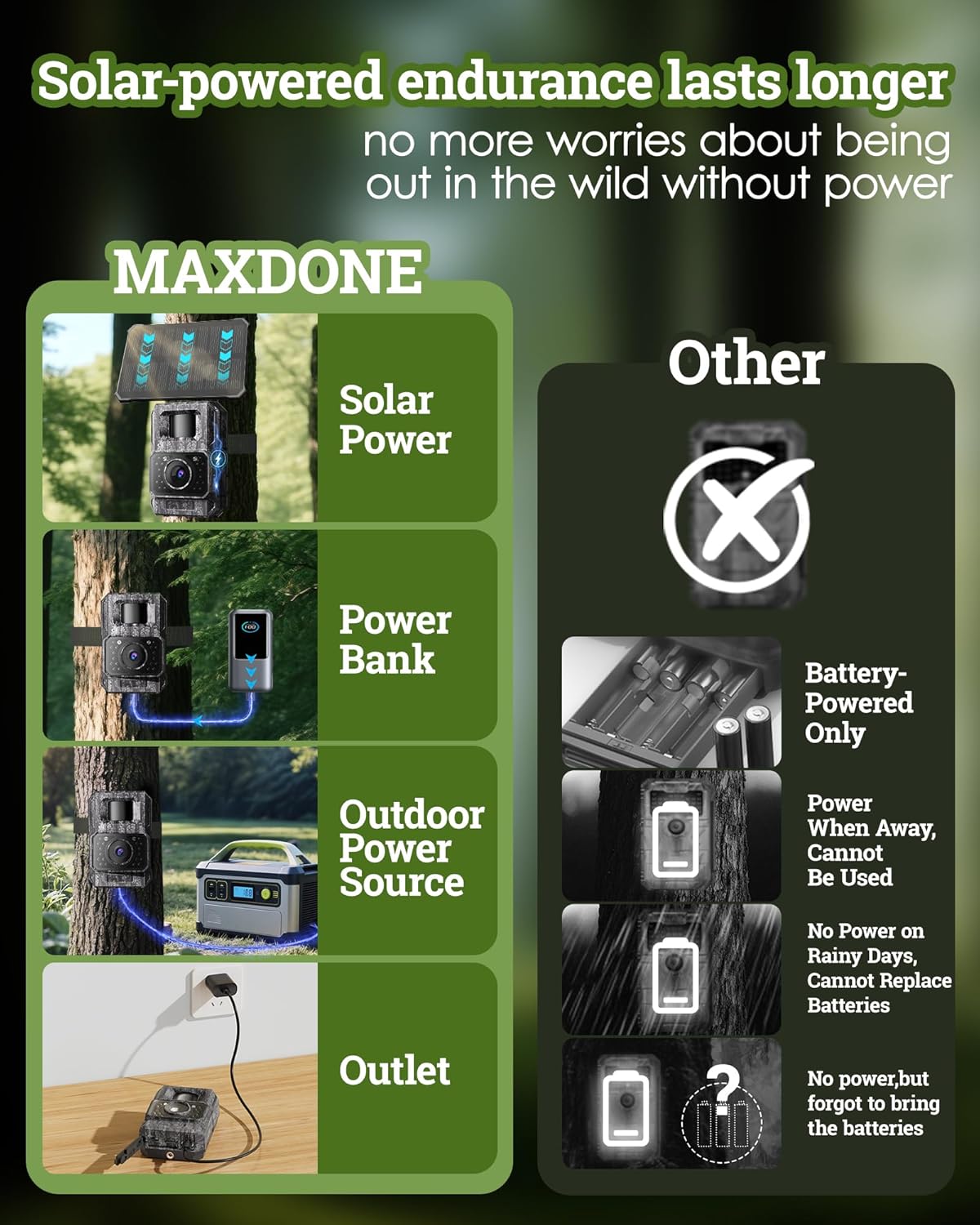
Image: Comparison of MAXDONE's solar-powered endurance with traditional battery-only cameras, showing MAXDONE charging via solar, power bank, outdoor power source, and outlet.
7. Whakapiki
Proper mounting ensures optimal camera performance and solar charging efficiency.
- Kōwhiri Tauwāhi: Select a location that provides a clear view of the desired monitoring area and allows the solar panel to receive ampte ra tika puta noa i te ra.
- Āpiti Kāmera: Use the included mounting strap to secure the camera to a tree or post. Alternatively, use the threaded tripod for flexible positioning.
- Whakaritea Paewhiri Solar: The solar panel is detachable and adjustable. Position it to face the sun directly, minimizing any potential blockage from foliage or structures.
- Utu Whakamatau: After mounting, use the 'TrailCamGO' app to check the camera's field of view and adjust detection zones as needed.

Image: The MAXDONE Trail Camera mounted on a tree with its adjustable solar panel positioned to receive sufficient sunlight. Examples show mounting on eaves, trees, and walls, emphasizing sun exposure.
8. Tiaki
Regular maintenance helps ensure the longevity and optimal performance of your trail camera.
- Clean Lens and Solar Panel: Periodically wipe the camera lens and solar panel with a soft, clean cloth to remove dirt, dust, or debris that could affect image quality or charging efficiency.
- Tirohia nga hiri: Ensure all rubber seals and the protective cover are properly closed and free from damage to maintain the IP66 waterproof rating.
- Aroturuki Pūhiko: Check the battery level regularly via the app, especially during periods of low sunlight or high activity.
- Whakaha Kaari SD: Format the SD card periodically to prevent data corruption and ensure sufficient storage space. Back up important footage i mua i te whakahōputu.

Image: The MAXDONE Trail Camera mounted on a tree in a rainy environment, highlighting its IP66 waterproof rating and silicone plug for port protection. The image also indicates an available temperature range of -4°F to 140°F.
9. Te Raru
If you encounter issues with your MAXDONE Trail Camera, refer to the following common problems and solutions:
| Raruraru | Take pea | Rongoā |
|---|---|---|
| Karekau te kamera i te hiko | Low battery; incorrect battery installation | Charge the battery fully; ensure battery is correctly inserted. |
| Kounga ahua/ataata ngoikore | Dirty lens; low light conditions; incorrect settings | Clean the lens; adjust camera placement for better light; check app settings for resolution. |
| Nga take hononga taupānga | Too far from camera; camera WiFi/Bluetooth off; app not updated | Move closer to the camera (within 10ft recommended); ensure camera is on; update 'TrailCamGO' app. |
| Karekau he kitenga motini | PIR sensor blocked; sensitivity too low; detection zone not set | Clear sensor area; increase motion sensitivity in app; configure detection zones. |
| Hapa kāri SD | Card full; corrupted; incompatible | Format SD card (backup data first); try a different compatible SD card. |
If the problem persists, please contact MAXDONE customer support for further assistance.
10. Whakatakotoranga
Detailed technical specifications for the MAXDONE Trail Camera Model CHD527:
| Āhuahira | Whakatakotoranga |
|---|---|
| Ingoa Tauira | CHD527 |
| Mōrahi Webcam Whakatau Atahanga | 64 MP |
| Whakataunga Hopu Ataata | 4K |
| Hōputu Hopu Ataata | MP4 (H.264 encoding) |
| Hangarau Hononga | Wi-Fi, Nihokikorangi |
| Tikanga Mana | App (TrailCamGO) |
| Puna Mana | Battery Powered (6000mAh rechargeable lithium battery), Solar Charging, Type-C Charging |
| Mahara Flash Tautokona Rahi Morahi | 256 GB (32GB included) |
| Whakatauranga Tiaki o te Ao | IP66 (Waiwai) |
| Hangarau Maama iti | Night Color (Infrared Night Vision up to 65FT) |
| Momo Matohi | Motini Whakahohe |
| Tere Trigger | 0.1 hēkona |
| Koki Whanui | 130° |
| Nga Ahua o te Tuemi L x W x H | 3.94 x 1.7 x 2.64 inihi |
| Taumaha Tūemi | 1.12 pauna |
| Te Awhe Maama Mahi | -4°F ki te 140°F |
11. Pūtāhui me te Tautoko
The MAXDONE Trail Camera Model CHD527 comes with a 1-Tau Rarangi Rarangi mai i te ra o te hokonga. Ka kapi tenei whakamana i nga hapa o te hanga me te mahi i raro i te whakamahinga noa.
For warranty claims, technical support, or any questions regarding your product, please contact MAXDONE customer service through the retailer's platform or visit the official MAXDONE website for contact information. Please have your purchase receipt and product model number (CHD527) ready when contacting support.