
1. Hua Neke Atuview
The UYIKOO GLS12 Sport Camera Sunglasses integrate a high-definition camera into a durable, wearable design. These sunglasses are equipped with UV protective polarized lenses and are designed for capturing video and photos during various outdoor activities. The device features a built-in rechargeable battery and supports loop recording.

Figure 1: UYIKOO GLS12 Sport Camera Sunglasses and included accessories.
Āhuatanga matua:
- Taumira Ataata: 1920 x 1080P at 30 frames/second.
- Hangarau Pūoko Whakaahua: CMOS.
- Arotahi: UV Protection Polarized Lenses.
- Rokiroki: Supports Micro SD Card (16GB included, up to 32GB).
- Pūhiko: Built-in rechargeable battery with approximately 1.5 hours of working time.
- Te tuhi: Loop recording function (saves video files every 3-6 minutes).
- Hononga: USB.
2. Tatūnga
2.1 Te Whakataki i te Pūrere
Before first use, fully charge the sunglasses. Connect the provided USB cable to the charging port located on the frame and plug the other end into a USB power source (e.g., computer, wall adapter). The charging indicator light will show the charging status.
2.2 Te whakauru i te Kaari SD Micro
- Locate the Micro SD card slot on the inner side of the right temple arm.
- Gently insert the provided 16GB Micro SD card into the slot until it clicks into place. Ensure the card is inserted in the correct orientation.
- To remove the card, gently push it inward until it springs out.
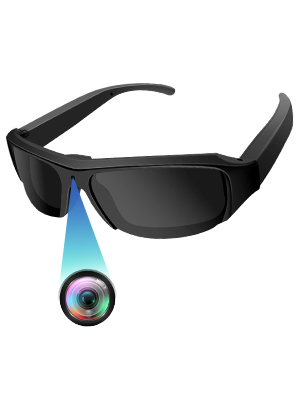
Figure 2: Proper insertion of the Micro SD card into the sunglasses.
3. Nga Tohutohu Whakahaere
3.1 Hiko / Whakaweto
- Whakahiko: Long press the power button (located on the inner side of the right temple arm) for a few seconds until the indicator light illuminates.
- Weto Whakakore: Pihi roa ano te paatene hiko kia weto te rama tohu.
3.2 Hopu Ataata
- Ensure the device is powered on and in video mode (check the mode switch if available).
- Short press the power button to start video recording. The indicator light will flash to confirm recording is in progress.
- Short press the power button again to stop recording. The indicator light will stop flashing.
3.3 Tango Whakaahua
- Ensure the device is powered on and in photo mode (check the mode switch if available).
- Short press the power button to take a photo. The indicator light will briefly flash.

Figure 3: Simple one-button operation for capturing video and photos.
3.4 Te hono ki te Rorohiko
Connect the sunglasses to your computer using the provided USB cable. The device will appear as a removable disk, allowing you to access and transfer your recorded video and photo files.
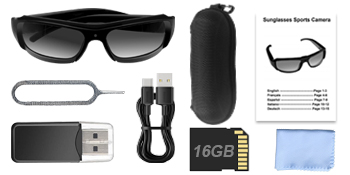
Figure 4: Connecting the sunglasses to a computer via USB for file whakahaere.
4. Media Examples
4.1 Whakaahua Hua

Figure 5: Sunglasses in use, demonstrating discreet camera placement.

Figure 6: Visual representation of battery capacity and loop recording functionality.

Whakaahua 7: Examples of outdoor activities where the camera sunglasses can be utilized.
4.2 Ataata Hua Whaimana
Ataata 1: Ka mutuview of the mini camera glasses, demonstrating features and usage. This video is provided by the seller, OhOsunshine.
5. Tiaki
- Whakapai Arotahi: Use the provided microfiber cloth to gently clean the polarized lenses. Avoid abrasive materials that could scratch the lenses.
- Rokiroki: Store the sunglasses in the portable glasses case when not in use to protect them from dust and damage.
- Tiaki Pūhiko: To prolong battery life, avoid fully discharging the battery frequently. Charge regularly, especially if not used for extended periods.
- Puranga wai: The device is not waterproof. Avoid exposure to heavy rain or submersion in water.
6. Te Raru
- Kāore te Pūrere i te Whakakā: Me whakarite kua utaina te pākahiko. Tūhono ki tētahi puna hiko ka ngana anō.
- Kaore e taea te tuhi: Check if the Micro SD card is properly inserted and has sufficient free space. The device supports loop recording, but a full card might prevent new recordings if the loop function is not active or configured.
- Kounga Ataata/Whakaahua Kino: Ensure lenses are clean. Record in well-lit environments for optimal results.
- Kāore te Rorohiko e Mōhio ki te Pūrere: Try a different USB port or cable. Ensure the device is powered on when connected.
7. Whakatakotoranga
| Āhuahira | Whakatakotoranga |
|---|---|
| Ingoa Waitohu | UYIKOO |
| Ingoa Tauira | GLS12 |
| Taumaha Tūemi | 5 hekere |
| Ahu mōkihi | 7.01 x 2.68 x 2.6 inihi |
| Pūhiko | 1 He pākahiko e hiahiatia ana (kei roto) |
| Tae | Kōwhai |
| Hangarau Pūoko Whakaahua | CMOS |
| Whakataunga Hopu Ataata | 1080p |
| Hōputu Hopu Ataata | MP4 |
| Hōputu Ororongo Tautokohia | AAC, MP3 |
| Hangarau Hononga | USB |
| Nga waahanga motuhake | Wearable Design, Built-in Rechargeable Battery with Loop Recording, UV Protection Polarized Lenses, Easy to Use with Simple On/Off Button |
8. Tautoko
If you have any questions or encounter issues with your UYIKOO GLS12 Sport Camera Sunglasses, please feel free to contact us. We are committed to resolving any problems within 24 hours.