
boAt Rockerz Trinity Gen 2
boAt Rockerz Trinity Gen 2 Bluetooth Neckband Earphones User Manual
Model: Rockerz Trinity Gen 2
Kupu Whakataki
Thank you for choosing the boAt Rockerz Trinity Gen 2 Bluetooth Neckband Earphones. This manual provides essential information for setting up, operating, and maintaining your earphones. Please read it carefully to ensure proper use and to maximize your listening experience. These earphones are designed for extended audio playback, high-resolution sound, and clear communication.
He aha kei roto i te Pouaka
- boAt Rockerz Trinity Gen 2 Earphones
- Uera Whakatau
- Pukapuka Kaiwhakamahi
The package includes the boAt Rockerz Trinity Gen 2 Earphones, a charging cable, and this user manual.
Ka mutu te huaview
The boAt Rockerz Trinity Gen 2 features a flexible neckband design with in-ear earbuds. It includes integrated controls for media playback, call management, and voice assistant activation. The neckband houses the battery and main electronics.
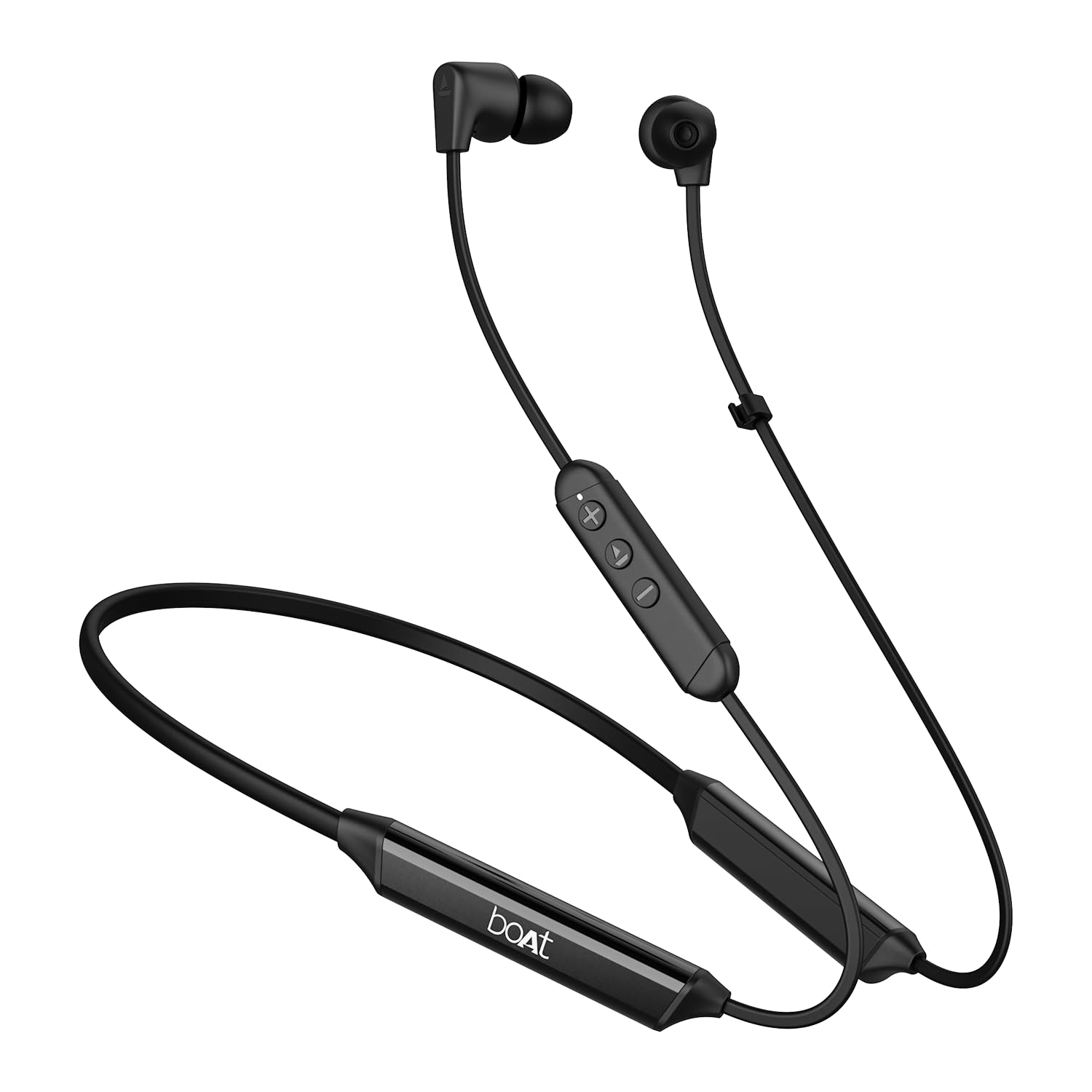
Image: The boAt Rockerz Trinity Gen 2 neckband earphones, highlighting the flexible neckband and in-ear design.

Whakaahua: He taipitopito view of the boAt Rockerz Trinity Gen 2 earbuds and the inline control panel, showing buttons for volume and playback.
Tatūnga
1. Te Whakataki i nga Waea Rongo
Before first use, fully charge your earphones. Connect the provided charging cable to the charging port on the neckband and to a USB power source. The LED indicator will show charging status. A full charge provides up to 150 hours of playback. With ASAP Charge, 10 minutes of charging provides up to 24 hours of playback.
Image: The boAt Rockerz Trinity Gen 2 neckband, illustrating its long battery life with "150 HOURS PLAYBACK" text.
2. Te Whakakaha/Weto
- Hei Whakahiko: Press and hold the Multi-function button (usually the center button on the inline control) for approximately 3 seconds until the LED indicator flashes blue and you hear a power-on prompt.
- Hei Whakaweto: Press and hold the Multi-function button for approximately 5 seconds until the LED indicator flashes red and you hear a power-off prompt.
3. Takirua Nihokikorangi
- Me mohio kua weto nga taringa.
- Press and hold the Multi-function button for about 5-7 seconds until the LED indicator flashes red and blue alternately, indicating pairing mode.
- On your device (smartphone, laptop), enable Bluetooth and search for available devices.
- Select "boAt Rockerz Trinity Gen 2" from the list of found devices.
- Kia honoa, ka mura mārire te tohu LED ki te kikorangi, ā, ka rangona he oro whakaū.

Image: The boAt Rockerz Trinity Gen 2 earphones connected to both a smartphone and a tablet, illustrating the dual pairing feature.
4. Dual Pairing (Multipoint)
The Rockerz Trinity Gen 2 supports dual pairing, allowing connection to two devices simultaneously. After pairing with the first device, disable Bluetooth on that device. Put the earphones back into pairing mode and connect to the second device. Once connected to the second device, re-enable Bluetooth on the first device. The earphones will automatically connect to both devices, allowing seamless switching between them for calls and media.
Nga Tohutohu Whakahaere
Mana Taketake
- Purei/Tatari: Patohia te paatene Maha-mahi kotahi.
- Runga Runga: Patohia te paatene '+'.
- Raro Raro: Patohia te paatene '-'.
- Riu Panuku: Patohia me te pupuri i te paatene '+'.
- Riu o mua: Patohia me te pupuri i te paatene '-'.
- Whakautu/Whakamutu Waea: Patohia te paatene Maha-mahi kotahi.
- Whakakore Waea: Patohia me te pupuri i te paatene Maha-mahi mo te 2 hēkona.
- Whakahohe i te Kaiawhina Reo: Patohia-taarua te paatene Mahi-maha.
Ororongo Hi-Res me te LDAC
The Rockerz Trinity Gen 2 supports Hi-Res Audio with LDAC codec, providing superior sound quality. Ensure your connected device also supports LDAC for the best audio experience. This feature allows for high-resolution audio transmission over Bluetooth, preserving more detail from your music.

Image: The boAt Rockerz Trinity Gen 2 earphones displaying the "Hi-Res Audio Wireless" and "LDAC" logos, indicating high-resolution audio support.
Aratau EQ Tärua
Switch between different equalizer modes to customize your audio experience. Refer to the product's quick start guide or experiment with button combinations (often a triple-press of the Multi-function button or a combination with volume buttons) to cycle through available EQ presets. This allows you to adjust the sound profile ki to hiahia.

Image: A close-up of the boAt Rockerz Trinity Gen 2 earbuds, highlighting the availability of dual EQ modes for sound customization.
AI-ENx™ Technology for Clear Calls
The earphones feature AI-ENx™ technology, which enhances call clarity by eliminating background noise. This ensures your voice is heard clearly during calls, even in noisy environments.

Image: A close-up of a boAt Rockerz Trinity Gen 2 earbud, emphasizing the AI-ENx™ technology for clear voice calls.
BEAST™ Mode (Low Latency)
Activate BEAST™ Mode for a low-latency gaming experience (65ms). This mode synchronizes audio with visuals, providing a more immersive gaming session. To activate/deactivate BEAST™ Mode, refer to the specific instructions in your quick start guide, usually involving a dedicated button press or a combination.

Image: The boAt Rockerz Trinity Gen 2 earphones with "BEAST™ MODE 65ms Low Latency" text, depicted alongside gaming characters to illustrate its use for gaming.
Te tiaki
Te horoi
- Horoia ngā taringaoro ki te kakahu ngohengohe, maroke, kāore he miro.
- Kaua e whakamahi i nga matū kino, i nga whakarewa horoi, i nga horoi kaha ranei.
- Regularly clean the ear tips to prevent wax buildup, which can affect sound quality.
Ātete Wai (IPX5)
The earphones are IPX5 rated, meaning they are resistant to sweat and light splashes of water. They are not designed for submersion in water. Avoid exposing them to heavy rain or direct water jets. Ensure the charging port cover is securely closed when not charging to maintain water resistance.

Image: The boAt Rockerz Trinity Gen 2 earbuds with water droplets on them, illustrating their IPX5 water resistance rating.
Rokiroki
Store the earphones in a cool, dry place away from direct sunlight and extreme temperatures. Avoid storing them with sharp objects that could damage the cables or earbuds.
Raparongoā
Karekau he Mana
- Me mohio kei te whakakiia nga taringa.
- Press and hold the Multi-function button for 3-5 seconds to power on.
Kāore e taea te Tauhoa ki te Pūrere
- Ensure the earphones are in pairing mode (LED flashing red and blue alternately).
- Me whakarite kei te whakahohea te Nihokikorangi i runga i tō pūrere, ā, kei roto i te awhe (10 mita te nuinga).
- Forget "boAt Rockerz Trinity Gen 2" from your device's Bluetooth list and try pairing again.
- Restart both your device and the earphones.
Low or Distorted Sound
- Whakatikatikahia te oro o ngā taringaoro me tō pūrere hono.
- Ensure the ear tips are clean and properly seated in your ears.
- Try different sized ear tips for a better seal.
- Whakatata atu ki to taputapu hono kia kore ai e pokanoa.
Ko te hopuoro kaore i te mahi
- Me whakarite kei te hono tika ngā taringa ki tō pūrere.
- Check your device's audio settings to ensure the earphones are selected as the input device.
- Clean the microphone opening if it appears obstructed.
Whakatakotoranga
| Waitohu | poti |
| Ingoa Tauira | Rockerz Trinity Gen 2 |
| Te Whakanoho Taringa | I te Taringa |
| Tauwehe Puka | I te Taringa |
| Mana Haruru | AI-ENx™ Technology (for calls) |
| Hangarau Hononga | Nihokikorangi |
| Pūhiko Wawaenga Te Ora | 150 haora |
| Wā Utu Pūhiko | 10 Minutes (for 24 hours playback via ASAP Charge) |
| Momo Atekōkiri Ororongo | Dynamic Driver (10mm, inferred from description) |
| Awhe Auautanga | 20 Hz - 40,000 Hz |
| Ātete wai | IPX5 |
| Nga waahanga motuhake | Hi-Res Audio with LDAC, Dual EQ Modes, AI-ENx™ Technology, Dual Pairing, BEAST™ Mode (65ms Low Latency), ASAP Charge |
| Tikanga Mana | Reo, Pātene |
| Taumaha Tūemi | 60 Karamu |
Pūtāhui me te Tautoko
Nga korero Whakaputanga
The boAt Rockerz Trinity Gen 2 earphones come with a 1-tau pūtāhui from the date of purchase. This warranty covers manufacturing defects. Please retain your purchase receipt for warranty claims. The warranty does not cover damage caused by misuse, accidents, unauthorized modifications, or normal wear and tear.
Tautoko Kiritaki
For technical assistance, warranty claims, or any other inquiries, please contact boAt customer support:
- Īmēra: info@imaginemarketingindia.com
- Kaihanga: Whakaarohia te Hokohoko Ltd
Please visit the official boAt webpaetukutuku mō ngā mōhiohio tautoko me ngā taipitopito whakapā hou rawa atu.
Ask a question about this manual
Ask about setup, troubleshooting, compatibility, parts, safety, or missing instructions. Manuals+ will review the question and use this page’s manual context to help answer it.