
Kupu Whakataki
Thank you for choosing the Jectse Mini Stick Gaming Keyboard. This manual provides essential information for setting up, operating, and maintaining your device. Please read these instructions carefully before use to ensure proper functionality and to maximize your gaming experience.
Ihirangi mokete
I mua i te haere ki te tatūnga, tirohia koa ko nga mea katoa kei raro nei kei roto i to kete:
- 1 × Jectse Mini Stick Gaming Keyboard
- 1 × USB Momo-C Cable
- 1 × Keycap Puller Tool
- 1 × Wrench
- 6 × Adhesive Feet
- 1 × Pukapuka Tohutohu (tēnei tuhinga)

Image: The Jectse Mini Stick Gaming Keyboard shown with its included accessories: USB-C cable, keycap puller, wrench, and adhesive feet.
Tatūnga
- Honoa te Taura USB: Locate the USB Type-C port on the gaming keyboard. Connect one end of the provided USB Type-C cable to this port.
- Tūhono ki te Pūrere: Connect the other end of the USB cable to an available USB port on your PC, Steam Deck, MiSTerFPGA, or other compatible gaming device.
- Whakaaetanga tuatahi: Your operating system or gaming device should automatically detect the keyboard. No additional drivers are typically required.
- Apply Feet (Optional): For enhanced stability, peel and apply the six adhesive feet to the bottom of the keyboard as desired.

Whakaahua: He tata view of the USB-C input port on the side of the gaming keyboard.
Nga Tohutohu Whakahaere
The Jectse Mini Stick Gaming Keyboard is designed for responsive and versatile gameplay. Below are key operational aspects:
Aratau Whakauru
The keyboard supports multiple input modes to ensure compatibility with various games and platforms:
- Aratau XTauru: Standard input mode for many modern PC games and consoles, recognized as a gamepad.
- Aratau Papapātuhi: Functions as a standard keyboard, suitable for games that primarily use keyboard controls.
Refer to your device's specific instructions or the product's online resources for details on switching between input modes, if applicable.
SOCD Cleaning Modes
Simultaneous Opposing Cardinal Directions (SOCD) cleaning prevents conflicting directional inputs. The keyboard offers the following modes:
- kūpapa: Both opposing inputs cancel each other out, resulting in no directional input.
- Up Priority: If Up and Down are pressed simultaneously, Up input is prioritized.
- Second Input Priority: The last directional input pressed is prioritized.
The specific method for selecting SOCD cleaning modes may involve key combinations or software settings. Consult the product's online documentation or support for detailed instructions.

Image: The gaming keyboard in use, connected to a console or PC setup, demonstrating its compact size and illuminated keys.
Ngā āhuatanga
The Jectse Mini Stick Gaming Keyboard incorporates several features designed to enhance your gaming performance:
- Rooputanga Tino-Hakaroa: Engineered with a processor-breaking polling rate, achieving a response time of less than 1 millisecond for precise and immediate input.
- Hototahi Pūrere Whānui: Fully compatible with various platforms including PC, Steam Deck, and MiSTerFPGA, offering broad utility across your gaming ecosystem.
- Flexible Input Modes: Easily switch between XInput and Keyboard input modes to match game requirements and personal preferences.
- Multiple SOCD Cleaning Modes: Provides Neutral, Up Priority, and Second Input Priority SOCD cleaning options to ensure fair and consistent directional inputs in competitive play.
- Silent Cherry MX Red Mechanical Switches: Equipped with genuine Cherry MX Silent Red mechanical switches, providing a quiet yet highly responsive and tactile gaming experience without distracting click noises.
- Whakaatu OLED: Features a 128x64 single-color Organic Light Emitting Diode (OLED) display for displaying status information or settings.

Whakaahua: He roto view of the gaming keyboard, emphasizing the Raspberry Pi RP2040 Master Chip, which contributes to its low latency performance.
Te tiaki
Proper maintenance ensures the longevity and optimal performance of your gaming keyboard:
- Te horoi: Whakamahia he kakahu ngohengohe, maroke hei muru i te mata o te papapātuhi. Mō te paru uaua, whakamahia he tauera itiamp ka taea te whakamahi i te tauera me te hopi ngawari, kia kore ai he wai e uru ki roto i te taputapu.
- Tango Kuputuhi: Use the provided keycap puller tool to carefully remove keycaps for cleaning or replacement. Avoid using excessive force to prevent damage to the switches.
- Rokiroki: Store the keyboard in a cool, dry place away from direct sunlight and extreme temperatures when not in use.
- A ape i te Wai: Do not expose the keyboard to water or other liquids, as this can cause internal damage.
Raparongoā
If you encounter issues with your Jectse Mini Stick Gaming Keyboard, refer to the following common troubleshooting steps:
| Raruraru | Take pea | Rongoā |
|---|---|---|
| Kaore i te mohiohia te papapātuhi | Loose USB connection, faulty cable, incompatible USB port. | Ensure the USB cable is securely connected to both the keyboard and the device. Try a different USB port or cable. Restart your device. |
| Inputs not registering correctly | Incorrect input mode, software conflict, dirty switches. | Verify the correct input mode (XInput/Keyboard) is selected. Check for conflicting software or drivers. Clean key switches if necessary. |
| OLED display not working | Power issue, display settings. | Ensure the keyboard is powered on and connected. Check if there are any specific key combinations to activate/adjust the display. |
| Ka piri nga taviri, karekau ranei e aro | Dirt or debris under keycaps. | Use the keycap puller to remove the keycap and clean the switch area. |
If the problem persists after attempting these solutions, please contact Jectse customer support for further assistance.
Whakatakotoranga
Detailed technical specifications for the Jectse Mini Stick Gaming Keyboard:
- Momo Hua: Fighting Box Keyboard
- Tau tauira: Jectse6gms3tvf4o
- Rauemi: Acrylonitrile Butadiene Styrene (ABS)
- Ahu: Approximately 190 × 76 × 10.6 mm (7.5 × 3.0 × 0.4 inches)
- Taumaha: Tata ki te 342 karamu
- Tauranga Whakauru: 1 × USB Type-C
- Rooputanga: Less than 1 millisecond
- Whakaatu: 128x64 Single Color Organic Light Emitting Diode (OLED)
- Keycap Color: Puata Kerei
- Selectable Input Modes: XInput, Keyboard
- SOCD Cleaning Modes: Neutral, Up Priority, Second Input Priority
- Whakawhiti Hangarau: Silent Cherry MX Red
- Hototahi: PC, Steam Deck, MiSTerFPGA
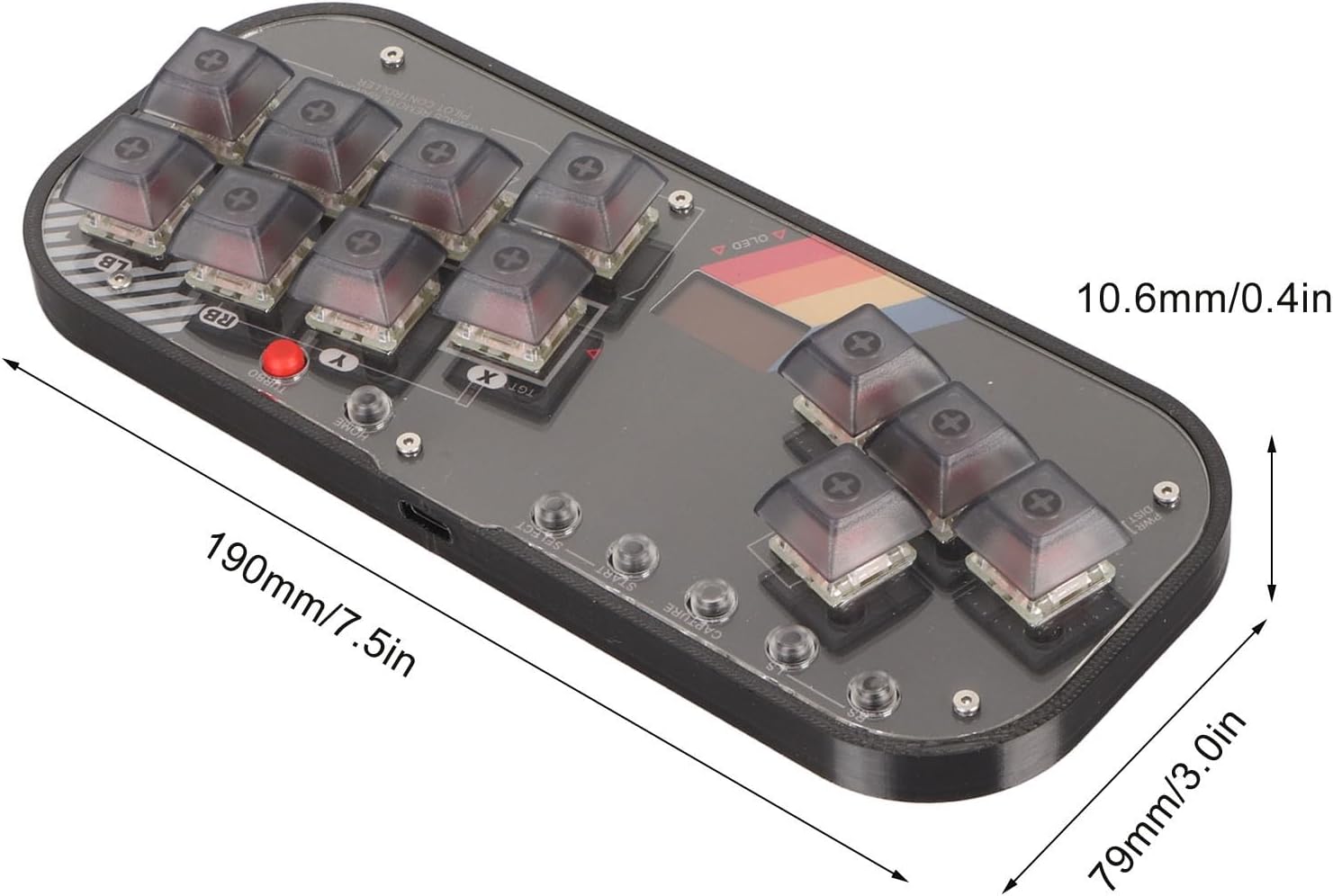
Image: A diagram illustrating the dimensions of the Jectse Mini Stick Gaming Keyboard, showing its length (190mm/7.5in) and width (79mm/3.0in), and thickness (10.6mm/0.4in).
Note: All data is measured manually, and there may be slight errors in measurement results.
Pūtāhui me te Tautoko
This product is covered by a standard manufacturer's warranty. For specific warranty terms and conditions, please refer to the documentation provided with your purchase or contact Jectse customer support.
For technical support, troubleshooting assistance, or any inquiries regarding your Jectse Mini Stick Gaming Keyboard, please visit the official Jectse store or contact their customer service department. Contact information can typically be found on the product packaging or the brand's official webpae.
Toa Tuihono: Jectse Amazon Store