
1. Kupu Whakataki
Thank you for choosing the MAXDONE 4K Night Vision Goggles. This device is designed to provide clear vision in low-light and total darkness conditions, making it ideal for various outdoor activities such as camping, hunting, wildlife observation, and security. Please read this manual thoroughly before using the device to ensure proper operation and to maximize its performance and lifespan.
The MAXDONE 4K Night Vision Goggles feature a 2025 Starlight Sensor, 4K Ultra-HD clarity, 8X digital zoom, and a 5000mAh fast-charging battery, offering a viewing range of up to 1968 feet (600 meters).
2. He aha kei roto i te Pouaka
Upon opening your MAXDONE Night Vision Goggles package, please verify that all the following items are included:
- 1x MAXDONE 4K Night Vision Goggles
- 1x Puke Kawe
- 1x Momo-C Uera Whakatau
- 1x 32GB TF Card (pre-installed or separate)
- 1x Kakahu horoi
- 1x Protective Storage Box
- 1x Neck Strap
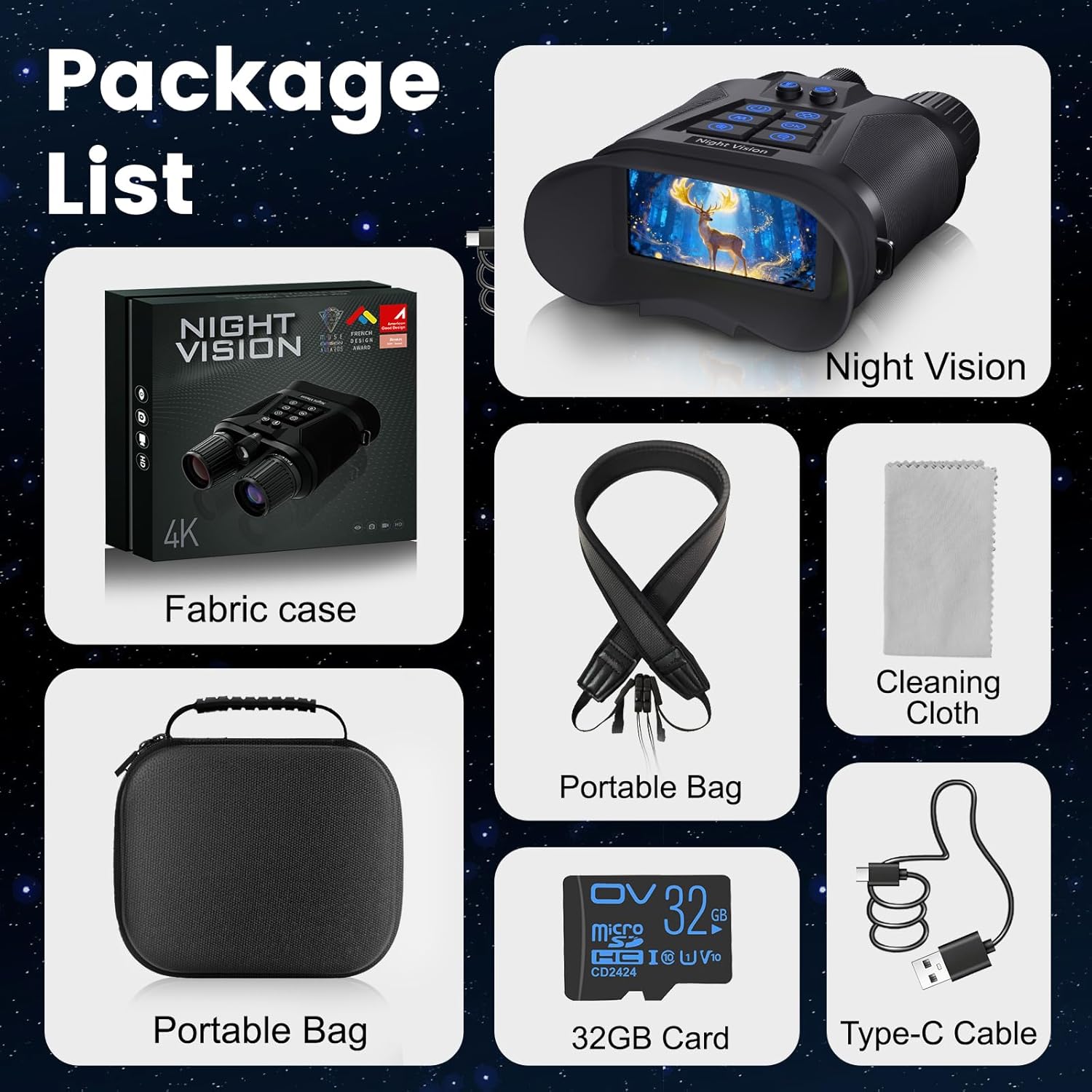
All items included in the MAXDONE Night Vision Goggles package: goggles, case, strap, cable, card, and cleaning cloth.
3. Nga waahanga matua
- 2025 Starlight Sensor: Equipped with MAXDONE’s enhanced starlight-grade sensor, this device captures clear, true-color images even in low-light environments, providing improved brightness and detail visibility.
- 600m Viewing Distance & 8× Digital Zoom: The adjustable zoom lens supports viewing distances of up to approximately 600 meters (under ideal conditions), allowing users to observe distant objects and fine details.
- 4K Ultra-HD Clarity: The 4K imaging technology provides high-definition visuals with visible fine details in both day and night conditions. Seven adjustable infrared levels allow flexible switching between color and black-and-white viewnga tikanga.
- Te Mana Roa-roa: Built-in 5000 mAh rechargeable battery supports up to approximately 12 hours of operation (based on typical usage and lighting conditions), suitable for extended outdoor or surveillance activities.
- Hoahoa Mahi-maha: Features an integrated light, microphone, and speaker for illumination, audio recording, and playback. The glow-in-the-dark buttons enhance usability and make operation convenient in dark environments.

An infographic detailing the main features: AI-ISP, 64MP photo, 4K UHD resolution, 99% color reproduction, color/infrared dual mode, 1968ft range, and 5000mAh battery.

A visual comparison showing vivid color vision during the day and crystal-clear infrared vision at night, highlighting the 64MP image and 4K video capabilities.

An illustration of the Starlight CMOS sensor's ability to see clearly in total darkness, with examples of different infrared illumination levels (1, 3, 5, 7).

Demonstration of the 8X digital zoom, showing how the device can view distant objects more closely on its 3.0-inch display.

Information on the long-lasting 5000mAh rechargeable battery, providing up to 12 hours with IR off and 18 hours with IR on, charged via Type-C.

Illustration of the powerful built-in light, offering both constant and strobe modes for illumination.

Examples of common uses for the night vision goggles, including security, wildlife observing, camping, hiking, hunting, and fishing.
4. Tatūnga
- Utuhia te Pūhiko: Before first use, fully charge the built-in 5000mAh battery using the provided Type-C cable and a compatible USB power adapter (not included). The charging indicator will show progress.
- Whakauruhia te Kāri TF: Locate the TF card slot (usually under a protective cover). Insert the included 32GB TF card with the gold contacts facing down until it clicks into place. This card is essential for saving photos and videos.
- Whakahiko: Press and hold the power button (usually marked with a power symbol) for a few seconds until the display screen illuminates.
- Adjust Eyepiece: Adjust the eyepiece diopter (if available) to match your vision for a clear view of the internal display.
- Arotahi te Arotahi: Rotate the objective lens ring to focus on your target object until it appears sharp on the display.
5. Nga Tohutohu Whakahaere
5.1 Mahi Taketake
- Hiko Whakaka/Weto: Patohia me te pupuri i te paatene mana.
- Kōwhiringa Aratau: Use the 'M' (Mode) button to switch between Photo, Video, and Playback modes.
- Topa: Use the '+' and '-' buttons (often marked with magnifying glass icons) to adjust the digital zoom level (up to 8X).
- Whakatikatika IR: In night vision mode, press the IR button (often marked with a sun/moon or IR symbol) to cycle through the 7 infrared illumination levels. Higher levels provide brighter vision in darker conditions but consume more battery.
5.2 Aratau Whakaahua
- Switch to Photo mode using the 'M' button.
- Frame your subject on the display.
- Press the 'OK' or Shutter button to capture a photo.
5.3 Aratau Ataata
- Switch to Video mode using the 'M' button.
- Press the 'OK' or Record button to start recording. A red dot or timer will appear on the screen.
- Press the 'OK' or Record button again to stop recording.
5.4 Aratau Whakahoki
- Switch to Playback mode using the 'M' button.
- Use the navigation buttons (up/down or left/right arrows) to browse through your saved photos and videos.
- Press 'OK' to view he whakaahua, he purei ataata ranei.
- Hei muku files, whakatere ki te hiahia file and press the 'Menu' button, then select the delete option.
5.5 Tautuhinga Tahua
Press the 'Menu' button to access settings. Use navigation buttons to scroll and 'OK' to select. Settings may include:
- Resolution (Photo/Video)
- Rā/Wā Stamp
- Reo
- Whakaweto Aunoa
- Whakahōputu Kāri TF
5.6 Ataata Hua Whaimana
Watch these official videos for a visual guide on using your MAXDONE Night Vision Goggles:
An official product video demonstrating the night vision capabilities, 8X zoom, and fast-charging 5000mAh battery of the MAXDONE Goggles.
A short official video highlighting the night vision binoculars and their 5000mAh fast-charging battery.
He whakaaturanga ataata manaasing the 2025 Starlight Sensor technology in the MAXDONE Night Vision Goggles.
6. Tiaki
- Whakapai Arotahi: Use the provided cleaning cloth or a soft, lint-free cloth to gently wipe the lenses. Avoid using abrasive materials or harsh chemicals.
- Rokiroki: When not in use, store the goggles in the protective storage box in a cool, dry place, away from direct sunlight and extreme temperatures.
- Tiaki Pūhiko: Hei whakaroa i te ora o te pākahiko, karohia te tuku katoa i te pākahiko. Me utu te taputapu i nga wa katoa, ahakoa kaore i te whakamahia mo nga wa roa.
- Whakahaere Kāri TF: Periodically back up your photos and videos to a computer and format the TF card to maintain optimal performance.
7. Te Raru
- Kaore te taputapu i te hiko: Ensure the battery is fully charged. If the issue persists, try charging with a different Type-C cable or power adapter.
- Kounga ahua kino: Check if the objective lens is focused correctly. Ensure the lenses are clean. In night vision mode, adjust the IR illumination level.
- Cannot save photos/videos: Verify that the TF card is correctly inserted and not full. Try formatting the TF card (this will erase all data).
- Patene kore whakautu: Try restarting the device. If unresponsive, allow the battery to fully drain and then recharge.
8. Whakatakotoranga
| Āhuahira | Whakatakotoranga |
|---|---|
| Tauira | Ngā Mōhiti Tirohanga Pō 4K |
| Pūoko | 2025 Starlight Sensor |
| Whakatau | 4K Ultra-HD (Video), 64MP (Photo) |
| Huringa Mamati | 8X |
| Viewawhe | Tae atu ki te 1968 ft (600 m) |
| Ngā Taumata Pūwero | 7 nga taumata whakarite |
| Pūhiko | Hanga-i roto i te 5000mAh pākahiko rechargeable |
| Ora Pūhiko | Approx. 12 hours (IR off), 18 hours (IR on) |
| Tauranga Whakatau | Patohia-C USB |
| Rokiroki | Kāri TF 32GB (kei roto) |
| Nga waahanga motuhake | Integrated light (constant/strobe), microphone, speaker, glow-in-the-dark buttons |
| Taumaha Tūemi | 2.68 pauna |
| Ahu mōkihi | 8.19 x 7.83 x 3.58 inihi |
9. Pūtāhui me te Tautoko
MAXDONE provides ongoing support to assist with product setup and technical inquiries. For warranty information, please refer to the warranty card included in your package or visit the official MAXDONE website. If you encounter any issues or have questions, please contact our customer support team through the contact details provided with your purchase or on our webpae.