1. Kupu Whakataki
The SALCAR V4W.716 WiFi Smart Thermostat is designed to control electric underfloor heating systems, including heating cables, heating films, and electric heaters. It provides intelligent and energy-efficient operation for your home's heating. This thermostat features a sensitive LCD touch display, adjustable backlight brightness, and multiple programmable modes to suit individual preferences.
Ko nga ahuatanga matua ko:
- Child protection and anti-frost functions.
- Power-off memory to retain settings.
- Temperature accuracy of ±0.5 °C.
- Remote control via the Tuya Smart Life application.
- Te hototahitanga mana reo me nga kaiawhina atamai.
2. Ihirangi mokete
I te whakatuwheratanga o te kete, tirohia kei te noho nga waahanga katoa:
- 1x SALCAR V4W.716 WiFi Smart Thermostat (16A)
- 1x Manual Kaiwhakamahi
- 1x Tohutohu Whakauru
- 1x External Sensor
- 1x Screw Pack for installation

Whakaahua 2.1: The image displays the SALCAR V4W.716 thermostat package contents, including the thermostat unit, user guide, and mounting screws.
3. Tatūnga me te Tāuta
Installation of the SALCAR V4W.716 thermostat should be performed by a qualified electrician to ensure safety and proper functionality. The thermostat is designed exclusively for electric heating systems and is not compatible with boiler or water heating systems.
3.1 Wiring Hoahoa
Follow the wiring diagram carefully. Ensure the power supply is disconnected before beginning installation.

Whakaahua 3.1: This diagram illustrates the wiring connections for the SALCAR V4W.716 thermostat. It shows connections for AC100-240V voltage input, the electric heating product (16A Max), and the NTC 10K external sensor.
Nga Waea Waea:
- L & N: Power input (AC100-240V).
- N1 & L1: Output to electric heating product (16A Max).
- NTC1 & NTC2: External sensor connection.
3.2 Nga waahanga tono
This thermostat is specifically designed for electric heating systems. It is compatible with heating films, heating mats, and heating cables. It is kaore compatible with boiler or water heating systems.

Whakaahua 3.2: This image clarifies that the thermostat is suitable for electric heating systems such as heating film, heating mats, and heating cables. It explicitly states incompatibility with boiler or water heating systems.
3.3 App Connection (Tuya Smart Life)
To enable smart features, connect the thermostat to the Tuya Smart Life application via 2.4G WiFi. This allows for remote control and voice assistant integration.

Whakaahua 3.3: This image highlights the key features of the SALCAR WiFi Thermostat, including WiFi connectivity, app control (Smart Life, Tuya Smart), voice control, programmability, timing function, touch interface, anti-frost function, and child lock.
4. Nga Tohutohu Whakahaere
The SALCAR V4W.716 thermostat features an LCD touch display for easy interaction and control.

Whakaahua 4.1: This image shows the SALCAR V4W.716 thermostat's LCD display, indicating current room temperature, set temperature, and heating status. Alongside it, a smartphone displays the corresponding app interface for floor heating control, showing current and set temperatures, and manual mode option.
4.1 Mahi Taketake
- Pātene Hiko: Press to turn the thermostat on or off.
- Te Whakarerekenga Pawera: Use the up and down arrows on the display or within the app to set the desired temperature.
- Kōwhiringa Aratau: Switch between manual and automatic (programmed) modes.
4.2 Ngā Aratau Ka Taea te Whakahōtaka
The thermostat supports up to six heating events per day and offers three programmable modes to align with your schedule:
- 5+2 Days: Weekdays (Monday-Friday) and weekends (Saturday-Sunday) have separate programs.
- 6+1 Days: Monday-Saturday and Sunday have separate programs.
- 7 Ra: Each day of the week can be programmed individually.
Adjust heating periods and temperatures according to personal habits for energy efficiency.

Whakaahua 4.2: This image demonstrates the programming capabilities of the SALCAR V4W.716 thermostat, showing the selection of 5+2, 6+1, or 7-day program types via the app interface. It also displays a detailed schedule for working days with specific periods and temperatures.
4.3 Remote and Voice Control
Control your heating system from anywhere using the Tuya Smart Life app on your smartphone. The thermostat is also compatible with voice assistants like Amazon Alexa and Google Home, allowing for convenient voice commands.

Whakaahua 4.3: This image illustrates the remote control capabilities of the SALCAR V4W.716 thermostat, showing a user interacting with the Tuya Smart Life app and a voice assistant (Alexa) to adjust the temperature. It highlights compatibility with Alexa and Google Home.
4.4 Nga Mahi Motuhake
- Maukati Tamariki: Ārai i ngā huringa tautuhinga kāore i whakamanahia.
- Anti-Frost Protection: Automatically activates heating if the temperature drops below a set threshold to prevent freezing.
- Tiri Whānau: Allows multiple users to control the thermostat via the app.
5. Tiaki
To ensure the longevity and optimal performance of your SALCAR V4W.716 Smart Thermostat, follow these general maintenance guidelines:
- Te horoi: Āta horoia te mata me teasing with a soft, dry cloth. Avoid using abrasive cleaners, solvents, or chemical sprays, as these can damage the surface or internal components.
- Aukati i nga arai: Ensure that the thermostat is not covered by furniture, curtains, or other objects that could obstruct its temperature sensor or airflow.
- Tuku Hiko: In case of extended absence, you may choose to turn off the heating system at the main breaker, but note that the thermostat has power-off memory to retain settings.
- Whakahōu Pūmanawa: Periodically check the Tuya Smart Life app for any available firmware updates for the thermostat to ensure you have the latest features and security enhancements.
6. Te Raru
If you encounter issues with your SALCAR V4W.716 Smart Thermostat, refer to the following common troubleshooting steps:
- Kāore te Thermostat e aro mai: Check if the device is powered on. Ensure the main power supply to the heating system is active. If the screen is blank, verify wiring connections.
- He Te Panui Pawera: Ensure the external sensor is properly connected and not damaged. Avoid placing the thermostat in direct sunlight or near heat sources that could affect its readings.
- Kāore he Whakamahana: Verify that the thermostat is set to a temperature higher than the current room temperature. Check the heating system's circuit breaker. Ensure the thermostat is in an active heating mode (not off or in a scheduled 'off' period).
- Nga Take Hononga Taupānga: Ensure your home WiFi network is 2.4GHz and stable. Restart your router and the thermostat. Re-attempt the pairing process in the Tuya Smart Life app. Confirm the app is updated to the latest version.
- Mana Reo Kaore i te Mahi: Ensure the thermostat is successfully linked to your Amazon Alexa or Google Home account within the Tuya Smart Life app. Check your internet connection and the functionality of your voice assistant device.
- Display Unlocking Difficulty: Some users report the display being slightly stiff to detach from the base plate during installation. Apply gentle, even pressure.
If problems persist after attempting these steps, please contact SALCAR customer support for further assistance.
7. Whakatakotoranga
Detailed technical specifications for the SALCAR V4W.716 WiFi Smart Thermostat:
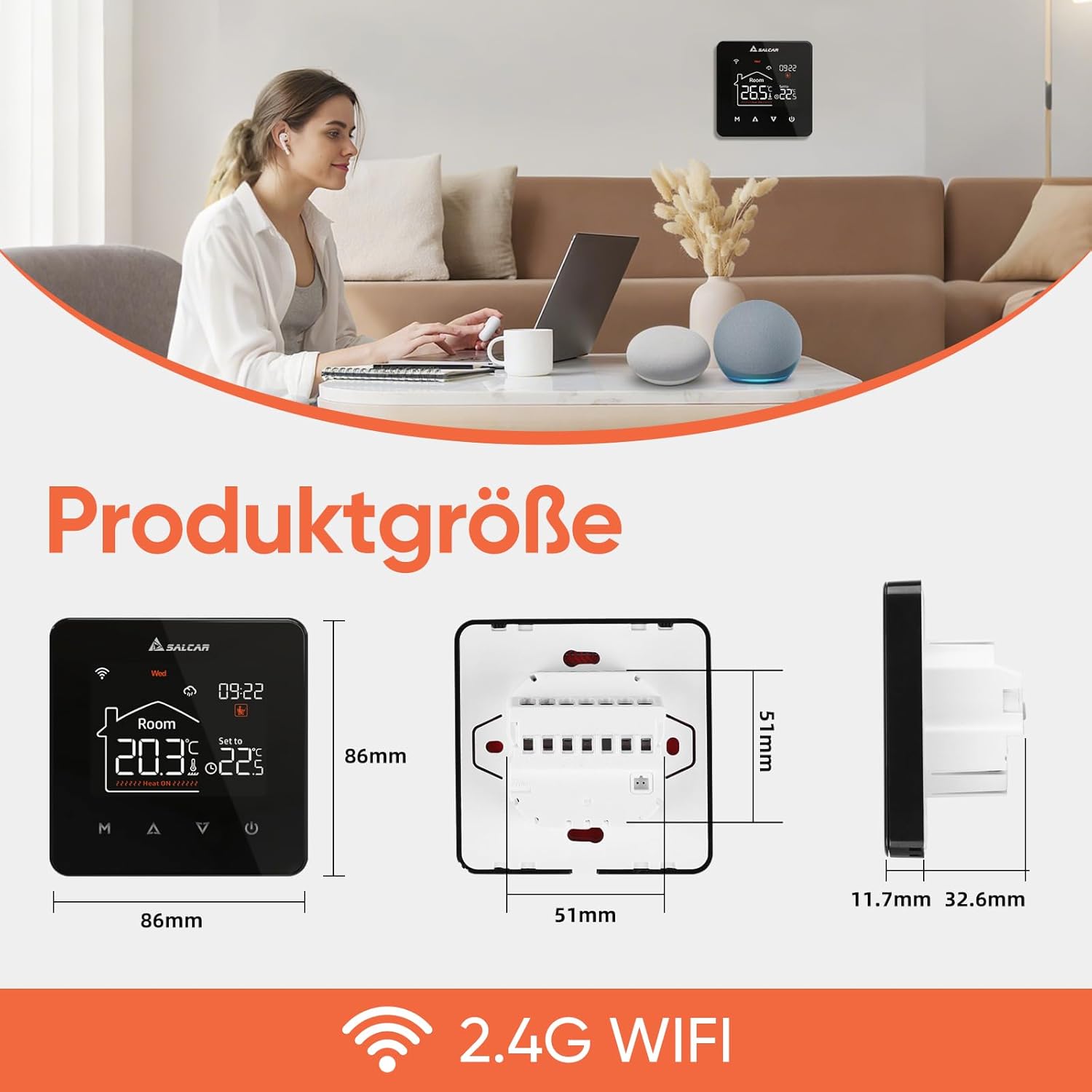
Whakaahua 7.1: This image provides the physical dimensions of the SALCAR V4W.716 thermostat, showing its front face (86mm x 86mm) and side profile (11.7mm front depth, 32.6mm back depth, 51mm total depth from wall).
| Āhuahira | Whakatakotoranga |
|---|---|
| Waitohu | SALCAR |
| Tauira | V4W.716 |
| Hunga Hua | 4.43 x 8.6 x 8.6cm; 280g |
| Whakamahinga Tauwhāiti | Electric plinth heater |
| Nga Pikohiko e hiahiatia ana | Kao |
| Momo Kaiwhakahaere | SmartThings (Tuya Smart Life App) |
| Nga waahanga motuhake | Low battery indicator (if applicable), Temperature indicator, Programmable, Automatic scheduling, Frost protection |
| Tae | Pango |
| Hononga | 2.4G WiFi |
8. Pūtāhui me te Tautoko
For warranty information and customer support, please refer to the documentation included with your product or contact SALCAR directly through their official webngā hongere ratonga kiritaki, ngā pae tukutuku rānei. Puritia tō rīhiti hoko hei taunakitanga hoko mō ngā kereme pūtāhui katoa.


