
1. Kupu Whakataki
Thank you for choosing the Vipdream XPJ01 Automatic Card Shuffler. This device is designed to provide efficient and fair shuffling for 1 to 2 decks of standard playing cards, enhancing your gaming experience. Please read this manual thoroughly before operating the device to ensure proper use, optimal performance, safety, and longevity.
2. Nga Korero Haumaru Nui
- Keep the device away from water and other liquids. The product is e kore e parewai.
- Do not operate the card shuffler while it is charging. Disconnect the charging cable before use.
- Use only the provided or a compatible charging cable.
- Kaua e taea e nga tamariki me nga kararehe.
- Kaua e ngana ki te wetewete, ki te whakatika ranei i te taputapu. Whakapa atu ki te tautoko a nga kaihoko mo te awhina.
- Avoid inserting foreign objects into the card slots or mechanism.
- Ensure the device is placed on a stable, flat surface during operation.
3. Ihirangi mokete
Tena koa tirohia te kete mo nga mea e whai ake nei:
- Vipdream XPJ01 Automatic Card Shuffler
- Tauira Whakatau USB
- Pukapuka Kaiwhakamahi (tenei tuhinga)
4. Hua Neke Atuview
Familiarize yourself with the components of your Vipdream Automatic Card Shuffler.
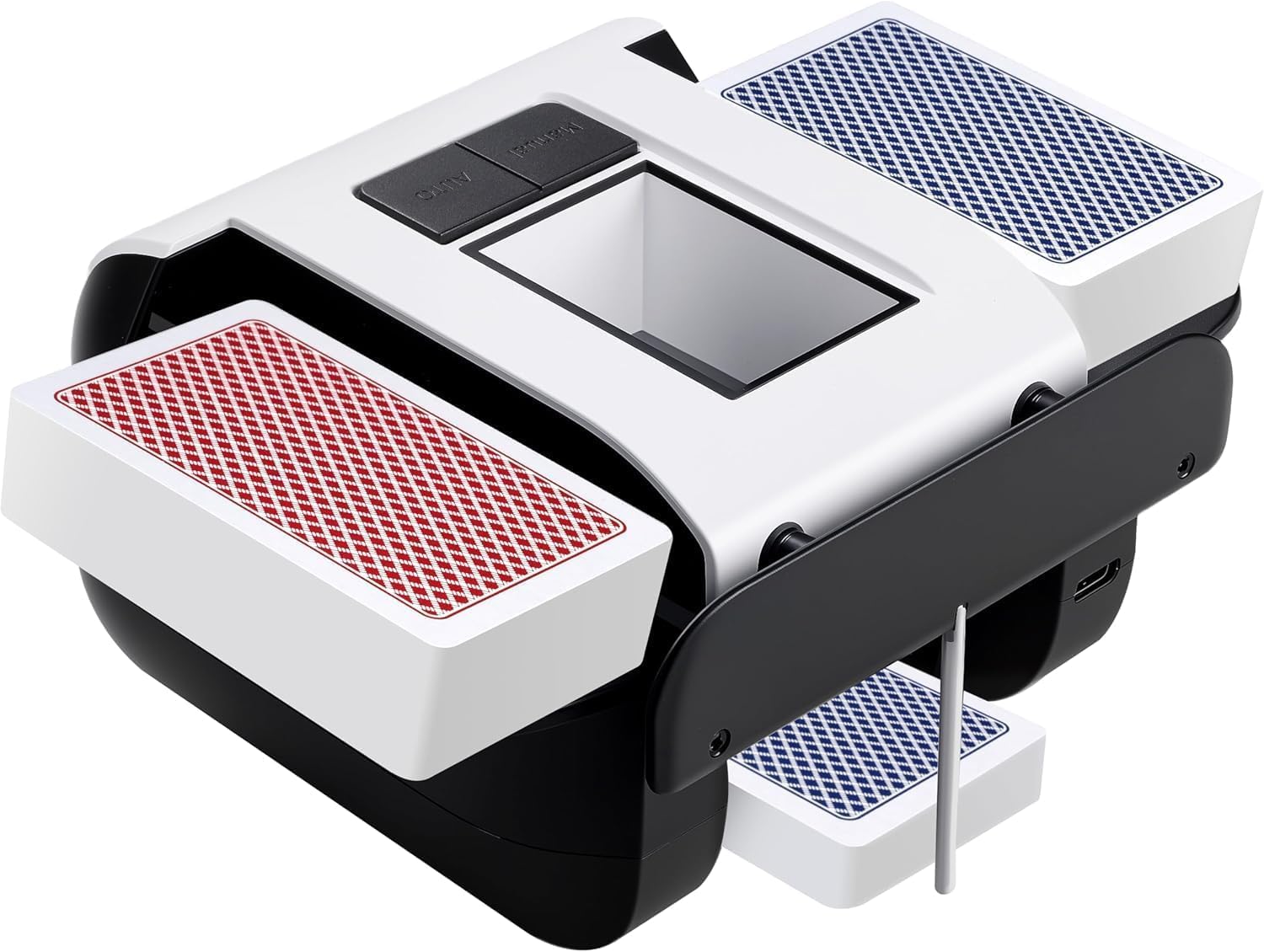
Whakaahua 1: Mua view of the Vipdream XPJ01 Automatic Card Shuffler. This image displays the main body of the shuffler, including the card input trays at the top and the card output tray at the bottom. A single control button is visible on the front panel.
Wae matua:
- Card Input Trays: Where cards are placed for shuffling (typically two slots for 1-2 decks).
- Card Output Tray: Where shuffled cards are collected.
- Pātene AUTO: Initiates the automatic shuffling process.
- Tauranga Whakatau: USB port for recharging the internal battery (usually located on the side or back).
- Maama Tohu: Shows charging status or operational status.
5. Tatūnga
- Wewete: Carefully remove the card shuffler and all accessories from the packaging.
- Akona Tuatahi: Before first use, fully charge the device. Connect the USB charging cable to the shuffler's charging port and plug the other end into a suitable USB power source (e.g., computer, wall adapter). The indicator light will typically show charging status (e.g., red for charging, green/off for fully charged).
- Turanga: Place the shuffler on a stable, flat, and dry surface.
Tuhipoka: The device is not operational while charging. Ensure it is fully charged and disconnected from the power source before use.
6. Nga Tohutohu Whakahaere
Follow these steps to shuffle cards:
- Whakaritea ngā Kāri: Ensure cards are clean, dry, and free from bends or tears. The shuffler supports standard-sized playing cards.
- Kōkuhu Kāri: Divide your deck(s) into two roughly equal halves. Place one half into each of the two card input trays at the top of the shuffler. Ensure cards are inserted face down or face up consistently, depending on your preference, and are seated properly in the trays.
- Tīmata te Whakakorikori: Pehia te AUTO button located on the front of the device. The shuffler will begin to automatically mix the cards.
- Kati Aunoa: The advanced smart sensor will detect when shuffling is complete and automatically stop the process.
- Tikina ngā Kāri: Once the shuffler stops, carefully remove the shuffled deck from the card output tray at the bottom.
- Tukurua (Kōwhiringa): For a more thorough shuffle, you may repeat the process multiple times.
This shuffler is suitable for various card games including Poker, UNO, Texas Hold 'Em, Blackjack, Omaha, and Baccarat.
7. Tohutohu Whakapaa
The Vipdream XPJ01 features an integrated rechargeable battery for convenience.
- Connect the provided USB charging cable to the charging port on the shuffler.
- Monohia tetahi atu pito o te taura USB ki te urutau hiko USB paerewa (kaore i whakauruhia), ki te tauranga USB rorohiko ranei.
- The indicator light will illuminate to show that the device is charging.
- Once fully charged, the indicator light will change color or turn off, depending on the model.
- Hiranga: Do not use the shuffler while it is connected to a power source and charging. Disconnect the charging cable before operating.
8. Tiaki
- Te horoi: Use a soft, dry cloth to wipe the exterior of the shuffler. Do not use abrasive cleaners or immerse the device in water.
- Tiaki Kaari: Ensure cards are clean and in good condition before shuffling to prevent dust and debris from entering the mechanism.
- Rokiroki: Store the shuffler in a cool, dry place when not in use.
9. Te Raru
| Raruraru | Take pea | Rongoā |
|---|---|---|
| Shuffler does not turn on. | He iti te pākahiko. | Me utu katoa te taputapu. |
| Shuffler stops during operation. | Cards jammed or improperly inserted. | Remove cards, check for obstructions, and reinsert cards correctly. |
| Cards are not shuffling smoothly. | Cards are worn, bent, or dirty. | Use new or clean, undamaged cards. |
| Shuffler is connected but not working. | Kei te utu te taputapu. | Disconnect the charging cable before attempting to use the shuffler. |
10. Whakatakotoranga
- Ingoa Tauira: XPJ01
- Waitohu: Vipdream
- Ahu (L x W x H): 7.5 x 5.5 x 3.7 inihi (ngā rahinga tata o te kete)
- Taumaha: 1.08 Pounds (approximate package weight)
- Rauemi: Kirihou
- Tae: Mā
- Puna Hiko: Pūhiko Whakahoki Anō (kua whakauruhia)
- Te Whakakore Kaari: 1-2 standard decks
- Ātete wai: Ehara i te parewai
11. Pūtāhui me te Tautoko
The Vipdream XPJ01 Automatic Card Shuffler comes with a standard manufacturer's warranty. Please refer to the product packaging or your point of purchase for specific warranty terms and conditions. For technical support, troubleshooting assistance, or warranty claims, please contact Vipdream customer service through the retailer where the product was purchased.
Tuhipoka: The warranty does not cover damage caused by misuse, accident, unauthorized modification, or operation in wet conditions as the product is not waterproof.