Kupu Whakataki
Thank you for choosing the DWVO Vanity Desk. This manual provides detailed instructions for the safe assembly, operation, and maintenance of your new vanity desk. Please read this manual thoroughly before beginning assembly or use to ensure proper function and longevity of the product. Keep this manual for future reference.
Nga korero haumaru
- Me whai i nga tohutohu a te huihuinga i nga wa katoa.
- Kia mahara kia noho haumaru nga hononga katoa i mua i te whakamahinga.
- Do not overload drawers or shelves.
- Tiakina nga waahanga hiko mai i te wai.
- For added safety, utilize the included anti-tip straps to secure the unit to a wall.
- The mirror comes with a protective film; remove it carefully before first use.
Ihirangi mokete
Verify that all components are present before assembly. Refer to the included parts list in your packaging. The package typically includes:
- Vanity Desk components (engineered wood panels, hardware)
- Whakaata LED
- Power Hub (1 Type-C port, 1 USB port, 2 AC outlets)
- RGB Cabinet Lighting kit (with remote or Bluetooth app control)
- Kaipupuri Whakamakuku makawe
- Anti-tip straps
- Nga tohutohu hui
Tatūnga me te Runanga
Assembly is required for this vanity desk. It is recommended to have two people for certain steps. The process typically takes approximately 2.5 hours. Follow the step-by-step instructions provided in the separate assembly guide included with your product. All parts are clearly labeled for ease of identification.

Pikitia 1: Ngā Ahu o te Hua me ngā Āhuatanga Matua.

Figure 2: Detailed dimensional view of the vanity desk.
Nga Tohutohu Whakahaere
1. Mahi Whakaata LED
Kei roto i te whakaata nui he rama LED kua whakauruhia me ngā tautuhinga ka taea te whakarite:
- Hiko Whakaka/Weto: Patohia te pūoko pā i runga i te mata o te whakaata hei whakakā, hei whakaweto rānei i ngā rama.
- Te Whakarereketanga Te Mahana Tae: Tap the touch sensor to cycle through three light tones: warm, daylight, and cool light (6000K Cold Light, 4500K Warm White, 3000K Warm Yellow).
- Whakaritenga Tirohanga: Press and hold the touch sensor to adjust the brightness level for your desired illumination.

Figure 3: LED Mirror with three adjustable lighting modes.
2. Built-In Power Hub
The vanity desk includes an integrated power station for convenient charging and powering of devices:
- Tauranga: 1 Type-C port, 1 USB port, and 2 standard AC outlets.
- Whakamahinga: Connect your smartphone, tablet, styling tools, or other electronic devices.

Figure 4: Integrated Power Hub and Hair Dryer Holder.
3. RGB Cabinet Lighting
The cabinet features vibrant 7-color RGB lighting:
- Mana: Use the provided remote control or a compatible Bluetooth application to manage the lighting.
- Āhuatanga: Adjust colors, brightness, and potentially activate timing or music modes (refer to RGB lighting specific instructions for full functionality).
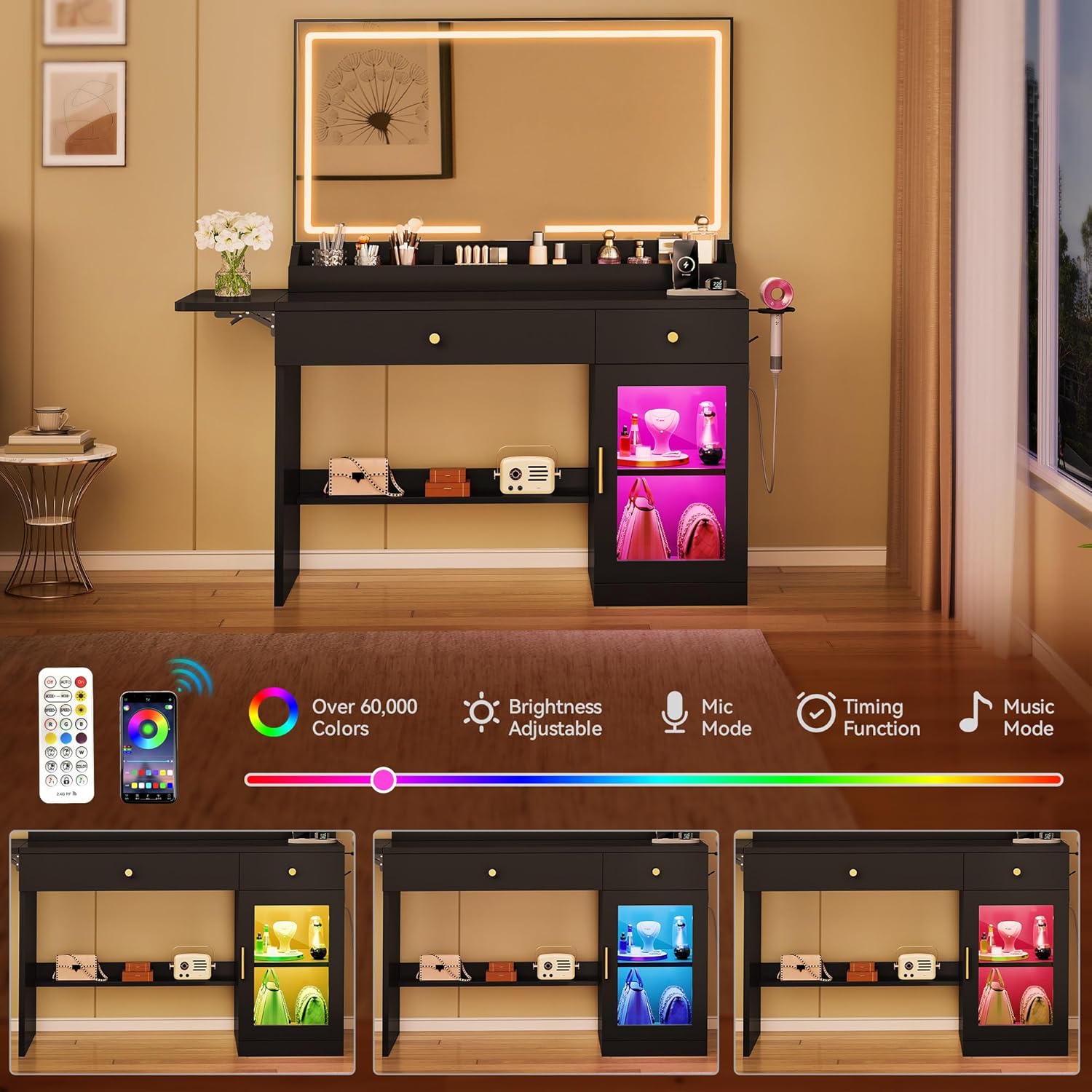
Figure 5: RGB Cabinet Lighting Features and Control Options.
4. Foldable Countertop
The vanity includes a clever fold-out top to extend your workspace:
- Hei Whakaroa: Gently pull the extension panel outwards until it locks into place.
- Hei Tango: Release the locking mechanism (if applicable, refer to specific mechanism in assembly guide) and fold the panel neatly back to save space.

Figure 6: Foldable Countertop Extension Panel.
5. Hair Dryer Holder
A dedicated holder is built into the side of the vanity for your hair dryer, keeping it organized and easily accessible. Simply place your hair dryer into the holder after use.
Nga waahanga rokiroki
The DWVO Vanity Desk offers various storage options to keep your essentials organized:
- Kaiutuutu: Two smooth-gliding drawers provide concealed storage for makeup, accessories, and tools.
- Papa Tuwhera: Convenient open shelving for frequently used items or decorative displays.
- Te Rūnanga: A roomy cabinet with an adjustable shelf offers flexible storage for larger items.
- Desktop Compartments: Integrated compartments on the desktop keep smaller items sorted and within reach.

Figure 7: Organized Drawers and Desktop Compartments.

Figure 8: Smooth-sliding drawer mechanism.
Te tiaki
- Te horoi: Horoia nga mata ki te ngohengohe, damp kakahu. A ape i nga matū kino e kino ai te otinga.
- Tiaki whakaata: Use a glass cleaner specifically designed for mirrors. Do not spray cleaner directly onto the mirror; apply to a cloth first.
- Pūmārō: Periodically check and tighten any loose screws or fittings to maintain stability.
Raparongoā
If you encounter any issues with your DWVO Vanity Desk, please refer to the following general troubleshooting tips:
- LED Mirror Not Lighting: Ensure the power cord is securely plugged into a working outlet. Check the touch sensor for responsiveness.
- RGB Cabinet Lights Not Working: Verify the power connection. Check the remote control batteries or Bluetooth app connection.
- Whakapiri Drawers: Ensure drawer slides are properly aligned and free of obstructions. Re-check assembly if necessary.
- Nga take pumau: Confirm all screws and fasteners are tightened. Ensure the anti-tip straps are correctly installed and secured to the wall.
Mo etahi atu awhina, tena waea atu ki te tautoko a nga kaihoko.
Whakatakotoranga
| Waitohu | DWVO |
| Tau tauira | MADWVBvGxl |
| Nga Ahinga (D x W x H) | 16" D x 39.5" W x 55.5" H (40.6 x 100.3 x 141 cm) |
| Taumaha Tūemi | 80 pauna (36.3 kg) |
| Rauemi Tāpare | Rakau Hangaia |
| Tae | Pango |
| Kāhua | Riihi arahina |
| Puka Hiko | 1 Type-C, 1 USB, 2 AC Outlets |
| Whakaata Rama | 3 Color Modes (Warm, Daylight, Cool), Adjustable Brightness |
| Rarama a te Rūnanga | 7-Color RGB, Remote/Bluetooth App Control |
| UPC | 199449856757 |
Pūtāhui me te Tautoko
For warranty information or technical support, please refer to the contact details provided in your product packaging or visit the official DWVO website. Customer support is available to assist with any questions or concerns regarding your vanity desk.
Mo etahi atu rauemi, ka taea e koe te toro ki te DWVO Store on Amazon.