
RIG ITI 5546
SMALLRIG Mobile Video Cage 5546 for iPhone 17 Pro Max User Manual
Tauira: 5546 | Waitohu: SMALLRIG
1. Kupu Whakataki me Nekeview
The SMALLRIG Mobile Video Cage 5546 is designed for the iPhone 17 Pro Max, providing a versatile platform for professional video recording, live streaming, and short film production. Its all-metal construction offers comprehensive protection, absorbing shock and safeguarding against scratches.
- One-touch Quick Lock Design: Features a quick lock mechanism for secure phone mounting and dismounting, preventing accidental release. Includes a classic quick-release interface for efficient connection.
- Multiple Installation Points: Equipped with multiple 1/4"-20 anti-twist threaded holes and cold shoe mounts for attaching handles, tripods, microphones, and lighting accessories. Side-mounted strap holes accommodate professional wrist and shoulder straps under 2mm in diameter for easy carrying.
- Unrestricted Phone Use: The hollow design ensures full access to all buttons, ports, radar, ultra-wide-angle lens, and wireless charging capabilities without interference.
- Lens Backplate System: Comes standard with a T-mount backplate and a 17mm threaded lens backplate for external lens mounting. The T-mount backplate is interchangeable with a 67mm magnetic filter adapter (ID: 5548, sold separately) for enhanced optical output.
2. He aha kei roto i te Pouaka
- Phone Cage for iPhone 17 Pro Max × 1
- TPU Soft Bumper for iPhone 17 Pro Max × 1
- T-Mount Lens Backplate × 1
- 17mm Threaded Lens Backplate × 1
- Tohutohu Whakahaere × 1
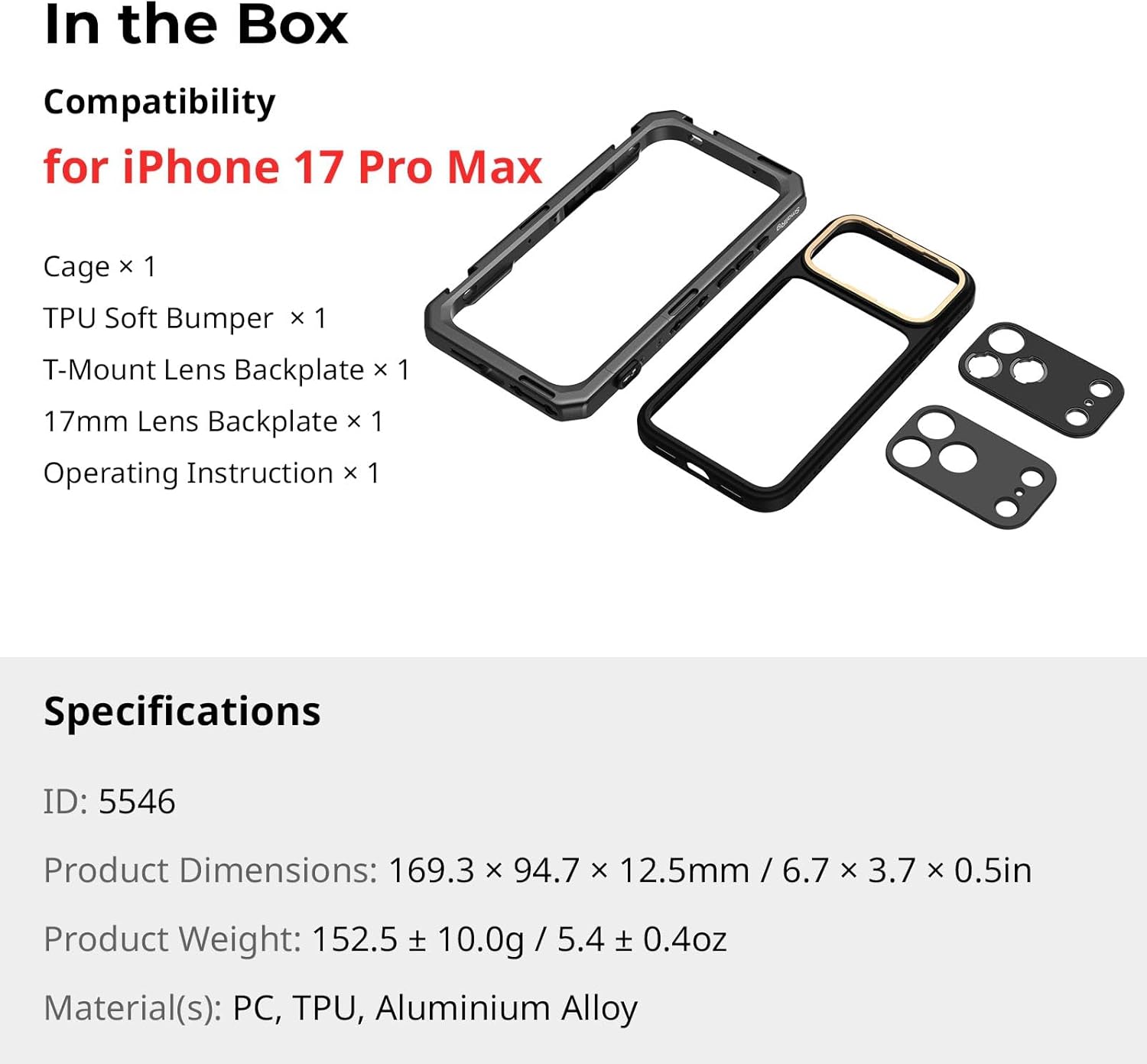
Figure 2.1: Included components of the SMALLRIG Mobile Video Cage 5546.
3. Tohutohu Tatūnga
3.1 Installing Your iPhone 17 Pro Max
- Ensure the quick lock mechanism on the cage is in the 'open' position.
- Carefully slide your iPhone 17 Pro Max into the TPU soft bumper.
- Insert the phone (with bumper) into the cage, aligning the camera module and ports.
- Engage the quick lock mechanism to secure the phone firmly within the cage.

Figure 3.1: Phone insertion and quick lock mechanism.
3.2 Attaching Lens Backplates
The cage supports interchangeable lens backplates. The kit includes a T-mount and a 17mm threaded backplate.
- To remove the current backplate, gently slide it off the camera module area.
- Align the desired backplate (T-mount or 17mm threaded) with the camera module.
- Slide the new backplate into place until it clicks securely.
- Attach compatible external lenses or filters to the installed backplate.
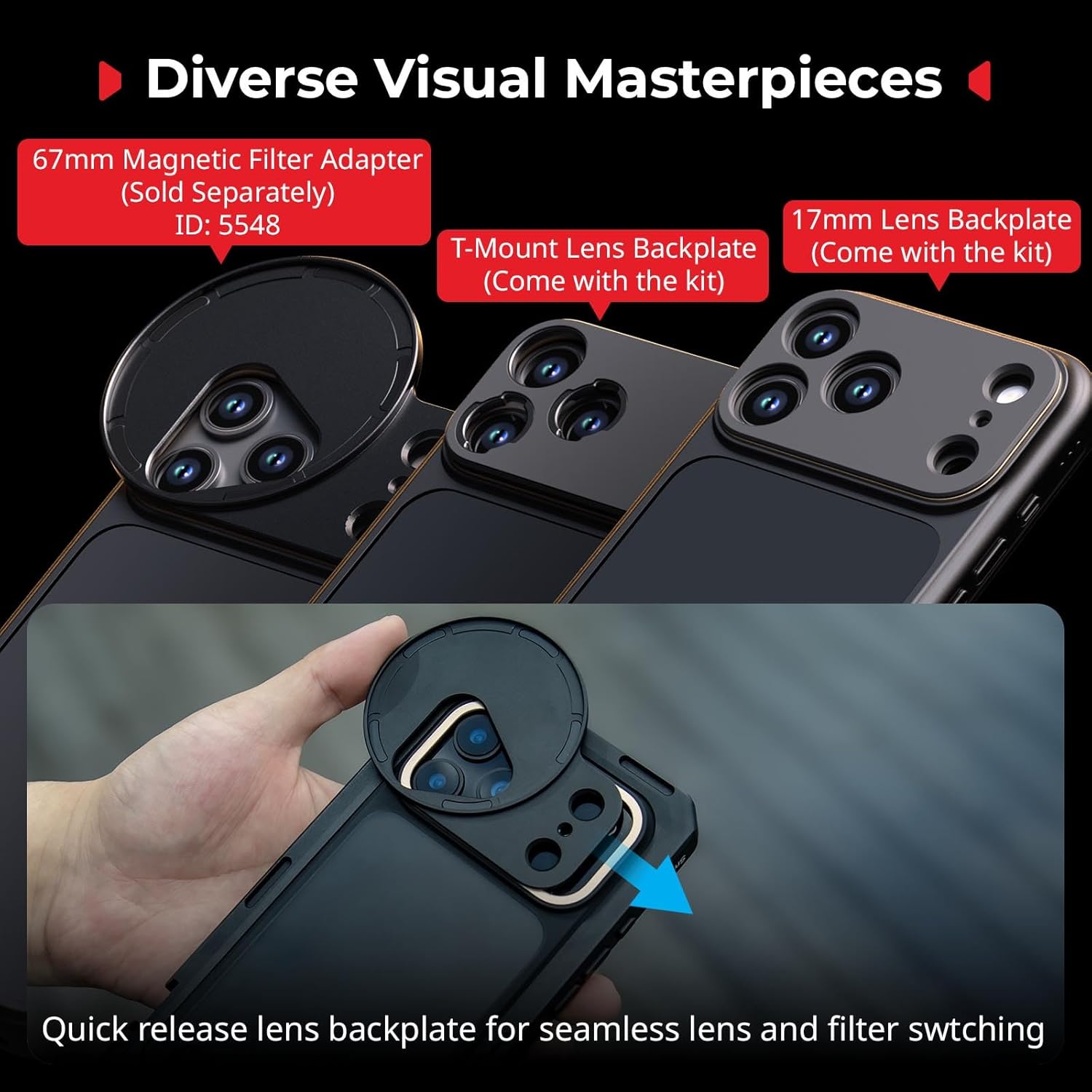
Figure 3.2: Interchangeable lens backplates for diverse optical accessories.
3.3 Te taapiri i nga taputapu
Utilize the 1/4"-20 anti-twist threaded holes and cold shoe mounts to attach various accessories:
- Kakau: Attach side handles for improved grip and stability during handheld shooting.
- Takitoru: Mount the cage onto a tripod for stable, stationary shots.
- Microphones & Lights: Use cold shoe mounts to add external microphones or LED lights for enhanced audio and illumination.
Video 3.1: Official SmallRig video demonstrating the phone cage for iPhone 17 Pro/Max, including accessory attachment and usage scenarios.
4. Nga Tohutohu Whakahaere
The SMALLRIG Mobile Video Cage enhances your iPhone 17 Pro Max for various content creation needs. Once your phone and desired accessories are securely attached, you can begin shooting.
- Te Pupuhi Ringaringa: Use attached handles for stable, ergonomic grip during dynamic shots.
- Tripod-Mounted Shooting: For static shots or interviews, mount the cage onto a tripod using the 1/4"-20 threaded holes.
- External Lenses/Filters: Experiment with different T-mount or 17mm threaded lenses and filters to achieve various cinematic effects.
- Power & Audio: Connect external power banks or audio recording devices via the available mounting points without obstructing phone functionality.

Whakaahua 4.1: Examples of cinematic and everyday shooting configurations.
Ataata 4.1: Whakaaturanga ataata whaimana a SmallRigasing the phone video rig for iPhone 17 Pro/Max in various operational scenarios.
5. Tiaki
To ensure the longevity and optimal performance of your SMALLRIG Mobile Video Cage, follow these maintenance guidelines:
- Te horoi: Wipe the metal cage and TPU bumper with a soft, dry cloth. For stubborn dirt, use a slightly damp cloth with mild soap, then dry thoroughly. Avoid harsh chemicals or abrasive materials.
- Rokiroki: Store the cage and its components in a clean, dry environment away from direct sunlight and extreme temperatures.
- Tirotiro: Periodically check all screws and connection points for tightness. Ensure the quick lock mechanism operates smoothly.
6. Te Raru
If you encounter any issues with your Mobile Video Cage, refer to the following common problems and solutions:
- Kāore te waea e mau pai ana: Ensure the quick lock mechanism is fully open before inserting the phone. Verify that the correct iPhone 17 Pro Max model is being used with the cage.
- Accessories not attaching firmly: Check that threaded holes are clean and free of debris. Ensure screws are tightened appropriately without over-tightening.
- Lens backplate loose: Confirm the backplate is correctly aligned and fully slid into place until it clicks.
- Buttons obstructed: The cage is designed for full access. If buttons are obstructed, re-seat the phone to ensure proper alignment within the TPU bumper and cage.
Mō ētahi atu āwhina, whakapā atu ki te ratonga kiritaki a SMALLRIG.
7. Whakatakotoranga
| Āhuahira | Taipitopito |
|---|---|
| Ingoa Tauira | 5546 |
| Pūrere Hototahi | iPhone 17 Pro Max |
| Tae | Pango |
| Hunga Hua | 6.67"D x 3.73"W x 0.49"H |
| Taumaha Tūemi | 152.5 Karamu |
| Rauemi | PC, TPU, Aluminium Alloy |
| Tau Waahanga Kaihanga | 12652-AC |
| Media Hanga-roto | 17mm Threaded Lens Backplate × 1, Operating Instruction × 1, Phone Cage × 1, T-Mount Lens Backplate × 1, TPU Soft Bumper × 1 |
8. Nga Korero Whakaputanga
The SMALLRIG Mobile Video Cage 5546 comes with a 2-Tau Pūtāhui mai i te rā i hokona ai. Ka hipokina e tēnei pūtāhui ngā hapa hangahanga, ā, ka whakarite kia kore he hapa o te rauemi me te mahi toi i raro i te whakamahinga noa.
For warranty claims or further details, please retain your proof of purchase and contact SMALLRIG customer support.
9. Tautoko
For technical support, product inquiries, or assistance with your SMALLRIG Mobile Video Cage 5546, please visit the official SMALLRIG webpaetukutuku, whakapā atu ranei ki ta raatau tari ratonga kaihoko.
Online resources, FAQs, and contact information can typically be found on the manufacturer's support page.
Tuhinga e pa ana - 5546
 |
Ngā Tohutohu Whakahaere mō te SmallRig Cage Series mō te iPhone 17 Pro / Pro Max Ngā tohutohu whakahaere me te hua kei rungaview mō ngā taputapu SmallRig Cage Series i hangaia mō te iPhone 17 Pro me te iPhone 17 Pro Max. Kei roto ko ngā ihirangi 'Kei roto i te Pouaka', ngā aratohu mahi, ngā āhuatanga whakawhānui, me ngā mōhiohio pūtāhui. |
 |
Pereti Whakamau Arotahi Miro SmallRig FilMov 17mm mō te iPhone 16 Pro / Pro Max - Tohutohu Whakahaere Ngā tohutohu whakahaere mō te Pereti Maunga Arotahi Miro SmallRig FilMov 17mm, i hangaia mō te iPhone 16 Pro me te iPhone 16 Pro Max. Kei roto ko ngā whakatakotoranga hua, te aratohu tāutanga, me ngā tuhipoka haumaru. |
 |
Kete Wāhi Ataata Waea SmallRig mō te Samsung S25 Ultra - Ngā Tohutohu Whakahaere Ngā tohutohu whakahaere me ngā whakaritenga taipitopito mō te SmallRig Mobile Video Cage Kit i hangaia mō te waea atamai Samsung S25 Ultra. Akohia ngā āhuatanga tāutanga, me ngā kōwhiringa whakawhanui. |
 |
Ngā Tohutohu Whakahaere mō te SmallRig Cage mō te Insta360 X5 Ngā tohutohu whakahaere mō te SmallRig Cage i hangaia mō te kāmera Insta360 X5. E whakamārama ana tēnei aratohu i ngā āhuatanga, ngā whakaritenga, me te tukanga huihuinga o te hua, me te whakaatu i ōna āheinga tiaki me ngā kōwhiringa whakairinga taputapu. |
 |
Pūrere Tātari Miro SmallRig 67mm mō te Whare Ataata Ao Whānui 4299B - Tohutohu Whakahaere Ngā tohutohu whakahaere mana mō te SmallRig 67mm Miro Tātari Adapter, i hangaia mō te Universal Video Cage 4299B. Akohia me pēhea te tāuta me te whakamahi i te urutau me ngā tātari me ngā pare ārai-kanapa. |
 |
SmallRig Mobile Video Cage mō te iPhone 15 Pro Series - Pukapuka Kaiwhakamahi He pukapuka ā-ringa mō te SmallRig Mobile Video Cage, i hangaia mō te iPhone 15 Pro me te iPhone 15 Pro Max. Kei roto ngā tohutohu taipitopito mō ngā āhuatanga, te whakamahinga, te whakamau taputapu, te whakakapinga o te papa karaihe, te tāutanga tātari, me ngā mōhiohio pūtāhui. |
Ask a question about this manual
Ask about setup, troubleshooting, compatibility, parts, safety, or missing instructions. Manuals+ will review the question and use this page’s manual context to help answer it.