
Kupu Whakataki
This manual provides detailed instructions for the WESEARY WG1 Wireless Gaming Headset. Please read this guide thoroughly to ensure proper setup, operation, and maintenance of your device. The WG1 headset offers dual wireless connectivity (2.4GHz USB/Type-C and Bluetooth), 3D stereo sound, and an omnidirectional noise-canceling microphone for an enhanced gaming experience across multiple platforms.
He aha kei roto i te Pouaka
Manatokona kei roto katoa nga mea kei roto i te kete:
- Wireless Gaming Headset (1 unit)
- Taura Utu (1 waeine)
- 2.4GHz USB & Type-C Dongle (1 unit)
- Pukapuka Kaiwhakamahi (Tenei tuhinga)
Nga waahanga hua
Kounga Ororongo
The WG1 headset is equipped with 50mm dynamic drivers designed to deliver rich, spatial audio. This allows for precise sound localization, enabling users to identify in-game audio cues such as footsteps and gunshots with clarity. The drivers produce profound bass and clear high frequencies for an immersive auditory experience.

Image: The WESEARY WG1 headset illustrating its 3D Stereo Surround Sound feature, showing sound waves emanating from the headset to enhance gaming immersion.
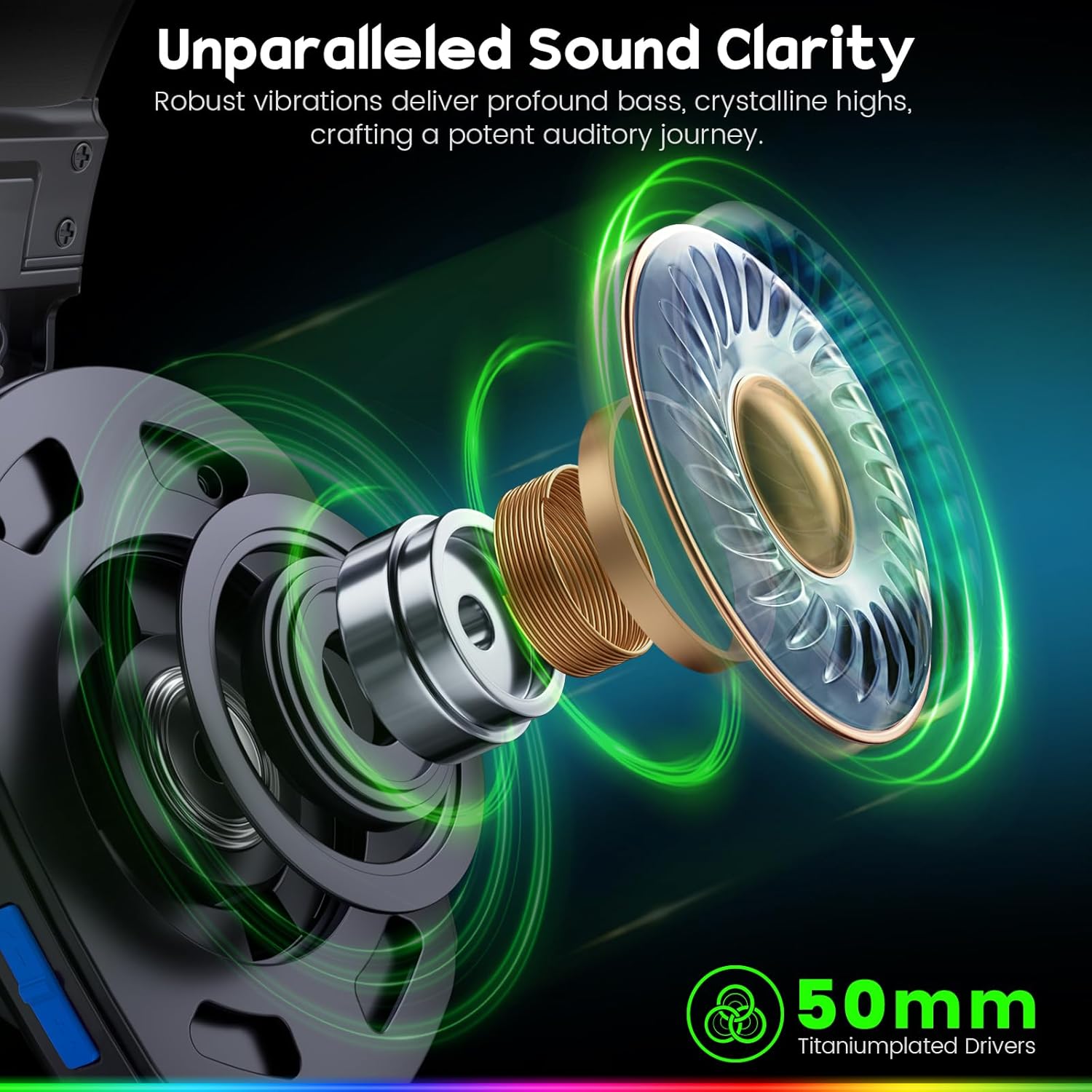
Image: An exploded diagram of the WESEARY WG1 headset's earcup, highlighting the 50mm titanium-plated drivers responsible for sound clarity and powerful bass.
Dual-Mode Connectivity
The headset supports two wireless modes: 2.4GHz and Bluetooth. The 2.4GHz mode is compatible with PS5, PS4, PC, Phone, Laptop, and Switch (audio only). The Bluetooth mode is compatible with PC, Mac, Switch (audio only), Mobile, Laptops, and Tablets. Note that the 2.4GHz USB and Type-C dongles must be used together for PS5/PS4/PC/Laptop/Mac. Neither mode is compatible with Xbox consoles. The microphone is not compatible with Nintendo Switch, and Bluetooth mode is not compatible with PS5/PS4.

Image: The WESEARY WG1 headset highlighting its dual wireless capabilities, featuring both USB-A and Type-C dongles for broad device compatibility.
Roopuu-Hakaroa
For competitive gaming, the 2.4GHz dongle mode provides an audio latency of ≤20ms, ensuring real-time audio synchronization. Bluetooth mode maintains a latency of less than 48ms, offering smooth and responsive audio for general use.

Image: A close-up of the WESEARY WG1 headset and its 2.4GHz dongle, emphasizing the ultra-low latency feature (≤20ms) for swift connectivity.
Whakamarie me te Hoahoa
The headset is designed for extended wear with soft, breathable earcups and an adjustable headband. This ergonomic design aims to provide a pressure-free fit for various head sizes, ensuring comfort during long gaming sessions.

Image: The WESEARY WG1 headset in a cosmic setting, highlighting its lightweight, breathable earcups and adjustable headband for comfortable wear.
Ora Pūhiko
The WG1 features a 1200mAh battery, providing up to 50 hours of playtime without LED lighting, or up to 35 hours with dynamic LED lighting activated. A full charge via USB-C takes approximately 2.5 hours.
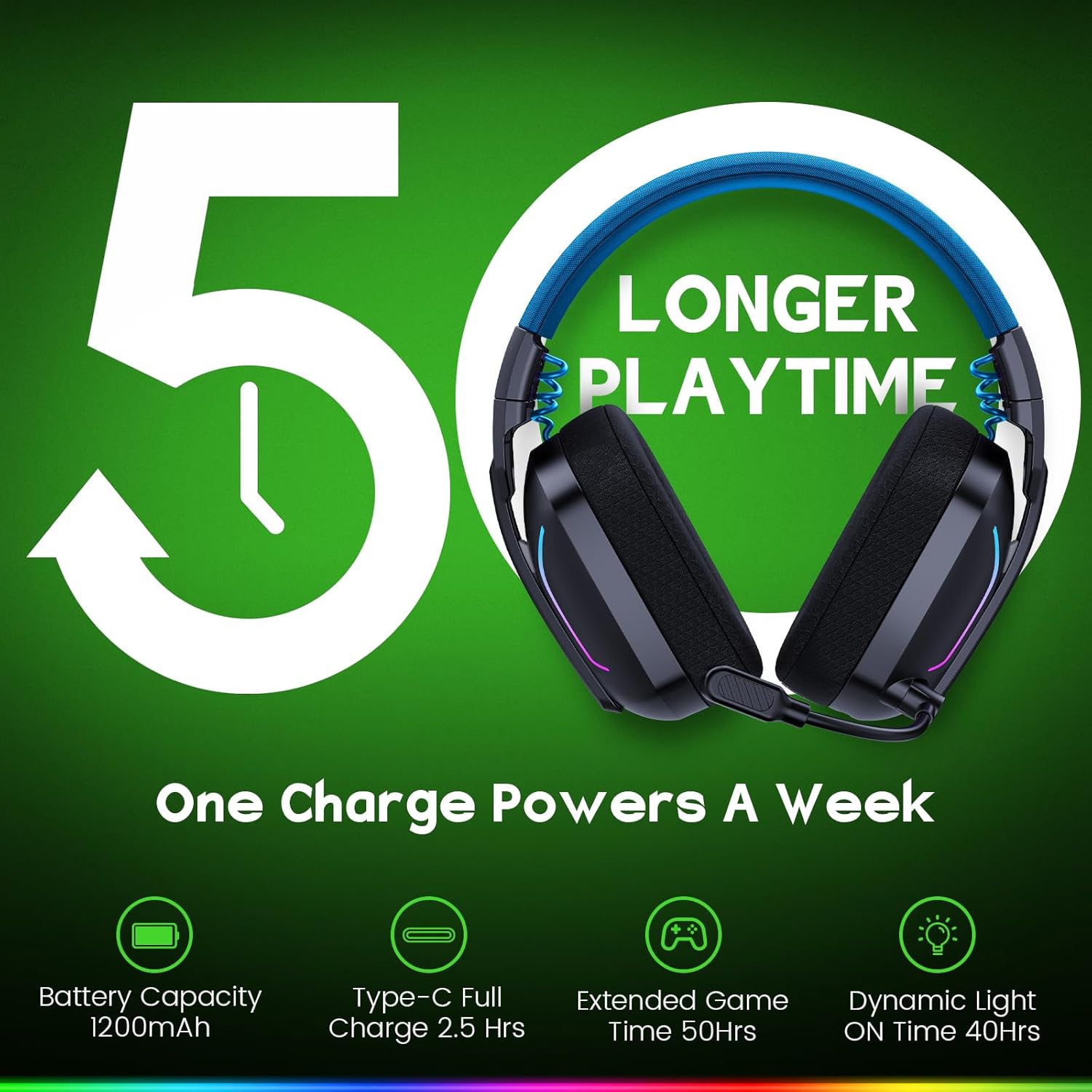
Image: The WESEARY WG1 headset with an overlay indicating its 1200mAh battery capacity and up to 50 hours of extended playtime on a single charge.
Dynamic LED Lighting
The headset includes dynamic, color-shifting LED lights that can be activated with a single button press. This feature allows users to customize their gaming setup's aesthetic.
Omnidirectional Microphone with ENC
The integrated 360° omnidirectional microphone is designed for clear communication. Advanced Environmental Noise Cancellation (ENC) technology suppresses up to 95% of background noise, ensuring your voice is heard clearly by teammates. The microphone can be muted with a single click.

Image: The WESEARY WG1 headset's microphone, demonstrating its crystal-clear voice call capability with 95% background noise suppression. A note indicates microphone incompatibility with Nintendo Switch.
Tatūnga
Te Whakataki i te Paneoro
Before first use, fully charge the headset. Connect the provided USB-C charging cable to the headset's charging port and to a compatible USB power source. The LED indicator will show charging status. A full charge takes approximately 2.5 hours.
2.4GHz Wireless Connection (for PS5, PS4, PC, Laptop, Mac)
- Insert the 2.4GHz USB dongle into an available USB-A port on your device.
- If your device only has Type-C ports, use the provided Type-C adapter with the USB dongle.
- Power on the headset by long-pressing the power button for 3 seconds.
- The headset will automatically connect to the dongle. The LED indicator on the headset will show a stable light once connected.
- On your device's audio settings, ensure the WESEARY WG1 headset is selected as the input and output audio device.
Bluetooth Connection (for PC, Mac, Mobile, Laptops, Tablets)
- Kia mahara kei te whakaweto te pane.
- Long-press the power button for 3 seconds to turn on the headset.
- Long-press the microphone button for 2 seconds to toggle to Bluetooth mode. The LED indicator will flash, indicating pairing mode.
- I runga i to taputapu, haere ki nga tautuhinga Nihokikorangi ka rapu mo nga taputapu e waatea ana.
- Select "WESEARY WG1" from the list to pair. The LED indicator on the headset will show a stable light once connected.
Ngā Tuhipoka Hototahi Hira:
- Both 2.4GHz and Bluetooth modes are NOT compatible with Xbox consoles.
- The microphone is NOT compatible with Nintendo Switch in either mode.
- Bluetooth mode is NOT compatible with PS5 or PS4 consoles.
Nga Tohutohu Whakahaere

Whakaahua: He taipitopito view of the WESEARY WG1 headset's left earcup, illustrating the location and function of its various control buttons and ports.
Power and Playback Controls (Button 1)
- Whakakā/whakaweto: Pehi roa mo te 3 hēkona.
- Purei/Tatari: Single click.
- Whakautu waea: Single click.
- Whakamutua te waea: Single click.
- Whakakahoretia te waea: Pehi roa mo te 2 hēkona.
- Traceback (Redial last number): Pāwhiri rua.
Volume Down / Previous Track (Button 2)
- Raro iho: Single click.
- Riu o mua: Pehi roa mo te 2 hēkona.
Volume Up / Next Track (Button 3)
- Rōrahi ake: Single click.
- Riri panuku: Pehi roa mo te 2 hēkona.
- Clear all devices (Reset pairing): Press Volume Up and Volume Down together for 6 seconds.
Microphone and Mode Toggle (Button 4)
- Mic on / off: Single click.
- Bluetooth mode ↔ Dongle mode: Long press for 2 seconds to switch between 2.4GHz and Bluetooth modes.
LED Control and Game/Music Mode (Button 5)
- LED Turn on / off: Single click.
- Aratau Keemu / Aratau Waiata: Pāwhiri rua.
- Re-pairing (BT mode): Long press for 3 seconds (when in Bluetooth mode).
Te tiaki
- Horoia te pane whakarongo i ia wā ki te kakahu ngohengohe, maroke. Āta karohia te whakamahi i ngā matū kaha, i ngā rauemi whakakoi rānei.
- Kaua e whakaatuhia te pane whakarongo ki ngā pāmahana tino kino, ki te haumākū, ki te rā tika rānei.
- Whakaorangia te pane i te waahi makariri, maroke ina kore e whakamahia.
- A ape i te tuku, te tuku ranei i te pane ki nga paanga kaha.
Raparongoā
Karekau he Oro / Raro iti
- Me mohio kei te hiko te pane me te whakakii katoa.
- Tirohia nga taumata oro i runga i te pane me to taputapu hono.
- Verify that the headset is correctly connected via 2.4GHz dongle or Bluetooth.
- For 2.4GHz, ensure the dongle is properly inserted and recognized by the device.
- For Bluetooth, ensure the headset is paired and selected as the audio output device in your device's settings.
- Try clearing all paired devices (Volume Up + Volume Down for 6 seconds) and re-pairing.
Ko te hopuoro kaore i te mahi
- Ensure the microphone is not muted (single click on Button 4).
- Check the microphone input settings on your connected device to ensure the WESEARY WG1 is selected.
- Confirm compatibility: The microphone is NOT compatible with Nintendo Switch.
- Ensure the headset is in the correct mode (2.4GHz for PS5/PS4/PC/Laptop/Mac, Bluetooth for PC/Mac/Mobile/Laptops/Tablets).
Nga Take Hononga
- Ensure the headset is within the operating range of your device.
- Whakaitihia te pokanoa mai i etahi atu taputapu ahokore.
- Honoa anō te pane whakarongo ki tō pūrere.
- For 2.4GHz, ensure both USB and Type-C dongles are used if required by your device (e.g., PS5/PS4/PC/Laptop/Mac).
Whakatakotoranga
| Āhuahira | Taipitopito |
|---|---|
| Ingoa Tauira | WG1 |
| Hangarau Hononga | Ahokore (2.4GHz, Nihokikorangi) |
| Hangarau Whakawhitiwhiti Ahokore | 2.4GHz Ahokore, Nihokikorangi |
| Momo Atekōkiri Ororongo | Atekōkiri Hihiko (50mm) |
| Mana Haruru | Sound Isolation, Noise Cancellation (ENC Mic) |
| Ora Pūhiko | Up to 50 Hours (without LED), Up to 35 Hours (with LED) |
| Pūhiko Raukaha | 1200mAh |
| Waa Whakatau | 2.5 haora (USB-C) |
| Rauemi | Composite, Plastic |
| Taumaha Tūemi | 11.7 hekere |
| Pūrere Hototahi | PC, Mac, Laptop, Mobile, Nintendo Switch (Audio only, Mic invalid). Not compatible with Xbox series. Bluetooth mode not compatible with PS5/PS4. |
Ataata Hua Whaimana
Ataata: Kua mutu te rangatiraview of the WESEARY WG1 Wireless Gaming Headset, showcasing its key features and design.
Pūtāhui me te Tautoko
For warranty information and technical support, please refer to the contact details provided on the product packaging or visit the official WESEARY webpae. Puritia to riirii hoko hei tohu mo te hoko mo nga kereme whakamana.