
1. Kupu Whakataki
The AJAZZ AKP03 Macro Keypad Stream Controller is a versatile device designed to enhance productivity and streamline workflows for gamers, streamers, and professionals. Featuring six programmable keys with LCD displays, three physical knobs, and three toggle switches, it offers extensive customization options for various tasks.
This manual provides detailed instructions for setting up, operating, and maintaining your AKP03 device, ensuring optimal performance and user experience.
2. Nga Hua o te Hua
- Six Programmable Macro Keys: Customizable LCD displays for single or continuous actions.
- Three Physical Knobs: For precise control over various functions.
- Three Toggle Switches: Additional control options.
- One-Click Operation: Instant execution of macro commands, text input, application launches, and media control.
- Intuitive Driver Software: Drag-and-drop functionality for easy key assignment and property configuration.
- Hototahi Whānui: Seamless integration with platforms like Streamlabs, Twitch, YouTube, and various software applications on Windows and Mac.
- Removable 40° Stand: Ka whakarato i te ergonomic viewing angle and stable placement.

Whakaatu 2.1: Neke Atuview of the AJAZZ AKP03 Macro Keypad, highlighting its programmable buttons, toggle switches, and scroll wheels.
3. Ihirangi mokete
Manatokona kei roto katoa nga mea kei roto i to kete:
- AJAZZ AKP03 Macro Keypad Stream Controller
- USB-C ki USB-A Cable
- Removable 40° Stand
- Pukapuka Kaiwhakamahi (tenei tuhinga)
4. Tatūnga
4.1 Hononga Tinana
- Attach the removable 40° stand to the bottom of the AKP03 for an ergonomic angle, if desired.
- Connect the provided USB-C cable to the USB-C port on the AKP03.
- Connect the USB-A end of the cable to an available USB port on your computer (PC or Mac).
- Ka hiko aunoa te taputapu.

Figure 4.1: Attaching the removable 40° stand to the AKP03.
4.2 Tāuta Pūmanawa
To unlock the full customization capabilities of your AKP03, you must install the dedicated driver software.
- Whakatuwheratia to web browser and navigate to the official AJAZZ webpae: www.a-jazz.com.
- Locate the 'Driver Download' section.
- Rapua 'AKP03' or browse for the corresponding driver for your model.
- Download the driver software compatible with your operating system (Windows or macOS).
- Whakahaerehia te kaitautauta ka whai i nga tohutohu i runga-mata hei whakaoti i te whakaurunga.
- Tīmataria anō tō rorohiko mēnā ka ākina.
Video 4.1: Demonstrates the software installation process and initial setup for the AJAZZ Macro Keypad.
5. Nga Tohutohu Whakahaere
5.1 Customizing Keys and Knobs
The AKP03's driver software provides a user-friendly interface for customization:
- Launch the 'Stream Dock AJAZZ' software from your desktop or applications folder.
- The software will display a visual representation of your AKP03.
- To assign an action, drag and drop a desired function (e.g., launch application, media control, macro command) from the software's library onto one of the six programmable keys.
- For knobs, select the knob in the software and assign functions such as volume control, scrolling, or zooming.
- You can configure properties for each assigned action, including specific file ara, web URLs, or macro sequences.
- The LCD displays on the keys will update to show the assigned icon or text.
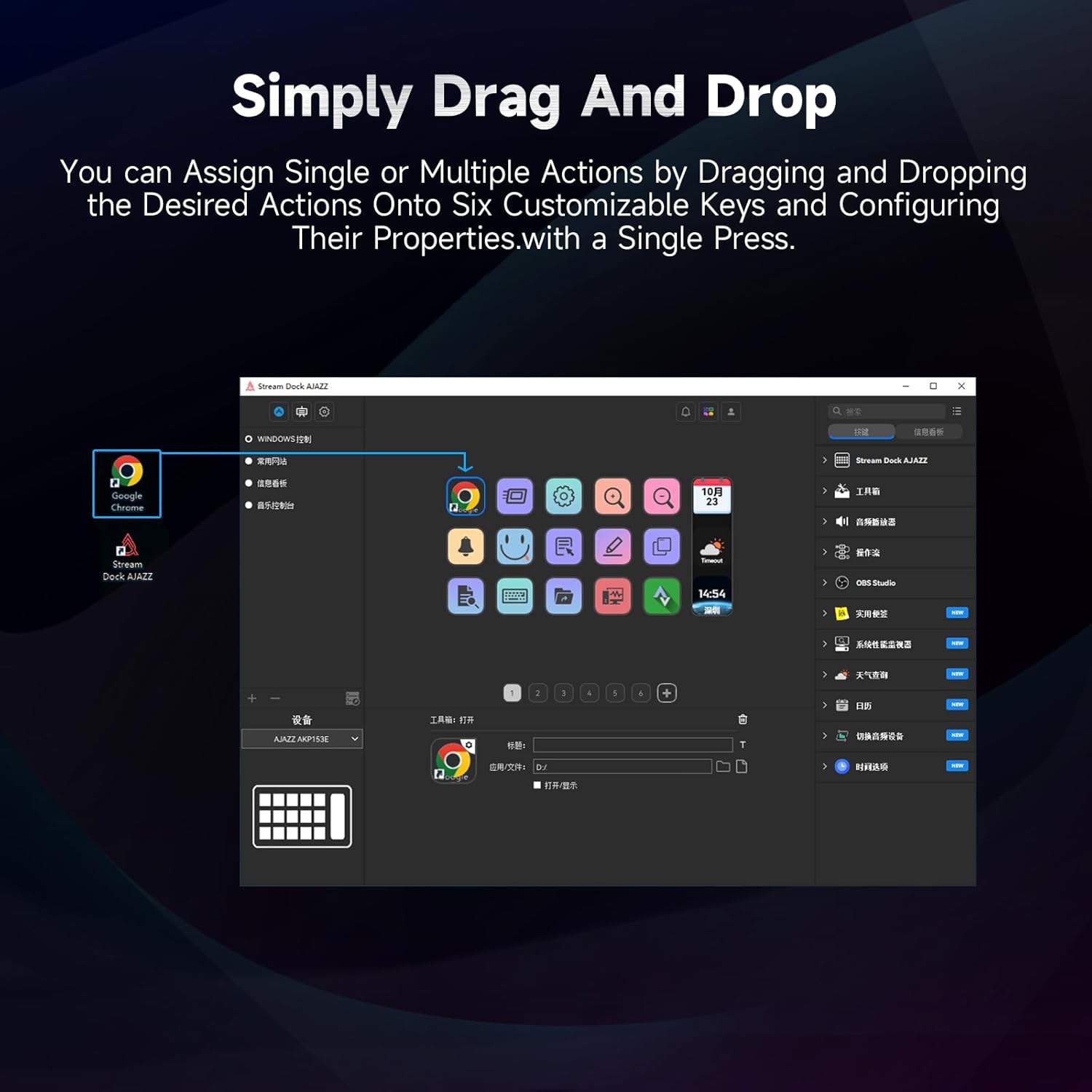
Figure 5.1: Customizing keys using the drag-and-drop interface in the AJAZZ software.
Video 5.1: Demonstration of assigning actions to keys for launching web pages and software with a single click.
5.2 Using Profiles and Pages
The software supports multiple profiles and pages, allowing you to switch between different sets of key assignments for various applications or tasks.
- Waihanga pro houfiles for specific games, editing software, or streaming setups.
- I roto i ia profile, you can create multiple pages of key assignments, accessible by navigating through the device's buttons or software interface.
- The AKP03 automatically switches to the relevant profile when a linked application is in focus.
Video 5.2: Illustrates the multi-functional capabilities and profile switching of the AKP03 for various tasks.
6. Tiaki
To ensure the longevity and optimal performance of your AJAZZ AKP03, follow these maintenance guidelines:
- Te horoi: Use a soft, dry cloth to wipe the surface of the device. Avoid abrasive cleaners or solvents.
- Rokiroki: Whakaorangia te taputapu ki te waahi makariri, maroke atu i te ra tika me te wera nui.
- Tiaki taura: Kaua e whakapiko, e takai rawa rānei i te taura USB kia kore ai e pakaru.
- Whakahōu Pūmanawa: Regularly check the AJAZZ website for software and firmware updates to ensure compatibility and access to new features.
7. Te Raru
If you encounter issues with your AKP03, refer to the following common troubleshooting steps:
- Pūrere Kaore i te Mohiotia:
- Ensure the USB cable is securely connected to both the AKP03 and your computer.
- Ngana ki te hono atu ki tetahi tauranga USB rereke.
- Tīmataria anō tō rorohiko.
- Verify that the driver software is correctly installed and up to date.
- Kī Kāore i te Whakautu:
- Check the software to ensure keys are properly assigned and the correct profile he kaha.
- Me whakarite kei te rere te pūmanawa taraiwa i muri.
- Nga Take Pūmanawa:
- Reinstall the driver software.
- Check for software updates on the AJAZZ webpae.
8. Whakatakotoranga
| Āhuahira | Taipitopito |
|---|---|
| Waitohu | AJAZZ |
| Ingoa Tauira | AKP03 |
| Pūrere Hototahi | PC, Pona |
| Momo Kaiwhakahaere | Papapātuhi |
| Hangarau Hononga | USB-C |
| Rahi Pātene | 6 Programmable Keys (with LCD displays), 3 Physical Knobs, 3 Toggle Switches |
| Taumaha Tūemi | 0.32 Kirokaramu |
| Rahi Tūemi (L x W x H) | 5 x 3 x 2 inihi |
| Puna Mana | Hiko Hiko |
9. Pūtāhui me te Tautoko
9.1 Nga Korero Whakaputanga
The AJAZZ AKP03 Macro Keypad Stream Controller comes with a 1-Tau Rarangi Rarangi mai i te rā i hokona ai. Ka hipokina e tēnei pūtāhui ngā hapa hanga me ngā hapa i raro i te whakamahinga noa. Kāore e hipokina ngā kino i puta mai i te whakamahi hē, ngā aituā, ngā whakarerekētanga kāore i whakamanahia, te tāutanga hē rānei.
Tena koa pupurihia to tohu mo te hoko mo nga kereme whakamana.
9.2 Tautoko Kiritaki
For technical assistance, troubleshooting, or warranty inquiries, please contact AJAZZ customer support:
- Webpae: www.a-jazz.com (Refer to the 'Support' or 'Contact Us' section)
- Īmēra: [Insert Customer Support Email, if available]
- Waea: [Insert Customer Support Phone Number, if available]
Our support team is available to assist you with any questions or concerns regarding your product.