
1. Kupu Whakataki
Thank you for choosing the HelloBaby HB30 Video Baby Monitor. This device is designed to provide a secure and reliable way to monitor your baby, offering peace of mind without requiring a Wi-Fi connection. This manual provides essential information for the safe and effective use of your monitor.
2. Nga korero haumaru
- No Wi-Fi, Enhanced Privacy: The HelloBaby HB30 operates on 2.4GHz FHSS technology, ensuring a private and secure connection that is not susceptible to internet hacking.
- Pūmate Kakaina: Keep all power cords and cables out of reach of children. Ensure the camera unit and its power cord are at least 3 feet (0.9 meters) away from the crib or playpen. Never place the camera or cords inside the crib.
- Puna Hiko: Use only the provided power adapters. Do not use other adapters as this may damage the unit or pose a safety risk.
- Water and Heat: Keep the monitor and camera away from water sources (e.g., bathtubs, sinks) and heat sources (e.g., radiators, stoves).
- Whakahau: Ensure proper ventilation around both units. Do not cover them with blankets or towels.
3. Ihirangi mokete
Upon unboxing your HelloBaby HB30 Video Baby Monitor, please verify that all components are present:
- Waeine Matua (Aroturuki)
- Wae Peepi (Kamera)
- Power Adapter for Parent Unit
- Power Adapter for Baby Unit
- Pukapuka Kaiwhakamahi
- Kete Whakamau Pakitara (ngā tīwiri me ngā punga)
Video: Unboxing the HelloBaby HB30 Baby Monitor. This video demonstrates the contents of the package, including the monitor unit, camera unit, and accessories.
Ataata: Ka mutuview of the HelloBaby HB30 Monitor and Camera. This video showcases the monitor and camera units, highlighting their compact size and ease of use.
4. Hua Neke Atuview
The HelloBaby HB30 is a feature-rich video baby monitor designed for simplicity and security. It includes a portable parent unit with a 2.4-inch color LCD screen and a camera unit with infrared night vision.
Āhuatanga matua:
- Secure 2.4GHz FHSS Technology: Ensures a private connection without Wi-Fi.
- Whakaaturanga LCD Tae 2.4-inihi: Ka whakarato marama view o to pepi.
- Tirohanga Pō Ārai-whero Aunoa: Monitors your baby clearly in low light or darkness.
- VOX Mode (Sound-Activated Screen): The screen activates when sound is detected, conserving battery.
- Korero Rua-Waahi: Allows you to comfort your baby remotely.
- Topa Mamati 2x: Get a closer look at your baby.
- Pūnaha Whakaroha: Ka tautokona kia 4 ngā kāmera (ka hokona motuhaketia ētahi atu kāmera).
- Te aro turuki i te pāmahana: Ka whakaatu i te pāmahana rūma.
- Atakiko: Built-in melodies to soothe your baby.
- Feeding Timer: Set reminders for feeding times.
- Awhe Whakawhiti Roa: Up to 1000ft in open areas.

Image: HelloBaby HB30 Monitor and Camera highlighting its six core features.

Image: Illustration of the secure FHSS transmission technology used by the HelloBaby HB30, emphasizing no Wi-Fi or app requirement.
5. Tatūnga
5.1. Te Whakautu i te Wāhanga Matua
Before first use, fully charge the parent unit for approximately 8 hours. Connect the small end of the power adapter to the parent unit and the other end to a power outlet. The battery indicator on the screen will show charging status.
5.2. Positioning the Camera Unit
Whakanohoia te kāmera ki tētahi wāhi e mārama ana te tirohanga view of your baby. Ensure the camera is at least 3 feet (0.9 meters) away from the crib to prevent entanglement with the power cord. The camera can be placed on a flat surface or mounted to a wall using the provided kit.
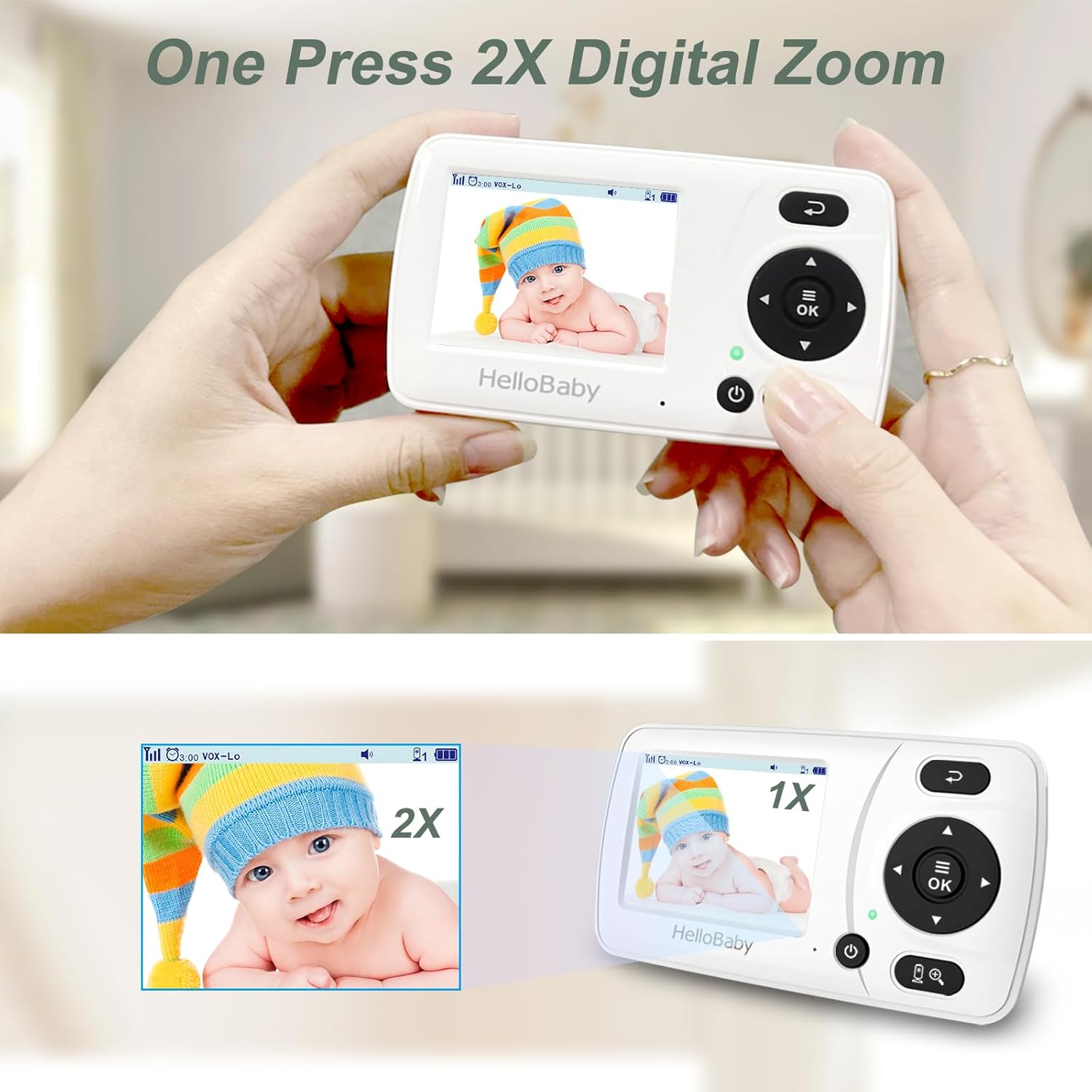
Image: The HelloBaby HB30 camera unit, demonstrating its adjustable stand for optimal positioning.

Image: The camera unit connected to a power outlet, illustrating the power setup.
5.3. Kei te Hiko Nei
Connect the camera unit to a power outlet using its adapter. The camera will automatically power on. Press and hold the power button on the parent unit to turn it on. The units are typically pre-paired and will connect automatically.
Video: Demonstrating the power-on sequence and basic display of the HelloBaby monitor.
6. Nga Tohutohu Whakahaere
6.1. Mana Taketake
Use the arrow buttons on the parent unit to navigate through menus and adjust settings. The 'OK' button confirms selections, and the 'Return' button goes back to the previous screen or live view.
6.2. Video Display & Zoom
The parent unit displays live video from the camera. Press the zoom button (magnifying glass icon) to activate 2x digital zoom. Use the arrow keys to pan the zoomed image.

Image: The 2x digital zoom feature on the HelloBaby HB30 monitor, showing a magnified view of a baby.
6.3. VOX Mode (Sound-Activated Screen)
VOX mode conserves battery by turning off the screen when no sound is detected. The screen will automatically turn on when your baby makes a sound. You can adjust the VOX sensitivity (Low, Medium, High) in the settings menu.

Image: Visual representation of the VOX (Sound-Activated Screen) mode, showing the screen turning on when a baby cries.
6.4. Korero-rua
Press and hold the microphone button on the parent unit to speak to your baby through the camera's speaker. Release the button to hear your baby again.
6.5. Matakitenga po
The camera automatically switches to infrared night vision in low light conditions, providing a clear black and white image of your baby.

Image: Comparison of day and automatic infrared night vision on the HelloBaby HB30 monitor.
6.6. Whanga Whangai
Access the 'Timer' option in the menu to set reminders for feeding. You can choose various intervals (e.g., 30 minutes, 1 hour, 2 hours).
6.7. Multiple Cameras
The HB30 system can support up to four camera units. To add or switch between cameras, navigate to the 'Camera' setting in the menu.
Video: Demonstrating camera switching and menu navigation on the HelloBaby monitor.
7. Tiaki
- Te horoi: Use a soft, dry cloth to clean the surfaces of the monitor and camera units. Do not use abrasive cleaners or solvents.
- Tiaki Mata: Gently wipe the camera lens with a soft, lint-free cloth to ensure clear image quality.
- Tiaki Pūhiko: To prolong battery life, avoid fully discharging the parent unit frequently. Charge it regularly.
- Rokiroki: Mena ka roa te wā e rongoa ai te taputapu, kia tino whakakīia te pākahiko, ā, ka rongoa ki te wāhi hauhautanga, maroke hoki.
8. Te Raru
| Raruraru | Take pea | Rongoā |
|---|---|---|
| Kāore he whakaahua/oro i te wae matua | Kāore ngā waeine i te whakakāhia, i te hono rānei. Kei waho i te awhe. | Ensure both units are plugged in and powered on. Move parent unit closer to camera. |
| Te kounga whakaahua kounga | Low light conditions (night vision active). Camera lens dirty. Out of range. | Image quality is typically black and white in night vision. Clean camera lens. Move units closer. |
| Kaore he tangi, he tangi iti ranei | Volume too low. VOX mode active. | Increase volume on parent unit. Adjust VOX sensitivity or disable it. |
| Te pokanoa | Kei te tata mai ētahi atu taputapu 2.4GHz. | Move the monitor away from other wireless devices (e.g., Wi-Fi routers, microwaves). |
| Ka tere te heke o te pākahiko wae matua | VOX mode off (screen always on). Old battery. | Enable VOX mode to conserve battery. Contact support if battery life remains poor after full charge. |
9. Whakatakotoranga
- Ingoa Tauira: HB30
- Rahi Mata: 2.4 Inihi
- Hangarau Hononga: Ahokore (2.4GHz FHSS)
- Whakamahinga o roto/waho: Roo-roto
- Puna Hiko: Hiko Hiko
- Taumira Hopu Ataata: 720p
- Hangarau Maama iti: Tae Pō (Whawhāwhero)
- Pūhiko: 1 te pākahiko Lithium Ion e hiahiatia ana (kei roto)
- Rahi Tūemi L x W x H: 3.14 x 6.37 x 5.43 inihi
- Taumaha Tūemi: 0.32 hekere
- UPC: 190282011600
10. Pūtāhui me te Tautoko
HelloBaby products are designed for reliability and performance. For warranty information, technical support, or assistance with your HB30 Video Baby Monitor, please refer to the contact details provided in your product packaging or visit the official HelloBaby webpae. Puritia to rihiti hoko mo nga kereme whakamana.