
1. Nga Korero Haumaru Nui
Tena panuihia nga tohutohu katoa i mua i te whakaurunga me te whakamahi. Puritia tenei pukapuka hei tohutoro a meake nei.
- Tāutanga Tangata-rua: Always use at least two people to lift and install the TV to prevent injury or damage.
- Whakapiki taiepa: Follow all wall mounting instructions precisely. Ensure the wall structure can support the TV's weight. If unsure, consult a professional.
- Aukati i nga arai: Do not drill into walls where electrical wiring or piping may be present.
- Whakanoho Pumau: If not wall-mounted, ensure the TV is placed on a stable, level surface to prevent tipping.
- Whakahau: Kaua e araia nga whakatuwheratanga hau. Me whakarite kia tika te mokowhiti huri noa i te pouaka whakaata kia tika te rere o te hau.
- makuku: Keep the TV away from water, moisture, and high humidity environments.
- Waea Hiko: Protect the power cord from being walked on or pinched. Do not use a damaged power cord.
- Te horoi: Wewetehia te pouaka whakaata i mua i te horoi. Whakamahia he kakahu ngohengohe, maroke. Kaua e whakamahia nga kai horoi wai me nga kai horoi aerosol.
2. He aha kei roto
Manatokona kei te noho nga waahanga katoa i roto i te pouaka:
- Amazon Ember Artline TV (55-inch)
- Alexa Voice Remote Enhanced
- Maunga Maunga Kit
- Waea hiko
- 2 Pahiko AAA
- Aratohu Timata Tere
- Amazon Ember Artline 55” Frame (four pieces) - Note: Frames ship separately and may arrive at a different time.

Image: Amazon Ember Artline 55-inch Fire TV with Ash frame.
3. Tatūnga me te Tāuta
3.1. Preparing the TV for Wall Mount
Before mounting, ensure the TV is prepared correctly. You will need a number two Phillips screwdriver. Do not use an electric drill to prevent stripping the bolt holes.
- Lay the TV screen side down on a soft, clean surface to access the recessed cover on the back.
- Remove the recessed cover.
- Install the two mount bolts into the designated holes using a number two Phillips screwdriver.
Video: Instructions for wall mounting the Amazon Ember Artline TV. This video demonstrates the steps for preparing the TV and installing the wall mount hardware.
3.2. Te Whakataunga Maunga Taiepa
You will need at least two people to complete this process. Ensure you have the included wall mounting template, bolts, screws, and anchors. Additionally, you will need an electric drill with a 3/16 inch drill bit, a #2 Phillips driver bit, a hammer, a pencil, and a level or level app. If mounting on wood studs, you'll need a 1/8 inch drill bit. If mounting on brick, you'll need a 5/16 inch drill bit and a stud finder for drywall.
- Mahere Tauwāhi:
- Consider the height of everyone using the TV. Place it at eye level for comfortable viewing.
- Find a mount location away from water or moisture.
- Avoid drilling holes over electrical wiring or piping.
- If installing on a brick wall, locate an area free of cracks.
- If your wall doesn't have proper stud spacing, contact a professional for installation.
- Whakapiki i te Taiapa:
- Plan the location of the wall mount using the wall mounting template.
- Locate two studs using a stud finder (for drywall). Mark the center of each stud with a pencil.
- Place the mount against the wall and mark at least four screw holes. Use a level or level app to ensure the mount is straight.
- Drill pilot holes on each mark using an electric drill with the appropriate bit (1/8" for drywall, 5/16" for brick).
- If on drywall, anchors are not needed. If on brick, use a hammer to install the mount anchors in the holes.
- Attach the mount to the wall using the mount screws, an electric drill, and a #2 Phillips bit.
- Installing Magnet Plates:
- Attach the template to the wall using double-sided tape.
- Mark the locations for the four magnet plates on the wall, then remove the template.
- Drill pilot holes on each mark using an electric drill with a 3/16 inch bit.
- Install the magnet plate anchors using a hammer.
- Install the magnet plates into the anchors using the magnet plate screws and an electric drill with a #2 Phillips bit.
- Attaching the TV to the Mount:
- While attaching the TV, avoid pressing against the screen.
- Fully extend the TV bracket away from the wall and gently release the bolt latches.
- Place the four alignment stickers above the mount bolts on the back of the TV and the bolt latches on the mount. Fold the stickers up to see them more clearly.
- Hang the mount bolts on the mount hooks. Use the alignment stickers to guide you.
- Close the bolt latches, then push the TV flush with the wall to connect the magnets and magnet plates.
4. Operating Your Amazon Ember Artline Fire TV
4.1. Atanga TV ahi
The Amazon Ember Artline features the new Fire TV experience (2026 release) with a modern design for fast access to entertainment. You can pin frequently used apps and browse dedicated content categories. Access hundreds of thousands of movies and TV episodes, including free, ad-supported content. Subscription fees may apply for certain services.

Image: The Fire TV interface displaying various streaming applications and content.
4.2. Alexa Voice Remote Enhanced
The included Alexa Voice Remote Enhanced allows for easy navigation and voice control. Talk naturally to find content, manage your smart home, or explore topics.
- Mana Reo: Press and hold the voice button to use your voice commands.
- Whakaterenga: Use the directional pad to navigate menus and content.
- Pātene Uru Tere: Dedicated buttons for popular streaming services (e.g., Prime Video, Netflix) provide instant access.
4.3. Ambient Experience and Art Mode
The Ember Artline functions as both an entertainment hub and a curated art gallery. It can display art, stream content, and manage your smart home. The matte screen reduces glare for an optimal viewte wheako.
- Taiwhanga Toi: Access a gallery of over 2,000 free works of art.
- Personal Photos: Upload and display your own photos from the Amazon Photos App. Use Alexa to create slideshows or collages (e.g., "Play a slideshow of us biking in the mountains.").
- Match the Room: Upload photos of your space, and the TV will recommend art pieces that complement your decor.
- Custom Frames: Choose from ten available frame colors. Frames are easy to install and change.

Image: The Amazon Ember Artline TV seamlessly integrated into a living room, displaying a vibrant piece of art.
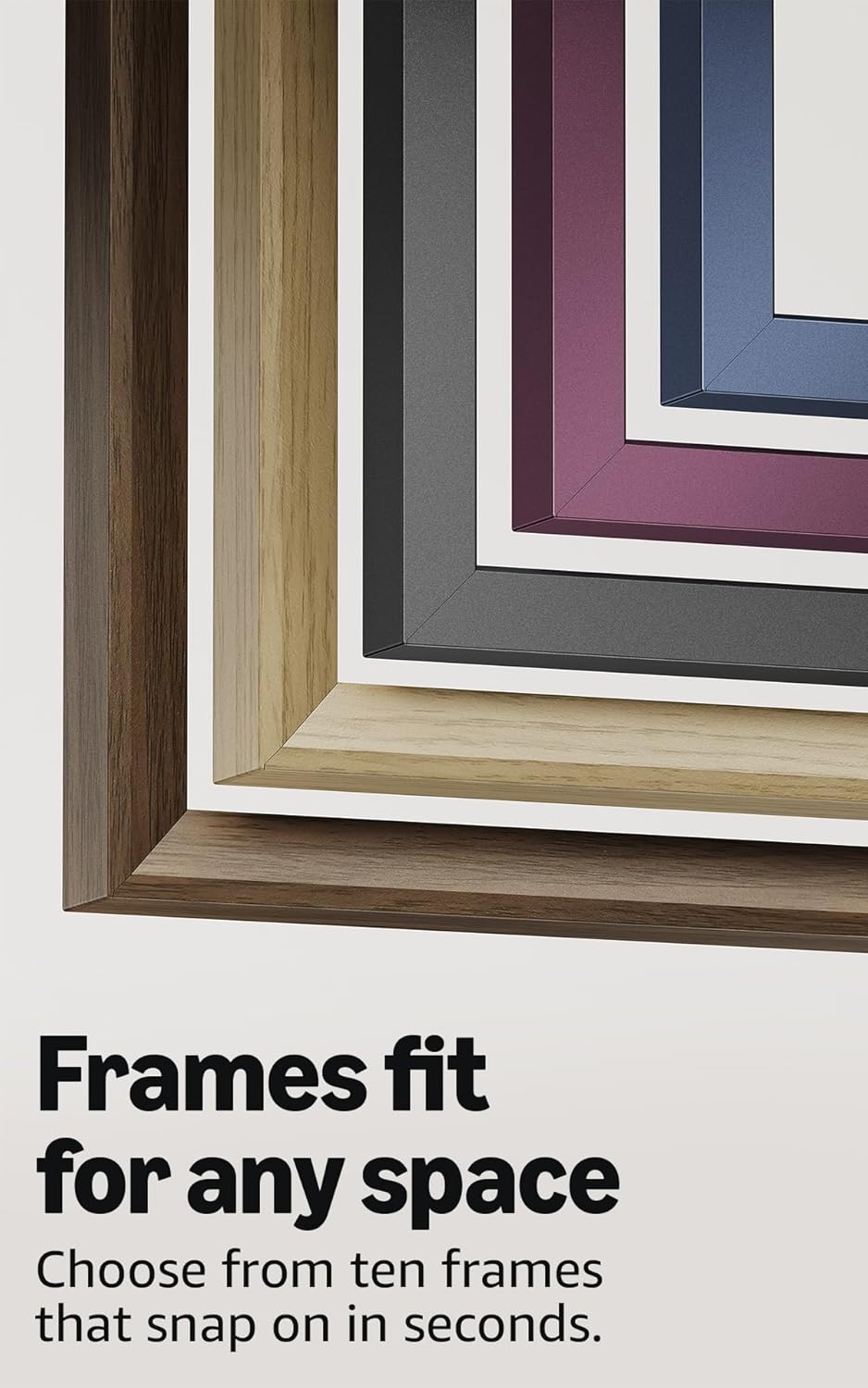
Image: A selection of different colored frames available for the Amazon Ember Artline TV, highlighting customization options.
4.4. Omnisense Technology (Motion Detection)
The custom Omnisense technology uses built-in sensors to detect your presence. The display will wake to show your favorite artwork or allow you to start watching content quickly. When you leave the area, the TV automatically turns off to save energy.

Whakaahua: He taipitopito view of the Omnisense sensor, which enables motion detection for automatic display activation and power saving.
Ataata: Ka mutuview of the Amazon Fire TV 4K TV with Alexa Voice Remote, demonstrating initial setup, interface navigation, and motion detection features.
5. Whakatakotoranga
| Āhuahira | Taipitopito |
|---|---|
| Whakatau | 3840 x 2160 (4K UHD) |
| Hōputu Awhe Hihiri Teitei (HDR) | HDR10, HLG, HDR10+ Adaptive, Dolby Vision |
| Momo rama | LED |
| tere tāmata | 60Hz |
| Screen finish | Matte, anti-glare |
| Rahi mata | 55“ (Viewable display size: 54.6“) |
| tauranga HDMI | 3 HDMI 2.0 + 1 HDMI 2.1 me te eARC |
| Wifi & Ethernet connectivity | Wi-Fi 6 + 1 Ethernet port |
| USB | 1 USB3.0 |
| Putanga Ororongo Mamati Mamati | 1 Tauranga Ororongo Whatu Mamati |
| Tautoko reo | Yes, hands-free with Alexa, press and ask Alexa with the Fire TV Alexa Voice Remote Enhanced or the free Fire TV app. |
| Tautoko ororongo | Dolby Digital Plus me te whakawhiti ororongo kua whakakōnaehia e Dolby |
| Te mana ororongo | 10W + 10W |
| OS | Pūnaha Whakahaere Ahi |
| Product size (without frame) | 48.3" x 28.3" x 1.54" |
| Taumaha (kare he anga) | 39.9 lbs |
| Tau SKU | QL55M800A |
| Paerewa Maunga Pakitara VESA | 300mm x 400mm (Note: Included wall mount is non-VESA; TV is VESA compatible for separately purchased mounts.) |
| TV size with frame | 49.1" x 28.7" x 1.8" |
| TV weight with frame | 42.5 lbs |
6. Āhuatanga Urunga
The Amazon Ember Artline Fire TV includes several accessibility features:
- ReoView kaipānui mata: Ka āhei te uru atu ki te nuinga o ngā āhuatanga o te Fire TV mō ngā kaiwhakamahi matapo, ngoikore rānei te tirohanga.
- Whakanui mata: Mā tēnei ka taea e ngā kaiwhakamahi te whakanui me te whakaiti i te tirohanga, me te hurihuri huri noa i te mata.
- Kara Kuputuhi: Ka whakakotahi i ngā tuhinga kei runga i te mata hei haki kiato, ka taea te whakarite.
- Tapanga Kati: E wātea ana mō ngā ataata me ngā whakaaturanga pouaka whakaata i ngā wāhi e tautokona ana.
- Whakaahuatanga Ororongo: E whakarato ana i ngā whakaahuatanga ā-waha o ngā mahi i runga i te mata, ngā āhua o te kanohi, me ngā huringa o ngā wāhanga (kāore e wātea ana mō ngā ihirangi katoa).
- Tautoko Āwhina Whakarongo Nihokikorangi: Ka tautoko i te rere oro mō ētahi taputapu whakarongo Nihokikorangi hototahi me ngā taputapu whakarongo tūmataiti. Ka tautokona hoki ngā paneoro Nihokikorangi hototahi.
7. Software Updates and Security
Ka whiwhi tenei taputapu i nga whakahoutanga haumarutanga raupaparorohiko tae noa ki te wha tau i muri i te wa e waatea ana te taputapu mo te hoko hei waahanga hou i runga i a maatau. webngā pae. Mō ngā mōhiohio e pā ana ki tō pūrere, tirohia te Whakahaere i ō Ihirangi me ō Pūrere.
8. Raihana me te Ratonga
A 1-Year limited warranty and service are included with the Amazon Ember Artline TV. Optional 3-Year and 4-Year Extended Warranties are available for U.S. customers and are sold separately. Extended warranty excludes frame accessories. Use of Fire TV is subject to the terms found on the Amazon webpae.
The Amazon Ember Artline 55” Frame includes a 90-day limited warranty and service.
9. Te Raru
If you encounter issues with your Amazon Ember Artline Fire TV, consider the following common troubleshooting steps:
- Kore Mana: Me mohio kei te hono pai te taura hiko ki te pouaka whakaata me te putanga hiko mahi.
- Kore Pikitia/Oro:
- Check all cable connections (HDMI, optical audio).
- Manatokohia kua tohua te puna whakauru tika i runga i te TV.
- Tīmataria anō te pouaka whakaata mā te wetewete mai i te putanga hiko mō te 60 hēkona, kātahi ka mono anō.
- Mamao Kaore i te Whakautu:
- Whakakapia ngā pākahiko AAA i roto i te Mana Mamao Reo Alexa.
- Tāruatia anō te mana mamao mā te pupuri i te pātene Kāinga mō te 10 hēkona.
- Nga Take Hononga Whatunga:
- Check your Wi-Fi router and modem to ensure they are working correctly.
- Tīmataria anō tō pouara me te pouwhanga.
- Go to the TV's Network settings to re-connect to your Wi-Fi network or try a wired Ethernet connection.
- Ambient Experience Not Activating:
- Ensure Omnisense technology is enabled in the TV settings.
- Check for any physical obstructions blocking the motion sensors.
- Software Performance: If the TV is slow or unresponsive, try restarting it. Ensure the TV's software is up to date.
For further assistance, refer to the online support resources or contact Amazon customer service.