
1. Kupu Whakataki
Mauruuru koe mo te hokoasing the Sharp PS-916 Bluetooth Party Speaker System. This system includes two identical portable Bluetooth speakers designed to deliver powerful audio with versatile connectivity options. Please read this manual carefully before using the product to ensure proper operation and to maximize your listening experience.
Ihirangi mōkī:
- 2 x Sharp PS-916 Party Speakers
- 1 x Taura Whakatau
- 1 x Mana Mamao
- 1 x Pukapuka Kaiwhakamahi

Image: The Sharp PS-916 system includes two speakers for a complete stereo experience.
2. Tatūnga
2.1 Te Whakautu i ngā Kaikōrero
The PS-916 speakers are equipped with rechargeable batteries, providing up to 12 hours of playback. Before initial use, fully charge both speakers.
- Connect the charging cable to the DC IN port on the rear of each speaker.
- Plug the other end of the charging cable into a suitable power adapter (not included) or USB power source.
- Ka tiaho te rama tohu utu. Ka huri te tae, ka mate rānei ina oti te utu.
2.2 Kei te Hiko / Weto
To power on or off each speaker, press and hold the ON/STAND BY INPUT pātene kei runga i te paewhiri mana.
2.3 Bluetooth Pairing (Single Speaker)
- Ensure the speaker is powered on and in Bluetooth mode. The Bluetooth indicator will flash, indicating it is ready for pairing.
- I runga i to taputapu pūkoro, whakaaheihia te Nihokikorangi ka rapua nga taputapu e waatea ana.
- Select "Sharp PS-916" from the list of devices.
- Once connected, the Bluetooth indicator will stop flashing and remain solid.
2.4 True Wireless Stereo (TWS) Pairing (Two Speakers)
TWS allows you to connect two PS-916 speakers wirelessly for a stereo sound experience.
- Power on both PS-916 speakers.
- Ensure neither speaker is currently connected to a Bluetooth device.
- I runga i tētahi o ngā kaikorero (koinei te kaikorero matua), pēhia te TWS button. The speaker will enter TWS pairing mode.
- The primary speaker will automatically search for the secondary speaker. Once connected, you will hear an audible confirmation, and the TWS indicator lights on both speakers will illuminate.
- Nā, honoa tō pūrere pūkoro ki te kaikorero matua mā te Nihokikorangi e ai ki te whakaahuatanga i te wāhanga 2.3. Ka purei te oro mā ngā kaikorero e rua i te reo irirangi.
3. Mahi
3.1 Paewhiri Mana Ki rungaview

Image: Main control panel for the Sharp PS-916 speaker.
- ON/STAND BY INPUT: Power on/off, switch input modes (Bluetooth, USB, TF, AUX, FM).
- PLAY/PAUSE (►/∕∕): Purei, whakataa ranei te purei ororongo.
- PREVIOUS (◀◀): Huka ki te riu o mua.
- NEXT (▶▶): Huka ki te riu e whai ake nei.
- PUTU PUKA: Hurihia hei whakatika i te oro matua.
- TWS: Initiate or disconnect True Wireless Stereo pairing.
- KAUPAPA: Cycle through preset equalizer modes.
- BASS: Activate or deactivate bass boost.
- KAMAMA: Change or turn off the LED light effects.
- MIC CONTROL: Adjust microphone volume or echo (if applicable).
3.2 Tauranga Whakauru
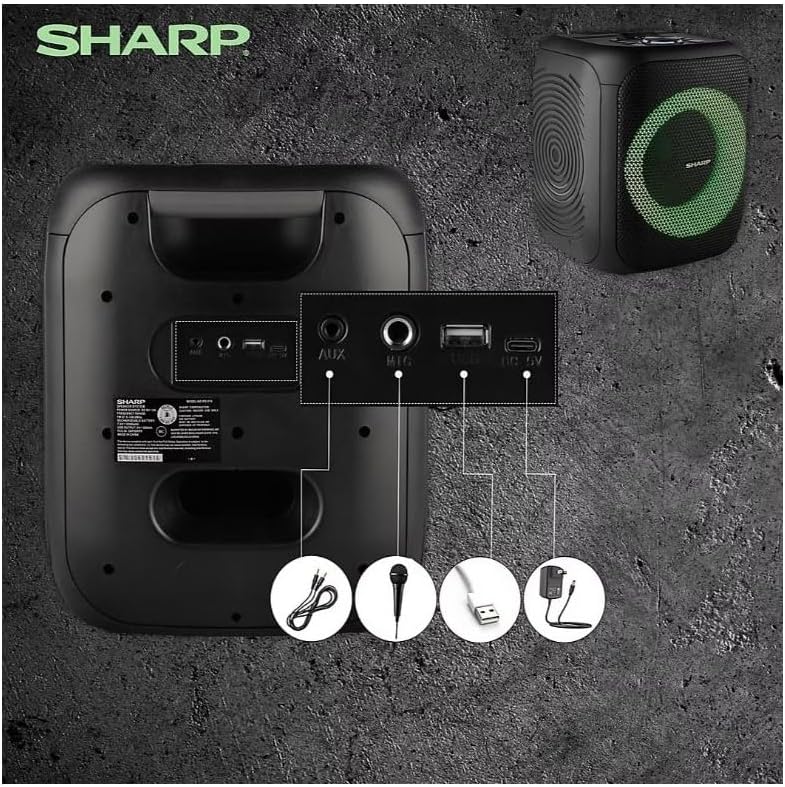
Image: Rear panel with various input and charging ports.
- AUX IN: Honoa nga taputapu oro o waho ma te whakamahi i te taura ororongo 3.5mm.
- MIC IN: Connect a microphone (sold separately) for karaoke or announcements.
- USB: Whakauruhia he puku kohiko USB hei purei i te oro.
- KARI TF: Whakauruhia he kāri TF (microSD) hei purei i te oro.
- DC IN: Connect the charging cable to power and charge the speaker.
3.3 Playing Audio from USB/TF Card
- Insert a USB flash drive or TF card into the corresponding port.
- Pehia te ON/STAND BY INPUT button repeatedly until the display shows the USB or TF mode.
- Ka tīmata aunoa te purei. Whakamahia te TAKARO/PAUSE, O MUA, a KAUPAPA nga paatene hei whakahaere i te purei ano.
3.4 Using AUX Input
- Connect one end of a 3.5mm audio cable to the AUX IN port on the speaker.
- Honoa te tahi pito ki te torooro ororongo ranei o to taputapu o waho.
- Pehia te ON/STAND BY INPUT button repeatedly until the display shows AUX mode.
- Whakahaerehia te purei me te oro mai i to taputapu o waho.
3.5 FM Radio Mahi

Image: The PS-916 features an integrated FM Tuner.
- Pehia te ON/STAND BY INPUT button repeatedly until the display shows FM mode.
- Patohia me te pupuri i te TAKARO/PAUSE pātene ki te matawai aunoa me te tiaki i nga teihana FM e waatea ana.
- Whakamahia te O MUA a KAUPAPA patene hei whakatere ma nga teihana kua tiakina.
3.6 LED Light Effects
Pehia te KAMARAMA button to cycle through different LED light modes or to turn the lights off.
4. Tiaki
4.1 Te horoi
- Whakawetohia te pūoro, ka momotu mai i te pūtake hiko i mua i te horoinga.
- Whakamahia he kakahu ngohengohe, maroke hei muru i nga mata o waho.
- Kaua e whakamahia ngā wai horoi, ngā waikura, ngā whakarewa rānei, nā te mea ka kino pea te whakaotinga, ngā wāhanga rānei o roto.
4.2 Rokiroki
- Penapenahia ngā kaikorero ki te wāhi hauhautanga, maroke, kia matara atu i te rā tika me te pāmahana tino kino.
- Mena ka roa te rokiroki, utua te pākahiko ki te 50% i ia marama torutoru kia mau tonu ai te hauora o te pākahiko.
5. Te Raru
If you encounter issues with your Sharp PS-916 speakers, please refer to the following common problems and solutions:
| Raruraru | Rongoa pea |
|---|---|
| Karekau te kaikorero e kaha ana. | Me whakarite kei te utaina te pākahiko. Honoa te taura utu ka ngana ano. |
| Kaore he tangi mai i te kaikorero. | Tirohia te taumata oro o te kaikorero me tō pūrere hono. Me whakarite kua tīpakohia te aratau whakauru tika. |
| Kaore e taea e te taputapu Nihokikorangi te takirua. | Ensure the speaker is in Bluetooth pairing mode (indicator flashing). Move your device closer to the speaker. Disconnect from other Bluetooth devices. |
| Ka rahua te takirua TWS. | Ensure both speakers are powered on and not connected to any other Bluetooth devices. Try initiating TWS pairing again. |
| Oro kerekere. | Reduce the volume on both the speaker and your connected device. Ensure the audio source is not distorted. |
6. Whakatakotoranga
| Āhuahira | Taipitopito |
|---|---|
| Waitohu | koi |
| Ingoa Tauira | PS-916 |
| Whirihoranga Tukuoro | 8" Woofer, 1" Tweeter (per speaker) |
| Te Mana Putanga Puke | 400 Watts (per speaker) |
| RMS Putanga Mana | 40 Watts (per speaker) |
| Hangarau Hononga | Nihokikorangi |
| Nga Whakauru taapiri | USB, TF Card, 3.5mm AUX, Microphone Input |
| Ora Pūhiko | Tae atu ki te 12 haora |
| Nga waahanga motuhake | True Wireless Stereo (TWS) Pairing, Bass Boost, LED Light Effects, FM Tuner |
| Tae | Pango |
| Taumaha Tūemi | 6.5 Pauna (mō ia kaikorero) |
| UPC | 728434122111 |
| GTIN | 728434122111 |
7. Raihana me te Tautoko
7.1 Nga Korero Whakaputanga
This Sharp PS-916 product comes with a 90-day limited warranty. This warranty covers manufacturing defects under normal use. It does not cover damage caused by misuse, accidents, unauthorized modifications, or normal wear and tear.
7.2 Tautoko Kiritaki
For technical assistance, warranty claims, or further inquiries, please refer to the contact information provided with your purchase documentation or visit the official Sharp support webpae.