
Kupu Whakataki
Thank you for choosing the GOBOULT Y1 v2.0 Wireless Earbuds. This manual provides essential information for setting up, operating, and maintaining your earbuds to ensure optimal performance and longevity. Please read it carefully before use.
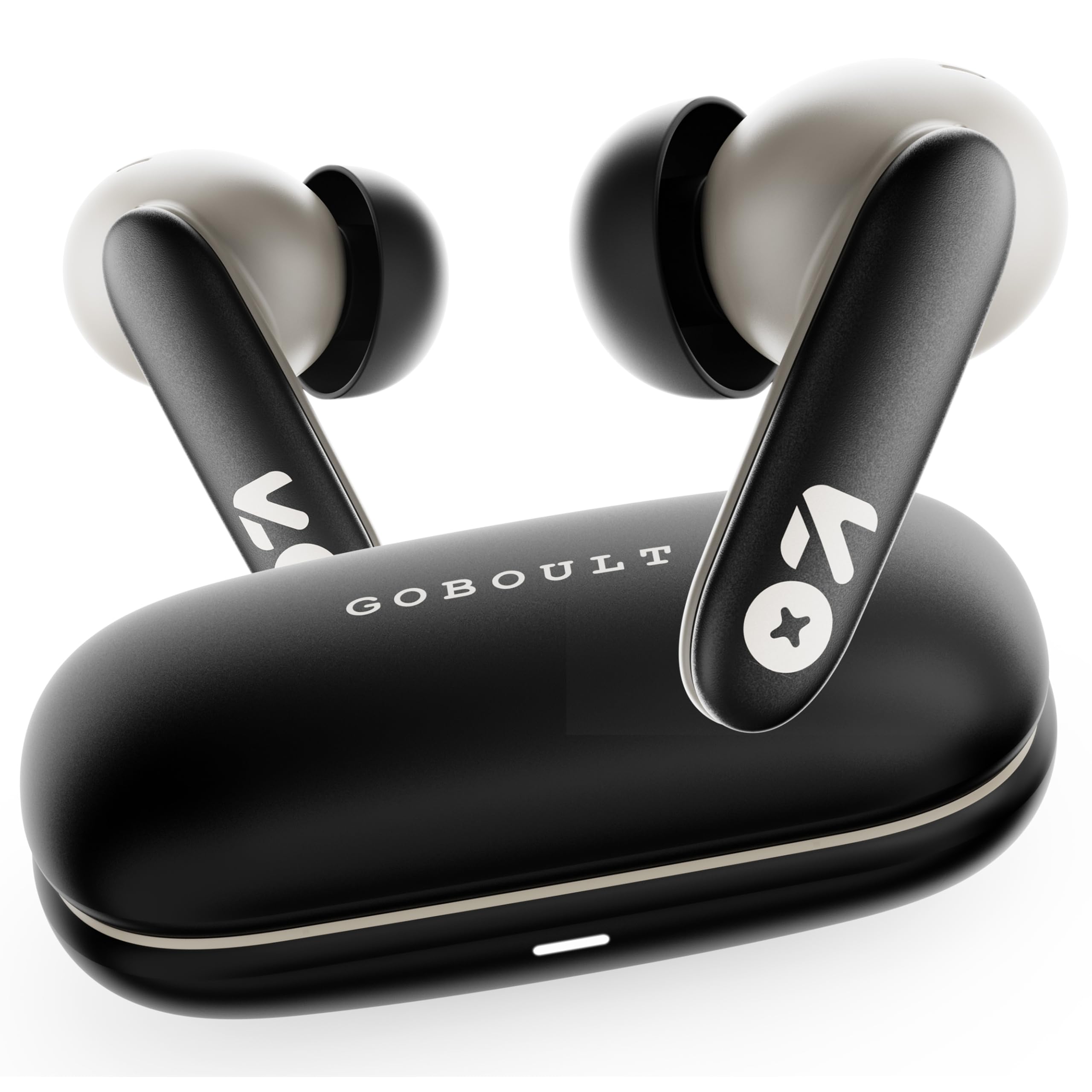
Image: GOBOULT Y1 v2.0 Wireless Earbuds and their charging case, showcasinte hoahoa maeneene.
He aha kei roto i te Pouaka
- GOBOULT Y1 v2.0 Wireless Earbuds
- Puhi utu
- USB Momo-C Taura Whakapae
- Uinga Taringa (he rereke nga rahi)
- Pukapuka Kaiwhakamahi
- Kaari Raati
Nga waahanga hua
The GOBOULT Y1 v2.0 earbuds are designed with advanced features for an enhanced audio experience:
- Wā purei roa: Tae atu ki te 60 hāora o te wā tākaro katoa me te pouaka utu.
- Nihokikorangi 6.0: Ensures fast, stable, and efficient wireless connectivity.
- Zen Quad Mic ENC: Environmental Noise Cancellation with four microphones for clear calls.
- Rooputanga Iti: 45ms ultra-low latency for gaming and video synchronization.
- Mana Pa: Intuitive touch sensors for managing music, calls, and voice assistant.
- Te Hononga Pūrere Takirua: Connect and switch seamlessly between two devices.
- 13mm Bass Driver: Ka tuku panguru kaha me te ororongo marama.
- AMP Tautoko App: Customize audio settings and controls via the dedicated application.
- IPX5 Ātete Wai: Protection against sweat and light splashes.
- Whakataki Tere: Type-C port for quick charging of the case.

Whakaahua: Ka mutuview of GOBOULT Y1 v2.0 features including sleek design, AMP App support, Bluetooth 6.0, 60 hours battery life, and dual device pairing.
Aratohu Tatūnga
1. Te Whakataki i nga Paorooro me te Puhi
I mua i te whakamahi tuatahi, whakakiia katoatia nga pukoro taringa me te putea utu.
- Whakanohoia nga purongo ki roto i te pukoro utu. Me whakarite kia tika te noho.
- Honoa te taura utu USB Momo-C ki te tauranga utu i runga i te pouaka me te pūtake hiko.
- The LED indicator on the case will show charging status. A full charge typically takes approximately 1.5-2 hours.

Image: The GOBOULT Y1 v2.0 earbuds and charging case, highlighting the 60-hour battery life and Type-C fast charging capability.
2. Initial Pairing (Single Device)
- Whakatuwherahia te putea utu. Ka uru aunoa nga taringa ki te aratau takirua.
- I runga i to taputapu (waea atamai, papa, aha atu), whakaahei i a Nihokikorangi.
- Rapua available Bluetooth devices and select "GOBOULT Y1 v2.0".
- Kia honoa, ka rangona he oro whakaū.
3. Takirua Pūrere Taurua
The Y1 v2.0 supports connecting to two devices simultaneously.
- Pair the earbuds with your first device as described in "Initial Pairing".
- Monokia te Nihokikorangi i runga i te taputapu tuatahi. Ka uru ano nga taringa ki te aratau takirua.
- Tāruatia ngā pane taringa ki tō pūrere tuarua.
- Whakahohe anō i te Nihokikorangi i te pūrere tuatahi. Me hono aunoa ngā pane taringa ki ngā pūrere e rua.
- To switch between devices, simply play audio on the desired device.

Image: The GOBOULT Y1 v2.0 earbuds connected to both a laptop and a smartphone, illustrating the dual device pairing feature.
Nga Tohutohu Whakahaere
1. Mana Pa
The earbuds feature intuitive touch controls on their stems:
| Mahi | Mahi |
|---|---|
| Pao Kotahi (Mauī/Matau) | Purei/Tatari Waiata, Whakautu/Whakamutua te Waea |
| Paoa Taurua (Matau) | Riro Panuku |
| Paoa Taurua (Maui) | Tuhinga o mua |
| Patohia kia Toru (Mauī/Matau) | Whakahohe Kaiāwhina Reo |
| Pēhi Roa (Mauī/Matau) | Whakakahoretia te Waea |
| Pēhi Roa (Matau) | Rōrahi Whakarunga |
| Pēhi Roa (Mauī) | Rōrahi Whakararo |

Image: Visual representation of touch controls for music playback and call management, along with the IPX5 water resistance rating.
2. Kaiāwhina reo
Activate your device's voice assistant (Siri, Google Assistant) by triple-tapping either earbud. You can then issue commands like making calls or playing music.

Image: The GOBOULT Y1 v2.0 earbuds highlighting Bluetooth 6.0 for stable connection and integration with AI voice assistants like Siri and Google Assistant.
3. Gaming Mode (Low Latency)
For an optimized gaming experience, activate the 45ms ultra-low latency gaming mode. Refer to the AMP App or specific touch control gestures (if available) for activation.

Image: The GOBOULT Y1 v2.0 earbuds illustrating the 45ms ultra-low latency Gaming Mode.
4. AMP Tautoko Taupānga
Download the GOBOULT AMP App to unlock advanced customization options:
- Adjust Equalizer (EQ) settings for personalized sound.
- Whakaritehia nga mana pa.
- Access additional features like Water Ejection mode.

Image: Screenshot of the GOBOULT AMP App interface, demonstrating equalizer adjustments and other customization features.
Te tiaki
1. Te horoi
Ko te horoi i nga wa katoa ka awhina i te pupuri i te kounga oro me te akuaku.
- Whakamahia he kakahu ngohengohe, maroke, korekore ki te muru i nga purongo me te putea utu.
- Tangohia mārire te ware taringa, te paru rānei i ngā pito o te taringa me te kupenga o te kaikorero mā te whakamahi i tētahi paraihe iti, i tētahi miro rānei.
- Kaua e whakamahia nga kai horoi, te waipiro, te whakarewa matū ranei.
2. Ātete Wai (IPX5)
The GOBOULT Y1 v2.0 earbuds are rated IPX5 water resistant, meaning they are protected against low-pressure water jets from any direction. This makes them suitable for workouts and light rain.
- Kaua e rukuhia nga taringa ki te wai.
- Ko te keehi whakawakanga ehara i te aukati wai.
- Me whakarite kia maroke ngā pane taringa i mua i te whakahokinga ki roto i te pouaka utu hei ārai i te pakaru.
Raparongoā
| Raruraru | Rongoā |
|---|---|
| Karekau nga taringa e hono ana | Kia tino utua ngā pane taringa. Whakawetohia, kātahi ka whakakāhia te Nihokikorangi i tō pūrere. Warewaretia te pūrere i ngā tautuhinga Nihokikorangi, ka hono anō. |
| Kotahi anake te pukoro e mahi ana | Place both earbuds back in the case, close it, then open again. Ensure both are charged. Reset earbuds if issue persists. |
| He iti te oro, he ngoikore ranei te oro | Clean earbud speaker mesh. Adjust volume on both earbuds and connected device. Try different ear tip sizes for a better seal. |
| Karekau e utuhia ana | Check USB Type-C cable and power adapter. Ensure connections are secure. |
Whakatakotoranga
| Āhuahira | Taipitopito |
|---|---|
| Waitohu | GOBOULT |
| Ingoa Tauira | Y1 v2.0 (Airbass) |
| Te Whakanoho Taringa | I te Taringa |
| Mana Haruru | Whakakorea te Riihi Taiao (ENC) |
| Putanga Nihokikorangi | 6.0 |
| Awhe Nihokikorangi | 10 Mita |
| Te Ora o te Pūhiko (Tapeke) | Tae atu ki te 60 haora |
| Rahi Atekōkiri Ororongo | 13 Milimetera |
| Latency Ororongo | 45 Mīrihekona (Aratau petipeti) |
| Whakautu auau | 20 Hz - 20,000 Hz |
| Taumata Atete Wai | IPX5 |
| Tikanga Mana | Touch Control, App |
| Pūrere Hototahi | Android, iOS, Desktops, Laptops, Tablets |
| Taumaha Tūemi | 50 Karamu |

Image: A detailed comparison table showing the specifications of GOBOULT Y1 v2.0 versus the previous Y1 model, highlighting improvements.
Pūtāhui me te Tautoko
The GOBOULT Y1 v2.0 Wireless Earbuds come with a 1-Tau Pūtāhui a te Kaihanga from the date of purchase. This warranty covers manufacturing defects.
For warranty claims, technical support, or any product-related inquiries, please refer to the contact information provided on your warranty card or visit the official GOBOULT support webpae.