Kupu Whakataki
The Dragon Magazine Archive is a comprehensive digital collection containing the first 250 issues of Dragon Magazine, along with 7 issues of its predecessor, The Strategic Review. This archive provides over two decades of rich content from the world of fantasy role-playing, including articles, adventures, game mechanics, and artwork. The collection is provided on 5 CD-ROMs in PDF format, designed for use on personal computers.
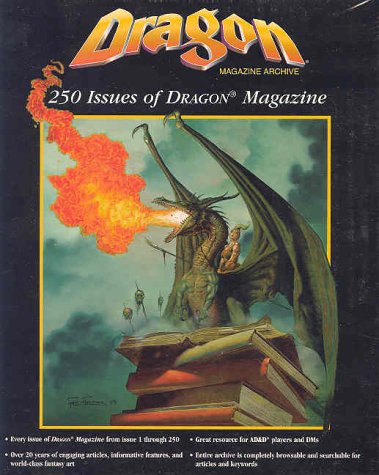
Whakaahua 1: Cover of the Dragon Magazine Archive. This image displays the cover art for the Dragon Magazine Archive. It features a large, green dragon with prominent wings, breathing a stream of fiery orange and yellow flames. The dragon is perched atop a stack of old, worn books. In the background, faint, ghostly figures float. The title 'Dragon Magazine Archive' is visible at the top, along with '250 Issues of DRAGON® Magazine'.
Tatūnga me te Tāuta
To begin using your Dragon Magazine Archive, follow these steps:
- Whakaritenga Pūnaha: Ensure your computer meets the minimum specifications for running the archive software and viewkei te PDF files. While the archive can function on older systems, a mid-range to fast computer with ample RAM is recommended for optimal performance, especially when using the built-in interface or performing searches.
- Kōkuhu Kōpae: Insert the first CD-ROM from the jewel case into your computer's CD/DVD drive.
- Whakahaerehia te Kaiwhakauru: The installation program should launch automatically. If it does not, navigate to the CD-ROM drive in 'My Computer' or 'This PC' and run the 'setup.exe' or 'install.exe' file.
- Whai i nga Tohuaki-Mata: Proceed through the installation wizard, accepting the license agreement and choosing your desired installation directory. The installer will guide you through inserting subsequent discs as needed.
- Hototahi Pūmanawa: The archive utilizes a proprietary interface. For enhanced viewing and search capabilities, it is highly recommended to have Adobe Acrobat Reader (version 4.0 or later recommended) installed on your system, as all magazine issues are provided in PDF format.
Upon successful installation, a shortcut to the Dragon Magazine Archive will be placed on your desktop or in your Start Menu.
Operating the Archive
The Dragon Magazine Archive offers various ways to access its extensive content:
- Launching the Archive: Double-click the Dragon Magazine Archive shortcut to open the main interface.
- Navigating Issues: The interface allows you to browse issues by number or year. Use the navigation controls to move between magazines.
- ViewNgā Ihirangi: Each magazine issue is presented as a PDF file. Ka taea e koe view pages within the built-in reader. For a potentially smoother experience, especially on systems with lower resources, you may open the PDF files directly using Adobe Acrobat Reader.
- Rapu ana: The archive includes a search function. You can search for keywords within specific issues or across the entire collection. Be aware that the search functionality may be more effective when using Adobe Acrobat's search features directly on the PDF files, as the built-in search can sometimes be clunky or yield broad results.
- Tā: You can print individual pages or entire articles from within the archive's viewer or directly from Adobe Acrobat Reader. The option to disable graphics during printing may be available to save ink and improve print speed.
- Bookmarking: The interface may allow you to bookmark specific articles or pages for quick access.
Te tiaki
To ensure the longevity and continued functionality of your Dragon Magazine Archive, consider the following maintenance tips:
- Tiaki Kōpae: Handle the CD-ROMs by their edges to avoid fingerprints and scratches. Store them in their original jewel case or a protective sleeve in a cool, dry place away from direct sunlight.
- Whakahōu Pūmanawa: While this is an archive product, check the publisher's official website periodically for any potential patches or updates that might improve performance or address known issues.
- Backup (Optional): For critical data preservation, consider creating digital backups of the PDF files to a hard drive or cloud storage, provided you adhere to copyright laws and terms of use.
Raparongoā
If you encounter issues while using the Dragon Magazine Archive, refer to the following common problems and solutions:
| Raruraru | Rongoā |
|---|---|
| Slow Interface Performance: The archive software runs slowly or is clunky. |
|
| Search Results are Inaccurate or Broad: Difficulty finding specific content using the built-in search. |
|
| Missing Content or Scan Quality Issues: Certain articles or sections appear to be missing or scans are of poor quality. |
|
| Hapa Pānui Kōpae: Computer cannot read one or more of the CD-ROMs. |
|
Whakatakotoranga
- Ingoa Hua: Dragon Magazine Archive
- Tau tauira: 0786914483 (ISBN-10)
- Ihirangi: 250 issues of Dragon Magazine (from issue 1) and 7 issues of The Strategic Review.
- Hōputu: PDF (Hōputu Tuhinga Kawe)
- Media: 5 CD-ROMs
- Reo: Ingarihi
- Kaiwhakaputa: Example Product Manufacturer (as per product data)
- Taumaha Tūemi: 0.01 ounces (approximate, for the physical media)
- Ahu: 2 x 8.25 x 10.25 īnihi (nga rahi o te kete)
- Hototahi Pūnaha: Designed for Windows-based personal computers. Requires a CD/DVD drive and PDF reader software (e.g., Adobe Acrobat Reader).
Pūtāhui me te Tautoko
Specific warranty information for the Dragon Magazine Archive is not provided in this manual. For details regarding product warranty, technical support, or inquiries about missing content or software patches, please refer to the official documentation included with your purchase or visit the website of the original publisher, Example Product Manufacturer. Contact information for support channels is typically found on the product packaging or within the software's help section.


