Kupu Whakataki
This manual provides detailed instructions for the proper use and care of your Audiovox CE-145G Personal CD Player. Please read this manual thoroughly before operating the device to ensure optimal performance and longevity.
Nga waahanga hua
- 40-Second Anti-Skip Protection: Ensures continuous audio playback even during movement, utilizing a digital buffer.
- Multi-Directional Anti-Roll Sensors: Provides additional protection against playback interruption from various movements.
- 22-Track Programmable Memory: Allows customization of CD playback order.
- Bass Boost System: Whakarei ake i te putanga ororongo iti-auau.
- 3-Beam Laser Pickup: Designed for accurate CD tracking and clear sound reproduction.
- Aratau Whakahoki Maha: Includes random play and various repeat functions.
- Pupuri Whakawhiti: Prevents accidental button presses and program changes.
- Whakaweto Aunoa: Conserves battery life by automatically shutting down the player when not in use.
- Line-Out Jack: For connecting to external audio systems or power adapters.
- Built-in Rechargeable Circuitry: Supports the use of rechargeable Ni-Cad batteries (not included).
- Stereo Headphones: Included for immediate listening.
Tatūnga
1. Tāuta Pūhiko
The Audiovox CE-145G operates on two (2) AA batteries (not included) or an optional AC/car adapter (not included) connected via the line-out jack. For rechargeable Ni-Cad batteries, the unit features built-in charging circuitry.
- Locate the battery compartment on the underside of the CD player.
- Kiriata te uhi o te wahanga pākahiko kia tuwhera.
- Whakauruhia kia rua (2) nga pākahiko AA, kia tika te polarity (+/-) kua tohua ki roto i te waahanga.
- Katia kia mau te uhi o te wahanga pākahiko.

Image: The Audiovox CE-145G Personal CD Player in translucent green, shown with included stereo headphones. This image illustrates the overall product design and the headphones that come with the unit.
2. Tuhono Waeaoro
Insert the stereo headphone plug into the headphone jack located on the side of the CD player.

Image: A close-up of the stereo headphones included with the Audiovox CE-145G CD player, showing the earcups and the 3.5mm audio jack.
Nga Tohutohu Whakahaere
1. Basic CD Playback
- Open the CD compartment lid by pressing the "OPEN" button or sliding the latch.
- Whakatakotoria he CD ki runga i te poupou waenga me te taha tapanga e anga ana ki runga.
- Katia te taupoki o te wāhanga CD kia pūmau rā anō te pāwhiri.
- Pehia te TAKARO/PAUSE button to begin playback. The track number and elapsed time will display.
- Kia okioki te purei ano, perehi TAKARO/PAUSE ano. Pēhia kia kotahi anō kia tīmata anō.
- Hei whakamutu i te purei ano, paatohia te KATI pātene.
- Hei peke ki te riu panuku, pehia te HOKOHOKO MUA pātene (►►|).
- To return to the beginning of the current track or go to the previous track, press the HIKI MURI pātene (|◄◄).
- To fast forward or rewind within a track, press and hold the HOKOHOKO MUA or HIKI MURI pātene, ia.
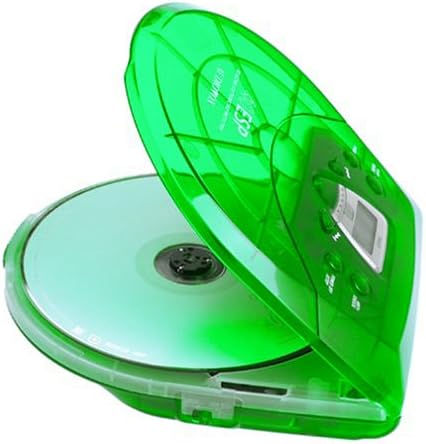
Image: The Audiovox CE-145G Personal CD Player with its translucent green lid open, revealing a compact disc placed inside the compartment.
2. Anti-Skip Protection (ESP)
The CE-145G features a 40-second Electronic Skip Protection (ESP) buffer. This system stores up to 40 seconds of audio data, allowing for uninterrupted playback even if the player experiences minor shocks or vibrations. This feature is automatically active during playback.
3. Programmable Memory (22 Tracks)
Ka taea e koe te whakarite kia 22 nga riu hei purei i roto i te raupapa motuhake.
- I te aratau STOP, pēhia te KAUPAPA pātene. Ka whakaatu te whakaaturanga "PROG" me "01".
- Whakamahia te HOKOHOKO MUA or HIKI MURI buttons to select the desired first track.
- Perehi KAUPAPA again to confirm the track. The display will show "02".
- Repeat steps 2 and 3 to add up to 22 tracks to your program.
- After programming the last track, press TAKARO/PAUSE to start playback of your programmed sequence.
- To clear the program, press the KATI pātene rua.
4. Whakanui Panguru
To enhance the bass frequencies, locate the Tuhinga o mua switch (or button) on the unit and activate it. Deactivate it to return to standard audio output.
5. Pupuri Taumahi
Ko te KAUPAPA switch prevents accidental button presses. Slide the KAUPAPA switch to the "ON" position to disable all control buttons. Slide it to "OFF" to re-enable controls.
6. Whakaweto Aunoa
To conserve battery life, the CD player will automatically power off after a period of inactivity (e.g., when a CD finishes playing and no buttons are pressed). To restart, press the TAKARO/PAUSE pātene.
Te tiaki
- Te horoi i te Waehe: Wipe the exterior of the player with a soft, damp kakahu. Kaua e whakamahi i nga kai horoi me nga whakarewa.
- Te horoi i te karu CD: If playback issues occur due to a dirty lens, use a specialized CD lens cleaning kit. Do not touch the lens directly.
- Tiaki CD: Puritia ngā CD mā ō rātou taha. Puritia kia ma, kia kore he karawarawa. Rongoātia ki roto i ō rātou pouaka ina kore e whakamahia.
- Tiaki Pūhiko: Tango pākahiko ki te kore te wae e whakamahia mo te wa roa kia kore ai e pakaru.
Raparongoā
| Raruraru | Take pea | Rongoā |
|---|---|---|
| Karekau he kaha | Kua mate nga pākahiko, kua he ranei te whakaurunga; Ko te urutau AC kaore i te hono, i te he ranei. | Replace batteries, check polarity, or ensure AC adapter is properly connected and functional. |
| CD skips or stops | CD is dirty or scratched; unit is subjected to excessive shock; lens is dirty. | Clean CD, use a different CD, avoid strong impacts, clean the CD lens. |
| Karekau he tangi | Headphones not connected properly; volume too low; headphones faulty. | Ensure headphones are fully plugged in, increase volume, try different headphones. |
| Ko nga paatene kaore e aro | HOLD switch is engaged. | Slide the HOLD switch to the "OFF" position. |
Whakatakotoranga
- Tauira: CE-145G
- Waitohu: Audiovox
- Parenga Anti-Skip: 40 seconds (Electronic Skip Protection)
- Riu Papatono: 22
- Puna Hiko: 2 x AA batteries (not included) or optional AC/car adapter
- Putanga Ororongo: 3.5mm headphone jack, Line-out jack
- Ahu (Ahua.): 11.8 x 8.3 x 2.6 inihi (Ngā Ahu Puka)
- Taumaha (Tata.): 1.35 pauna (Taumaha Tuemi)
- Tae: Translucent Green
Pūtāhui me te Tautoko
The Audiovox CE-145G Personal CD Player is backed by a 90-day parts-and-labor warranty mai i te ra o te hokonga. Tena koa pupurihia to tohu mo te hoko mo nga kereme whakamana.
For technical support or warranty service, please refer to the contact information provided with your product packaging or visit the official Audiovox webpae.


