Ka mutu te huaview
The HTC HSG-2064 Mobile Base is a robust and essential accessory designed to provide mobility for heavy workshop machinery. Constructed from heavy gauge steel with a full welded design and powder coat finish, it ensures strength and durability. This mobile base is specifically engineered to fit various table saws, including Powermatic 64, 64-A, 63, General 50-175, 50-185, Grizzly 16" Model #G-1538, and Reliant 16" model #EE-166. It features two rigid wheels and one swivel wheel for easy maneuverability, and brake knobs to secure the base in place, raising your machine approximately 3/4-inch off the floor for convenient relocation.
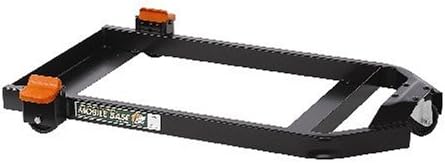
Image: The HTC HSG-2064 Mobile Base, showcasing its sturdy black steel frame, two rigid wheels with orange brake levers, and a single swivel wheel.
Nga korero haumaru
- Always ensure the mobile base is on a level, stable surface before moving or operating machinery.
- Engage all brake mechanisms fully before operating any machinery mounted on the base.
- Do not exceed the weight capacity of the mobile base. Refer to the specifications section.
- Keep hands and feet clear of moving parts, especially during movement and when engaging/disengaging brakes.
- Inspect the mobile base regularly for any signs of wear, damage, or loose components. Do not use if damaged.
- Use appropriate lifting techniques or assistance when placing heavy machinery onto the mobile base.
Rarangi Wahi
Before assembly, verify that all components are present and undamaged:
- 1 x Welded Steel Frame (Main Body)
- 2 x Rigid Wheels (pre-attached or requiring simple attachment)
- 1 x Swivel Wheel (pre-attached or requiring simple attachment)
- 2 x Brake Knobs/Levers (for rigid wheels)
- Necessary Fasteners (bolts, nuts, washers) for wheel and brake attachment (if not pre-assembled)
Note: Due to the "full welded" construction, the main frame is a single piece, simplifying assembly.
Tatūnga me te Runanga
While the main frame is fully welded, some minor assembly of wheels and brake mechanisms may be required. Follow these general steps:
- Wewete Waenga: Kia ata tangohia nga waahanga katoa mai i te kete ka whakatakoto ki runga i te mata ma, papatahi.
- Attach Rigid Wheels: If not already attached, secure the two rigid wheels to the designated mounting points on one end of the mobile base frame using the provided fasteners. Ensure they are firmly tightened.
- Attach Swivel Wheel: Mount the single swivel wheel to the designated mounting point on the opposite end of the frame. This wheel allows for directional changes.
- Tāutahia ngā Poro Pēki: Attach the brake knobs or levers to the rigid wheels as per the design. These mechanisms are crucial for locking the base in place.
- Manatoko Pūmautanga: Once assembled, gently rock the mobile base to ensure all components are securely fastened and the base is stable.
- Mīhini Tūnga: Carefully lift and place your compatible table saw (e.g., Powermatic 64, General 50-175) onto the mobile base. Ensure the machine's feet or base sit securely within the mobile base frame.
It is recommended to have assistance when placing heavy machinery onto the mobile base.
Nga Tohutohu Whakahaere
Using your HTC HSG-2064 Mobile Base is straightforward:
- To Move the Machine:
- Ensure all brake knobs on the rigid wheels are disengaged.
- Gently push or pull the machine to its desired new location. The swivel wheel provides easy steering.
- Avoid sudden movements or pushing over uneven surfaces.
- To Secure the Machine:
- Once the machine is in its desired stationary position, firmly engage the brake knobs on both rigid wheels. This will lock the wheels and prevent unintended movement.
- Verify that the base is stable and does not move before operating the machinery.
- Whakatikatika Teitei: The mobile base raises your machine approximately 3/4-inch off the floor, providing clearance for movement without affecting the machine's operational height significantly.
Te tiaki
Regular maintenance ensures the longevity and safe operation of your mobile base:
- Te horoi: Periodically wipe down the steel frame to remove dust, sawdust, and debris. A damp cloth followed by a dry cloth is sufficient.
- Tirohanga wira: Check the wheels for any accumulation of debris (e.g., wood chips, string) that might impede their rotation. Clean as necessary.
- Taki Tiaki: Annually, or more frequently with heavy use, inspect all bolts and fasteners for tightness. Re-tighten any loose components to maintain structural integrity.
- Brake Mechanism: Ensure the brake knobs engage and disengage smoothly and effectively. If they become stiff, a light application of a dry lubricant may help, but avoid over-lubrication which can attract dust.
- Aukati Rust: While the powder coat finish offers protection, if the coating is scratched or damaged, consider touching up exposed metal to prevent rust, especially in humid environments.
Raparongoā
| Raruraru | Take pea | Rongoā |
|---|---|---|
| Difficulty moving the base. | Brakes are engaged; wheels are obstructed by debris; wheels are damaged. | Disengage brakes fully. Clear any debris from wheels. Inspect wheels for damage and replace if necessary. |
| Base slides or moves when brakes are engaged. | Brakes not fully engaged; brake mechanism worn or damaged; surface is too slick. | Ensure brake knobs are fully depressed/engaged. Inspect brake mechanisms for wear and contact manufacturer if damaged. Consider placing on a less slick surface or using anti-slip mats under the wheels. |
| Kāore i te pumau, i te wiri rānei te turanga. | Loose fasteners; uneven floor; machine not properly seated on base. | Check and tighten all assembly fasteners. Move the base to a level floor. Re-position the machine to ensure it is centered and stable on the base. |
Whakatakotoranga
- Tau tauira: HSG-2064
- Kaihanga: HTC
- Hototahi: Powermatic 64, 64-A, 63; General 50-175, 50-185; Grizzly 16" Model #G-1538; Reliant 16" model #EE-166
- Wheel Configuration: 2 rigid wheels, 1 swivel wheel
- Whakapiki Teitei: Approximately 3/4-inch (1.9 cm)
- Rawa Hanga: Heavy gauge steel, full welded
- Mutu: Koti paura
- Rahi Hua (L x W x H): 93.22 x 83.06 x 9.91 cm (36.7 x 32.7 x 3.9 inihi)
- Taumaha Tūemi: 12.07 kg (26.6 Pauna)
Pūtāhui me te Tautoko
For information regarding warranty coverage, technical support, or replacement parts for your HTC HSG-2064 Mobile Base, please contact the manufacturer directly. Refer to the original product packaging or the manufacturer's official webpae mo nga taipitopito whakapā me nga kupu whakamana.
Kaihanga: HTC
Tena koa pupurihia to tohu mo te hoko mo etahi kereme whakamana.


