Kupu Whakataki
This manual provides detailed instructions for the installation, operation, and maintenance of your DB DRIVE A3 2250.5 Okur Series A3 Class AB 1000 Watt 5-Channel AmpKaiwhakaora. Pānuihia tēnei pukapuka ā-ringa i mua i te tāutanga, i te whakahaere rānei, kia tika ai te whakamahinga, kia kore ai hoki e kino te waeine, te pūnaha oro rānei o tō waka.
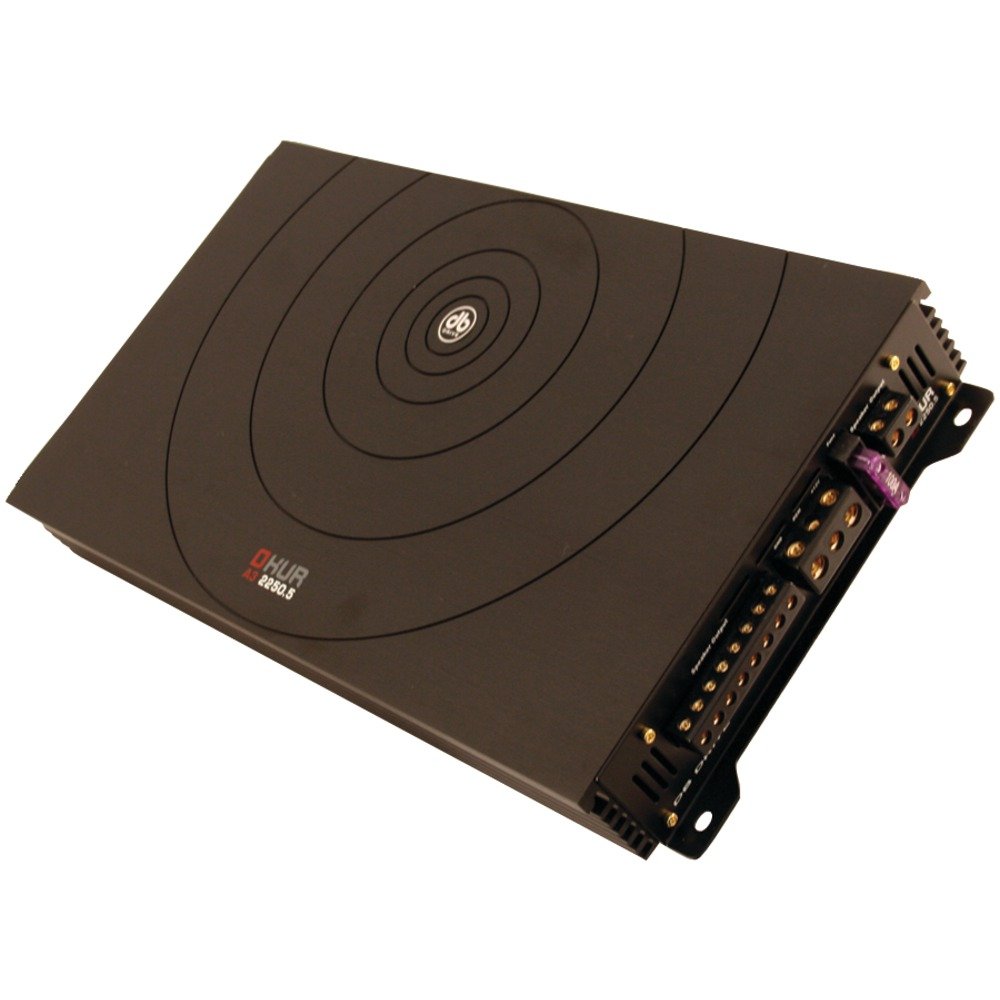
Image: DB DRIVE A3 2250.5 Okur Series A3 Class AB 1000 Watt 5-Channel Ampkaiwhakarewa. Ko tenei whakaahua e whakaatu ana i te amplifier's top view, highlighting its compact design and branding.
Nga korero haumaru
Kia mau tonu nga whakaritenga haumaru e whai ake nei hei aukati i te whara, i te kino ranei:
- Disconnect the vehicle's battery negative terminal before making any power connections.
- Me whakarite kia tika te ara o ngā waea katoa, kia mau hoki hei ārai i te kōpiripiri, i te poto rānei o te ara iahiko.
- Whakamahia ngā waea ine tika mō ngā hononga hiko me te whenua e ai ki te wāhanga tāutanga.
- Tāutahia te amphe whakamahana ki tetahi waahi e taea ai te whai hau kia kore e wera rawa.
- A ape i te whakauru i te ampwhakawerawera i ngā wāhi e pāngia ana e te makuku, e te nui rawa rānei o te wiri.
- Mena kāore koe i te tino mōhio ki tētahi wāhanga o te tukanga tāutanga, whakapā atu ki tētahi kaiwhakauru ororongo waka ngaio.
Tatūnga me te Tāuta
1. Te Wetewete me te Tirotiro
Tango tupato te amplifier from its packaging. Inspect the unit for any signs of damage that may have occurred during shipping. Contact your dealer immediately if any damage is found.
2. Te Whakamau i te Ampkaikawe
Choose a mounting location that is dry, well-ventilated, and secure. Common locations include under a seat, in the trunk, or behind a panel. Ensure there is sufficient airflow around the ampte whakamahana whakamahana o te lifier.
- Tohua ngā kōhao whakapiri mā te whakamahi i te ampkaiwhakaora hei tauira.
- Keria he kōhao whakamātau mēnā e tika ana, me te tūpato kei kino ngā wāhanga o te waka.
- Whakaorangia te ampwhakapūmau mā te whakamahi i ngā tīwiri whakapiri kua whakaratohia.
3. Hononga Waea
Proper wiring is crucial for performance and safety. Refer to the following guidelines:
- Hiko (BATT+): Connect a heavy-gauge wire (e.g., 4 AWG or 8 AWG depending on total power) directly from the positive terminal of the vehicle's battery. Install an inline fuse holder within 18 inches (45 cm) of the battery.
- Papa (GND): Connect a heavy-gauge wire of the same size as the power wire to a clean, unpainted metal surface of the vehicle's chassis. Ensure a solid, low-resistance connection.
- Mamao (Rem): Connect a smaller gauge wire (e.g., 18 AWG) from the amplifier's remote terminal to the remote output of your head unit. This turns the ampwhakakā, whakaweto hoki i te rama me te waeine upoko.
- Whakauru RCAHonoa ngā taura RCA mai i te pūoko o tō paneamp putanga ki te amplifier's RCA input jacks. Ensure correct channel matching (Front L/R, Rear L/R, Sub).
- Nga Putanga Kaikorero: Connect speaker wires from the amplifier's speaker terminals to your speakers. Observe correct polarity (+ to + and - to -). This is a 5-channel amplifier, typically 4 channels for full-range speakers and 1 channel for a subwoofer.
4. Gain, Crossover, and Bass Boost Settings
These settings allow you to fine-tune the amplifier's output to match your audio system and preferences.
- Whiwhi Mana: Adjust the gain to match the output voltage of your head unit. Start with the gain at minimum, then slowly increase it until you hear distortion, then back off slightly. This is not a volume control.
- Crossover (LPF/HPF):
- Tere Toha Iti (LPF): For the subwoofer channel, set the LPF to allow only low frequencies to pass (e.g., 80-120 Hz).
- Tātari Whakawhiti Teitei (HPF): For the full-range channels, set the HPF to block low frequencies from reaching your main speakers (e.g., 80-100 Hz) to prevent distortion and improve sound clarity.
- Parepare Pai: Use the bass boost sparingly. Excessive bass boost can lead to distortion and speaker damage. Adjust to taste, ensuring sound remains clear.
Nga Tohutohu Whakahaere
Once installed and configured, the amplifier will power on automatically with your head unit via the remote turn-on wire. Adjust volume and tone controls primarily from your head unit. The amplifier's settings (gain, crossover) are set during installation and generally do not require frequent adjustment.
Te tiaki
The DB DRIVE A3 2250.5 ampHe iti noa te tiaki i te kaipatu.
- Te horoi: Ia wa, horoia te ampKo te taha o waho me te kakahu ngohengohe, maroke hei tango i te puehu. Kaua e whakamahi i nga matū kino, i nga horoi horoi ranei.
- Te tirotiro: Occasionally check all wiring connections to ensure they are secure and free from corrosion. Ensure the amplifier's ventilation fins are not obstructed.
Raparongoā
Mena ka pa ki a koe nga raru o to amplifier, tirohia nga raru me nga otinga e whai ake nei:
| Raruraru | Take pea | Rongoā |
|---|---|---|
| Kore He Mana / Ampe kore e huri te kaitahu |
|
|
| Kore Putanga oro |
|
|
| Oro Kopikopiko |
|
|
| AmpTe Werawera Nui o te Whakawera (Aratau Tiaki) |
|
|
Whakatakotoranga
| Āhuahira | Taipitopito |
|---|---|
| Tau tauira | A3 2250.5 |
| Putanga Mana Morahi | 1000 Watts |
| Nga hongere | 5-Channel (4 stereo, 1 mono for subwoofer) |
| Ampakomanga lifier | Te akomanga AB |
| Waehanga | Audiophile Grade |
| Ahu (L x W x H) | 53.59 x 30.48 x 10.92 cm |
| Taumaha | 6.53 kg |
| Whakahaere Wea | DRIVESINK (Okur Series A3 feature) |
Pūtāhui me te Tautoko
DB Drive products are designed for reliability and performance. This product is covered by a limited warranty. Please refer to the warranty card included with your product or visit the official DB Drive webpae mo nga tikanga me nga tikanga whakamana.
For technical support, service, or warranty claims, please contact your authorized DB Drive dealer or visit the DB Drive official webpae mo nga korero whakapā me nga rauemi tautoko.


