Kupu Whakataki
This manual provides comprehensive instructions for the setup, operation, and maintenance of your Coby CT-P9040 5.8 GHz Analog Cordless Phone. Please read this manual thoroughly before using your phone to ensure proper functionality and to prevent damage.
Nga Ihirangi me nga Waehanga
I mua i te tīmatanga, kia tino mohio kei roto i te kete ngā wāhanga katoa:
- Pukoro Ahokore
- Waeine turanga
- Pouaka AC
- Waea Waea Waea
- Pūhiko Pūhiko Rechargeable
- Pukapuka Kaiwhakamahi (tenei tuhinga)
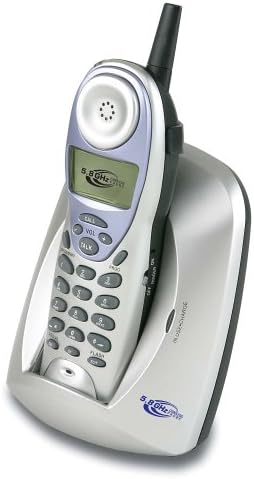
Image: The Coby CT-P9040 cordless phone, showing the handset docked in its silver base unit. The handset features a display screen, numeric keypad, and function buttons. The base unit has a charging cradle for the handset.
Aratohu Tatūnga
1. Tāuta Pūhiko
- Kimihia te wahanga pākahiko kei muri o te ringaringa.
- Whakatuwheratia te uhi o te wahanga pākahiko.
- Connect the rechargeable battery pack connector to the jack inside the compartment.
- Place the battery pack into the compartment and close the cover securely.
2. Hononga Waeine turanga
- Connect one end of the telephone line cord to the "LINE" jack on the back of the base unit.
- Honoa te pito kē atu o te taura waea ki tētahi hononga waea paerewa.
- Connect the AC power adapter to the "DC IN" jack on the back of the base unit.
- Monohia te urutau hiko AC ki tētahi putanga hiko paerewa.
3. Whakataki Tuatahi
Place the handset in the base unit's charging cradle. Ensure the "IN CHARGE" indicator light on the base unit illuminates, indicating proper charging. For optimal battery performance, charge the handset for at least 12-14 hours before initial use.
Nga Tohutohu Whakahaere
Te Waeatanga
- Pick up the handset from the base unit or press the KORERO pātene.
- Whakarongo mo te reo waea.
- Waea te nama waea e hiahiatia ana.
- Hei whakamutu i te waea, pehia te KORERO button again or place the handset back in the base unit.
Te Whakautu Waea
Ina tangi te waea, tangohia ake te waea, pēhi rānei i te pātene KORERO pātene hei whakautu i te waea.
Taumahi Waea Anō
Ki te waea ano i te nama whakamutunga i karangahia, paatohia te PANUI pātene i runga i te ringaringa.
Whakaritenga Rōrahi
I te wa e waea ana, whakamahia te VOL+ a VOL - buttons on the handset to adjust the earpiece volume.
Mahi Kohiko
Pehia te Kohiko button to use call waiting or transfer calls if supported by your telephone service provider.
Storing Phone Numbers (Speed Dial)
Your phone can store up to 10 numbers for frequently called contacts. Refer to the detailed instructions in the full manual for programming speed dial entries.
Te Tiaki me te Tiaki
- Puritia te waea kia matara atu i ngā pūtake wera, i te rā tika, me te makuku.
- Horoia ngā mata o te waea ki te wai ngohengohe,amp kakahu. Kaua e whakamahi i nga kai horoi me nga whakarewa.
- Ensure the charging contacts on the handset and base unit are clean to maintain proper charging.
- If the phone will not be used for an extended period, remove the battery from the handset.
Raparongoā
| Raruraru | Take pea | Rongoā |
|---|---|---|
| Karekau he oro waea | Kua momotu te taura waea. | Me whakarite kia pai te hono o te waea waea ki te wae turanga me te kowiri pakitara. |
| Karekau te ringaringa e utu ana | Handset not properly seated in cradle or dirty charging contacts. | Reseat the handset in the base unit. Clean the charging contacts on both the handset and base unit with a dry cloth. |
| He kino te kounga oro / Static | Interference from other electronic devices or out of range. | Move the base unit away from other electronic devices (e.g., microwaves, Wi-Fi routers). Move closer to the base unit. |
| Kāore e taea te waea/whiwhi waea | Power adapter disconnected or battery low. | Check if the AC power adapter is securely plugged in. Ensure the handset battery is fully charged. |
Whakatakotoranga
- Tauira: CT-P9040 SVR
- Auautanga: 5.8 GHz Analog
- Hongere: 40 Channel Auto Scan
- Pūmahara: 10-number speed dial storage
- Nga Mahi: Flash, Redial, Pause, Tone/Pulse Switch
- Jack paneoro: Built-in 2.5mm
- Whakapiki: Desk and Wall Mountable
- Ahu (L x W x H): 5 x 8 x 4 inihi
- Taumaha: 1.8 pauna
- Tae: Hiriwa
- ID Kaiwaea: Kaore i Tautokona
- Mahi Raina-maha: Mahi Raina-kotahi
Pūtāhui me te Tautoko
For warranty information and technical support, please refer to the warranty card included with your product or visit the official Coby webpae. Puritia to riirii hoko hei tohu mo te hoko mo nga kereme whakamana.
For further assistance, you may contact Coby customer service. Contact details are typically available on the manufacturer's webte waahi kei roto ranei i te kohinga hua.